Note: This guide is for educational purposes and is written for homeowners who are comfortable with basic electrical safety. A doorbell transformer may feed low-voltage doorbell wiring, but the transformer itself is usually connected to 120-volt household wiring. If you are unsure, see damaged wiring, find an ungrounded box, smell burning, or discover anything that looks like it was installed by a raccoon with wire strippers, call a licensed electrician.
Introduction: When the Doorbell Goes Silent, the Transformer May Be the Culprit
A working doorbell is one of those tiny household luxuries you barely noticeuntil it stops working. Suddenly, delivery drivers vanish like ninjas, guests start texting “I’m outside,” and your dog becomes the only notification system in the house. When a wired doorbell stops ringing, buzzes weakly, or fails to power a video doorbell, the problem may be the doorbell transformer.
A doorbell transformer reduces standard household voltage to a safer low-voltage AC output used by the chime, push button, and many video doorbells. Traditional chimes often use 16 volts AC, while many smart doorbells need a transformer rated somewhere in the 16–24 VAC range with enough VA capacity to power the camera, Wi-Fi, night vision, and indoor chime. In plain English: the transformer is the little power translator that keeps your doorbell from turning into a tiny electrical drama.
Replacing a doorbell transformer is usually a small project, but it deserves respect. The low-voltage side is simple; the line-voltage side is where safety matters. This step-by-step guide explains how to diagnose a bad transformer, choose the right replacement, remove the old unit, wire the new one, and test your doorbell system without guessing.
What Is a Doorbell Transformer?
A doorbell transformer is a small electrical device that converts household power into low-voltage power for your doorbell system. It is commonly mounted to an electrical junction box, near the main service panel, in a garage, basement, utility room, closet, attic, or sometimes near the indoor chime box.
Most wired systems include three basic parts:
- The transformer: Supplies low-voltage AC power.
- The doorbell button: Completes the circuit when pressed.
- The chime: Rings, dings, buzzes, or politely announces visitors.
If you have a smart doorbell, the transformer may also keep the doorbell battery topped up or power the device continuously. That is why older 10VA transformers sometimes struggle with newer video doorbells. The transformer may technically “work,” but not have enough power capacity to keep the system stable.
Signs You May Need to Replace a Doorbell Transformer
Before grabbing a screwdriver, make sure the transformer is actually the problem. A doorbell system can fail because of a worn button, loose wire, bad chime, corroded terminal, tripped breaker, or incompatible smart doorbell setup.
Common Symptoms of a Bad or Weak Transformer
- The doorbell does not ring at all.
- The chime sounds weak, slow, or inconsistent.
- A video doorbell reports low voltage or poor power.
- The transformer feels unusually hot or smells burnt.
- A multimeter shows no output or voltage far below the transformer rating.
- The doorbell works briefly, then stops after a smart doorbell upgrade.
A transformer can also hum slightly, which may be normal. Loud buzzing, overheating, visible damage, or melted insulation is not normal. That is the transformer waving a tiny red flag.
Tools and Materials You Will Need
Gather everything before opening the electrical box. Nothing ruins DIY confidence like standing on a ladder, holding two tiny wires, and realizing your voltage tester is in another room under a laundry basket.
Tools
- Non-contact voltage tester
- Multimeter that measures AC voltage
- Screwdrivers
- Wire strippers
- Needle-nose pliers
- Flashlight or work light
- Electrical tape
- Phone camera for reference photos
Materials
- Replacement doorbell transformer
- UL-listed wire connectors sized for your conductors
- Junction box cover, if the old one is missing or damaged
- Labels or painter’s tape for identifying wires
Choosing the Right Replacement Transformer
Do not choose a transformer based only on size, color, or the confident-looking one at the hardware store. Match the transformer to your doorbell system.
Check Voltage
Traditional wired doorbells often use 16VAC. Some older systems may use 8VAC or 10VAC. Many modern video doorbells require 16–24VAC. Always check the label on your existing transformer and the installation instructions for your chime or smart doorbell.
Check VA Rating
VA stands for volt-amps, which describes how much power the transformer can supply. Common ratings include 10VA, 20VA, 30VA, and 40VA. A higher VA rating does not force extra power into the doorbell; it simply means the transformer can supply more capacity when needed. Voltage must match the device requirements, but VA can usually be higher as long as it stays within the manufacturer’s limits.
For many video doorbells, a 16VAC 30VA transformer is a popular upgrade because it provides more capacity than older 10VA units. However, some devices specify 24VAC or a 10–40VA range. Read the device instructions first. Your doorbell may be smart, but it still expects you to read the manual.
Step 1: Turn Off Power at the Breaker
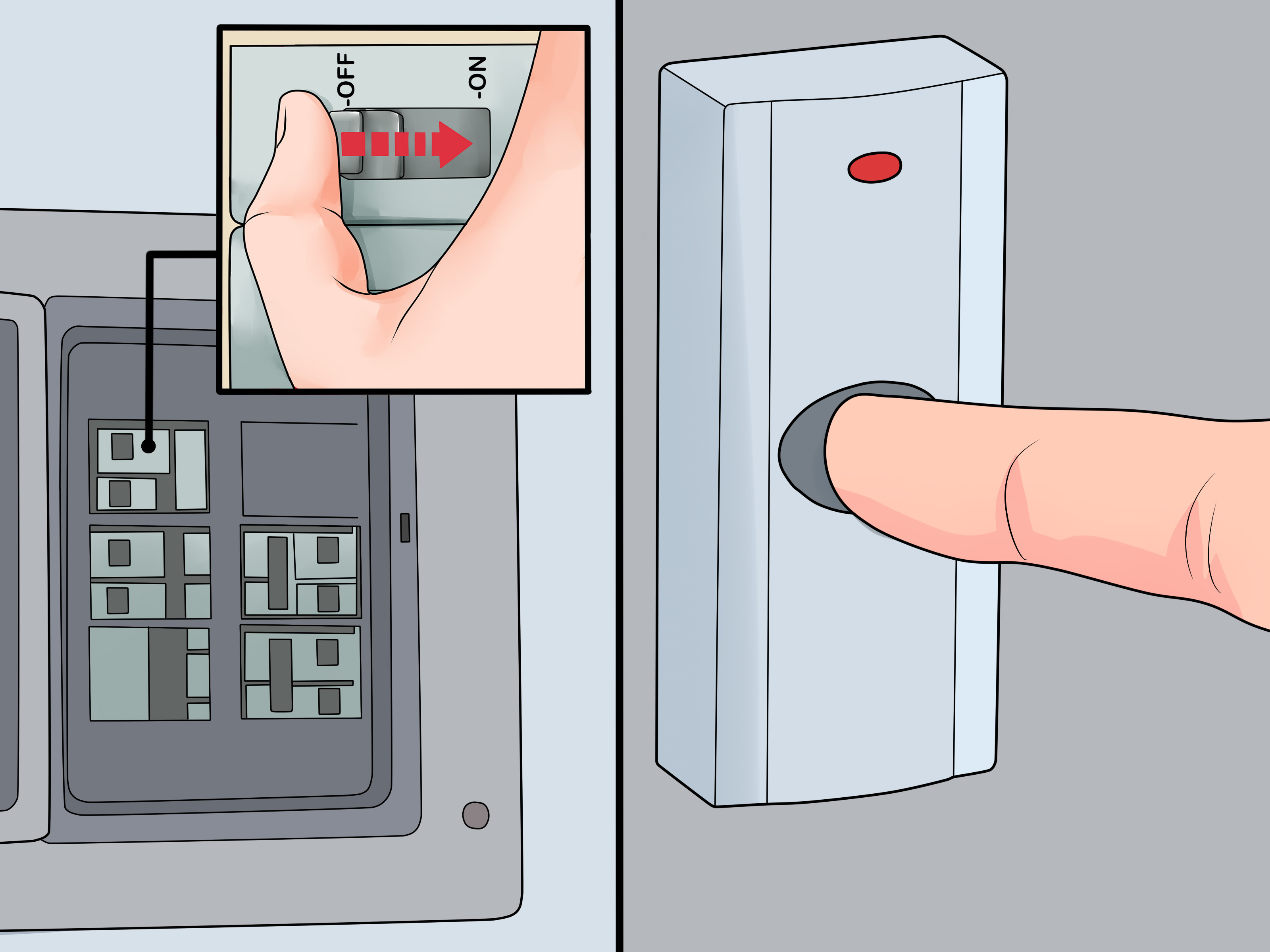
Find the breaker that controls the transformer circuit and switch it off. The transformer may be connected to a nearby lighting circuit, basement circuit, garage circuit, or utility circuit. If the breaker panel is poorly labeled, turn off breakers one at a time until the doorbell and related circuit lose power.
Do not rely on the doorbell not ringing as your only safety check. A broken transformer, bad button, or disconnected chime could make the system silent even while the electrical box is still live. Silence is not proof. Electricity is sneaky like that.
Step 2: Confirm the Power Is Off
Use a non-contact voltage tester at the junction box before touching any wires. Then, use a multimeter if you know how to test properly. Confirm there is no voltage on the line-voltage conductors. If you are not confident testing wires safely, stop and call an electrician.
This is the most important step in the whole project. A doorbell transformer may seem harmless because the doorbell side is low voltage, but the transformer’s primary side connects to household wiring. Treat every wire as live until your tester proves otherwise.
Step 3: Locate the Existing Transformer
Doorbell transformers are famous for hiding in odd places. Look near:
- The main electrical panel
- The garage ceiling or wall
- The basement joists
- The furnace or utility room
- The attic, if accessible
- The indoor chime box
- A closet near the front door
If you see a small metal or plastic device attached to a junction box with two thin low-voltage wires connected to screw terminals, you have probably found it. Some transformers are mounted on the side of a junction box; others are attached to a cover plate. If it is buried behind drywall or inaccessible without damaging the building, that is a code and serviceability problem worth discussing with an electrician.
Step 4: Take Photos and Label the Wires
Before disconnecting anything, take clear photos of the old transformer, the junction box, the primary wires, and the low-voltage wires. Label the thin wires going to the chime and button if there are multiple sets.
Low-voltage doorbell wires are often not polarity-sensitive because they carry AC, but labeling them still helps prevent confusion. If your system has front and rear doorbells, a smart doorbell adapter, or a chime connector, organization saves time and reduces the chance of creating a mystery circuit worthy of a detective podcast.
Step 5: Disconnect the Low-Voltage Wires
Loosen the screws on the low-voltage terminals and remove the thin doorbell wires. Keep the wire ends separated and gently bend them out of the way. If they are brittle, corroded, or too short, trim and strip a fresh end if there is enough slack.
Do not let the low-voltage wires fall back into a wall cavity. Tape them temporarily to the box or nearby surface. Losing tiny wires inside a wall is a special kind of DIY sadness.
Step 6: Open the Junction Box and Disconnect the Old Transformer
Remove the junction box cover if needed. Inside, you should see the transformer’s primary wires connected to the house wiring. In many U.S. installations, black is hot, white is neutral, and green or bare copper is ground. However, never assume wire colors are correct in an older home. Verify and follow the transformer instructions.
Remove the wire connectors and disconnect the transformer leads. Loosen the locknut or mounting screws holding the transformer to the box. Remove the old transformer carefully.
Step 7: Mount the New Transformer
Install the new transformer in an approved location according to the manufacturer’s instructions. Most replacements mount to a junction box knockout or cover. The line-voltage connections must remain inside an approved electrical box with a proper cover. Do not leave wire splices floating in open air, tucked behind insulation, or stuffed into a wall like a secret nobody asked for.
Make sure the transformer is secure. A loose transformer can vibrate, buzz, strain wires, or make troubleshooting harder later.
Step 8: Connect the Line-Voltage Wires
With power still off, connect the new transformer’s primary wires to the house wiring. In a common setup, connect black to hot, white to neutral, and green to ground or the grounding screw. Use properly sized wire connectors, twist them securely, and gently tug each connection to confirm it is tight.
Fold the wires neatly back into the box. Do not crush insulation, overstuff the box, or mix low-voltage and line-voltage wiring in a way that violates the transformer instructions or local electrical code. If the box is too crowded, damaged, missing a cover, or not grounded, this is not a “just make it fit” moment. Bring in a professional.
Step 9: Connect the Low-Voltage Doorbell Wires
Attach the thin doorbell wires to the transformer’s secondary screw terminals. Wrap each wire clockwise around its terminal screw and tighten it firmly. The connection should be snug, not mangled. If the transformer has multiple output terminals, choose the output voltage required by your doorbell system.
For example, a multi-voltage transformer may offer 8V, 16V, and 24V terminals. Connecting a 16V chime to a 24V output can damage the chime. More voltage is not “extra strong doorbell energy.” It is a fast route to replacing more parts.
Step 10: Restore Power and Test the Output
Replace the junction box cover. Turn the breaker back on. Use a multimeter set to AC voltage to test the transformer’s low-voltage terminals. A 16VAC transformer may read slightly above or below 16 volts when unloaded. If the reading is wildly different, turn the breaker off and recheck the wiring or call an electrician.
Next, press the doorbell button. The chime should ring cleanly. If you have a video doorbell, check the app for power status after the device has had time to boot and stabilize. Some smart doorbells take a few minutes before reporting accurate power conditions.
Troubleshooting After Replacement
The Doorbell Still Does Not Ring
If the transformer output is correct but the doorbell still does not ring, the problem may be the button, chime, wiring, or smart doorbell adapter. Remove the button and briefly touch the two low-voltage wires together. If the chime rings, the button is bad. If it does not, test at the chime terminals and inspect the wiring path.
The Transformer Buzzes
A faint hum can be normal. A loud buzz may indicate loose mounting, loose wiring, an overloaded transformer, or a failing chime. Turn off power before tightening anything.
The Video Doorbell Shows Low Power
Confirm the transformer voltage and VA match the doorbell manufacturer’s requirements. Also check whether the device requires a chime connector, power kit, jumper, resistor, or bypass setup. Smart doorbells are wonderful, but sometimes they bring more accessories than a celebrity at an airport.
The Chime Hums Constantly
Constant humming often means current is flowing through the chime when it should not. This can happen with some video doorbells if the chime connector is missing or installed incorrectly. Recheck the manufacturer’s wiring diagram.
When to Call an Electrician
Call a licensed electrician if:
- You cannot identify the correct breaker.
- Your voltage tester shows power after the breaker is off.
- The junction box is overcrowded or damaged.
- There is aluminum wiring, brittle insulation, or burn marks.
- The transformer is hidden inside a wall or inaccessible space.
- You are uncomfortable working near 120-volt wiring.
- Your local rules require a permit or licensed electrical work.
There is no shame in calling a pro. The goal is a working doorbell, not a dramatic story that begins with, “So I thought the breaker was off…”
Practical Tips for a Cleaner Installation
Match the Transformer to the Whole System
If you have two doorbells, two chimes, or a video doorbell plus mechanical chime, calculate power needs carefully. A transformer that worked for a simple push button may not support a camera doorbell and an old mechanical chime at the same time.
Keep the Transformer Accessible
Mount the transformer where it can be inspected and replaced later. Future you will be grateful. Future electricians will also judge you less silently.
Use a Multimeter, Not Guesswork
A multimeter tells you whether the transformer is actually producing the right voltage. Guessing based on symptoms can lead to replacing the wrong part and spending Saturday afternoon arguing with a chime box.
Do Not Oversize Voltage
Higher VA capacity is usually acceptable within device limits, but higher voltage is not automatically better. A 24V output can damage equipment designed only for 16V. Always check the label and manual.
Experience-Based Advice: What Homeowners Learn the Hard Way
After working through doorbell transformer replacements in real homes, one lesson becomes obvious: the hardest part is often not wiring the new transformer. It is finding the old one. Builders sometimes place transformers in reasonable spots, such as near the electrical panel. Other times, they tuck them above drop ceilings, behind closet shelves, next to furnace equipment, or in garages where they blend into the background like shy little metal barnacles.
A good first move is to start at the chime. Remove the chime cover and look for the low-voltage wires. If the wires disappear upward, check the attic or ceiling area. If they head downward, check the basement or utility room. If your home has an unfinished garage wall near the entry, inspect there too. Patience beats random wall surgery every time.
The second lesson is that old transformers can be surprisingly underpowered. A classic doorbell button and mechanical chime may have worked for decades on a small transformer. Then a homeowner installs a video doorbell and wonders why the app complains about power, the chime buzzes, or the device works only when the moon is in a cooperative mood. Smart doorbells draw power continuously, not just when someone presses the button. That means VA capacity matters.
The third lesson is to photograph everything. Even if the wiring looks simple, take pictures before removing wires. A photo can answer questions later, especially if there are multiple low-voltage cables for front and rear doors. Labeling wires may feel unnecessary in the moment, but it is much easier than guessing which pair goes to the chime while balancing on a ladder.
Another practical experience: do not skip testing. Many people replace a transformer because the doorbell stopped ringing, only to discover the real problem was a $6 button with corroded contacts. Testing the transformer output, button, and chime before buying parts can save time. If the transformer produces the correct voltage and the chime rings when the button wires are touched together, the transformer is not the villain. The button is. It happens. Doorbell buttons live outdoors and spend years being poked by wet fingers, delivery drivers, kids, and the occasional confused moth.
Finally, respect the junction box. A neat, covered, accessible box is not just about appearance. It protects connections, reduces fire risk, and makes future maintenance possible. If the old transformer is mounted badly, the cover is missing, or wires are crammed together, use the replacement as a chance to clean things up properly. The best DIY repair is not just the one that works today; it is the one that still makes sense five years from now when someone else opens the box and does not immediately whisper, “Oh no.”
Conclusion
Replacing a doorbell transformer is a manageable project for a careful DIYer, but it is not a job to rush. Start by confirming the transformer is the problem. Choose a replacement with the correct voltage and enough VA capacity for your chime or video doorbell. Turn off the breaker, test before touching wires, label everything, mount the transformer properly, and keep all line-voltage connections inside an approved junction box.
When done correctly, a new transformer can bring a dead doorbell back to life, solve low-power smart doorbell issues, and restore that satisfying ding-dong that tells you someone has arrived. And if the project reveals questionable wiring, do the smartest thing of all: call an electrician. A safe installation is always better than a dramatic one.