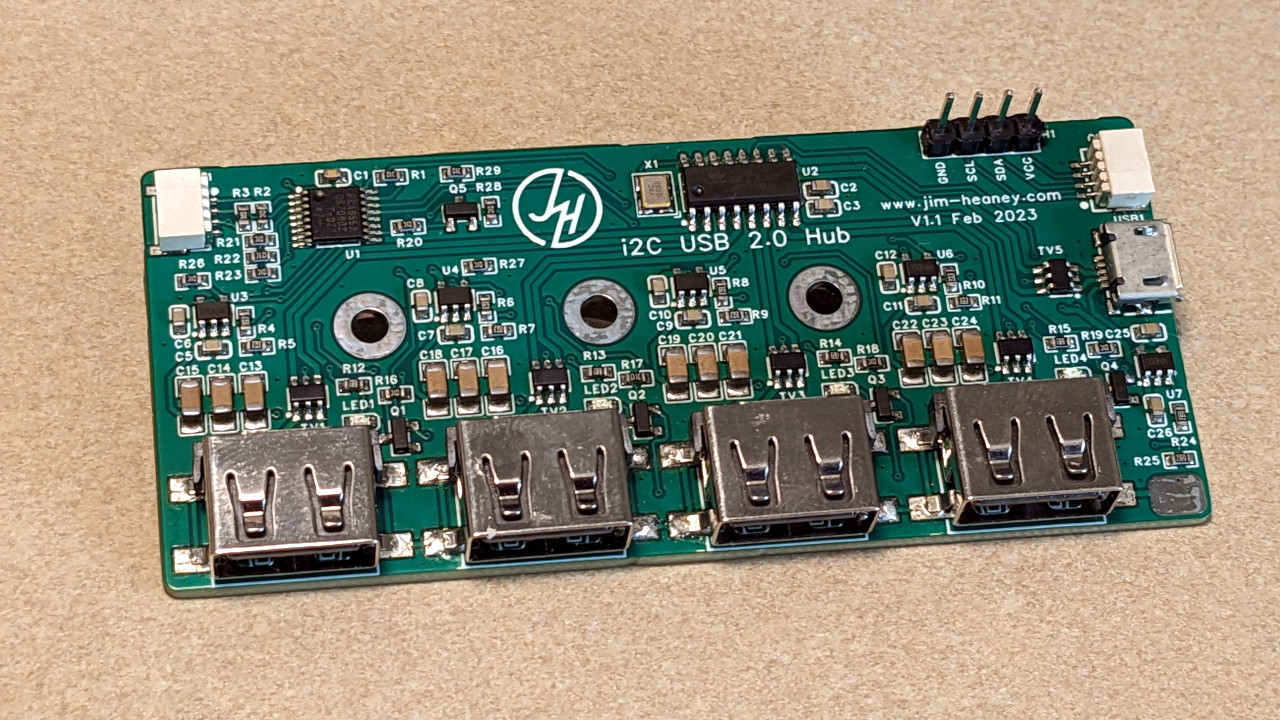
There are USB hubs, and then there are USB hubs that behave like tiny obedient robots. An I2C controlled USB hub belongs proudly in the second category.
Why an I2C Controlled USB Hub Is More Interesting Than It Sounds
At first glance, a USB hub is not exactly the kind of gadget that gets invited to the cool table. It sits on your desk, accepts cables, blinks politely, and tries not to fall behind the monitor. But the moment you add I2C control to the mix, the humble hub turns into something far more useful: a programmable power traffic cop for your USB devices.
The idea behind an I2C controlled USB hub is simple but surprisingly powerful. Instead of manually unplugging a device or pressing a physical switch beside each port, a microcontroller such as an Arduino, ESP32, Raspberry Pi, or similar board can turn USB ports on and off through software. That means you can reset a frozen USB device, isolate a peripheral, manage power, test hardware automatically, or build a system that behaves like it has tiny invisible fingers flipping switches on command.
The project that inspired the phrase “Flip The Switch On This I2C Controlled USB Hub” demonstrates exactly that kind of clever engineering. It takes the familiar concept of a USB 2.0 hub and adds electronic control over individual downstream ports. In practical terms, every USB port becomes something you can command instead of something you must physically touch. For makers, lab technicians, embedded developers, and anyone who has ever crawled under a desk to unplug a misbehaving device, this is not a luxury. This is emotional support hardware.
What Is an I2C Controlled USB Hub?
An I2C controlled USB hub is a USB hub whose port power, indicators, or configuration features can be managed through the I2C bus. I2C, short for Inter-Integrated Circuit, is a two-wire communication protocol commonly used to let microcontrollers talk to sensors, port expanders, displays, and other chips. In this case, it allows a controller board to send commands that change the state of a USB hub’s ports.
A typical USB hub connects one upstream USB port from a computer or host to several downstream ports for devices. A smarter hub adds power switches, current limiting, fault reporting, and sometimes configuration options. An I2C controlled design goes one step further by exposing some of that control to a separate controller. Instead of relying only on the host computer’s USB stack, the hardware can be managed by an external microcontroller.
This matters because USB devices do not always behave like well-trained office pets. A webcam may freeze. A development board may stop responding after a firmware upload. A USB serial adapter may need a hard reset. A storage device may need to be disconnected from power during a test cycle. With a normal hub, the fix often involves unplugging a cable. With an I2C controlled USB hub, the fix can be a software command.
How the Hardware Works
The core concept is built around three important building blocks: a USB hub controller, load switches for the USB power lines, and an I2C I/O expander or similar control chip. The USB hub controller handles the actual USB data routing. The load switches control whether each downstream port receives power. The I2C control chip lets an external microcontroller toggle those switches.
The USB Hub Controller
Many embedded USB hub designs use dedicated hub controller ICs, such as Microchip’s USB251xB family for USB 2.0 applications. These chips are designed for embedded systems, consumer electronics, docking hardware, monitors, and custom USB expansion boards. A controller like the USB2514B can support multiple downstream USB 2.0 ports and offers configuration features such as port mapping, port disabling, power control modes, and SMBus or I2C-related configuration options.
That is important because a controlled USB hub is not merely a bundle of wires. USB data lines require proper routing, impedance awareness, power sequencing, and hub enumeration. The hub controller is the diplomatic ambassador between your host computer and the devices attached downstream. It makes sure the computer sees a valid hub instead of a mysterious spaghetti incident.
The Load Switches
The magic of turning ports on and off usually happens on the 5-volt VBUS line of each downstream USB port. Instead of wiring VBUS directly to every port, the design routes power through load switches. A load switch is an electronically controlled power gate. When its enable pin is active, power flows to the port. When it is disabled, the port loses power and the connected device effectively experiences a hard disconnect.
Good USB power switches often include features such as current limiting, thermal shutdown, soft-start behavior, and fault signaling. These features are not decorative. They help protect the hub, the host, and the connected device from short circuits, inrush current, and other electrical drama. The best design is not just “turn it off and on again”; it is “turn it off and on again without making the circuit board smell like regret.”
The I2C I/O Expander
An I2C I/O expander, such as a PCA9557-style device, can provide multiple digital outputs controlled over the I2C bus. In a hub like this, each output can connect to a load switch enable pin. Send the right byte over I2C, and the expander changes its output states. One bit may control Port 1, another may control Port 2, and so on.
This approach is elegant because I2C needs only two signal lines, SDA and SCL, plus power and ground. That makes it friendly for Arduino, ESP32, Raspberry Pi, STEMMA QT, Qwiic, and other maker-friendly ecosystems. Instead of dedicating many microcontroller pins to every switch and LED, one small I2C chip can handle the job neatly.
Why Per-Port Power Control Matters
Per-port power control is the difference between turning off one lamp and shutting down the entire house because the toaster got moody. In USB hub design, individual port switching allows one downstream device to be reset or isolated without disturbing everything else connected to the hub.
This is especially useful in test benches. Imagine a developer validating firmware on several USB devices. One board locks up after a failed flash. Without per-port power control, someone may need to physically unplug it or power-cycle the whole hub. With an I2C controlled USB hub, the test script can disable only that port, wait a moment, re-enable it, and continue testing. The computer stays connected. The other devices keep working. Nobody has to perform cable yoga.
It also matters for remote systems. A Raspberry Pi running in a cabinet, kiosk, robot, weather station, or automation setup may depend on USB peripherals. If one peripheral fails, a software-controlled hub can reset it without requiring a human to visit the machine. That can save time, reduce maintenance, and prevent the classic troubleshooting sentence: “Can someone go there and unplug it?”
Common Use Cases for an I2C Controlled USB Hub
Automated Hardware Testing
Automated testing is one of the strongest use cases. When engineers test USB devices, they often need repeatable connect, disconnect, and power-cycle events. Manual unplugging is slow and inconsistent. A scriptable hub makes the process cleaner. A test routine can power up a device, check enumeration, run commands, shut it down, and repeat the process many times.
Recovering Locked USB Devices
Some USB devices occasionally stop responding but recover after a full power cycle. This can happen with development boards, USB cameras, serial adapters, SDR dongles, sensors, or experimental hardware. Software reset commands do not always work because the device itself may be frozen. Cutting VBUS to that port gives the device a true restart.
Robotics and Embedded Systems
Robots often carry USB cameras, lidar modules, serial adapters, and microcontroller boards. A robot that can reset a failed USB peripheral by itself is more reliable than one that waits helplessly for a human with a cable. The same idea applies to drones, mobile platforms, lab instruments, and industrial monitoring boxes.
Power Budget Management
Not every device needs to run all the time. In a battery-powered or power-limited system, switching off unused USB ports can reduce unnecessary draw. This is not a replacement for proper low-power design, but it is a practical tool. Turning off a USB accessory when it is not needed can be the difference between “still running” and “why is everything dark?”
Security and Device Isolation
USB devices can represent both convenience and risk. In certain controlled environments, it may be useful to physically remove power from a USB port until a trusted condition is met. While this does not replace proper endpoint security, authentication, or USB data controls, power switching can be one layer in a broader hardware management strategy.
USB 2.0, Power Switching, and the Practical Design Details
USB hub power design involves more than connecting 5 volts to a row of ports and hoping the electrons behave. USB 2.0 hubs may be bus-powered or self-powered. A bus-powered hub gets its energy from the upstream USB connection, while a self-powered hub has its own supply. For systems with multiple downstream devices or high-power peripherals, a self-powered design is usually more practical.
Power switching can be individual or ganged. In individual mode, each port has its own switch and can be controlled separately. In ganged mode, several ports share one switch and turn on or off together. Individual mode is more flexible and is the star of the I2C controlled USB hub idea. Ganged mode is simpler, but it is less useful when only one device needs a reset.
Over-current protection is another key issue. If a downstream device pulls too much current, a well-designed hub should detect the problem and protect itself. Dedicated USB power switches can provide current limiting and fault behavior. This is one reason a proper electronic load switch is preferable to a random transistor selected from the parts drawer at midnight.
There is also the matter of inrush current. When a USB device is suddenly powered, its capacitors can draw a short burst of current. If that burst is not controlled, it may cause voltage dips or unstable behavior. USB power switches with controlled rise time help reduce this problem. In other words, the hub should not just flip the switch; it should flip it with manners.
I2C Control: Simple in Theory, Fussy in Real Life
I2C is popular because it is simple, widely supported, and easy to route compared with large parallel buses. But it still has rules. Pull-up resistors are required on SDA and SCL. Voltage levels must match or be safely translated. Device addresses must not conflict. Cable length should be reasonable. Noise can matter, especially around USB, switching regulators, motors, and other electrically energetic neighbors.
For a controlled USB hub, the I2C controller may be an Arduino-style board, ESP32, Raspberry Pi, or another host microcontroller. The software task is usually straightforward: configure the I/O expander pins as outputs, then write bit patterns to turn ports on or off. A simple command might set all ports on. Another might disable Port 3. A more advanced library could name ports, track states, blink indicators, and expose a clean API for test scripts.
The user experience improves dramatically when the software abstracts the bit twiddling. Nobody wants to remember that Port 2 is bit 3 unless they are the kind of person who labels spice jars in hexadecimal. A friendly library can offer functions like enablePort(2), disablePort(4), or setCurrentLimit(HIGH). Under the hood, it still writes bytes over I2C, but the human does not need to suffer.
What Makes This Project Clever
The clever part of an I2C controlled USB hub is not that it uses exotic technology. It does not. The beauty is in combining ordinary parts in a way that solves a very real annoyance. USB hub controller, I2C expander, load switches, indicator LEDs, and current-limit control are all familiar pieces. Put them together thoughtfully, and suddenly a basic hub becomes a tool for automation.
This is often the best kind of hardware hacking. It is not about creating a gadget that looks impressive only in a dramatic close-up photo. It is about scratching a practical itch. The itch here is obvious: USB devices sometimes need to be unplugged, but humans are not always nearby, willing, or capable of reaching the cable without moving three coffee mugs and a suspiciously dusty router.
A controllable hub also bridges the gap between embedded systems and desktop workflows. Developers can use it with test rigs, manufacturing jigs, classrooms, repair benches, and home labs. It gives software direct influence over physical USB connections, and that opens up many small but valuable possibilities.
Design Considerations Before Building One
Choose the Right Hub Controller
The USB hub controller determines the number of ports, supported USB speed, configuration options, and layout requirements. USB 2.0 is easier to route than SuperSpeed USB, but it still deserves careful PCB design. Differential pair routing, grounding, decoupling, connector placement, and crystal or clock requirements all matter.
Use Proper Power Switches
Do not treat VBUS switching as an afterthought. A good design should consider current rating, current limit behavior, voltage drop, enable polarity, thermal protection, soft start, and fault reporting. The load switch is the bouncer at the USB power nightclub. Choose one that knows what it is doing.
Think About Default States
What happens when the board powers up? Are all ports on? Are all ports off? Does the I2C expander default to inputs? Do the load switches have pull-ups or pull-downs? Default behavior matters because a hub may briefly power connected devices before the controller software runs. Good hardware design should make the safe state predictable.
Plan for Current Limits
Some designs allow current limits to be selected, for example between lower and higher operating modes. This can be useful when a port may power either a small low-power peripheral or a hungrier device. However, current limits should be chosen according to the hub’s supply capability, switch ratings, connector ratings, and expected USB behavior.
Make the Software Friendly
A board like this becomes far more valuable when the control software is easy to use. Arduino examples, Python scripts, command-line tools, and clear documentation can turn a clever PCB into a practical tool. Hardware without good documentation is like a treasure map drawn by a raccoon: technically interesting, but not ideal.
I2C Controlled USB Hub vs. Software-Only USB Power Control
There are utilities that can control power on some smart USB hubs through the host operating system. These tools are useful, but they depend heavily on whether the hub actually implements per-port power switching correctly. Many inexpensive hubs do not. Some advertise features vaguely. Others behave differently from what the USB descriptors suggest. The result can be a mildly theatrical debugging session.
An I2C controlled hub takes a more direct hardware approach. Instead of asking the USB host controller to request port power changes, an external controller physically enables or disables the power switch for each port. This gives the system designer more predictable behavior, especially in embedded use cases where the controller board is already managing other hardware.
That said, both approaches have value. Software-only control is convenient when supported. Hardware-level I2C control is more deliberate, more design-intensive, and more suitable when you need reliable physical power cycling as part of a larger automation system.
Potential Limitations
An I2C controlled USB hub is useful, but it is not magic. Cutting power to a USB port may not always be identical to a clean software disconnect. The host operating system may need time to detect removal and re-enumeration. Some devices may backfeed power through signal lines or other connections if the surrounding system is not designed carefully. Some USB devices may need delays between power-off and power-on events to reset reliably.
There are also layout challenges. USB data lines are high-speed signals, and sloppy routing can cause intermittent problems that feel haunted. Power integrity matters too. A hub that controls ports electronically still needs a stable 5-volt supply, adequate decoupling, and sensible grounding. The I2C side may be simple, but the USB side expects respect.
Finally, using USB-C connectors does not automatically make a device modern, powerful, or standards-compliant. USB-C adds its own requirements for configuration channels, orientation, power rules, and cable behavior. A well-designed hub must treat the connector as part of the system, not as a cosmetic upgrade with reversible vibes.
Experience Notes: What It Feels Like to Use a Switchable USB Hub
The first time you use a software-controlled USB hub, the experience feels almost too satisfying. A device freezes, you run a command, the port goes dark, the device disappears, the port comes back, and the device reappears. No crawling under the desk. No yanking cables. No whispered negotiation with a USB plug that somehow needs three attempts despite being rectangular and allegedly simple.
In a development workflow, the biggest benefit is consistency. Manual unplugging introduces small variations. Maybe the cable is pulled too slowly. Maybe the device is left off for two seconds one time and ten seconds the next. Maybe someone unplugs the wrong cable and suddenly the keyboard is gone. A controllable hub makes the process repeatable. The script can disable Port 1 for five seconds, enable it again, wait for enumeration, then continue. That kind of repeatability is gold when tracking bugs.
It is also surprisingly helpful for organizing a lab bench. Many makers collect USB devices the way kitchens collect mystery lids. Programmers, dev boards, serial adapters, logic analyzers, dongles, cameras, and storage devices all end up fighting for attention. With port control, you can leave devices physically connected but electrically inactive until needed. This reduces connector wear and keeps the desk from becoming a cable swamp.
Another practical experience is remote recovery. A small computer running a camera or sensor setup can become unreliable if one USB peripheral locks up. Without controlled power, remote troubleshooting may stop at “please reboot the whole system.” But rebooting the host may not always reset a device if it remains powered through the hub. A controllable USB hub can give the system one more recovery option before a human must intervene.
For students and hobbyists, the project is a great learning platform because it combines several real engineering topics in one board. You get USB architecture, power distribution, I2C communication, GPIO expansion, load switching, current limits, and firmware control. None of these ideas lives alone in a textbook. They interact. Pull-ups affect communication. Switch defaults affect boot behavior. Power sequencing affects enumeration. Documentation affects whether anyone else can use the board without developing forehead wrinkles.
The main lesson is that useful hardware often comes from making ordinary actions programmable. Turning a USB port off is not glamorous. Turning it off automatically, safely, repeatedly, and remotely is powerful. It is the same reason smart relays, programmable power supplies, and reset controllers exist. The value is not in the switch itself; it is in the control.
After working with a hub like this, a regular hub starts to feel oddly passive. It still does its job, of course, but now you know what is missing. You want each port to have a state. You want scripts. You want logs. You want the ability to tell a flaky USB gadget, with professional calm, “Port 3, take a short nap.” That is when the I2C controlled USB hub stops being a novelty and becomes one of those tools you wish had been on your bench years earlier.
Conclusion
An I2C controlled USB hub is a smart upgrade to one of the most overlooked pieces of computer hardware. By combining a USB hub controller, per-port load switches, and an I2C I/O expander, it allows microcontrollers and scripts to manage USB port power directly. That makes it useful for automated testing, embedded systems, robotics, remote troubleshooting, and any project where physically unplugging devices is inconvenient or impossible.
The best part is that the concept is both practical and understandable. It does not require science-fiction parts or a moon landing budget. It uses well-known electronics principles and applies them to a problem almost every developer has met: USB devices sometimes need a proper reset. With I2C control, that reset can become a command instead of a desk-diving expedition.
Note: This article synthesizes real-world information from public technical documentation and reputable electronics resources, including USB hub controller documentation, USB power-switch design references, I2C GPIO expander datasheets, maker hardware documentation, and open-source USB hub control projects.