Note: This article is based on real public information about Google Takeout, Google My Activity, location history, ad personalization, voice recordings, and widely discussed user experiences. Individual examples are paraphrased and generalized for readability.
The Moment People Opened Their Google Data and Realized the Internet Has a Memory
Downloading your Google data sounds harmless enough, like cleaning out a junk drawer or checking how many embarrassing YouTube rabbit holes you survived in 2014. Then the archive arrives. Suddenly, you are staring at years of searches, Maps activity, YouTube history, app interactions, location clues, saved files, voice snippets, device details, and advertising assumptions that feel less like “data” and more like a diary written by a robot roommate who never sleeps.
Google Takeout lets users export copies of data connected to many Google products, including services such as Gmail, Drive, Photos, Maps, YouTube, Chrome, Search, and account activity. In theory, this is a transparency tool. In practice, many people describe the experience as opening a digital basement and discovering that every box has your name on it.
The unsettling part is not always that the information exists. Some of it makes sense. Google Maps needs location data to show directions. YouTube uses watch history to recommend videos. Search history helps personalize results. The creep factor comes from the scale, the detail, and the strange intimacy of seeing ordinary moments stacked together across years. A single search is nothing. Ten years of searches is a personality test wearing a trench coat.
What Is Google Takeout?
Google Takeout is Google’s official export tool for downloading a copy of data associated with your account. Users can choose which products to include, select a file type, and receive archives that may range from a few megabytes to many gigabytes. Depending on how long you have used Google services, the archive can include browsing-related activity, location records, YouTube viewing patterns, saved photos, contacts, calendars, Drive files, app activity, and more.
For privacy-conscious users, Takeout is useful. It allows people to review what is stored, back up important files, move data elsewhere, or delete things they no longer want connected to their account. But for casual users, it can feel like being handed a receipt for your entire online life. Nobody expects the receipt to be 45 gigabytes and emotionally judgmental.
30 Unsettling Things People Found in Their Google Data
Across public forums, privacy discussions, and user stories, people have shared a wide range of discoveries after downloading their Google data. Some were funny. Some were awkward. Some made them change their privacy settings before finishing the first archive folder.
1. Years of Search History They Forgot Existed
Many users were startled to find searches from years earlier, including medical worries, relationship questions, late-night anxieties, and random curiosities. A single “why does my eye twitch” search is innocent. Seeing 600 anxiety-powered searches lined up by date is like meeting your past self in a dimly lit hallway.
2. Location History That Reconstructed Their Routine
Some people found that Maps or Timeline data could show familiar routes, workplace visits, restaurants, gyms, errands, and trips. The unsettling detail was not just “you went somewhere.” It was the pattern: when they left home, how long they stayed, and which places appeared again and again.
3. YouTube Watch History That Felt Too Personal
YouTube history can reveal moods, hobbies, politics, health concerns, guilty pleasures, and “I watched one video about raccoons and now I am apparently a raccoon scholar” phases. Users found that their viewing habits painted a surprisingly accurate portrait of their interests and vulnerabilities.
4. Voice Recordings From Assistant Devices
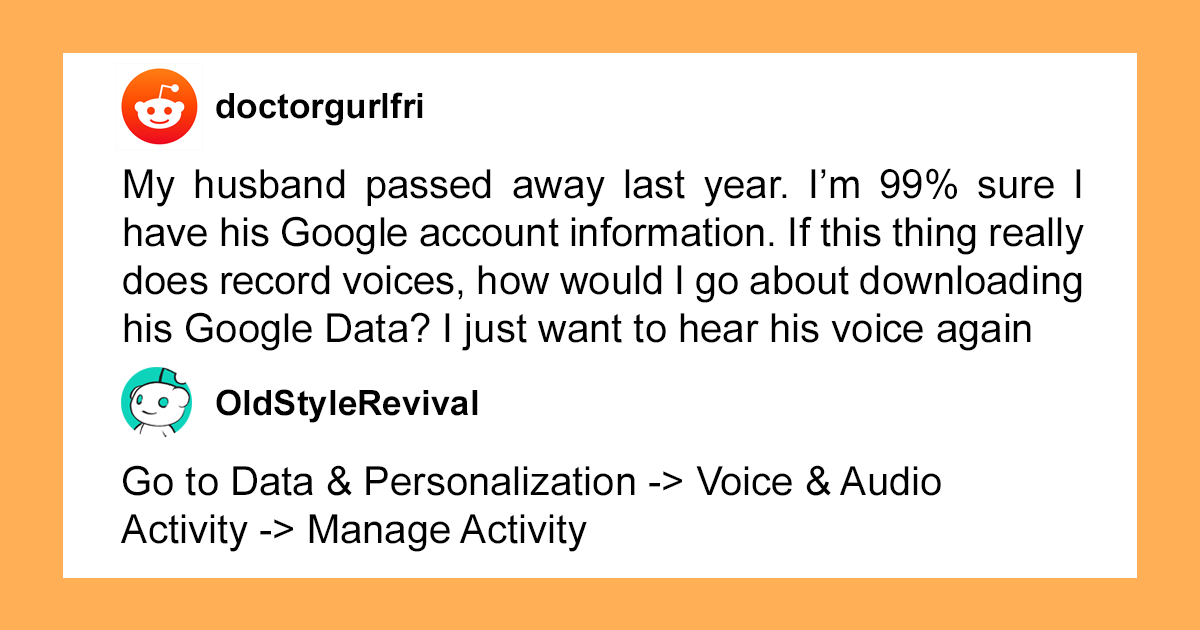
Some users reported finding audio clips linked to voice interactions. Google provides controls for voice and audio activity, but people were still surprised by how intimate a short clip can feel, especially when it includes background noise, family voices, or an accidental activation.
5. Ad Categories That Were Weirdly Accurate
Google’s ad personalization tools may use activity to infer interests. Users have found categories related to shopping, hobbies, age ranges, household interests, and life events. The strange part is when the guesses are accurate enough to feel like mind reading, or wrong enough to feel like being insulted by a spreadsheet.
6. Old Photos They Thought Were Gone
People who used Google Photos or automatic backup sometimes discovered old images they had forgotten about. Some were sweet memories. Others were blurry receipts, screenshots, exes, bad haircuts, and images that should have retired peacefully with an old phone.
7. Contacts From Ancient Social Circles
Some archives included old contacts synced from phones, email accounts, or imported address books. Users found names from school, former jobs, old roommates, and people they barely remembered. Nothing says “digital archaeology” like finding a contact saved as “Mike Maybe Plumber???” from 2012.
8. App Activity Across Devices
Android users often found device and app-related information that showed what apps were used and when. This made some people realize that phones are not just phones. They are tiny reporting machines with cameras, calendars, microphones, maps, and the social judgment of a nosy aunt.
9. Calendar Events That Revealed Forgotten Life Chapters
Old calendar entries can feel surprisingly emotional. People found job interviews, medical appointments, first dates, flights, school deadlines, and reminders from past versions of themselves. The unsettling part is realizing your calendar remembers stress you happily forgot.
10. Gmail Metadata and Old Emails
Users who exported Gmail data sometimes found ancient conversations, newsletters, receipts, password resets, shipping updates, and messages from people no longer in their lives. The content itself may be expected, but the scale can be overwhelming. Your inbox is not an inbox. It is a museum with spam.
11. Purchases and Receipts
Emails, confirmations, and account activity can indirectly reveal years of purchases. Food delivery, online shopping, subscriptions, airline tickets, hotel stays, and app receipts can form a financial timeline that says, “You spent how much on takeout?”
12. Saved Maps Searches
People found searches for addresses, businesses, hotels, clinics, parks, and restaurants. A map search can be harmless, but a long list may reveal travel plans, private appointments, or places someone considered visiting but never did.
13. Old Chrome Data
Depending on sync settings, users may find bookmarks, autofill information, browser history, or device-linked browsing details. This can be useful for restoring data, but also uncomfortable when old browsing habits come back wearing a name tag.
14. Deleted Does Not Always Feel Deleted
Some users became confused when they found old material they believed they had removed from a device. Often this happens because deleting something locally, deleting a browser history item, deleting a file, or changing a setting are not always the same action. Digital housekeeping has more trapdoors than a haunted mansion.
15. Location Guesses Based on IP or Device Signals
Even when precise location tracking is limited, services may still use signals such as IP address, device settings, nearby Wi-Fi, or activity context. Users sometimes found approximate location clues that made them realize privacy is not one switch. It is a whole control panel.
16. Search Predictions That Revealed Private Worries
Looking through old searches, people noticed patterns around stress, health, money, family, and relationships. The unsettling part was not that Google “knew” one thing. It was that the archive showed emotional seasons: breakup searches, job-hunt searches, symptom searches, and “how to fix my life by Monday” searches.
17. YouTube Comments From Another Era
Some users found old YouTube comments they had forgotten posting. This can be funny, unless the comment was written by a teenage version of themselves with confidence, poor punctuation, and no fear of consequences.
18. Files Shared Years Ago
Drive exports can reveal documents, spreadsheets, shared folders, old schoolwork, abandoned projects, and files with permission histories. People were surprised to find content connected to old collaborators or projects they assumed had disappeared into the digital fog.
19. Device Names and Login Clues
Google account data may show devices connected to the account. Users sometimes discovered old phones, tablets, computers, or sessions they no longer recognized. That can be harmless, but it is also a strong reminder to review account security and sign out of devices you no longer use.
20. The Size of the Archive Itself
For many people, the scariest discovery was simply the file size. A few gigabytes of personal data feels big. Tens or hundreds of gigabytes feels like your phone has been writing a biography without permission from the main character.
21. Assistant Misfires
Some users reported finding voice interactions that appeared to be accidental triggers. Even short clips can feel creepy when they capture background sound. It is the digital equivalent of discovering your toaster has been keeping a podcast archive of your kitchen.
22. Old Hangouts or Chat Data
People who used older Google communication tools sometimes found chat history or related records. The awkwardness comes from seeing casual conversations preserved long after the relationship, job, class, or group chat faded away.
23. Google Photos Location Clues
Photos can contain time, device, and sometimes location-related information. Even without a dramatic “tracking” moment, a photo library can quietly show where someone was, who they were with, and what their life looked like at the time.
24. Old Reviews and Ratings
Some users rediscovered restaurant reviews, star ratings, and Maps contributions. A review of a taco place from 2016 may not sound sensitive, but collectively these entries reveal habits, neighborhoods, travel, and preferences.
25. Fitness or Health-Adjacent Clues
Depending on connected apps and services, some users found data related to activity, routes, or wellness habits. Even when not formally medical, this kind of data can feel sensitive because it touches routines, bodies, and private goals.
26. The Timeline of a Relationship
Searches, photos, messages, calendar entries, and location patterns can accidentally reconstruct a relationship: first dates, trips, arguments, breakups, blocked contacts, and emotional recovery searches. No one asks their data archive to become a romance historian, yet here we are.
27. Saved Password-Related Clues
Some users found account-related data that reminded them how many services they had signed up for over the years. Even when passwords themselves are protected, the surrounding trail can reveal old accounts that should be closed or secured.
28. Data From Services They Barely Used
People were surprised to find data from products they did not remember using much. A forgotten Google service, an old Android phone, a school account, or a single experiment years ago could leave behind more information than expected.
29. A Digital Portrait That Felt Too Complete
The creepiest discovery was often not one file, one search, or one map point. It was the combined portrait. Search history showed curiosity. Maps showed movement. YouTube showed attention. Photos showed memories. Gmail showed purchases. Calendar showed obligations. Together, the archive felt less like data and more like a shadow version of the person.
30. The Realization That Convenience Has a Price
Many users ended their Google Takeout journey with a complicated feeling. Google services are genuinely useful. Search works. Maps saves time. Photos preserves memories. Gmail is convenient. But convenience often runs on data, and seeing that data in one place can turn an abstract privacy concern into a very concrete “Oh no, the cloud has receipts.”
Why These Discoveries Feel So Unsettling
The human brain is not built to process years of personal behavior as exportable files. We live forward, forget generously, and assume yesterday has the manners to stay blurry. Data does not do that. It keeps structure. It keeps timestamps. It keeps patterns.
That is why a Google data archive can feel more invasive than any single app permission. It is cumulative. One saved location point is boring. Thousands of them are a map of your habits. One YouTube video is entertainment. Years of watch history can reveal your politics, fears, hobbies, age, humor, insomnia, and whether you had a suspiciously intense sourdough phase.
This does not mean every piece of data is used in the darkest possible way. Google provides privacy tools, activity controls, deletion options, ad settings, and export features. But users still have a valid emotional reaction when they see how much of modern life passes through one account.
How to Check Your Own Google Data Without Panicking
If you want to review your Google data, start with Google Takeout. Do not export everything at once unless you are ready for a large archive and a long afternoon. Select the products you care about most: Search, Maps, YouTube, Photos, Gmail, Drive, Chrome, or Assistant-related activity.
Next, visit Google My Activity. This is where you can review and manage activity tied to your account, including searches, websites visited, videos watched, and product interactions. You can delete activity by date, by product, or in larger batches. You can also configure auto-delete options for some activity types.
Then review Location or Timeline settings. Google has changed how Timeline data works, with more emphasis on device-based storage and user controls. Still, it is worth checking whether Timeline is on, whether backups exist, and whether old location data should be deleted.
After that, open ad personalization controls. You may find interest categories that are accurate, strange, outdated, or hilariously rude. Turn off personalization if you prefer less tailored ads. You will still see ads, but they should be less tied to your account activity.
Finally, check voice and audio activity. If you use Google Assistant or smart speakers, review whether audio recordings are saved. If the setting is on, consider whether that is worth the convenience. If it is off, remember that previously saved audio may still need to be deleted separately.
Privacy Tips After Downloading Your Google Data
First, change your mindset from “delete everything forever” to “reduce what gets collected going forward.” The best privacy cleanup is not a one-time bonfire. It is a maintenance habit.
Use auto-delete for activity where available. Review connected devices and sign out of anything old. Remove apps and services that have account access but no longer serve a purpose. Clear old location history if you do not need it. Delete YouTube history if it creates recommendations you dislike. Turn off voice recording if it makes you uncomfortable. Review Drive sharing permissions. Clean Gmail with search filters. Back up important data before deleting anything permanent.
Also, separate convenience from necessity. You may decide Google Maps is worth location access while YouTube watch history is not. You may want Gmail but not personalized ads. You may keep Photos but disable automatic backup for certain folders. Privacy is not always an all-or-nothing lifestyle. You do not have to move to a cabin, write letters with a feather, and communicate only through raccoon messengers. Small controls still matter.
Related Experiences: What It Feels Like to Read Your Own Digital Diary
The strangest part of downloading your Google data is how ordinary everything looks at first. There is no dramatic warning screen. No thunder. No villain chair slowly turning around. Just folders, JSON files, HTML pages, photos, timestamps, and labels. Then you click one file, then another, and suddenly your casual internet life becomes searchable evidence.
People often describe the experience in stages. Stage one is curiosity. You think, “Let’s see what’s in here.” Stage two is comedy. You find an old search like “can ducks be angry” and briefly admire your own intellectual range. Stage three is discomfort. You see a location record from a hospital visit, a search from a bad week, a voice clip from your living room, or a YouTube binge that perfectly matches a sad little chapter of your life. Stage four is control. You start opening privacy settings with the focus of someone defusing a bomb in a movie.
One common experience is realizing how much of life is passive. You did not manually write down every restaurant you visited. You did not intentionally create a watch-history mood board. You did not plan to preserve every awkward search. Yet digital services often collect the small byproducts of convenience: the map route, the autocomplete, the backup, the sync, the saved preference, the account login. None of these moments feel meaningful alone. Together, they become a portrait.
Another experience is nostalgia with a weird aftertaste. Old photos, searches, routes, and messages can bring back memories. A vacation route may make you smile. A calendar reminder for an old exam may make you grateful it is over. A playlist from a difficult time may feel tender. But because the memories are mixed with system logs and metadata, the whole thing feels less like a scrapbook and more like a scrapbook assembled by a security camera.
Many people also feel motivated after reviewing their data. They delete old activity, tighten settings, review permissions, enable two-factor authentication, and rethink which apps deserve access. The experience can be uncomfortable, but it can also be empowering. Transparency tools only help if people actually use them, and nothing inspires a settings audit quite like discovering your phone remembers a sandwich shop you visited during a layover six years ago.
The bigger lesson is not that everyone should abandon every Google product immediately. The lesson is that data awareness should be normal. If a service is useful enough to live in your pocket, guide your car, store your photos, organize your email, answer your voice commands, and recommend your entertainment, then it is important enough to review. Downloading your Google data may be unsettling, but it is also clarifying. It turns vague privacy anxiety into specific decisions. Keep this. Delete that. Turn off this setting. Export those photos. Remove that old device. Stop feeding the algorithm quite so many midnight questions about back pain, aliens, and whether coffee counts as breakfast.
Conclusion: The Cloud Remembers, So Learn Where the Eraser Is
The stories of people downloading their Google data are unsettling because they reveal how much of modern life becomes digital residue. Search history, location clues, voice interactions, ads, photos, contacts, and YouTube habits can turn into a surprisingly detailed record of who we are, where we go, what we fear, what we buy, and what we watch when we should definitely be asleep.
But the takeaway is not hopelessness. Google data tools can help users see, export, manage, and delete information. The smartest response is not panic; it is participation. Review your settings. Understand what is being saved. Delete what you do not need. Limit future collection where possible. Convenience is useful, but it should not be invisible.
Your data archive may not contain a smoking gun. It may contain something weirder: thousands of tiny, accurate, boring, funny, personal details that add up to you. And that is exactly why it is worth looking.