Note: This article is written for web publishing in standard American English and is based on real repair history, Apple service documentation, right-to-repair reporting, teardown culture, and the documented Macintosh LC III capacitor issue.
When the World’s Most Polished Tech Company Has a Hardware Oops
Apple has built one of the most powerful reputations in consumer technology by making complicated things feel simple. The box opens like theater. The aluminum feels expensive before the device even turns on. The screws are tiny, the tolerances are tight, and the marketing voice whispers, “Relax, we thought of everything.”
And most of the time, Apple really does think of an impressive number of things. But every now and then, the curtain lifts and we see something refreshingly human behind the magic: a reversed capacitor, a confusing repair message, a fragile keyboard, a service program, a board marking that makes technicians squint and say, “Wait, that cannot be right.”
The phrase “Even Apple get their parts wrong sometimes” is not just a funny jab at a trillion-dollar company. It is a useful reminder that hardware is hard. Circuit boards are designed by humans. Assembly lines follow drawings. Repair manuals evolve. Parts databases grow complicated. Even a company famous for precision can ship a design that later becomes a repair community legend.
The Macintosh LC III Capacitor Story: A Tiny Part, a Big Lesson
One of the best examples comes from the vintage Mac repair world. The Macintosh LC III, sold in the early 1990s, was part of Apple’s compact “pizza box” desktop family. These machines were common in schools, labs, and homes, and many still survive today in the hands of collectors who enjoy bringing old computers back from the dead. Vintage computer people are basically electronic archaeologists with better soldering irons.
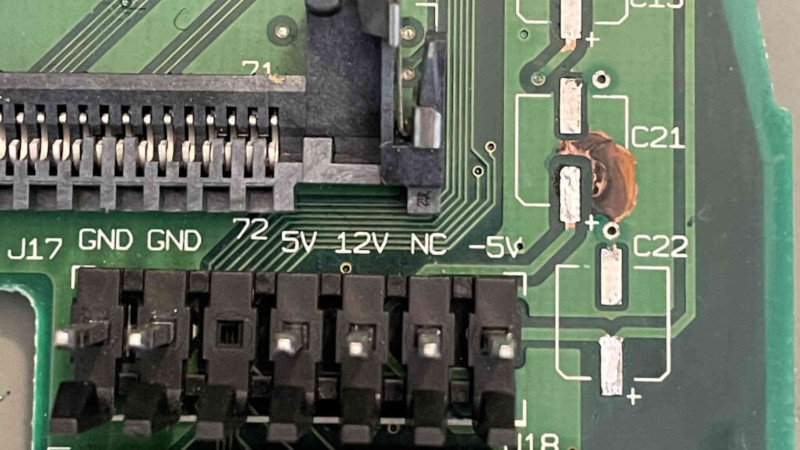
The LC III developed a long-running rumor: one capacitor on the logic board appeared to be installed the wrong way around. The capacitor in question, commonly discussed as C22, sits near power rails that include positive voltages and a negative 5-volt rail. On positive rails, the usual orientation made sense. But on the negative rail, the same orientation meant the polarized electrolytic capacitor was effectively backwards.
That matters because polarized capacitors are not decorative little soda cans. They are designed to work with voltage in a particular direction. Reverse the polarity and you may reduce performance, shorten the life of the part, damage the capacitor, stress the power supply, or create a safety risk when replacing the original capacitor with a less forgiving modern substitute such as a tantalum capacitor.
What made the LC III case especially interesting was that the issue was not simply a factory worker placing one part incorrectly on one unlucky board. Evidence from hobbyist inspection showed that the printed circuit board marking itself was wrong. In plain English: the factory likely followed the board. The board was the thing giving bad instructions. This is the hardware equivalent of copying a typo into every printed cookbook and then blaming the chef when everyone adds salt instead of sugar.
Why Didn’t Every LC III Immediately Fail?
The natural question is obvious: if Apple really got the capacitor orientation wrong, why did these Macs not erupt like tiny beige volcanoes in every elementary school computer lab?
The answer is that electronics can be surprisingly tolerantuntil they are not. The original capacitor was rated above the reverse voltage it was likely experiencing, and the negative 5-volt rail did not carry a large load in typical use. The machine could still boot, run, print documents, play educational software, and help students avoid writing essays by “formatting the title page” for 45 minutes.
That does not make the design correct. It means the mistake was survivable under many conditions. A part can be wrong and still appear to work for years, especially when the affected circuit is lightly used or buffered by surrounding components. This is one reason vintage repair is so fascinating: the device may function, but the circuit may not be functioning as intended.
The bigger danger appears during restoration. Many collectors recap old Macs because surface-mount electrolytic capacitors from that era often leak with age. If a repair guide says to follow the silkscreen and the silkscreen is wrong, a careful repairer can accidentally repeat the original mistake. With modern tantalum replacements, reverse polarity can be much less forgiving. In the worst case, the part may fail dramatically. At best, the voltage rail may behave incorrectly, causing serial port problems or strange instability.
Apple’s Precision Brand Meets the Messy Reality of Repair
Apple’s public image is built around control: controlled design, controlled hardware, controlled software, controlled retail, controlled repair language, controlled everything except perhaps the number of browser tabs open on your MacBook. That control has benefits. Devices feel integrated. Parts are engineered to fit tightly. Software and hardware often work together in ways that competitors struggle to match.
But control also creates expectations. When Apple says a part is genuine, customers assume it is not just physically compatible but also correctly documented, properly calibrated, and fully accepted by the device. When Apple publishes repair manuals, people expect clarity. When iOS reports a part as unknown, users expect the warning to be meaningful, not merely a side effect of a complicated authentication process.
This is where Apple’s modern repair ecosystem gets complicated. Over the years, Apple has expanded access to genuine parts, manuals, diagnostics, and tools through programs such as Self Service Repair and the Independent Repair Provider program. The company has also added Parts and Service History in iOS, allowing users to see whether certain components were replaced and whether they are recognized as genuine Apple parts.
Those changes are helpful, especially for buyers of used iPhones and owners who want more transparency. But they also reveal how difficult modern repair has become. A screen is no longer just glass and pixels. A battery is no longer just a battery. A camera may need calibration. A biometric component may involve security pairing. A used genuine Apple part may still need software approval before it behaves like a normal replacement.
Parts Pairing: When the Right Part Still Feels Wrong
One of the biggest repair debates around Apple is parts pairing. In simple terms, parts pairing means that a component is electronically or cryptographically associated with a specific device. Replace that component without the proper software process and the device may display warnings, disable features, or refuse to recognize the replacement as fully valid.
Apple argues that pairing helps protect privacy, security, safety, and performance. That argument has real weight for parts connected to Face ID, Touch ID, cameras, and batteries. Nobody wants a phone repaired with a questionable battery that swells like a pillow in a horror movie. Nobody wants biometric security turned into a free-for-all.
Repair advocates, however, argue that parts pairing can also restrict legitimate repairs. If a genuine Apple part pulled from another device triggers warnings or loses functionality, independent repair shops and DIY owners may feel punished for using perfectly real hardware. This has been a central issue in right-to-repair discussions, and pressure from lawmakers, repair organizations, and consumers has pushed Apple to soften some of its policies.
With iOS 18 and Apple’s newer repair processes, the company began allowing broader calibration of genuine used Apple parts for select iPhone models. That is a meaningful improvement. Still, the debate is not over. Repairers continue to watch closely because the real question is not whether Apple repair is possible. It is whether Apple repair is practical, affordable, transparent, and fair outside Apple’s own walls.
Service Programs Show That Even Premium Products Need Corrections
Apple’s own service programs also show that hardware problems are not rare anomalies in the tech world. Over the years, Apple has offered repair, replacement, and exchange programs for issues involving keyboards, batteries, displays, cameras, logic boards, and other components. These programs are not always admissions of design failure, but they do acknowledge that certain products or batches need special handling.
The butterfly keyboard era is a famous example. Apple introduced the butterfly mechanism to make MacBooks thinner and keys more stable, but many users experienced sticky keys, repeated characters, and failures caused by dust or debris. Apple revised the design, launched service programs, and eventually moved away from the butterfly keyboard. The lesson was blunt: thin is nice, but a keyboard should first perform the ancient and sacred duty of typing the letter “E” only once.
Battery-related service programs tell a similar story. Lithium-ion batteries are complex, sensitive parts. They age, swell, degrade, and require careful management. Apple’s battery health systems and genuine battery warnings are partly about safety and reliability, but they also add layers of software interpretation to what used to be a simpler repair category.
In other words, Apple’s repair history is not a story of incompetence. It is a story of complexity. The more integrated a device becomes, the more each part depends on the whole system. When something goes wrong, the fix may involve hardware, firmware, calibration, diagnostics, documentation, and customer communication.
Why Small Hardware Mistakes Matter
A reversed capacitor on a 1990s Mac might seem like a niche curiosity, but it teaches lessons that still matter in 2026. First, documentation is powerful. If a board marking is wrong, the wrong information can survive for decades. Repair guides may repeat it. Hobbyists may copy it. Shops may trust it. A tiny symbol on a circuit board can become a long-term maintenance trap.
Second, real-world devices are not judged only at launch. They are judged across their entire lifespan. A Mac that worked fine in 1993 may become a challenge in 2026 when someone replaces aging capacitors. A phone that works beautifully when new may become expensive to maintain if parts are locked down or poorly documented. Longevity depends on repairability.
Third, communities matter. The LC III capacitor issue became clearer because hobbyists inspected boards, compared models, measured continuity, discussed failures, and updated repair knowledge. Independent repair communities often preserve practical knowledge that manufacturers no longer prioritize. Without them, many older devices would quietly become e-waste.
What Apple Gets Right About Parts
It is easy to dunk on Apple, mostly because the company is large enough to echo. But to be fair, Apple also gets many things right. Its parts are generally engineered to high standards. Its devices often run for many years. Its move toward official self-service repair has made manuals, tools, diagnostics, and genuine parts more available than they were during the most locked-down years.
Apple’s Parts and Service History feature can help buyers avoid surprise repairs when purchasing a used iPhone. Genuine parts support can reduce uncertainty for customers who want quality and safety. Apple’s use of Activation Lock protections for parts from lost or stolen devices addresses a real concern: a repair market should not accidentally create incentives for theft.
Those are legitimate improvements. The criticism is not that Apple should stop caring about safety or security. The criticism is that safety and security should not become convenient labels for unnecessary repair friction. The best repair system would protect users while also respecting ownership, independent repair, reuse, and long-term product life.
What Repairers Can Learn From Apple’s Mistakes
The biggest lesson for repairers is simple: trust, but verify. A board marking is useful, but a multimeter is better. A repair guide is helpful, but circuit understanding is stronger. A part may look symmetrical in a row of identical components, but one rail may be negative while the others are positive. The electrons do not care how neat the layout looks.
Anyone recapping vintage electronics should document the original board, photograph the component orientation, inspect the circuit, and compare trusted sources. When dealing with negative voltage rails, extra caution is essential. If a part seems suspicious, do not let the silkscreen bully you. The silkscreen is ink, not scripture.
Modern device repair requires a different checklist. Before replacing iPhone parts, owners should understand whether the part needs calibration, whether the model supports Repair Assistant, whether the component is new, used genuine, or aftermarket, and whether Parts and Service History will display a message afterward. That message may affect resale value even when the phone functions normally.
What Consumers Should Take Away
For everyday users, the takeaway is not “Apple is bad at hardware.” That would be silly. Apple is very good at hardware. The better takeaway is that no brand is magic. Premium products still need maintenance. Official parts can still be part of confusing systems. Factory documentation can be wrong. Service programs exist because real products meet real life, and real life is rude.
If you are buying a used iPhone, check Parts and Service History. If you are buying a used Mac, research known model issues before paying. If you are restoring a vintage Apple computer, read more than one repair guide and look for community updates. If you are choosing between official service and independent repair, weigh cost, warranty, part quality, calibration requirements, and the reputation of the technician.
The smartest consumer is not the one who worships Apple or hates Apple. The smartest consumer is the one who appreciates good design while still asking good questions. That person gets better repairs, better value, and fewer surprises shaped like tiny reversed capacitors.
Experience Section: What This Topic Feels Like in the Real World
Anyone who has repaired electronics knows the emotional roller coaster of “this should be easy.” You open the device with confidence. You arrange the screws carefully. You tell yourself this will be a quick job. Then one connector refuses to release, one screw strips, one adhesive strip snaps, and suddenly you are negotiating with a battery using the tone normally reserved for difficult relatives at Thanksgiving.
The Apple parts conversation feels especially familiar because Apple products often look simple from the outside and become deeply specific on the inside. A MacBook may appear to be one smooth slab of aluminum, but inside it is a city of brackets, flex cables, sensors, shields, adhesives, and screws that are similar enough to confuse you but different enough to punish you. The design is beautiful. The repair can be humbling.
The LC III capacitor story captures that feeling perfectly. Imagine being a careful vintage Mac restorer. You have the right tools, the right replacement capacitors, and the confidence of someone who has watched enough repair videos to believe solder fumes contain wisdom. You look at the board, follow the printed markings, and install the part exactly as the machine appears to request. Then you learn the marking itself may be wrong. That is the moment every repairer quietly stares into the distance.
It is also the moment that separates parts swapping from real troubleshooting. A parts swapper says, “I followed the diagram.” A troubleshooter says, “Let’s measure the rail.” That difference matters. Electronics repair rewards curiosity. The more you ask why, the less likely you are to repeat someone else’s mistake. This is true whether you are recapping a 30-year-old Macintosh or replacing a modern iPhone display.
In modern Apple repairs, the experience can feel less like soldering and more like bureaucracy with screws. You may install a genuine part and still need software calibration. You may finish a repair perfectly and still see a warning message. You may discover that the physical act of replacement is only half the job; the other half is convincing the device that the job happened in an approved way. It is like fixing your own sink and then needing the sink to accept your credentials.
For independent shops, this creates a daily balancing act. Customers want affordable repairs. Apple wants security and quality control. Repair advocates want access and fairness. Technicians want the phone to stop yelling about parts that clearly work. Everyone has a point, but the person holding the broken device just wants it repaired before dinner.
Vintage repair communities offer a more hopeful model. When someone documents a flaw like the LC III capacitor orientation, the knowledge spreads. Wiki pages update. Guides improve. People compare notes. Mistakes become warnings instead of traps. That is the best version of repair culture: patient, technical, generous, and lightly caffeinated.
The most useful personal habit inspired by these stories is simple: slow down. Take photos before removing anything. Label screws. Check polarity. Read multiple sources. Measure when possible. Do not assume the board, manual, seller, app, or previous repairer is correct. Even Apple can get parts wrong sometimes, so the rest of us are allowed to double-check.
There is also a bigger ownership lesson here. When you buy a device, you are not just buying the launch-day experience. You are buying the repair story that follows it. Can the battery be replaced? Are parts available? Will software accept the repair? Are there known design flaws? Is documentation public? The answers affect cost, lifespan, resale value, and environmental impact.
That is why the little LC III capacitor matters more than its size suggests. It is a tiny component that points to a giant truth: technology is not perfect because a famous logo is stamped on it. Technology becomes durable when people can inspect it, question it, fix it, and share what they learn. Even Apple makes mistakes. Good repair culture makes those mistakes survivable.
Conclusion: Perfection Is a Brand Promise, Not a Law of Physics
Apple’s reputation for quality is deserved, but quality does not mean infallibility. The Macintosh LC III capacitor story, modern parts pairing debates, service programs, and evolving self-repair policies all show the same thing: hardware is a living system of design choices, documentation, manufacturing, software, and repair knowledge.
Sometimes Apple gets the part right but the policy wrong. Sometimes the part is genuine but the software is skeptical. Sometimes the board marking is wrong and a hobbyist with a multimeter has to solve a mystery three decades later. That is not just a gotcha. It is a reminder that repair access, clear documentation, and independent verification matter.
So yes, even Apple get their parts wrong sometimes. The good news is that careful repairers, informed consumers, and curious communities can get them right again.