Note: This article is written for educational DIY electronics projects. Do not use a homemade proximity sensor as the only safety device for machinery, vehicles, medical equipment, or anything that can bite, burn, crush, or sue you.
Introduction: The Junk Drawer Has Entered the Chat
Every maker has one: the drawer of mysterious electronic leftovers. Half a roll of hookup wire, an Arduino Nano with bent headers, a lonely potentiometer, an LED that may or may not be red, and enough aluminum foil to either build a sensor or wrap a suspiciously large burrito. The good news is that these odds and ends can become something genuinely useful: a DIY proximity sensor that detects a nearby hand or object without physical contact.
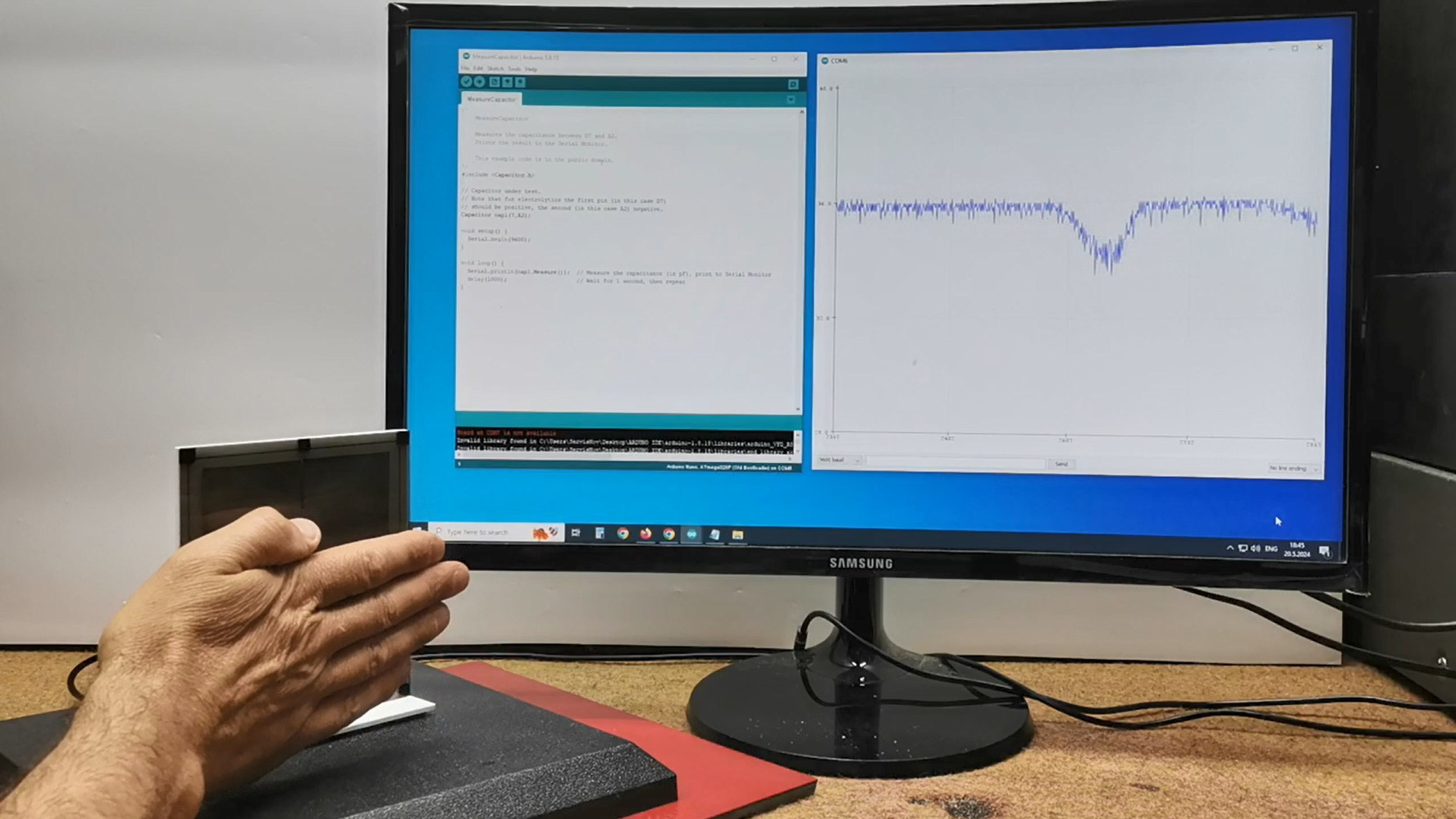
The basic idea is simple. Instead of buying a polished industrial proximity sensor, you can use scrap metal plates, a microcontroller, and software that measures tiny changes in capacitance. When a hand approaches the sensing plate, it changes the electrical field around that plate. The microcontroller notices that change, compares it with a threshold, and triggers an output such as a light, buzzer, relay, or serial message. It is not magic. It is physics wearing a hoodie.
This project is especially appealing because it demonstrates a wonderful truth about electronics: sometimes the “sensor” is not a fancy component at all. Sometimes it is just a piece of metal, a resistor, and clever code. With careful layout, calibration, and filtering, a homemade capacitive proximity sensor can detect human presence through plastic, cardboard, acrylic, thin wood, fabric, and other nonconductive materials. That makes it perfect for touchless buttons, interactive art, hidden controls, desk lamps, Halloween props, model displays, and experimental human-machine interfaces.
What Is a DIY Proximity Sensor?
A proximity sensor detects an object without requiring direct mechanical contact. Commercial proximity sensors come in many flavors: infrared, ultrasonic, inductive, capacitive, magnetic, optical, and time-of-flight. Each type has strengths. Ultrasonic sensors are popular for distance measurement. Inductive sensors are great for metal. Infrared sensors are compact and fast. Capacitive proximity sensors, the star of this project, are excellent for detecting conductive or high-dielectric objects, including the human body.
In a scrap-parts version, the “sensor head” can be a piece of aluminum foil, copper tape, a trimmed soda can, a square of PCB copper, or two metal plates salvaged from old packaging or broken electronics. The “brain” can be an Arduino Nano, Arduino Uno, ATtiny board, ESP32, Raspberry Pi Pico, or another microcontroller capable of timing a pin charge/discharge cycle or reading capacitive touch values. The “personality” comes from software: calibration, smoothing, thresholding, and hysteresis.
The Short Version
A homemade capacitive proximity sensor works by measuring how long it takes a sensor plate to charge or discharge. When a hand approaches, capacitance increases. That change slightly alters timing or measured value. The software watches for the shift and decides whether something is nearby.
Why Use Scrap Parts?
Because buying parts is fun, but making something useful from leftovers feels like defeating capitalism with a soldering iron.
Scrap-part builds are excellent for learning because they force you to understand the principle instead of hiding it behind a black plastic module. A commercial module may give you a digital output and a tiny adjustment screw. A DIY version teaches you why sensor area matters, why long wires behave like antennas, why grounding changes everything, and why software filtering can turn a jittery mess into a stable input.
Common scrap parts for this project include:
- Arduino Nano, Uno, ESP32, Pico, or similar microcontroller
- Aluminum foil, copper tape, PCB scraps, or thin metal plates
- One high-value resistor, often between 1 MΩ and 10 MΩ
- Hookup wire or salvaged ribbon cable
- Potentiometer for adjustable sensitivity
- LED, buzzer, or relay module for output
- Cardboard, acrylic, plastic, or wood for mounting
- USB cable and a computer for programming
The charm of the build is that none of these parts needs to be glamorous. The sensor plate can look like it was designed by a raccoon with a ruler. As long as the electrical connections are sound and the software is thoughtful, it can still work surprisingly well.
How Capacitive Proximity Sensing Works
Capacitance is the ability of a system to store electrical charge. Two conductive surfaces separated by an insulator form a capacitor. In a DIY proximity sensor, one surface is your sensing plate. The other “surface” can be the environment, ground, or an approaching object such as a human hand. The air, plastic, or enclosure material acts as part of the dielectric space between them.
When nothing is nearby, the plate has a baseline capacitance. When a hand moves closer, the electric field around the plate changes. The measured capacitance rises or shifts. The microcontroller does not need to understand the hand’s life story. It only needs to notice that the sensor value has crossed a defined threshold.
Self-Capacitance vs. Mutual Capacitance
Simple DIY projects usually use self-capacitance. One plate or wire is measured relative to the system environment. This approach is easy to build and sensitive enough for touch and near-touch detection. Mutual capacitance uses two electrodes, often a transmit electrode and a receive electrode, and measures coupling between them. It can be more controlled, but it requires more careful geometry and software.
For a scrap-parts proximity sensor, self-capacitance is the friendly starting point. It is forgiving, cheap, and wonderfully hackable.
The Scrap-Part Circuit
A classic Arduino-style capacitive sensor uses two digital pins and a high-value resistor. One pin acts as a send pin. The other is connected to the sensing plate and acts as a receive pin. The resistor sits between the two pins. The software charges and discharges the sensor node, then measures timing. Longer timing generally means more capacitance.
A practical build may look like this:
- Send pin: Arduino D4
- Receive pin: Arduino D2
- Resistor: 1 MΩ to 10 MΩ between D4 and D2
- Sensor plate: aluminum foil connected to D2
- Output LED: D13 or another digital pin with a resistor
- Optional potentiometer: connected to an analog input for threshold adjustment
A larger resistor usually increases sensitivity but also slows response and may increase noise. A larger plate increases sensing range but may also pick up more stray interference. Long sensor wires can behave like tiny radio antennas, which is charming only until your lamp starts responding to the refrigerator compressor.
Building the Sensor Plate
The sensing plate is where the physical world meets the code. You can make it from aluminum foil taped to cardboard, copper tape stuck behind acrylic, a copper PCB pour, a washer, a metal lid, or a strip cut from a soda can. The plate should be smooth enough to mount securely and large enough to create a useful electric field.
Plate Size Matters
Small plates are better for touch buttons and short-range detection. Large plates are better for hand presence sensing at a distance. A plate around 2 by 2 inches is a good starting point. For presence detection near a desk, a larger rectangular plate hidden under a nonmetallic surface can work well.
Mounting Behind Materials
Capacitive sensing can work through nonconductive overlays such as plastic, glass, acrylic, cardboard, thin plywood, and fabric. Thicker materials reduce sensitivity. Metal covers are usually a problem unless the design intentionally uses metal-over-capacitive techniques, which are more advanced. For a beginner-friendly sensor, keep metal objects away from the front of the sensing area unless they are the actual sensor plate.
Software: The Real Secret Ingredient
The hardware is wonderfully simple, but the software decides whether the project feels polished or haunted. A good DIY proximity sensor program does four important things: measures the raw sensor value, establishes a baseline, smooths noisy readings, and triggers only when the change is meaningful.
Baseline Calibration
When the device starts, it should sample the sensor several times with no hand nearby. That average becomes the baseline. Real-world capacitance shifts with humidity, temperature, power source, nearby objects, and grounding. A sensor plugged into a laptop may behave differently from the same sensor powered by a battery pack. Baseline tracking helps the system adapt instead of panicking.
Filtering and Smoothing
Capacitive readings can jump around. Software smoothing reduces false triggers. A moving average, exponential filter, or median filter can calm the data. For example, instead of reacting to one reading, the software can average the last 10 readings. This makes the output less twitchy, though it may slightly slow response.
Threshold and Hysteresis
A threshold says, “If the reading rises this much above baseline, trigger.” Hysteresis says, “Once triggered, do not turn off until the reading falls below a lower release point.” Without hysteresis, the output may chatter on and off near the threshold. With hysteresis, the sensor behaves like a sensible adult instead of a caffeinated squirrel.
Example Uses for a Homemade Proximity Sensor
Once the sensor works, the fun begins. A scrap-parts capacitive proximity sensor can be used in projects where a hidden or contactless input is more interesting than a button.
Touchless Desk Lamp
Hide a foil plate under a wooden desktop or inside a lamp base. When your hand approaches, the microcontroller toggles an LED strip or relay module. The result feels futuristic, even if the sensing plate is literally kitchen foil.
Interactive Art
Put several sensor plates behind a poster, sculpture, or cardboard exhibit. As visitors move their hands near different areas, the project can play sounds, change lights, or animate a display. Capacitive sensing is especially useful because the sensor can be invisible from the front.
Secret Control Panel
Place copper tape behind a plastic panel and map zones to functions. One zone might turn on lights, another might change modes, and another might reset the project. Congratulations, your old project box now has a user interface that looks like spy gear.
Presence Wake-Up
A low-power microcontroller can use proximity sensing to wake a device when a hand approaches. This is useful for displays, clocks, kiosks, battery-powered gadgets, and small appliances that should stay quiet until a user is nearby.
Common Problems and Fixes
DIY capacitive sensing is simple in concept but moody in practice. Here are common issues and how to fix them.
The Sensor Is Too Sensitive
Use a smaller plate, reduce the resistor value, shorten the wire, lower the software gain, or increase the trigger threshold. Also move the sensor away from power cables, USB hubs, metal surfaces, and other large conductive objects.
The Sensor Is Not Sensitive Enough
Use a larger plate, increase the resistor value, improve the ground reference, reduce overlay thickness, or adjust the threshold. Make sure the sensor wire is actually connected. This sounds obvious, but electronics loves humbling people.
The Reading Drifts Over Time
Add baseline tracking. Let the software slowly update the baseline when no object is detected. Avoid updating the baseline too quickly, or the sensor may “learn away” a hand that remains nearby.
The Output Flickers
Add hysteresis and smoothing. Require several consecutive readings above the threshold before triggering. Require several readings below the release threshold before turning off.
It Works on USB but Not on Battery
The computer connected through USB often provides a large reference ground. Battery-powered builds may need a larger ground plane, better shielding, or a more stable mechanical layout. Adding a grounded backing plate behind the sensor area can improve consistency, but it must be tested carefully because shielding changes sensitivity.
Design Tips for Better Results
Good capacitive sensing is mostly about controlling the electric field and rejecting nonsense. The following design habits improve reliability:
- Keep sensor wires short whenever possible.
- Mount the sensor plate firmly so it does not move.
- Keep the sensor away from high-voltage wiring and switching power supplies.
- Use twisted wire or shielded cable if the sensor must be remote.
- Separate sensing plates if you build multiple channels.
- Use software averaging, thresholding, and hysteresis.
- Test in the final enclosure, not only on the bench.
- Recalibrate after changing power sources or mounting materials.
The last point is important. A sensor that behaves perfectly while dangling in midair may behave differently once taped inside a plastic box, mounted near screws, or placed on a metal shelf. The final installation is part of the circuit.
Capacitive, Ultrasonic, Infrared, or Inductive?
A capacitive DIY proximity sensor is not always the right answer. It is excellent when you want hidden, short-range, contactless detection of people, hands, conductive materials, or objects that affect the local electric field. It is less ideal when you need exact distance measurement across several feet.
Ultrasonic sensors are better for measuring distance to large objects. Infrared sensors are compact and can be good for short-range reflection sensing, though surface color and ambient light may matter. Inductive sensors are rugged and excellent for metal detection, but they are not useful for detecting a hand through plastic unless the hand is secretly a robot claw. Capacitive sensing sits in the sweet spot for hidden controls, presence detection, and experimental interfaces.
Safety and Practical Limitations
This project is low voltage, but that does not mean every use is safe. If you use a relay to switch mains-powered devices, follow electrical codes, use proper isolation, and consider using certified relay modules or smart plugs instead of improvised mains wiring. Keep homemade sensors away from wet environments unless the entire system is designed for moisture protection.
Also remember that capacitive sensors can false-trigger. A nearby cable, damp hand, humid day, metal object, static charge, or power supply noise can change readings. For lamps, toys, art, and experiments, that is manageable. For dangerous equipment, it is unacceptable as a sole safety input.
Why This Project Is Worth Building
The best part of a DIY proximity sensor is not saving a few dollars. It is learning how much intelligence can be moved from hardware into software. The sensor plate is simple. The circuit is simple. But with calibration, filtering, adaptive thresholds, and thoughtful layout, the project becomes surprisingly capable.
This is a beautiful example of maker engineering: start with junk, add curiosity, then let code do the heavy lifting. You learn about electric fields, parasitic capacitance, microcontroller timing, signal processing, interface design, and debugging. You also gain a useful input method that can be hidden behind surfaces and customized for strange, delightful projects.
Experience Notes: What Building One Actually Teaches You
The first lesson from building a scrap-parts proximity sensor is that the bench is a liar. On the bench, everything may work perfectly. The LED turns on when your hand approaches. The buzzer chirps at just the right distance. You feel like a wizard. Then you move the same circuit into a project box and suddenly the sensor behaves like it has developed trust issues. This is normal. Capacitive sensors are influenced by enclosure material, nearby conductors, grounding, wire routing, humidity, and even how the device is powered.
One practical experience is that plate shape matters less than secure mounting at first. Beginners often obsess over perfect geometry, but a loose foil plate flapping slightly against cardboard can cause more trouble than an ugly but firmly taped plate. Movement changes capacitance. If the sensor moves, your baseline moves. If your baseline moves, your software starts making dramatic decisions. Tape it down, glue it down, or sandwich it between layers so it stays put.
Another discovery is that the potentiometer is more useful than expected. A sensitivity knob makes testing much faster because you can tune the threshold without uploading new code every two minutes. During prototyping, connect a potentiometer to an analog input and map its value to the detection threshold. Later, when the project is stable, you can replace the knob with a fixed value in software. Until then, the knob is your peace treaty with reality.
Serial output is also your best friend. Print the raw sensor value, filtered value, baseline, and trigger state. Watching the numbers change tells you far more than staring at an LED. You will see whether the hand produces a strong signal, whether the baseline drifts, and whether noise spikes are causing false triggers. Without serial data, debugging becomes a séance.
Power source changes are another classic surprise. A sensor tuned while connected to a desktop computer may act differently on a phone charger or battery pack. The ground reference changes, and the readings can shift. Test with the same power source you plan to use in the finished project. If the device will run on batteries, tune it on batteries. If it will be plugged into USB power, test with that exact supply.
Finally, the most satisfying experience is hiding the sensor behind an ordinary surface. A plain wooden box becomes a touchless controller. A cardboard robot wakes up when someone waves nearby. A lamp responds without a visible switch. That moment is why this project is fun: it turns scrap into interaction. It makes an object feel aware, even though all it really has is foil, timing, and code trying very hard not to be fooled by humidity.
Conclusion
A DIY proximity sensor using scrap parts and software is one of those projects that feels small until you realize how many ideas it unlocks. With a microcontroller, a metal plate, a resistor, and careful code, you can build a contactless input that detects nearby hands, hides behind nonmetallic surfaces, and turns ordinary objects into interactive devices.
The project is not a replacement for certified industrial sensors, and it should never be trusted as the only safety system in a hazardous application. But for learning, prototyping, art, desk gadgets, hidden switches, and maker experiments, it is wonderfully effective. It teaches the important lesson that good electronics is not always about adding more parts. Sometimes it is about understanding the parts you already have and writing software smart enough to make them useful.
So open the junk drawer. Rescue that forgotten Arduino. Flatten the foil. Find the resistor that escaped from the breadboard three months ago. Your next proximity sensor may already be sitting there, waiting patiently under a layer of dust and questionable optimism.