In ARK Survival, a campfire is more than a cozy decoration for your dinosaur-themed wilderness retreat. It is your early-game kitchen, portable heater, night light, and occasional charcoal factory. When the sun drops, the temperature dips, and your survivor starts looking like a shivering snack for the nearest raptor, a lit campfire can feel like a major life achievement.
The good news is that learning how to light a campfire in ARK Survival is extremely simple. You do not need matches, a lighter, or a survival reality-show host shouting motivational advice. You only need the Campfire Engram, a few basic resources, fuel, and the correct interaction prompt.
This guide explains how to make and light a campfire in both ARK: Survival Evolved and ARK: Survival Ascended. You will also learn which fuel lasts longest, how to cook meat safely in-game, where to place your campfire, and what to do when the fire refuses to cooperate like a stubborn Dilophosaur.
Why a Campfire Matters in ARK Survival
The campfire is one of the first truly useful structures in ARK. It gives new survivors a way to cook raw meat, create warmth during cold nights, provide light around a starter base, and produce charcoal when wood is burned.
Cooked meat is especially important during the early game. Raw meat can restore food, but cooked meat is generally the better option for staying fed while exploring, gathering resources, or trying to convince a dinosaur that you are not lunch. A campfire also helps make your first shelter feel less like a pile of sticks and more like an actual home.
Unlike advanced crafting stations, the Campfire is cheap, fast to craft, and available very early. That makes it one of the most important beginner structures in ARK Survival.
What You Need Before Lighting a Campfire
Before you can start roasting meat and pretending you run a five-star prehistoric restaurant, you need to craft the Campfire itself. In the standard game, the Campfire unlocks at level 2 and costs 3 Engram Points.
Standard Campfire Recipe
- 12 Thatch
- 1 Flint
- 16 Stone
- 2 Wood
You can gather these materials quickly near most spawn areas. Pick up loose stones from the ground, punch trees for thatch and wood, and strike rocks with basic tools once you have them. A stone pick is especially helpful for collecting flint, while a hatchet can make gathering wood much easier.
Once the materials are in your inventory and the Engram is unlocked, you are ready to craft your first campfire.
How to Light a Campfire in ARK Survival: 6 Easy Steps
Step 1: Unlock the Campfire Engram
Open your Engram menu after reaching level 2. Find the Campfire under the early crafting structures and unlock it with your available Engram Points.
This step is easy to overlook when you are busy running from dinosaurs, punching trees, and wondering why every peaceful-looking beach has something with teeth. Without unlocking the Engram, the Campfire recipe will not appear in your crafting menu.
Once unlocked, the Campfire becomes available to craft directly from your survivor inventory. You do not need a workbench, smithy, forge, or a committee of highly trained dodos.
Step 2: Gather the Basic Campfire Materials
Collect the materials needed for the Campfire recipe: thatch, flint, stone, and wood. These are standard early-game resources, so you can usually gather them close to where you first spawn.
For a fast start, pick up loose stones while moving along the beach or forest floor. Punch trees for thatch and wood, then craft a stone pick as soon as possible to collect flint from rocks. Keep a small stack of wood in your inventory after crafting because you will need more fuel once the campfire is placed.
A beginner mistake is using every piece of wood in the Campfire recipe and then discovering that the campfire has nothing left to burn. It is a bit like building a grill and forgetting the charcoal. Gather extra fuel before you place it.
Step 3: Craft the Campfire in Your Inventory
Open your inventory and go to the crafting section. Select the Campfire recipe, then craft it. The finished Campfire will appear in your inventory as a placeable structure.
Move the Campfire to a convenient hotbar slot. This lets you place it quickly without opening several menus while nighttime approaches and every sound in the jungle suddenly becomes suspicious.
For your first campfire, build near a simple shelter, sleeping bag, or starter base. Keeping your survival tools in one area makes early-game progress much easier, especially after an unexpected dinosaur-related setback.
Step 4: Place the Campfire in a Safe, Dry Spot
Select the Campfire from your hotbar and place it on solid ground. Choose a relatively flat area near your shelter, storage box, or crafting corner. Avoid placing it right beside water, on an awkward slope, or somewhere likely to be trampled by wandering creatures.
A campfire is useful near a beach spawn, but placing it too close to water can create problems. If the game will not let the structure work correctly, move it farther inland onto dry, stable ground.
It is also smart to leave room around the Campfire. You will need to access its inventory often, and you do not want your cooking station trapped behind a storage box, a wall, and a dinosaur tail the size of a canoe.
Step 5: Add Fuel to the Campfire Inventory
Walk up to the Campfire and use the interaction prompt to open its inventory. The exact button depends on your platform and custom key bindings, but the game will display the available interaction controls on screen.
Place a burnable fuel source into the Campfire inventory. Common Campfire fuel options include:
- Thatch: Easy to gather but burns very quickly.
- Wood: A reliable early-game choice and useful for making charcoal.
- Sparkpowder: Burns longer than basic wood and is helpful for longer cooking sessions.
- AnglerGel: A longer-lasting fuel option once you have access to it.
Wood is usually the most practical starting fuel. It is easy to gather, burns long enough for early cooking, and creates charcoal as it burns. Thatch works in an emergency, but it disappears quickly enough to make you feel like the fire is eating your inventory out of spite.
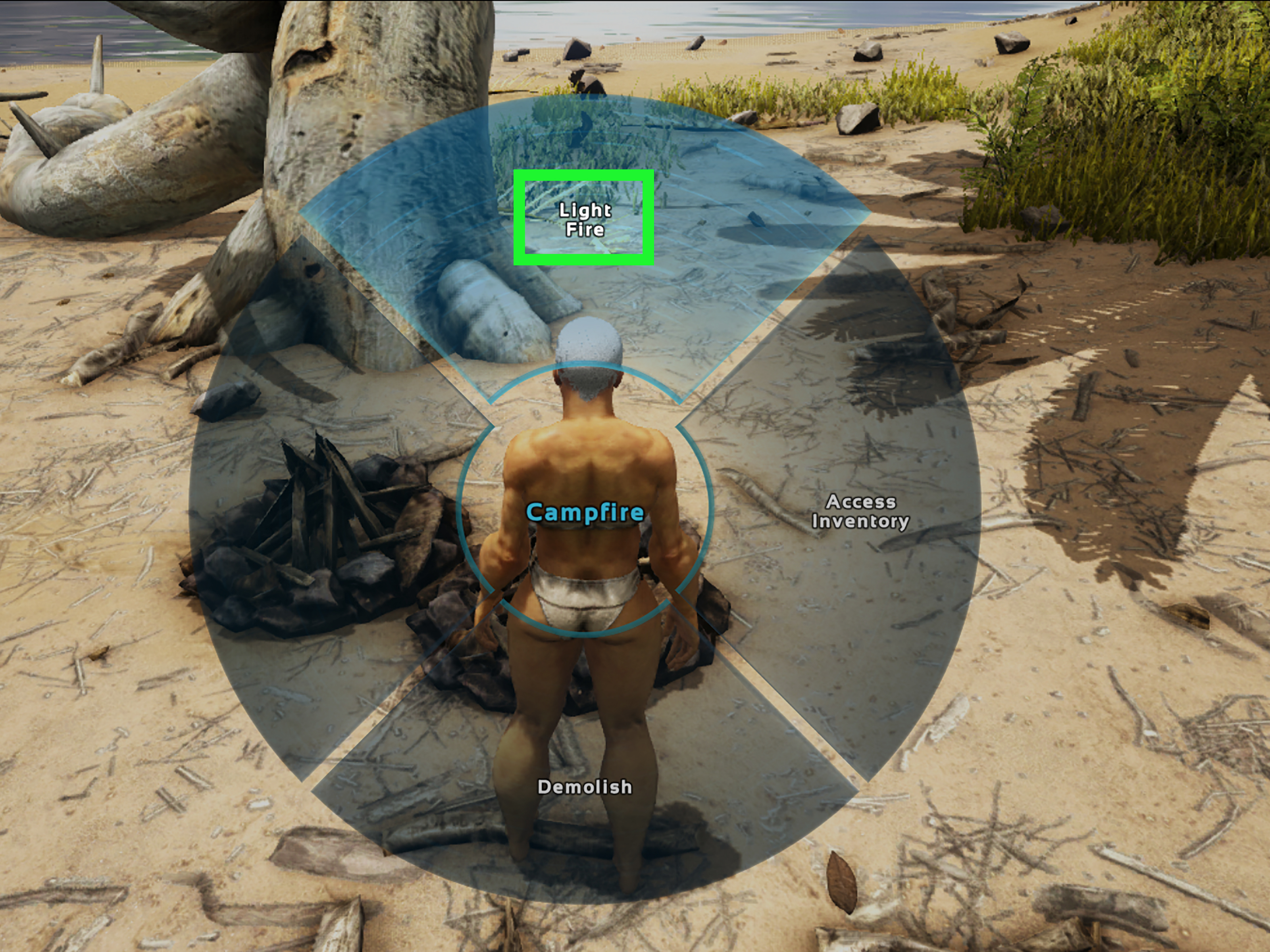
Step 6: Select “Light Fire” and Start Cooking
After placing fuel in the Campfire inventory, use the interaction menu or inventory option labeled “Light Fire”. The fire should ignite immediately if the Campfire has valid fuel and is placed correctly.
To cook food, put raw meat or raw fish meat into the Campfire inventory before or after lighting it. The Campfire will gradually turn raw food into cooked food while fuel remains available.
Keep an eye on the fuel supply. When the fuel runs out, the fire goes out, cooking stops, and your survivor may be left staring at uncooked meat with the sadness of someone who forgot to check the gas tank before a road trip.
Best Campfire Fuel in ARK Survival
The “best” fuel depends on what you are doing. For a quick emergency meal, use whatever you have. For regular cooking and warmth, wood is usually the easiest and most practical choice. For longer burn time, sparkpowder is useful when you have enough flint and stone to spare.
When to Use Thatch
Use thatch when you are brand new, short on wood, or need a few seconds of fire to cook a small amount of meat. It is common, lightweight, and easy to collect from trees. However, it burns quickly, so it is not ideal for long nights or large batches of food.
When to Use Wood
Wood is the standard Campfire fuel for most beginner players. It lasts longer than thatch and produces charcoal. Charcoal becomes useful later for crafting recipes, dyes, and other progression-related tasks.
Keep a separate stack of wood in storage if possible. That way, you can fuel your campfire without accidentally consuming every piece needed for building walls, crafting tools, or repairing your increasingly battered starter hut.
When to Use Sparkpowder
Sparkpowder is useful when you want a longer-lasting flame and do not need to preserve stone and flint for immediate construction. It is a good option for keeping a fire going while you organize your base, prepare food for a trip, or wait out a cold night.
Common Campfire Problems and Easy Fixes
The Campfire Will Not Light
First, check whether there is actual fuel in the Campfire inventory. Raw meat is food, not fuel. Berries are food, not fuel. Fiber is useful for crafting, but it will not make your Campfire light up no matter how strongly you believe in it.
Make sure you added thatch, wood, sparkpowder, or another valid fuel source. Then open the interaction menu and select the lighting option again.
The Fire Goes Out Too Fast
You are probably using thatch or only carrying a tiny amount of fuel. Add more wood or sparkpowder before starting a larger cooking session. A few extra pieces of wood can save you from repeatedly reopening the Campfire every minute.
The Campfire Is Too Close to Water
If the Campfire is placed near the shoreline, river edge, or another wet area, move it to dry ground. A slightly elevated spot near your shelter is usually safer and easier to use.
Your Food Is Not Cooking
Check three things: the Campfire must be lit, it must have fuel, and the food must be in the Campfire inventory. If the flames are active and the fuel stack is decreasing, the cooking process should continue normally.
Smart Campfire Habits for New ARK Players
Build your first Campfire before nightfall whenever possible. The early game becomes much smoother when you already have cooked food, a source of light, and a little warmth waiting at camp.
Do not carry every valuable item while gathering fuel. Put extra resources in a storage box or hide them in your shelter. ARK has a wonderful way of turning a two-minute wood-gathering trip into a surprise encounter with something much larger than you.
Consider placing a Campfire near your main bed or sleeping bag. When you respawn after an unfortunate adventure, having a familiar base setup makes recovery easier. A small starter camp with a Campfire, storage box, sleeping bag, and simple walls can carry you surprisingly far.
Finally, remember that a Campfire is an early-game survival tool, not a permanent industrial kitchen. As you progress, you can use better structures such as Cooking Pots, grills, forges, and advanced crafting stations. Still, even experienced survivors often keep a Campfire around because sometimes the simplest tool is exactly what you need.
Campfire Experience: Lessons From Early ARK Survival
Most ARK players remember their first successful campfire because it often happens after a series of minor disasters. You spawn on a beach, gather stones, punch a tree too many times, get thirsty, panic at a dinosaur noise, and eventually place a Campfire just before darkness settles over the map. It may not be glamorous, but it feels like a major victory.
The first lesson is that preparation beats panic. New players often wait until their hunger meter is low before trying to cook food. By then, they may be injured, cold, carrying too little wood, and being followed by something with a questionable attitude. Gathering a small stack of fuel early makes campfire use much calmer. Ten minutes of preparation can prevent several minutes of prehistoric chaos.
Another useful experience is learning not to build everything directly on the beach. Beaches are convenient because they offer open space, stones, trees, and easy access to water. They are also popular routes for wandering creatures and other players on multiplayer servers. A campfire placed slightly inland, near cover and resources, often gives you a better chance to cook, organize supplies, and recover without becoming part of the local food chain.
Fuel management becomes surprisingly important as your base grows. At first, a few pieces of thatch seem fine. Then you try to cook a large stack of meat, the fire dies halfway through, and you discover that your evening meal has turned into a collection of raw disappointment. Wood is usually the easy answer for everyday use. Sparkpowder becomes helpful when you want longer burn time, especially while crafting or preparing for a trip.
Players also learn that Campfires are excellent “reset points” during difficult early sessions. After a risky resource run, return to camp, cook food, drop off supplies, repair tools, and decide what to do next. That small routine creates a sense of progress in a game where danger can appear from the bushes, the sky, the ocean, or sometimes directly behind you for reasons nobody understands.
One of the best beginner habits is to keep a small emergency bundle near your Campfire: extra wood, cooked meat, water containers, simple tools, and spare clothing for changing temperatures. It is not exciting, but neither is respawning far from your base because you left with an empty food meter and a broken spear. ARK rewards dramatic adventures, but it also rewards survivors who remember to pack lunch.
Eventually, your original Campfire may become a nostalgic object sitting beside a much larger base full of metal structures, tamed creatures, electric lights, and high-level crafting stations. Do not remove it too quickly. The humble Campfire is where the survival loop begins: gather, craft, cook, recover, and head back into the wilderness. It may be a tiny pile of stones and flames, but in ARK Survival, it is often the first sign that you are no longer just surviving. You are building a life among dinosaurs.
Conclusion
Learning how to light a Campfire in ARK Survival is one of the most useful early-game skills you can master. Unlock the Campfire Engram, gather the basic recipe materials, craft and place the structure, add fuel, and select the “Light Fire” option. From there, you can cook meat, stay warm, create light, and produce charcoal for later crafting.
Keep extra wood nearby, place your fire on dry ground, and avoid waiting until hunger or nighttime turns your first camping trip into a dinosaur-themed emergency. A simple Campfire may not look impressive, but it is the foundation of a safer, stronger, and much better-fed survivor.
Note: This guide covers the standard Campfire in ARK: Survival Evolved and ARK: Survival Ascended. Mods, unofficial server settings, mobile editions, custom key bindings, and future updates can change recipes, fuel rates, or interaction prompts.