Note: This article is based on current Instagram app behavior and reputable social media guidance. Because Instagram changes menus faster than most people change their profile photo, labels may appear slightly differently depending on your app version, device, country, or account type.
Somewhere in your Instagram past, there is a recipe you swore you would cook, a travel Reel you promised yourself you would revisit, a meme that absolutely deserved a second laugh, and maybe one questionable 2 a.m. like that you would rather quietly remove from the historical record. Good news: Instagram gives you a way to review your liked posts, Reels, and videos without needing detective-level scrolling skills.
If you are trying to figure out how to see your likes history on Instagram, the feature is tucked inside Your activity. From there, you can view posts you have liked, sort them by date, filter them, open them again, or unlike content you no longer want attached to your account. It is one of Instagram’s most useful hidden-in-plain-sight tools, especially if you use likes as bookmarks, mood boards, shopping reminders, or tiny digital breadcrumbs back to things you enjoyed.
This guide walks you through the process in seven easy steps, explains what you can and cannot see, covers troubleshooting tips, and adds real-world experience from actually using Instagram’s likes history as a practical tool instead of a random graveyard of double taps.
What Is Instagram Likes History?
Your Instagram likes history is a section inside the app where you can review content you have liked. It usually includes photos, carousel posts, Reels, and videos you interacted with by tapping the heart icon or double-tapping the post. Think of it as Instagram’s version of “Wait, what was that thing I saw yesterday?”
Unlike your saved posts, likes are not organized into collections. They are more like a chronological activity trail. That makes them useful for quickly finding something recent, but less ideal for long-term organization. For example, if you liked a home office setup yesterday, finding it in your likes history should be easy. If you liked it three years ago during a midnight productivity phase, you may need patience, filters, and possibly a snack.
The key thing to remember is that your likes history is about your interactions. It does not let you see a complete feed of what someone else has liked across Instagram. You may be able to see likes on individual public posts, depending on privacy settings and whether like counts are hidden, but Instagram does not offer a public “liked posts history” page for other users.
How to See Your Likes History on Instagram: 7 Easy Steps
Step 1: Open the Instagram App
Start by opening the Instagram app on your iPhone or Android device. Make sure you are signed into the correct account. This sounds obvious, but if you manage multiple accounts, it is surprisingly easy to search for your favorite pasta Reel in your business account and wonder why your personal chaos is missing.
For the smoothest experience, update Instagram before you begin. App updates often change menu labels, move settings, or fix bugs that affect activity pages. If your screen does not match the steps below, an outdated app is usually the first suspect.
Step 2: Go to Your Profile
Tap your profile picture in the bottom-right corner of the screen. This takes you to your Instagram profile, where you can see your posts, Reels, bio, highlights, and all the little identity decisions you have made online.
Your likes history is not accessed from the home feed, search tab, or Reels tab. It lives behind your profile menu because Instagram groups it with account activity and interaction management.
Step 3: Tap the Menu Icon
In the top-right corner of your profile, tap the three-line menu icon. Many people call it the hamburger menu, which is charming because nothing says “digital privacy settings” like a tiny sandwich.
Depending on your app version, the menu may open a page called Settings and activity or show a list of activity and account options. Either way, you are looking for the section that controls how you use Instagram.
Step 4: Tap “Your Activity”
Next, select Your activity. This is Instagram’s control room for your behavior on the app. It may include time spent, photos and videos, interactions, account history, recent searches, links visited, archive options, and deleted content.
For likes history, the important area is Interactions. Instagram places likes, comments, story replies, and similar actions there because they are all ways you have engaged with other content.
Step 5: Select “Interactions”
Inside Your activity, find and tap Interactions. On some versions of Instagram, you may see interaction types listed directly, while others require one extra tap. If the wording looks a little different, look for anything related to likes, comments, or engagement.
This section is helpful because it does not only show what you liked. It can also help you manage other traces of activity, such as comments you have made. For anyone trying to clean up an old account, this area is basically a digital broom closet.
Step 6: Tap “Likes”
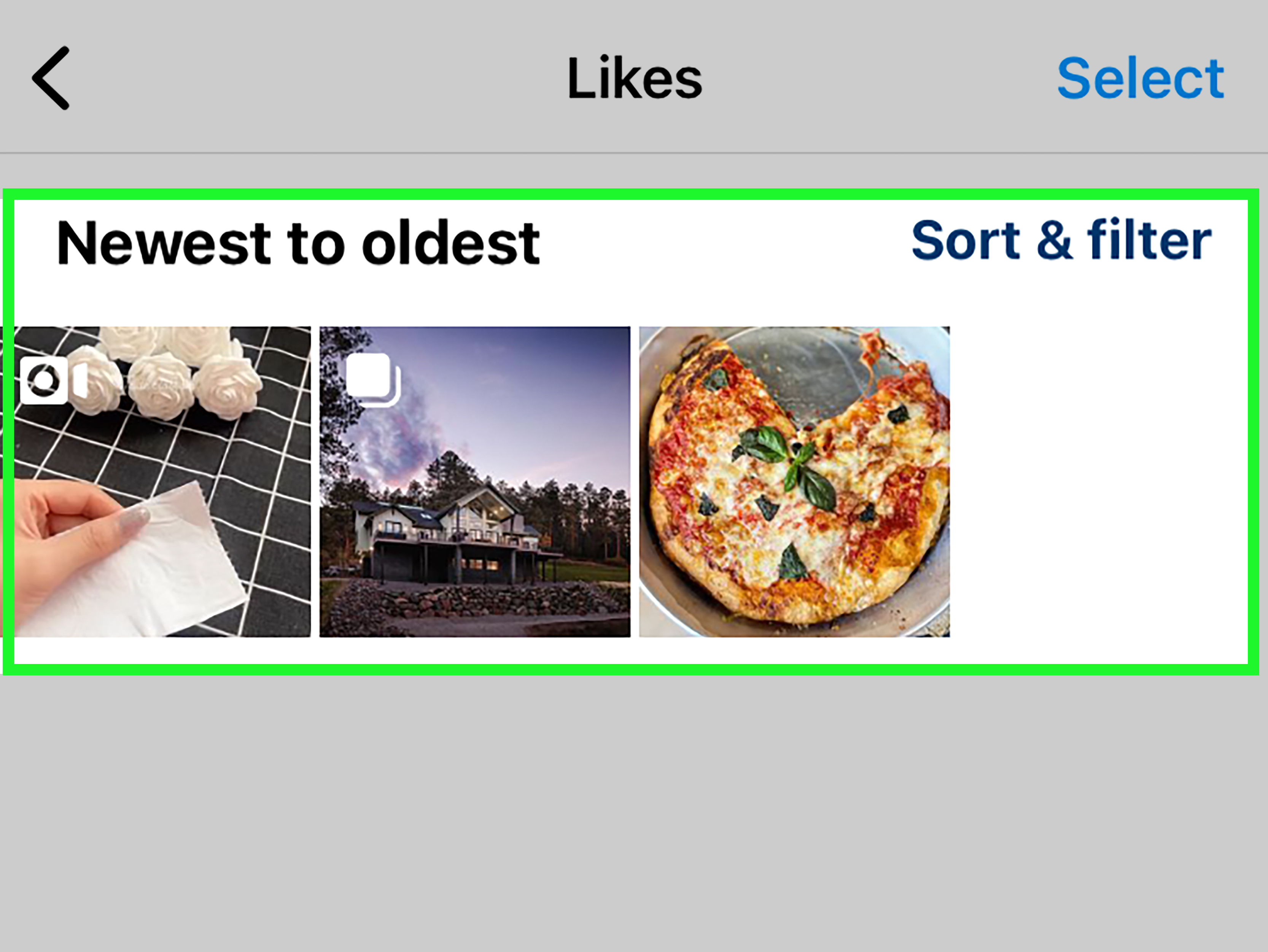
Now tap Likes. This opens a grid or list of posts, Reels, and videos you have liked. The most recent likes usually appear first by default.
From here, you can tap any item to view the original post. If the post is still available and you still have permission to see it, Instagram will open it. If the creator deleted the post, made their account private, blocked you, or changed access settings, that content may no longer appear or may not open correctly.
Step 7: Use Sort, Filter, or Unlike Options
Once you are inside your likes history, look for sorting or filtering controls. Instagram may let you sort likes from newest to oldest or oldest to newest. You may also be able to filter by date range or author, depending on your account and app version.
This is where the feature becomes genuinely useful. Want to find the first posts you liked years ago? Sort from oldest to newest. Trying to locate a Reel you liked last weekend? Use a date filter. Cleaning up your account? Select posts and remove likes in bulk if the option is available.
To unlike something, open the post and tap the heart icon again, or use Instagram’s available selection tools inside the Likes section. When the heart is no longer filled, your like has been removed. Quiet, clean, and far less dramatic than deleting your entire account because of one embarrassing gym meme.
Can You See Instagram Likes History on Desktop?
Instagram’s desktop version has become more useful over the years, but the mobile app is still the most reliable place to manage likes history. If the feature is available on your desktop interface, you can try logging into Instagram.com, opening the More menu, selecting Your activity, and looking for Likes under interactions.
However, desktop menus can vary, and some activity management features may be easier to access from the app. If you are writing a tutorial, helping a friend, or managing a brand account, it is safest to recommend the mobile app as the primary method.
Why You Might Want to Check Your Instagram Likes History
To Find a Post You Forgot to Save
This is the most common reason. You saw a recipe, outfit, product, workout, quote, design idea, or travel tip and liked it instead of saving it. Later, your brain sends an urgent message: “We need that thing.” Your likes history can help you retrieve it before it disappears into the endless scroll swamp.
To Clean Up Old Interactions
People change. Your interests change. Your sense of humor changes. Your old likes may not represent who you are now, especially if your account is many years old. Reviewing your likes history gives you a chance to remove interactions that feel outdated, irrelevant, or simply cringe enough to deserve retirement.
To Understand Your Content Preferences
Your liked posts reveal patterns. Maybe you are liking more travel Reels than you realized, or your feed has slowly become 80% dogs wearing sweaters. For casual users, this is entertaining. For creators and marketers, it can be useful research. Your likes show what catches your attention, which can inspire your own content strategy.
To Manage Your Privacy
Liking a public post can be visible in certain contexts, such as on the post itself. If your account is private, your activity is more limited to approved followers, but that does not make every interaction invisible. Reviewing your likes helps you stay aware of what you have publicly or semi-publicly engaged with.
Likes History vs. Saved Posts: What Is the Difference?
Likes and saved posts are not the same thing. A like is a public or semi-public interaction, depending on the post and privacy settings. A saved post is more like a private bookmark. Instagram says saved posts are only visible to you, and the person who posted the content is not notified that you saved it.
For quick appreciation, use a like. For something you seriously want to revisit, use Save. Better yet, organize saved posts into collections. You might create folders like “Recipes,” “Home Ideas,” “Travel Plans,” “Marketing Inspiration,” or “Things I Will Definitely Buy After I Pretend to Think About It.”
If you rely only on likes, your useful posts get mixed with jokes, celebrity updates, sports clips, and random late-night scrolling decisions. Saved collections are cleaner, easier to search visually, and much better for long-term organization.
How to Remove Likes from Multiple Instagram Posts
If your goal is not just to view liked posts but to clean them up, Instagram may allow you to select multiple liked posts and unlike them together. Go to Your activity, open Interactions, choose Likes, and look for a Select option. Then choose the posts you want to unlike and confirm the removal.
This is helpful if you are refreshing your account, reducing old interactions, or cleaning up content from a specific time period. Use filters before selecting posts if you only want to target a certain date range.
One warning: do not rush. Bulk actions are convenient, but they can also turn into “Oops, I removed 300 likes from posts I actually wanted to keep.” Before removing anything, scan the selection carefully.
What to Do If You Cannot Find Your Likes History
Update the Instagram App
If the Likes section is missing, update Instagram from the App Store or Google Play. Features can disappear, move, or malfunction when the app version is old.
Check the Right Account
If you have multiple accounts, switch to the account where you originally liked the post. Likes do not carry across accounts, even if all the accounts belong to you.
Look for Different Menu Labels
Instagram sometimes tests new labels. You may see Settings and activity instead of a simpler menu, or interaction options may appear in a slightly different order. Search within settings if your app includes a settings search bar.
Restart the App
Close Instagram completely and reopen it. This is not glamorous tech advice, but it works often enough to remain famous.
Try Clearing Cache on Android
Android users can try clearing the app cache through phone settings. This can fix display issues without deleting the account. On iPhone, reinstalling the app is often the closest equivalent.
Remember That Deleted or Private Content May Disappear
If a post you liked no longer appears, the creator may have deleted it, archived it, restricted access, changed privacy settings, or blocked your account. Instagram cannot show you content you no longer have permission to view.
Can Other People See Your Instagram Likes History?
Other people cannot open a complete page showing every post you have liked. However, individual likes may still be visible in certain places. For example, if you like a public post, others may see your name among the people who liked that post. If the post belongs to a private account, visibility depends on account access and follower approval.
Instagram also offers settings related to like counts and, for some users, visibility of certain activity in social features. Because these options can vary by rollout, it is smart to review your privacy settings regularly. If you are concerned about who can see your activity, check sections related to Privacy, Like and share counts, and any setting that mentions activity visibility.
Smart Ways to Use Your Likes History
Turn Likes into Saved Collections
Once a month, review your recent likes and save the truly useful posts into collections. This keeps your best finds organized and prevents important posts from getting buried under random entertainment.
Use Likes as a Content Research Tool
If you create content, your likes history can reveal what formats, hooks, captions, visuals, and topics naturally attract you. Study those posts. Ask yourself why you liked them. Was it the opening line? The editing style? The clear tutorial? The oddly persuasive cat?
Clean Up Old Likes Before a Brand Refresh
If you are turning a personal account into a creator or business profile, reviewing old interactions is a smart housekeeping step. You do not need to erase your personality, but you may want your visible activity to match your current goals.
Save Instead of Like for Private Research
If you want to keep a post for later but do not necessarily want to interact publicly, saving may be the better option. Saved posts are private to you, while likes can be visible depending on the post and settings.
Common Questions About Instagram Likes History
Can I see every post I have ever liked on Instagram?
You can see many of your liked posts through the Likes section, but availability may depend on Instagram’s current data display, removed content, account privacy changes, blocked accounts, or app limitations.
Can I search my liked posts by keyword?
Instagram does not offer a powerful keyword search inside likes history. Sorting and filtering are more useful. If you need long-term organization, save important posts into named collections.
Can I see someone else’s liked posts history?
No. Instagram does not provide a full likes history page for other users. You may see individual likes on specific posts when visibility settings allow it, but you cannot browse another person’s complete liking activity.
Do hidden like counts hide my actual likes?
Hidden like counts mainly affect whether numbers are displayed. They do not necessarily make every like invisible. The post owner and Instagram may still have access to engagement information, and visibility can depend on the post, account type, and settings.
Is likes history the same as Instagram Insights?
No. Likes history shows content you have liked. Instagram Insights, available for professional accounts, shows performance data for your own content, such as reach, engagement, and interactions.
Real Experience: What It Is Actually Like to Use Instagram Likes History
Using Instagram likes history feels a little like opening a time capsule curated by your thumbs. The first thing you notice is how many reasons people hit the like button. Sometimes it means “I love this.” Sometimes it means “I want to remember this.” Sometimes it means “I acknowledge that my friend posted a salad and I am being supportive.” That makes likes history useful, but also a bit messy.
In real use, the feature works best for recent discoveries. If you liked a Reel yesterday showing a clever phone photography trick, you can usually find it quickly by going to Your activity, opening Likes, and checking the newest posts. This is much faster than trying to recreate your feed through search terms like “guy camera sunset transition wow,” which is not exactly a scientific filing system.
The sorting and filtering tools are especially helpful when you remember the approximate date. For example, if you know you liked a restaurant post during a weekend trip, filtering by date can narrow the search dramatically. Without filters, your likes history can feel endless, especially if you are a generous liker. Some people hand out likes like confetti at a parade.
The biggest lesson from using likes history is that likes are not a good replacement for saves. A like is too casual. It gets mixed with jokes, news, friends’ updates, tutorials, pets, celebrities, and random posts you barely remember. If something matters, save it immediately. Even better, put it into a collection with a clear name. “Dinner Ideas” will help you later. “Stuff” will betray you.
Another useful habit is monthly cleanup. Spend five minutes reviewing recent likes. Save the posts you want to keep, unlike anything that no longer feels relevant, and notice what kind of content you have been engaging with. This can improve your feed because Instagram uses interactions as signals. If you keep liking fitness tips, design ideas, and cooking videos, your recommendations may lean further in that direction. If you accidentally train your feed with chaos, do not be shocked when chaos returns wearing a suggested-post badge.
For creators, likes history can become a quiet research lab. Look at the posts you liked and study the pattern. Did the creator use a strong first sentence? Was the video short and practical? Did the carousel solve a specific problem? Your own behavior can teach you what good content feels like from the audience side.
For privacy-conscious users, the experience is also a reminder to be intentional. You do not need to panic about every like, but you should understand that likes are interactions, not secret diary entries. Reviewing them occasionally helps you stay comfortable with your public-facing activity.
Overall, Instagram likes history is simple, useful, and slightly humbling. It helps you rediscover forgotten posts, clean up old interactions, and understand your own scrolling habits. Used wisely, it turns a pile of double taps into something practical. Used carelessly, it remains what it has always been: a museum of tiny decisions made while avoiding bedtime.
Conclusion
Learning how to see your likes history on Instagram takes less than a minute once you know where to look: open your profile, tap the menu, go to Your activity, choose Interactions, and open Likes. From there, you can revisit posts, sort by date, filter your activity, and remove likes when needed.
The feature is especially useful for finding posts you forgot to save, cleaning up old interactions, and understanding what kind of content keeps catching your attention. Still, likes should not be your only organization system. If a post is important, save it. If it belongs in a category, add it to a collection. Your future self will thank you, probably while searching for that one recipe with the crispy potatoes.