Sometimes the most effective productivity tool is not another app, another planner, or another dramatic promise to become “a totally new person on Monday.” Sometimes it is a small, inexpensive smart plug that quietly cuts power to the thing stealing your attention. A cheap smart plug can turn your TV, game console, Wi-Fi router, desk lamp, charger, or entertainment setup into something that follows your schedule instead of your mood.
The idea sounds almost too simple: plug a distracting device into a smart plug, set a timer or schedule, and let the outlet do the awkward work of saying, “Nope, not right now.” But that simplicity is exactly why it works. Digital distractions often win because they are easy to access. A remote is nearby. A console wakes instantly. A phone charger sits on the desk like a tiny invitation to doom-scroll. A smart plug adds just enough friction to interrupt the habit loop.
This guide explains how a cheap smart plug can help block distractions, what features to look for, which devices make sense to control, and how to build a focus-friendly setup without turning your home into a futuristic command center that requires a PhD in Wi-Fi.
Why a Smart Plug Can Help You Focus
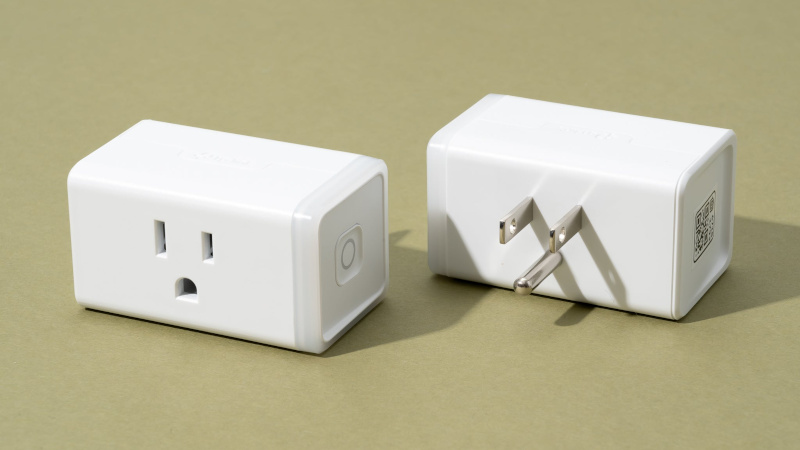
A smart plug is a small adapter that goes between your wall outlet and a device. Once connected to an app or smart-home platform, it can turn that device on or off automatically. Most budget smart plugs support schedules, timers, remote control, voice assistants, and basic automation. Some models also include energy monitoring, which shows how much power a connected device uses.
For productivity, the magic is not the technology itself. The magic is behavioral design. Distractions are sticky because they require almost no effort. If your gaming console, TV, or phone charger is always available, your brain does not have to negotiate very hard. A smart plug gives you a practical boundary. Instead of relying only on willpower, you create an environment that supports the choice you already wanted to make.
Think of it as a tiny bouncer for your outlet. It is not judgmental. It does not lecture you. It simply cuts the power when focus time begins.
What Makes a Cheap Smart Plug Useful for Blocking Distractions?
Not every smart plug is ideal for distraction control. The best choice is usually simple, compact, reliable, and compatible with your existing phone or smart-home system. You do not need the most expensive model. In fact, many affordable smart plugs from well-known brands can handle the exact features needed for focus routines.
1. Scheduling
Scheduling is the most important feature. It lets you decide when a device should turn on or off every day. For example, you can schedule a TV to lose power from 7 p.m. to 9 p.m. while you study, read, work out, or finish homework. You can schedule a desk phone charger to turn on only after your evening focus block. You can even set a gaming setup to power up after chores or work hours are done.
2. Timer or Auto-Off
A timer is perfect when you want controlled access rather than a total ban. Maybe you are fine with 30 minutes of TV after dinner, but not three accidental episodes and a confused look at the clock. With auto-off, the device turns off after a set amount of time. This works well for lamps, chargers, speakers, and entertainment devices that do not need constant power.
3. App Control
App control lets you turn devices on or off from your phone. This can be convenient, but there is a catch: if your phone is the distraction, opening another app may not help. For better results, set schedules in advance and avoid manually overriding them unless necessary. The goal is to reduce decision-making, not create a new button to obsess over.
4. Voice Assistant Compatibility
Many smart plugs work with Alexa, Google Home, Apple Home, Samsung SmartThings, or Matter-supported platforms. Voice control is useful when your hands are busy or when the outlet is behind furniture. However, for blocking distractions, voice control should be treated as a backup. If you can simply say, “Turn on the game console,” every time you feel bored, the system may become more polite than powerful.
5. Compact Design
A slim smart plug is worth choosing because it is less likely to block the second outlet. This matters in bedrooms, dorm rooms, small offices, and entertainment corners where outlets are already treated like prime real estate.
6. Energy Monitoring
Energy monitoring is not required, but it is a nice bonus. It can show how much power your devices use in standby mode. Seeing real usage can make the benefits feel more concrete. It is one thing to say, “I should turn off the TV setup.” It is another thing to see that your electronics quietly sip power even when nobody is watching anything.
Best Distractions to Control With a Smart Plug
A cheap smart plug is not a magic wand, but it is excellent for controlling devices that do not need uninterrupted power. The key is to choose distractions that are physical and plug-based. Apps are tricky. Outlets are easier.
TVs and Streaming Devices
The living room TV is a classic distraction machine. It starts with “just one episode” and ends with you learning the backstory of a side character from a show you did not even plan to watch. Plugging the TV or streaming device into a smart plug can create clear viewing windows. For example, power can stay off during work hours and turn back on after 6 p.m.
Gaming Consoles
A smart plug can help create gaming boundaries. It is especially useful for consoles connected to monitors or TVs in a bedroom or study space. You can set the plug to stay off until a certain time, then automatically turn off again at bedtime. This does not replace self-control, but it gives self-control backup.
Phone Chargers
This one is underrated. If your phone charger is beside your bed or desk, your phone naturally follows. A smart plug can limit charging to certain times, encouraging you to keep your phone in another room during focus blocks or overnight. For example, schedule the charger to turn on from 9 p.m. to 10:30 p.m., then off until morning.
Wi-Fi Router
Some people use a smart plug to turn off home Wi-Fi during deep work or bedtime. This can be effective, but use caution. Do not cut power to a router if other people need the internet, if smart-home safety devices depend on it, or if you need online access for school, work, or emergencies. A router schedule works best in a personal setup where you control the internet use and understand the tradeoff.
Desk Lamps and Work Zones
Smart plugs are not only for removing distractions. They can also support focus by turning on the right environment. A lamp scheduled to turn on at 7 a.m. can signal “study mode.” A warm desk light at night can make reading feel inviting. When your workspace activates automatically, starting feels easier.
How to Set Up a Smart Plug for Focus
Setup usually takes only a few minutes. First, plug the smart plug into the wall. Then plug your device into the smart plug. Open the manufacturer’s app or your smart-home app, connect the plug to Wi-Fi, name it clearly, and create your schedule.
Choose a name that makes sense. Instead of “Plug 1,” use “TV Blocker,” “Gaming Schedule,” “Phone Charger,” or “Focus Lamp.” Clear names make automations easier to manage later.
A Simple Focus Schedule
Here is a realistic example for a student, remote worker, or anyone trying to protect evening focus time:
- 7:00 a.m. Focus lamp turns on.
- 8:00 a.m. TV plug turns off.
- 3:30 p.m. Phone charger turns on for 45 minutes.
- 6:00 p.m. Entertainment plug turns on.
- 9:30 p.m. Gaming console turns off.
- 10:30 p.m. Bedroom charger turns off.
The exact times do not matter as much as consistency. Start with one routine and adjust it after a week. If the schedule feels too strict, you will override it. If it feels too loose, it will not help. The best setup is firm enough to matter and flexible enough to survive real life.
Smart Plug Rules That Actually Work
A cheap smart plug works best when paired with simple rules. Complicated systems tend to collapse the first time you are tired, hungry, or convinced that a 14-minute video will somehow improve your future.
Use “Off First” Thinking
Instead of deciding when distractions are forbidden, decide when they are allowed. For example, keep the TV off by default and schedule it to turn on only during a planned entertainment window. This flips the habit. Entertainment becomes intentional rather than automatic.
Put the App Out of Reach
If possible, set the automation and move the smart-home app away from your home screen. You do not need to delete it. Just make manual control slightly less convenient. The point is to let the schedule run without turning every focus block into a debate.
Use Multiple Small Barriers
A smart plug is stronger when combined with other small changes. Put the remote in a drawer. Keep the phone outside the bedroom. Use app limits. Turn off notifications. Move the console controller away from the desk. None of these steps is dramatic, but together they create a system where focus becomes the easier choice.
What Not to Plug Into a Smart Plug
Safety matters. Do not use a cheap smart plug with high-risk or high-wattage devices unless the plug is specifically rated for that use and the device manual allows it. Avoid using smart plugs with space heaters, medical devices, refrigerators, freezers, sump pumps, aquariums, or anything that must remain continuously powered. Do not use a smart plug as a safety switch for dangerous appliances.
Space heaters deserve special attention. Safety organizations commonly recommend plugging space heaters directly into wall outlets and avoiding extension cords or power strips. A smart plug may seem convenient for scheduling heat, but it can create unnecessary risk if the device draws too much power or turns on unattended. Productivity is great; accidentally creating a fire hazard is not a “life hack.”
Cheap Smart Plug vs. App Blocker: Which Is Better?
App blockers are useful for websites, social media, and phone habits. A smart plug is better for physical distractions. They solve different problems. If your main issue is scrolling, use app limits. If your main issue is turning on the TV, charging your phone beside your bed, or playing console games during study time, a smart plug can be more effective because it changes the environment.
The best setup often combines both. Use app blockers to control digital temptations and a smart plug to control physical devices. That way, you are not relying on one tool to fix every habit.
How Much Should You Spend?
For distraction blocking, you usually do not need a premium smart plug. A reliable budget model is enough if it has scheduling, timer control, and compatibility with your preferred platform. Many inexpensive options come in multi-packs, which can lower the cost per plug. If you use Apple Home, Matter support may be worth prioritizing. If you use Alexa or Google Home, many Wi-Fi plugs will work as long as they support your platform.
The real value is not the price of the plug. It is the time you protect. If a small outlet adapter helps you reclaim even a few focused hours each week, it can easily justify its cost. That is the rare tech purchase that pays you back in attention, not just blinking LEDs.
Real-World Experience: Using a Cheap Smart Plug to Block Distractions
The first thing you notice when using a cheap smart plug for focus is how often distraction depends on convenience. Before setting one up, turning on the TV or charging the phone beside the bed feels almost invisible. You do not think, “I am now choosing to sacrifice my attention.” You just reach for the remote, tap the screen, or plug in the charger because it is there.
After adding a smart plug, the habit becomes visible. When the TV does not turn on during a scheduled focus block, there is a tiny pause. That pause is useful. It gives your brain a second to remember the plan. Maybe the plan was to finish a chapter, clean the kitchen, stretch for 20 minutes, or finally answer an email that has been aging like cheese in your inbox. The smart plug does not force greatness. It simply interrupts the autopilot.
One practical setup is to use a smart plug on the entertainment center. Schedule it off during the hours when you usually lose time. For many people, that is late afternoon or late evening. The moment the plug shuts off, the room changes personality. The TV is no longer the center of gravity. Suddenly, the book on the table looks more possible. The laundry basket looks less like a decorative sculpture. Even silence feels less suspicious.
Another surprisingly helpful setup is controlling a phone charging station. Put the charger across the room or outside the bedroom and connect it to a smart plug. Schedule charging for a reasonable window, then let it turn off. This reduces the excuse to keep the phone nearby “because it needs charging.” The phone still gets power, but it no longer earns a VIP pass to your pillow.
A smart plug also works well as a start signal. For example, a desk lamp can turn on at the same time every morning. That small cue can make a work session feel official. It is like your desk saying, “Welcome back. Please pretend we are organized.” Over time, the routine becomes easier because the environment leads you into it.
The biggest lesson is that the smart plug should not feel like punishment. If the schedule is too aggressive, you will disable it. A better approach is to protect the hours that matter most and leave room for enjoyment. Entertainment is not the enemy. Accidental entertainment is the problem. A cheap smart plug helps separate the two.
Conclusion
A cheap smart plug to block distractions is one of the simplest productivity upgrades you can make. It does not require a complicated system, a full smart-home setup, or a motivational speech taped to your wall. It works because it changes your environment. By scheduling power to TVs, consoles, chargers, lamps, and other devices, you reduce the number of moments where willpower has to fight alone.
The best smart plug for focus is compact, affordable, easy to schedule, and compatible with the apps or voice assistants you already use. Start with one distraction, set one realistic schedule, and let the outlet become part of your routine. You may still procrastinate occasionallywe are humans, not productivity robots wearing sneakersbut you will have fewer easy traps waiting for you.