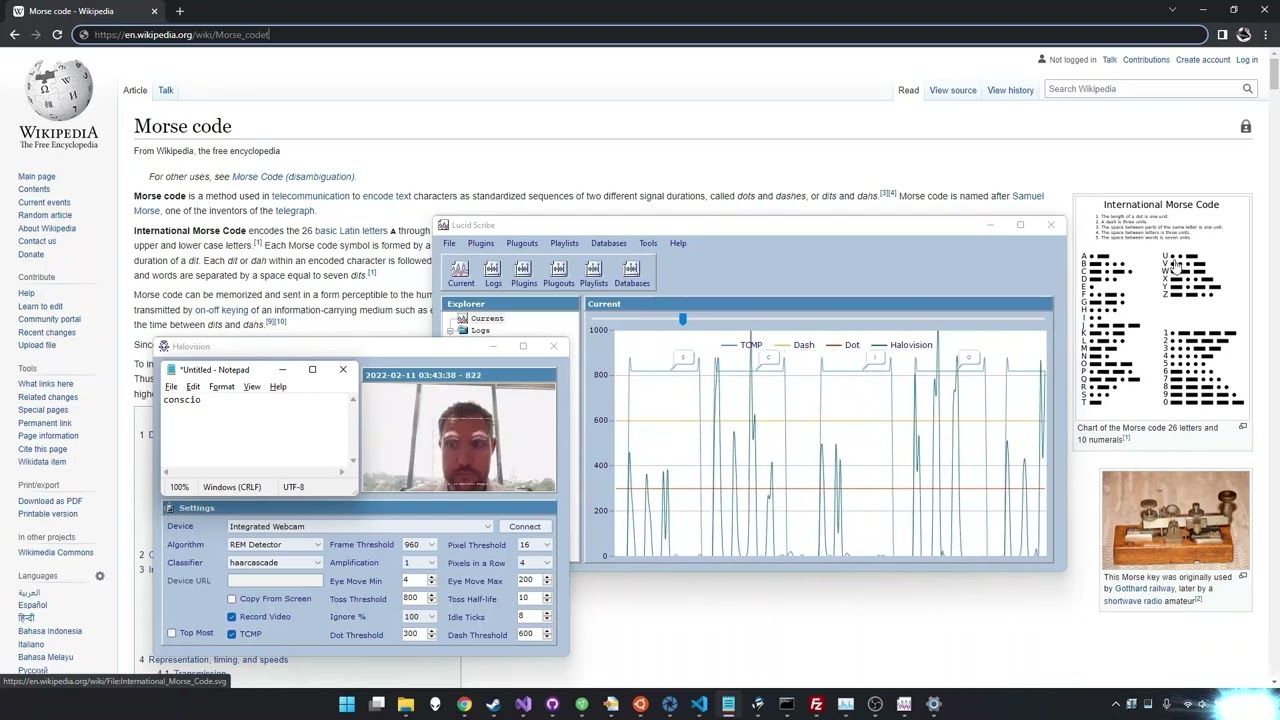
Imagine typing an email, controlling a computer, or sending a quick “yes, I am absolutely judging your coffee order” message without moving your hands, speaking, or touching a screen. That is the surprisingly powerful promise behind a Morse keyboard that communicates with the blink of an eye. It sounds like something from a spy movie, a medical lab, and a garage hacker’s weekend project all rolled into one. Yet the idea is beautifully simple: use short and long eye blinks as dots and dashes, translate those signals into Morse code, and turn them into text.
For most people, keyboards are so ordinary that we barely notice them. Fingers tap, screens glow, words appear. But for people with severe motor impairments, paralysis, ALS, stroke-related disability, or locked-in syndrome, ordinary input devices can become impossible to use. In those moments, the smallest reliable movement can become a doorway back into conversation. An eyelid, humble and underappreciated, may become a keyboard key.
The concept of a blink-based Morse keyboard is not only clever; it is a reminder that assistive technology often advances when engineers stop asking, “What can a typical user do?” and start asking, “What movement is still available, consistent, and comfortable?” Sometimes the answer is not a hand gesture, a voice command, or a touchscreen tap. Sometimes it is a blink.
What Is a Morse Keyboard Controlled by Eye Blinks?
A Morse keyboard controlled by eye blinks is an assistive input system that converts intentional eyelid movement into written characters. A short blink may represent a dot. A longer blink may represent a dash. A pause separates letters or words. The software then decodes the pattern into text, just as a radio operator or telegraph receiver would interpret Morse code.
For example, the letter “E” is one dot, so a single short blink could produce “E.” The letter “T” is one dash, so a longer blink could produce “T.” The letter “A” is dot-dash, meaning the user might blink quickly, pause very briefly, then hold a longer blink. It is minimal, elegant, and slightly magicallike texting with your eyelashes, except without the mascara-related engineering issues.
In practice, a blink Morse keyboard can be built in several ways. Some systems use webcams and computer vision. Others use infrared sensors, electrooculography, wearable glasses, or small embedded boards such as ESP32 devices. The common goal is the same: detect a deliberate blink, classify its length or pattern, convert it into a symbol, and output the result as keyboard text or speech.
Why Morse Code Still Makes Sense in Modern Assistive Technology
Morse code may look old-fashioned at first glance. After all, it belongs to the age of telegraphs, ship radios, and people who could probably repair a toaster with a pocketknife and confidence. But its age is exactly what makes it useful. Morse code was designed for low-bandwidth communication. It uses only two signal types: short and long. That makes it ideal for situations where a person has only one controllable input.
A blink-based keyboard does not need ten fingers, a full voice, or even precise eye pointing. It needs the ability to create two distinguishable signals. Short blink, long blink. Dot, dash. Message delivered.
International Morse code also has a predictable structure. Common letters tend to have shorter patterns, which can reduce effort once the user becomes familiar with the system. The letter “E” is one dot. “T” is one dash. “I” is two dots. “M” is two dashes. The system rewards practice, rhythm, and muscle memory. That matters because assistive communication is not only about technical possibility; it is about fatigue, comfort, and repeatability.
How the Blink-Based Morse Keyboard Works
The basic workflow is straightforward, although the engineering behind it can get delightfully nerdy.
1. The Camera or Sensor Watches the Eye Area
A webcam-based system uses video frames to monitor the user’s face. Modern computer vision tools can detect facial landmarks, including points around the eyes. These landmarks help the software estimate whether the eyes are open, partially closed, or closed.
Some experimental systems compare changes between video frames. If the eye region changes enough, the software interprets that motion as a blink. More advanced systems calculate measurements such as eye openness using facial landmark geometry. When the eyelid closes, the eye shape changes in a measurable way.
2. The Software Separates Natural Blinks from Intentional Blinks
This is the tricky part. Humans blink naturally all day long. A useful Morse keyboard must avoid turning every normal blink into alphabet soup. Otherwise, the user might try to write “hello” and accidentally produce something that looks like a cat walked across the telegraph wire.
To reduce false input, systems often use timing thresholds. A very brief natural blink may be ignored. A controlled blink within a specific duration may count as a dot. A longer intentional closure may count as a dash. Calibration is important because no two users blink exactly alike. Lighting, camera angle, glasses, fatigue, and eye conditions can all affect performance.
3. Dots and Dashes Become Letters
Once the system has classified the blink as a dot or dash, it stores the sequence. A pause tells the software that one character has ended. Another longer pause may mark a space between words. The software then checks the pattern against a Morse code dictionary and outputs the corresponding character.
For instance, dot-dot-dot is “S.” Dash-dash-dash is “O.” Dot-dot-dot, dash-dash-dash, dot-dot-dot becomes SOS, the classic distress signal. In a blink keyboard, that could be sent using only eyelid movement. It is a dramatic example, but it shows why Morse code has survived across centuries: it can carry meaning through almost any on-off channel.
4. The Output Acts Like a Keyboard or Speech Device
The final text can appear in a typing window, an on-screen keyboard, a communication app, or a text-to-speech system. Some projects aim to behave like a Human Interface Device keyboard, meaning the computer treats the blink system like a regular keyboard. Other designs use Bluetooth to connect with phones, tablets, or laptops.
This flexibility is crucial. Assistive technology becomes more useful when it works with devices people already own. A blink keyboard that can connect to a phone is more practical than one locked to a single lab computer guarded by cables, adapters, and one mysterious charging brick nobody can find.
The Human Need Behind the Technology
Eye-blink communication matters most for people who retain awareness but lose reliable speech and movement. Locked-in syndrome is one of the most powerful examples. In many cases, a person may remain conscious and able to understand language while losing nearly all voluntary muscle control. Vertical eye movement and blinking may remain possible, making the eyes a vital communication channel.
People with ALS may also benefit from eye-gaze and blink-based systems as the disease progresses. Speech can weaken. Hand movement may become limited. A communication device that uses eye movement can help preserve independence, relationships, and personal expression. That last phrasepersonal expressionis not decoration. It is the core of the story.
Communication is not only about requesting water, medicine, or assistance. It is about jokes, opinions, memories, frustration, sarcasm, affection, and dignity. A person should be able to say “I love you,” but also “Please stop playing that song,” “The pillow is weird,” or “I would like pizza, and yes, this is medically important.”
Why a Morse Keyboard Can Be Better Than a Full Eye-Tracking Keyboard
Modern eye-tracking keyboards can be impressive. They allow users to look at letters on a screen, dwell on a selection, and compose messages. However, they can require careful calibration, stable positioning, specific hardware, and enough eye control to target small areas of a display. For some users, that works beautifully. For others, it may be tiring or unreliable.
A blink-based Morse keyboard offers a different tradeoff. It may be slower at first, because Morse code requires learning. But it can be simpler in terms of input. Instead of aiming at dozens of letters, the user produces a timed signal. That can be helpful when eye movement is limited, when a screen is not convenient, or when a compact low-cost system is needed.
The best assistive technology is not one-size-fits-all. It is more like a toolbox. Eye-gaze keyboards, switch scanning, sip-and-puff devices, head tracking, brain-computer interfaces, and blink Morse systems all have their place. The right solution depends on the person’s abilities, environment, fatigue level, budget, support network, and goals.
Challenges: Because Eyelids Are Not Mechanical Switches
As charming as the idea is, a Morse keyboard controlled by blinks faces real challenges.
Accuracy
The system must reliably tell the difference between dot, dash, pause, accidental blink, and eye fatigue. A small timing error can change one letter into another. In Morse code, dot-dash is “A,” while dash-dot is “N.” That is a tiny difference with a big result. Nobody wants to say “nap” when they meant “app,” unless they are writing a very honest software review.
Fatigue
Repeated intentional blinking can tire the eyes. Designers need to consider rest periods, predictive text, shortcuts, phrase banks, and error correction. A good interface should not force users to blink out every letter of “I need assistance adjusting my chair” if a saved phrase can handle it in two or three selections.
Lighting and Camera Position
Webcam systems depend on video quality. Poor lighting, shadows, reflections on glasses, or a low-resolution camera can reduce accuracy. A system designed for real homesnot just clean demosmust survive messy bedrooms, hospital rooms, daylight glare, night lamps, and the occasional family member walking through the frame like a confused background actor.
Personal Calibration
Different users have different blink speeds and levels of eyelid control. A reliable Morse keyboard should allow custom thresholds for dots, dashes, and pauses. Ideally, it should learn from the user over time.
Design Features That Make a Blink Morse Keyboard More Useful
A practical blink keyboard should do more than translate dots and dashes. It should support the real experience of communication.
Predictive Text
Predictive text can reduce the number of blinks needed. If the user starts a common word, the system can suggest likely completions. This is especially valuable because every blink costs effort.
Phrase Shortcuts
Common messages such as “yes,” “no,” “pain,” “water,” “call nurse,” “I need suction,” or “I love you” should be available quickly. Medical and emotional phrases both matter.
Clear Feedback
The user should see or hear what the system detected: dot, dash, letter, word, or error. Feedback helps build confidence and reduces frustration.
Error Correction
Backspace must be easy. Mistakes are inevitable. A communication device without easy correction is like a pencil without an eraser and with a judgmental personality.
Multiple Output Options
The best systems can output text to a screen, speak the message aloud, send it to another device, or act as a keyboard. Communication should travel where the user needs it.
Real-World Examples and the Maker Spirit
The blink Morse keyboard concept has appeared in maker projects, research prototypes, and assistive technology experiments. One notable approach used an ordinary webcam and facial detection to type by blinking in Morse code patterns. Another project, EyeBREAK, explored a portable hands-free keyboard using eyelid input, Bluetooth capability, an ESP32 microcontroller, and real-time detection. These projects show a healthy pattern in accessibility innovation: start with what is available, test what works, and keep refining.
That maker attitude matters. Assistive technology can be expensive, and not every user has access to specialized equipment. Low-cost systems based on webcams, phones, open-source software, or small embedded boards can expand access. They may not replace clinical-grade communication devices, but they can inspire better designs and give families, developers, and therapists new options to explore.
The future may combine blink input with eye gaze, facial muscle signals, predictive language models, and adaptive calibration. A user might blink to select, look to navigate, and rely on smart phrase prediction to reduce effort. The goal is not to make the most futuristic gadget. The goal is to make communication faster, more comfortable, and more personal.
Experience Section: Living With the Idea of a Keyboard You Can Blink
Using a Morse keyboard controlled by eye blinks would feel strange at first. Most of us are used to communication being nearly instant. We think, our fingers move, and text appears. A blink keyboard asks the user to slow down and become aware of timing. A short blink must be short enough. A long blink must be long enough. Pauses matter. Rhythm matters. It is closer to learning a musical instrument than using a normal keyboard.
In the beginning, the experience may be awkward. The user might accidentally blink too quickly, hold a dash too long, or forget the Morse pattern for a letter. The first few sessions would likely involve simple goals: type “E,” then “T,” then “A,” then maybe “yes” and “no.” Progress would come through repetition. The system would become more natural as the user builds memory for common letters and phrases.
One of the most important experiences would be trust. The user needs to trust that the system is listening correctly. If the software misses blinks or invents letters, frustration rises quickly. That is why feedback is so important. A small sound, visual indicator, or spoken confirmation can reassure the user: “Dot received.” “Dash received.” “Letter complete.” Communication becomes less mysterious when the system shows its work.
Caregivers would also need training. A blink Morse keyboard is not only a device; it is part of a communication routine. Someone may need to position the camera, adjust lighting, open the app, confirm comfort, and understand when the user is tired. The best experience happens when the technology supports the relationship instead of becoming another complicated medical object in the room.
There is also an emotional side. The first successful message from a blink keyboard could be deeply moving. It might be a practical message like “water,” but even that is powerful. It means the user has control. It means the silence has a crack in it. Over time, the messages can become richer: a joke, a complaint, a memory, a preference, a private thought. That is where the technology becomes more than an input method. It becomes a bridge.
For developers, testing such a system would teach humility. A demo that works for a healthy person sitting still at a desk may not work for someone lying in bed, dealing with fatigue, medication effects, dry eyes, or limited head control. Real accessibility design requires patience, listening, and iteration. The user is not a test case; the user is the expert on their own body.
For families, a blink keyboard could change daily life in small but meaningful ways. Instead of guessing, they could ask. Instead of interpreting every expression, they could receive a clearer answer. Even slow communication can reduce anxiety when the alternative is silence. A single sentence typed by blinking may take time, but the value of that sentence can be enormous.
The experience also shows why old technologies never really disappear. Morse code began as a telegraph language, traveled through radio history, and now finds new life in accessibility prototypes. It proves that innovation is not always about inventing something entirely new. Sometimes it is about taking a durable idea and placing it in a new human context. Dots and dashes once crossed continents by wire. Now they may cross the distance between a silent body and a waiting world.
Conclusion
A Morse keyboard that communicates with the blink of an eye is a small idea with enormous implications. It takes one of the simplest communication codes ever created and pairs it with modern computer vision, sensors, and assistive design. The result is a tool that can turn eyelid movement into language, independence, humor, urgency, and connection.
It is not perfect. Accuracy, fatigue, calibration, and comfort all matter. But the promise is clear: when traditional input methods fail, communication can still find another path. Sometimes that path is not through hands or speech. Sometimes it is through a quiet blink that says, “I am here.”