Fortnite NPCs are a little like that one friend who says, “I’m right behind you,” then gets distracted by a chest, a wolf, a suspicious bush, and possibly their own shadow. Luckily, when you hire certain NPC characters in Fortnite, you are not completely at the mercy of their digital life choices. You can give them commands, direct their movement, tell them to follow, make them wait, or dismiss them when they start acting like a walking siren with shoes.
This guide explains how to give commands to NPC characters in Fortnite in three simple steps. Whether you are trying to finish a quest, survive longer in Battle Royale, use a hired character as backup, or simply stop your NPC from charging into battle like they have personal beef with everyone on the island, the process is straightforward once you know where the command wheel is hiding.
The important thing to understand is this: not every Fortnite NPC can be commanded. You must first hire a character that supports follower commands. Once hired, the character becomes your temporary teammate, and a special follower command menu becomes available. From there, you can issue quick tactical orders during a match.
What Are NPC Characters in Fortnite?
NPC stands for “non-player character.” In Fortnite, NPCs are computer-controlled characters that can appear around the map. Some sell weapons, offer services, provide items, start conversations, or let you hire them as companions. The exact NPC lineup changes from season to season, so the character who helped you last month may be on vacation, replaced, relocated, or mysteriously deleted by the storm gods.
Hirable NPCs are the ones that matter for commands. After you hire one, the character follows you, fights enemies, and can sometimes perform helpful actions depending on the current game rules. Think of them as bargain-bin bodyguards. They may not have perfect aim, but they are brave, noisy, and occasionally useful at the exact moment you need them.
Why Give Commands to NPCs in Fortnite?
Giving commands to Fortnite NPCs helps you control how your hired character behaves. Instead of letting the NPC wander around and announce your location by shooting at a passing butterfly, you can direct them more carefully. Good command use can help you reposition your companion, hold an area, bait enemy attention, or keep them from following you into a stealthy rotation.
Players often use NPC commands for three main reasons: completing quests, improving combat support, and managing positioning. If a challenge asks you to give a hired character a command, simply issuing one order through the follower command wheel is usually enough. If you are playing seriously, commands become more tactical. A well-placed NPC can distract opponents, pressure a squad, or cover an angle while you heal.
How to Give Commands to NPC Characters in Fortnite: 3 Steps
Step 1: Find and Hire an NPC That Can Be Recruited
Before you can command an NPC, you need to hire one. Walk up to a recruitable NPC and interact with them. If they can be hired, you will see a hire option in the interaction menu. Select it and pay the required amount of Gold Bars if the game asks for payment.
Not every NPC is available for hire. Some only sell items, some provide services, and some are just there to look cool and make you wonder why they have better fashion sense than half the lobby. Hirable characters usually have a clear “Hire” option when you speak with them. If you do not see that option, that NPC probably cannot become your follower in the current match.
Once hired, the NPC should begin following you. You may also notice a follower-related icon or command prompt near your player interface. This tells you the game recognizes the hired character as your companion and that the command system is ready.
Because Fortnite changes often, NPC locations and available services may shift between seasons, updates, and limited-time events. If you are following an older guide, use it as a general reference, not a treasure map carved into stone. The in-game map, character collection, quest hints, and current season guides are better for finding exactly where recruitable NPCs are located right now.
Step 2: Open the Follower Command Wheel
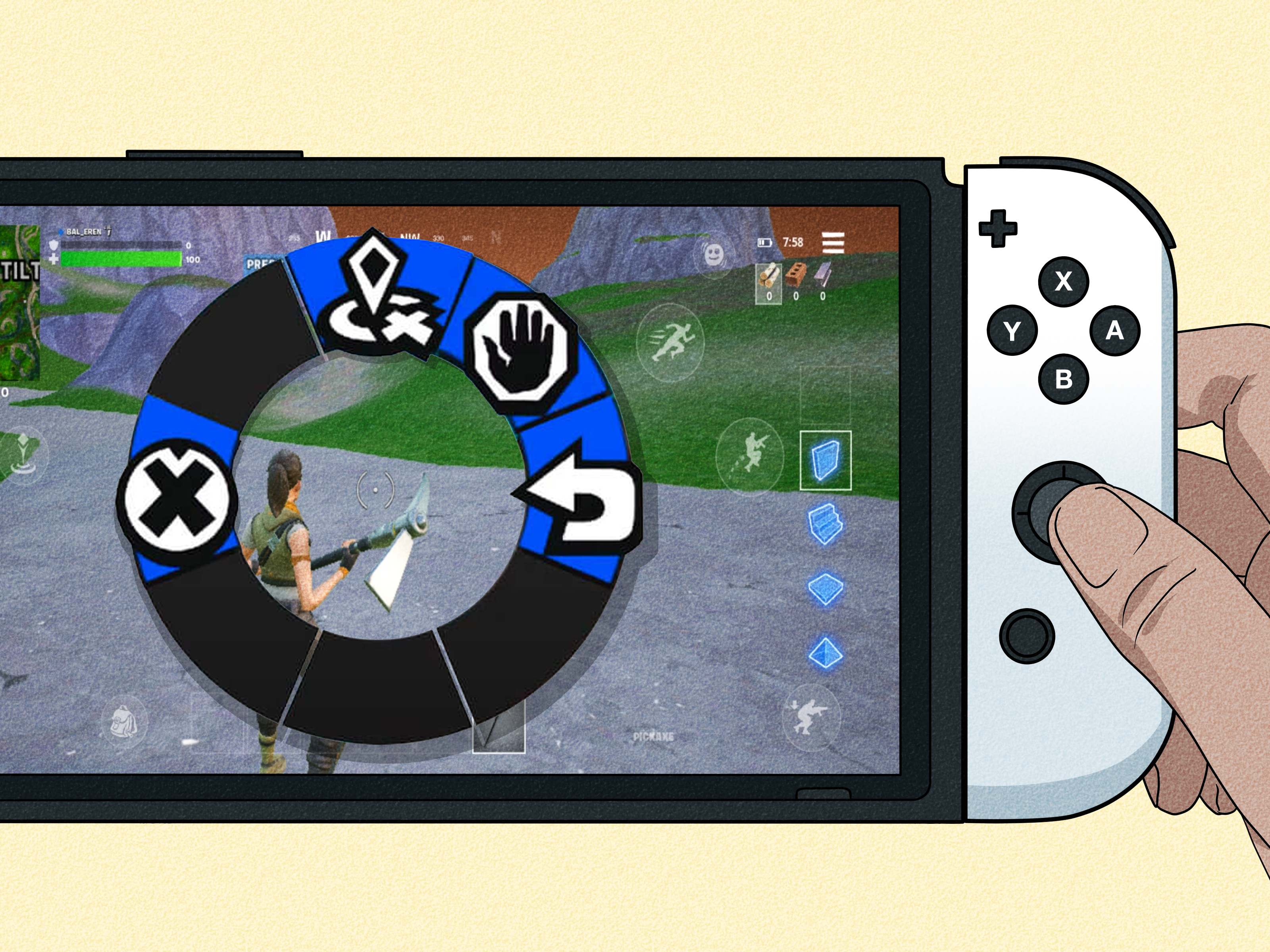
After hiring an NPC, open the follower command wheel. On PC, this is commonly done by pressing and holding the middle mouse button. On PlayStation, Xbox, and other controller setups, it is commonly opened by holding left on the D-pad. The exact input may vary if you changed your keybinds, so check your Fortnite control settings if the command wheel does not appear.
This menu is sometimes confused with the normal squad communication wheel. That is understandable because Fortnite loves wheels: emote wheel, ping wheel, communication wheel, command wheel. At this point, your controller is basically hosting a game show. The difference is that the follower command wheel appears when you have a hired NPC available to command.
If you press the command input before hiring an NPC, you may only see regular squad communication options. If that happens, do not panic. Hire a valid NPC first, then try again. If the NPC is hired but the menu still does not show, double-check that the character is alive, close enough, and actually assigned to you as a follower.
Step 3: Choose a Command for Your Hired NPC
Once the follower command wheel appears, select the command you want. Fortnite command options can vary depending on the mode and update, but common commands include asking the NPC to follow, move, wait, or dismiss. Some versions and situations may include additional options, such as revive-related behavior when available.
For a basic quest, choose any available command. For real gameplay, choose based on what is happening around you. If you are rotating to zone, use follow. If you want your NPC to hold a position, use wait. If you want them to go to a specific area, use move. If they are giving away your location, stealing your dramatic moment, or simply making too much chaos, dismiss them.
After selecting the command, the NPC should respond. They may move toward the pinged location, stay in place, return to following you, or leave your squad depending on your choice. Like all AI companions, they are helpful but not perfect. Give them simple, practical instructions and do not expect them to play like a Fortnite Champion Series finalist with a headset and three energy drinks.
Best Commands to Use and When to Use Them
Use “Follow” When Rotating
The follow command is best when you are moving across the map, escaping the storm, pushing toward the next circle, or leaving a dangerous area. Your NPC will try to stay near you and act like a backup teammate. This is the safest default command because it keeps your hired character close enough to help in fights.
However, follow can also be risky. NPCs are not exactly stealth ninjas. They may shoot, run loudly, break cover, or reveal your position. If you are hiding in a bush with two health and a dream, a follower NPC can accidentally turn your quiet recovery session into a public announcement.
Use “Move” to Create Pressure
The move command is useful when you want your NPC to go to a specific spot. This can help you create a distraction, pressure enemies from another angle, or send the NPC ahead before you push. It is especially helpful when enemies are boxed up, hiding behind cover, or watching your position too closely.
For example, if an opponent is holding a rooftop, you can send your NPC toward one side while you rotate to the other. The NPC may draw attention, giving you a small window to heal, reload, or reposition. It is not guaranteed to work every time, but when it does, it feels like you just invented chess with shotguns.
Use “Wait” to Hold a Position
The wait command tells your NPC to stay where they are. This is useful when you want to keep them out of danger, hold an entrance, or avoid having them follow you into a sneaky flank. It is also helpful when you are looting a quiet area and do not want your hired character wandering into trouble.
Wait can be strong in buildings, bunkers, or high-ground positions. Put the NPC somewhere that gives them cover and a line of sight. Do not leave them standing in the open like a decorative lawn statue with a rifle. They can be eliminated, and once they are gone, your extra support disappears.
Use “Dismiss” When the NPC Becomes a Problem
Dismiss is the emotional support command for players who regret their decisions. Sometimes an NPC helps. Sometimes an NPC fires at enemies you were trying to avoid, blocks your movement, or makes stealth impossible. When that happens, dismissing the character can be the smartest choice.
This is especially true near the final circles. Late-game Fortnite can be chaotic, and every sound matters. If your hired NPC is attracting attention or interfering with your positioning, it may be better to let them go. A quiet solo player can be more dangerous than a noisy duo where one teammate is controlled by questionable robot logic.
Common Problems When Giving NPC Commands
The Command Wheel Does Not Appear
If the command wheel does not appear, make sure you actually hired the NPC. Talking to an NPC is not the same as hiring them. You must select the hire option and complete the transaction. Also check that the NPC is still alive. If they were eliminated in a fight, you cannot command them anymore.
Another common issue is using the wrong input. On PC, try holding the middle mouse button. On controller, try holding left on the D-pad. If you changed your controls, open your settings and review your communication or command bindings.
The NPC Ignores the Command
NPCs may not always respond perfectly. They can get blocked by terrain, distracted by enemies, delayed by combat, or confused by complicated movement paths. If a command fails, try issuing it again from a clearer position. Simple commands in open areas usually work better than commands through buildings, cliffs, or chaotic fights.
You Cannot Find a Hirable NPC
If you cannot find a hirable NPC, remember that the Fortnite map changes regularly. NPC locations, services, and hire options are season-dependent. Search current in-game information, check the character collection if available, or visit popular named locations where NPCs often appear. Also keep enough Gold Bars ready, because hiring usually costs currency.
Tips for Using NPC Commands Like a Smarter Player
Do Not Treat NPCs Like Real Teammates
A hired NPC can help, but they are not a substitute for smart gameplay. They may shoot at bad times, stand in awkward places, or lose track of enemies. Use them as support, not as your entire strategy. The goal is to make them useful without relying on them to carry the match.
Use NPCs to Create Distractions
One of the best ways to use a hired NPC is as a distraction. Send them toward an enemy position while you take a safer angle. Even if the NPC does not get eliminations, they may force your opponent to look away, reload, build, or move. In Fortnite, one second of distraction can be the difference between winning a fight and becoming someone else’s highlight clip.
Keep Your NPC Near Cover
NPCs survive longer when they are not standing in the open. If you use the move or wait command, place them near walls, rocks, trees, buildings, or other cover. This helps them stay alive and continue supporting you. A living NPC is useful. A defeated NPC is just a memory with poor pathfinding.
Use Commands Before the Fight Gets Too Messy
The best time to command an NPC is before everything turns into explosions, sprinting, panic-building, and suspiciously accurate enemy shots. Give the order early. Move them into position before pushing. Tell them to wait before sneaking. Use follow before rotating. Good command timing makes NPCs feel less random.
Are Fortnite NPC Commands Available in Every Mode?
No, NPC commands are not guaranteed in every Fortnite experience. Battle Royale, Zero Build, Creative, UEFN islands, and limited-time modes can all handle NPCs differently. Some modes may not include hirable characters at all. Some Creative experiences may use custom NPC systems with their own rules. Others may include guards or characters that behave differently from standard Battle Royale followers.
In creator-made Fortnite experiences, NPC behavior depends on how the island creator configured the character or guard devices. Some NPCs may be decorative, some may fight, and some may be set up to accept commands if the creator enables that feature. This is why NPC behavior can feel different from one Fortnite mode to another.
Quick Example: Using a Hired NPC in a Real Match
Imagine you land near a location with a hirable NPC. You collect loot, gather Gold Bars, and hire the character. Now you are moving toward the next storm circle, but another player starts shooting from a hill. Instead of running directly at them, you open the follower command wheel and use the move command to send your NPC toward cover on the left side.
The enemy sees movement and turns their attention toward the NPC. While they are distracted, you rotate right, reload, heal, or take a better angle. Even if the NPC does not win the fight, they create pressure. That pressure gives you choices, and choices win Fortnite matches.
Now imagine the opposite situation. You are in the final circle with only a few players left. You are hiding behind cover, waiting for two opponents to fight each other. Your NPC starts moving around and making noise. This is when dismissing or positioning the NPC away from you can be smarter than keeping them glued to your hip. Fortnite is not only about firepower. Sometimes the best command is “please stop ruining my sneaky masterpiece.”
Extra Experience: What It Feels Like to Command NPCs in Fortnite
Using NPC commands in Fortnite feels simple at first, but the more you play with hired characters, the more you realize they are best used with a plan. The first time many players hire an NPC, they expect a flawless assistant. Then the NPC sprints into gunfire, shoots at someone halfway across the map, or stands in a doorway like a bouncer guarding a very exclusive bathroom. That is when you learn the truth: NPCs are powerful tools, but only when you manage them.
The most useful experience comes from treating your hired NPC like a flexible distraction. In casual matches, it is tempting to let them follow you everywhere. That works fine for early looting and simple fights. But once the match becomes more serious, active commands become much more valuable. Sending an NPC ahead can reveal enemy attention. Telling them to wait can protect your stealth. Moving them to another angle can create pressure without risking your own position.
One helpful habit is to command your NPC before entering a fight, not during the most chaotic part of it. If you wait until your shields are cracked and three players are jumping around your box, opening a command wheel may feel like trying to read a restaurant menu during a tornado. Instead, use commands early. Before pushing a building, send the NPC to one side. Before healing, tell them to hold a doorway. Before rotating through open ground, make sure they are following and not stuck behind a rock questioning their career choices.
Another lesson is that NPCs are surprisingly good at creating emotional damage. Not always to enemies, sometimes to you. They can reveal your position, walk into bad fights, or ignore the exact thing you hoped they would do. Still, that unpredictability can work in your favor. Enemies often react to NPCs because they cannot instantly tell how dangerous the situation is. A moving NPC can look like a player for just long enough to make someone hesitate, reload, aim, or build. That tiny hesitation is useful.
In Zero Build, NPC positioning can feel even more important because cover matters so much. If your hired character is standing in the open, they may disappear quickly. Place them near cover, use them to watch angles, and avoid dragging them into every fight without purpose. In standard Battle Royale, building gives you more options, but NPCs can still interfere if they crowd your space. Keep them useful, not annoying.
The biggest tip from experience is to stay realistic. A hired NPC will not magically turn a bad rotation into a Victory Royale. They will not outplay an elite squad by themselves. But they can buy time, add pressure, distract opponents, and help complete quests. When used well, NPC commands give you another small advantage. Fortnite is a game of small advantages stacked together: better positioning, faster healing, smarter movement, cleaner aim, and yes, occasionally telling a digital bodyguard where to stand.
So the next time you hire an NPC, do not just let them wander behind you like a lost tourist. Open the command wheel. Test follow, move, wait, and dismiss. Learn how they react in different situations. With enough practice, your hired character becomes less of a random chaos machine and more of a helpful tactical tool. Mostly. They are still an NPC, after all. Keep expectations reasonable and your escape route ready.
Conclusion
Giving commands to NPC characters in Fortnite is easy once you know the process: hire a compatible NPC, open the follower command wheel, and choose the order you want them to follow. The system is useful for quests, combat support, rotations, distractions, and late-game positioning. While NPCs are not perfect teammates, smart command use can make them much more effective.
The key is timing. Use commands before fights become messy, position your NPC near cover, and dismiss them when they create more problems than solutions. Fortnite changes often, so NPC locations and options may vary by season, but the core idea remains the same: a hired character is more useful when you actually tell them what to do.
Note: Fortnite updates frequently, so NPC locations, hire costs, available commands, and character behavior may change between seasons. Always check the current in-game interface for the most accurate controls and options.