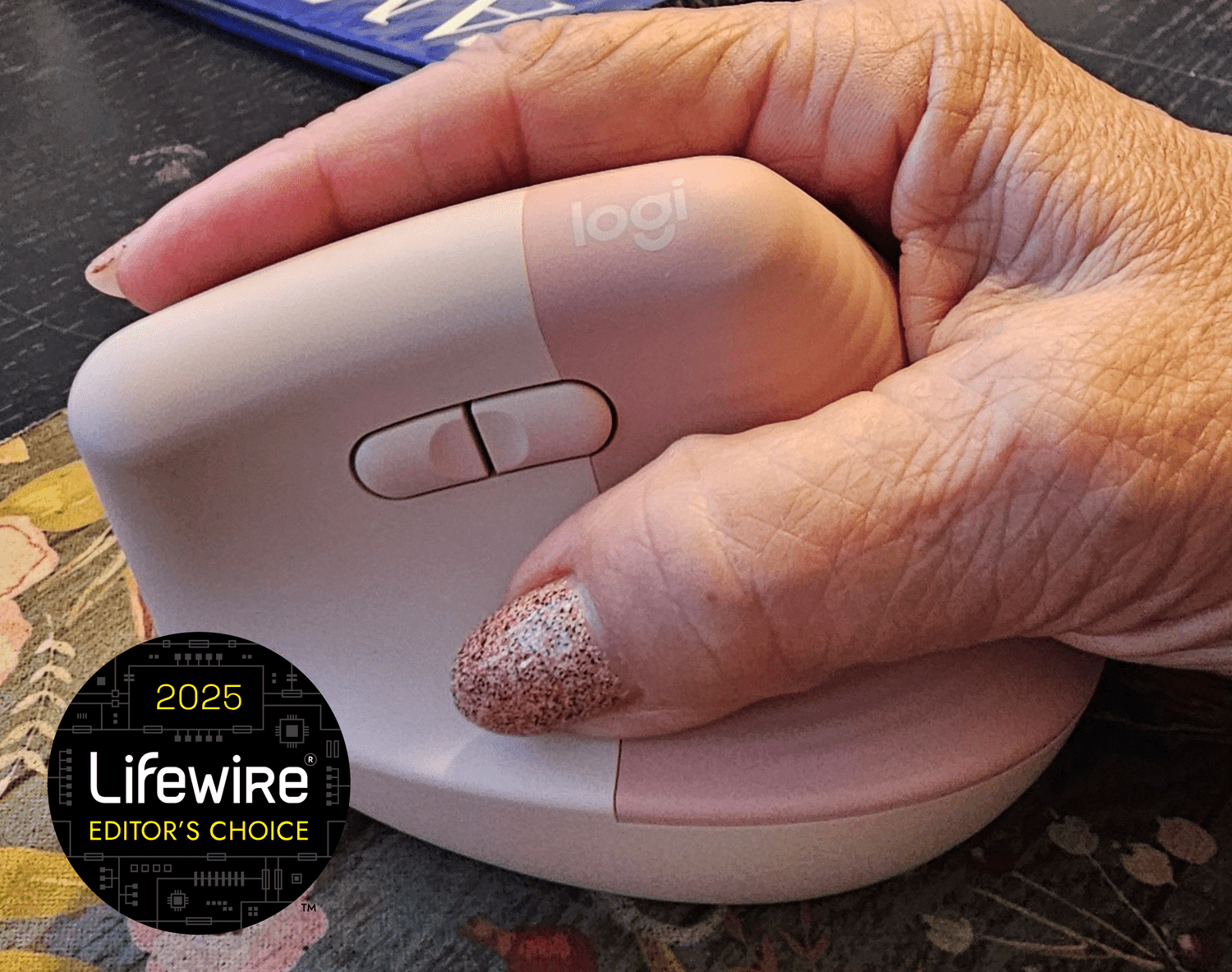
I didn’t set out to become a “mouse person.” I just wanted to click things without my wrist filing a formal complaint.
You know the feeling: that low-grade ache that shows up around lunch, the cranky forearm that tightens during spreadsheets,
the little zing in your wrist that whispers, “So… we’re doing this again tomorrow?”
For a while, I did what most people do: I blamed my chair, my desk, my stress, my horoscope. I tried stretching. I tried
“sitting up straight” (for an inspiring seven minutes). I tried ignoring it (0/10, do not recommend). Then I switched to a
vertical mouseone of those odd-looking “handshake” mice that seems like it belongs in a sci-fi movieand something
surprising happened: the daily discomfort eased up enough that I stopped thinking about my wrist every five minutes.
This isn’t a miracle-cure fairy tale, and it’s definitely not medical advice. But if you spend hours at a computer and you’ve
started collecting aches like they’re limited-edition trading cards, a vertical ergonomic mouse could be a genuinely helpful
part of the fixespecially when you pair it with smarter workstation habits.
What a Vertical Mouse Actually Does (and Why It Looks So Weird)
A traditional mouse encourages your forearm to rotate so your palm faces down. That rotation is called pronation.
A vertical mouse changes the grip angle so your hand sits closer to a “handshake” position, which keeps your
forearm in a more neutral pronation/supination posture. Translation: your arm isn’t twisted as much just to move a cursor.
The goal is simple: more neutral alignmentless awkward twisting at the forearm, less side-bending at the wrist,
and less of that “why does my hand feel like it worked a double shift?” vibe at the end of the day.
Why a Regular Mouse Can Start a Pain Parade
Wrist and forearm discomfort from computer work usually isn’t one single villain. It’s a small gang of troublemakers working together:
repetitive movement, static tension (holding your hand in one position), awkward angles, and sometimes pressure on soft tissues.
Add long sessions without breaks andcongratsyou’ve built a theme park for irritation.
The most common “desk pain” culprits
- Non-neutral wrist posture (bent up/down or angled side-to-side)
- High repetition (click-drag-scroll, repeat until retirement)
- Grip force (death-gripping your mouse like it owes you money)
- Awkward reach (mouse too far away, shoulder creeping up)
- Long sessions without movement (your body is not a statue)
Ergonomics guidance from workplace and medical sources tends to hammer the same point: aim for neutral positions.
Neutral means joints aligned naturallywrists straight, shoulders relaxed, elbows comfortably open (not pinned or winging out),
and your mouse close enough that you’re not reaching like you’re trying to pet a cat across the room.
So… Does a Vertical Mouse Really Help?
The honest answer: it can help a lot for some people, and only a little for others. The strongest, most consistent finding in
research is that vertical or angled mouse designs can reduce forearm pronation compared with traditional flat mice.
That’s a big deal if pronation and wrist deviation are part of what’s irritating you.
But “better posture” doesn’t automatically mean “zero pain forever.” Studies and reviews often show mixed results on
symptom reduction, because discomfort is influenced by the whole system: workstation setup, total computer time, breaks,
stress, sleep, underlying conditions, and how you actually use the mouse (speed, grip, reach, and posture).
What I took away from the evidence (in normal human language)
- Vertical mice typically reduce forearm twist. That can feel immediately “less cranky” for some wrists and forearms.
- Performance can be comparable after you adjust, but the steepest-angled “fully vertical” models may feel awkward for precision work at first.
- Not every study shows a symptom slam-dunk. Some people need additional changes (mouse placement, chair height, breaks, strength/mobility work).
My Switch: What Changed (and What Didn’t)
When I first grabbed a vertical mouse, my hand felt like it had been reassigned to a different department without training.
The grip was comfortable, but my brain kept trying to “flatten” my hand the way it always had. For the first couple days,
I moved slower, clicked clumsier, and briefly wondered if I’d forgotten how to be employed.
Then the learning curve softened. The biggest difference wasn’t magical pain erasureit was that the usual end-of-day ache
didn’t ramp up as quickly. The tension in my forearm eased. And I stopped unconsciously bending my wrist outward during long stretches.
What didn’t change until I fixed it: my mouse was still too far away, and my shoulders were still inching toward my ears during deadlines.
The vertical mouse helped, but it couldn’t outvote a bad setup. Once I pulled the mouse closer and adjusted pointer speed
so I could use a lighter touch, the whole experience improved.
How to Choose a Vertical Mouse Without Overthinking Yourself Into a Nap
1) Pick the right size (this matters more than people admit)
If the mouse is too small, your hand claws. Too big, your fingers stretch and your grip gets weird. Many brands offer standard and “large” sizes,
and it’s worth matching your hand size if possible. Comfort beats fancy features every time.
2) Consider the angle: “semi-vertical” vs. “fully vertical”
Some mice are only partially angled (often easier to learn), while others are steeply vertical. If you do detailed design work,
gaming, or precision editing, a moderate angle can be a smoother transition. If pronation is your main issue, steeper angles may feel better.
There’s no universal winnerthere’s only “what your arm likes.”
3) Buttons and scroll wheel: keep it boring at first
Extra buttons are greatuntil you accidentally summon the “Back” command 40 times in a row. If you’re trying to reduce discomfort,
prioritize a smooth scroll wheel and reliable left/right click. You can get fancy later.
4) Wireless vs. wired: ergonomics doesn’t care, but your desk might
Wireless can reduce cable drag and make placement easier. Wired means no charging. Neither option automatically makes your wrist happier.
5) Adjust pointer speed so you can use a lighter touch
A pointer device should let you cover the screen while keeping your wrist straight and your grip relaxed. If you’re constantly “flicking” the mouse
across the desk, bump up sensitivity and reduce how far you have to travel.
Set Up Matters: The Vertical Mouse Isn’t a Solo Act
If you want the most benefit, treat your vertical mouse like part of a small ergonomic orchestra. When everything plays together,
your body stops sounding like a creaky door in a horror movie.
Quick workstation wins
- Keep the mouse close. Your upper arm should rest comfortably by your side, shoulder relaxed.
- Neutral wrist. Aim for “straight line” from forearm through handnot bent up, down, or sideways.
- Elbow comfort. A slightly open elbow angle is often more comfortable than a tight 90° lock.
- Don’t park your wrist on a hard edge. If you use a rest, rest your palm/heel of handnot the wrist itself.
- Micro-breaks. Tiny breaks beat heroic “I’ll stretch at midnight” promises.
Mini habit that surprised me: loosen the grip
A lot of us mouse-grip like we’re steering through a hurricane. Try this: every time you hit “send” on an email,
release your grip completely for one breath. It sounds silly. It also works.
Stretches and Movement: Simple, Not Dramatic
You don’t need an elaborate routine that requires a yoga mat, incense, and a soundtrack called “Forest Whispers.”
You need small, consistent movement. Gentle wrist and forearm stretches can help some people feel looserespecially if you’re
stuck in one position for hours.
Easy options that don’t disrupt your day
- 20–30 second forearm stretch a couple times a day (gentle, never sharp pain)
- Shoulder rolls to undo “keyboard shoulders”
- Stand up for a quick reset every so often
If you’re experiencing numbness, tingling, weakness, symptoms that wake you at night, or pain that keeps escalating,
don’t self-diagnose your way into a corner. That’s your cue to talk to a qualified healthcare professional.
Who Benefits Most From a Vertical Mouse?
In my experience (and consistent with ergonomic logic), a vertical mouse tends to be most helpful when your discomfort is tied to
forearm rotation, wrist deviation, and long mouse-heavy daysthink analysts, editors, designers, students, and anyone
who lives inside tabs for a living.
It may be especially worth trying if you:
- Feel forearm tightness after long mouse sessions
- Notice wrist strain when your palm is flat-down on a traditional mouse
- Use a laptop a lot (and your mouse space is awkward)
- Want a low-effort change before you overhaul your entire workspace
What I’d Tell a Friend Before They Buy One
If your wrist hurts, a vertical mouse is a reasonable experimentnot because it’s trendy, but because it changes your arm position
in a way that can reduce strain. Give yourself a week or two to adapt. Keep the mouse close. Adjust pointer speed. Relax your grip.
And if the pain doesn’t improve, treat that as useful information: the mouse might not be the main issue, and your next step is
checking the rest of your setup (or getting professional guidance).
Conclusion: Goodbye Pain, Hello… Fewer Daily Complaints
Switching to a vertical mouse didn’t turn my desk into a spa. But it did help calm the daily irritation loopespecially once I paired
it with basic ergonomics: neutral wrist posture, comfortable reach, lighter grip, and regular movement.
If you’re curious, a vertical ergonomic mouse is one of the simplest workstation upgrades you can try. Worst case: you return it.
Best case: you stop thinking about your wrist all dayand that’s a quality-of-life upgrade you can feel.
Extended Personal Experience: 500 More Words of “So This Is What Happened”
I promised myself I’d be scientific about the switch. You knowtake notes, track symptoms, behave like a responsible adult.
Instead, I mostly documented my experience with a mix of curiosity and dramatic sighing. Still, here’s the honest play-by-play.
Days 1–2: “Why is my hand standing up?”
The first day felt like writing with my non-dominant handtechnically possible, emotionally suspicious. The handshake grip was comfortable,
but my muscle memory kept trying to flatten my palm, like my brain refused to believe this new posture was allowed.
Precision tasks (photo cropping, spreadsheet drag-and-drop) were slower. I also discovered a new talent: accidentally hitting the side buttons
and going “Back” in my browser at the exact moment I was trying to look competent on a call.
Days 3–5: The awkward phase ends, the tiny wins start
Somewhere around day three, my cursor started doing what I asked instead of what it thought I meant. I adjusted pointer speed so I didn’t have to
travel across the desk like I was training for a tiny mouse marathon. That one change made everything smootherand it nudged me to use a lighter touch.
The first “win” I noticed wasn’t a dramatic pain drop; it was that the familiar forearm tightness didn’t spike mid-afternoon.
My wrist also stopped doing that subtle outward bend during long scroll sessions.
Week 2: I forgot to think about my wrist (which is the goal)
By the second week, the vertical mouse felt normal. Not “cool” normaljust “this is my hand now” normal.
The biggest improvement was how predictable my comfort became. Before, I’d have random flare-ups that made me shift positions constantly.
Now, discomfort showed up less often and usually had an obvious cause: I was slumping, reaching too far, or rushing through work with my shoulders up.
In other words, the vertical mouse didn’t fix everything, but it made it easier to notice and correct the habits that were actually provoking the problem.
The funniest part: the mouse became my posture tattletale
With a traditional mouse, I could “get away” with bad angles for a while. With the vertical mouse, if my setup was off, I felt it immediately.
That turned out to be useful. I pulled the mouse closer, stopped resting my wrist on the desk edge, and started doing tiny reset breaks.
Over time, the combo mattered more than any single product.
Would I recommend a vertical mouse to everyone? No. But if your days are mouse-heavy and your wrist or forearm is protesting, it’s a practical,
low-drama experiment. Just give yourself time to adaptand treat it like part of a bigger ergonomics plan, not a magical gadget.