The Timex Ironman is one of those watches that looks simple until you press the wrong button twice and suddenly feel like you have launched a NASA countdown. Don’t worry. You have not broken it. You have only entered the mysterious kingdom of digital watch settings, where “MODE,” “SET/RECALL,” “START/SPLIT,” and “STOP/RESET” rule the land.
This guide explains 3 ways to set a Timex Ironman: setting the time and date, setting alarms and chimes, and setting timers or workout features. The exact button labels may vary slightly depending on whether you own an Ironman Classic 30, Classic 100, Triathlon, FLIX, Endure, or another model, but the logic is usually similar. Press MODE to move through features, use SET or SET/RECALL to enter settings, adjust numbers with START/SPLIT and STOP/RESET, then save with DONE, SET, or the button shown on the screen.
Think of your Timex Ironman as a tiny coach on your wrist. It can track laps, remember splits, beep at the top of the hour, wake you up, time your pasta, help with intervals, and light up dramatically with INDIGLO when you check the time in a movie theater like a responsible adult. Let’s set it correctly.
Before You Start: Know the Timex Ironman Buttons
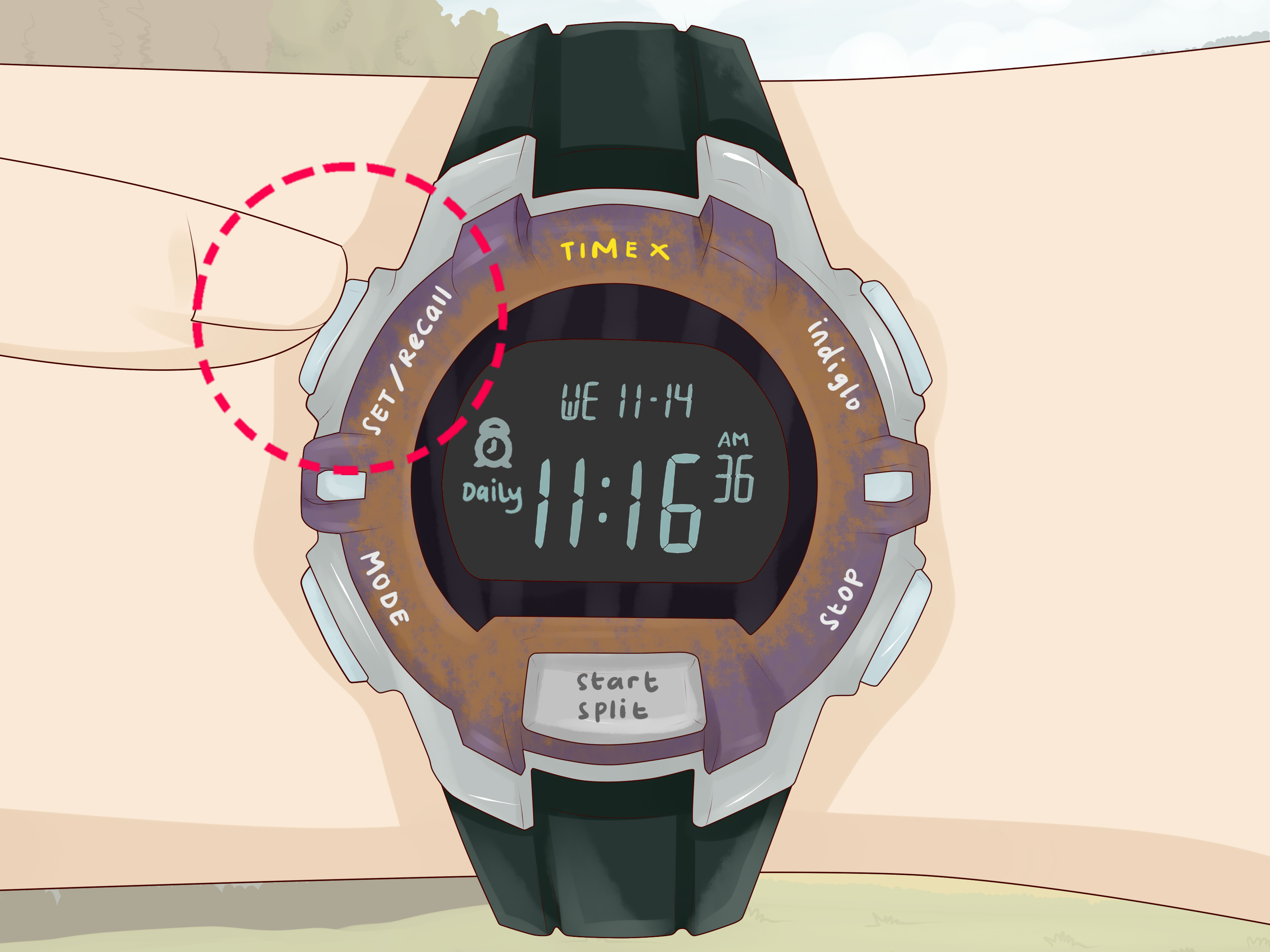
Most Timex Ironman watches use a five-button layout. The names may be printed on the case or shown on the display while you are editing settings. If your model uses slightly different wording, follow the function, not just the label.
Common Timex Ironman Button Functions
- MODE: Moves through major modes such as Time, Chrono, Timer, Alarm, Occasion, or Interval Timer.
- SET, SET/RECALL, or SET/RESET: Opens the setting screen or saves changes.
- START/SPLIT: Usually increases a value, starts the stopwatch, starts the timer, or records a lap/split.
- STOP/RESET: Usually decreases a value, stops a timer, resets a stopwatch, or moves backward through options.
- INDIGLO: Turns on the backlight. On some models, holding it activates a night mode feature.
A helpful rule: when something is flashing, that is the thing you can change. Hours flashing? Change the hour. Minutes flashing? Change the minutes. Time zone flashing? Change the time zone. If nothing is flashing, you are probably not in setting mode yet.
Way 1: Set the Time, Date, and Display Options
This is the setting most people need first. Maybe your watch came out of the box showing a time zone from another planet. Maybe the battery was replaced. Maybe daylight saving time happened and now your watch is judging you from the past. Whatever the reason, setting the time and date is the foundation for everything else.
Step-by-Step: Set the Time on a Timex Ironman
- Press MODE until the normal time and date screen appears.
- Press and hold SET/RECALL, SET, or the setting button on your model until a number or setting begins to flash.
- If the watch shows Time Zone 1, 2, or 3, choose the time zone you want to edit. Use START/SPLIT or STOP/RESET to change it.
- Press NEXT, MODE, or the button indicated on-screen to move to the hour.
- Use START/SPLIT or STOP/RESET to set the correct hour. Watch carefully for AM or PM if using 12-hour format.
- Move to minutes, then adjust them.
- Move to seconds. Many models let you reset seconds to zero, which is useful if you are matching your watch to a phone or atomic clock.
- Continue through month, day, year, 12/24-hour format, and date format.
- Press DONE, SET, or SET/RECALL to save and exit.
For example, if your Timex Ironman says 7:42 PM but it should say 6:42 PM, enter the time setting mode, move to the hour field, and reduce the hour by one. If the watch suddenly shows 6:42 AM, keep scrolling through the hour until the PM indicator appears. This is the most common “my alarm went off at breakfast instead of dinner” mistake.
Set the Date Correctly
The date matters because some Ironman models use it for occasion reminders, dated workout records, weekly alarms, and calendar-based features. After setting the hour, minute, and seconds, keep pressing NEXT until you reach month, day, and year. Adjust each field carefully. If your model offers date format choices, choose the format that feels natural: MM-DD for standard American formatting, or DD.MM if you prefer day-first display.
Choose 12-Hour or 24-Hour Time
Many Timex Ironman watches allow both 12-hour and 24-hour time. If you are a runner, nurse, traveler, military member, or someone who simply enjoys never asking “wait, morning or evening?” 24-hour time is useful. If you prefer standard everyday American display, choose 12-hour mode and pay attention to the AM/PM marker.
Turn Button Beep and Hourly Chime On or Off
During the time-setting sequence, some models let you toggle the hourly chime and button beep. The hourly chime beeps at the top of each hour. The button beep makes a sound when you press buttons. These are helpful during workouts but less charming during a quiet meeting. If your watch is beeping like it has tiny opinions, check these settings.
Way 2: Set the Alarm, Chime, and Daily Reminders
The Timex Ironman is not just a stopwatch with a strap. Many models include multiple alarms, often three or more depending on the version. You can use them for waking up, medication reminders, training sessions, school schedules, work breaks, or remembering that your laundry has been sitting in the washer long enough to develop a personality.
Step-by-Step: Set an Alarm on a Timex Ironman
- Press MODE repeatedly until you reach ALARM, ALM 1, ALM 2, or ALM 3.
- If your watch has multiple alarms, use START/SPLIT or STOP/RESET to choose the alarm you want to set.
- Press and hold SET/RECALL, SET, or the button shown for setting.
- When the hour flashes, use START/SPLIT or STOP/RESET to adjust it.
- Press NEXT to move to minutes, then adjust the minutes.
- If your watch uses 12-hour time, confirm AM or PM.
- Select the alarm frequency if available: daily, weekdays, weekends, weekly, or one-time.
- Turn the alarm ON.
- Press DONE or SET to save.
Here is a practical example. Suppose you want an alarm for weekday morning runs at 6:15 AM. Go to Alarm mode, select ALM 1, set the hour to 6 AM, set minutes to 15, choose weekdays if your model offers it, and save. Now your watch becomes your tiny wrist-sized accountability partner. It will not run the miles for you, sadly, but it will beep with confidence.
How to Turn an Alarm Off
If an alarm is active, many Timex Ironman watches show a small alarm icon on the time screen. To disable it, go back to Alarm mode, choose the active alarm, enter the setting or alarm toggle screen, and switch it to OFF. On some models, pressing START/SPLIT or STOP/RESET while viewing the alarm toggles it on or off.
What Happens When the Alarm Sounds?
When the alarm goes off, the watch usually beeps and may flash the INDIGLO light. Press any button to silence it. Some models include a backup alarm that repeats after a few minutes if you ignore the first alert. Translation: the watch knows you heard it.
Set Occasion Reminders
Some Timex Ironman models include an Occasion mode for birthdays, anniversaries, holidays, appointments, or bill reminders. Press MODE until you reach OCCASN or Occasion mode, select a date, then assign a reminder type. This feature is especially useful if you want a low-tech reminder system that does not require apps, Wi-Fi, or a phone battery with 3% left.
Way 3: Set the Timer, Chronograph, and Workout Features
The Ironman name exists for a reason. These watches are built for workouts, laps, splits, countdowns, intervals, and timing real-life events that require more precision than “about five minutes.” The three most important performance modes are Chrono, Timer, and, on some models, Interval Timer.
Set the Countdown Timer
The countdown timer is perfect for run/walk sessions, stretching, cooking, study sprints, rest breaks, and gym circuits. Unlike the chronograph, which counts up, the timer counts down from a specific time.
- Press MODE until TIMER appears.
- Press SET/RECALL or SET.
- When hours flash, use START/SPLIT or STOP/RESET to adjust them.
- Press NEXT to move to minutes, then seconds.
- Choose what happens at the end if your model offers options: STOP, REPEAT, or sometimes start the chronograph.
- Press DONE to save.
- Press START/SPLIT to begin the countdown.
- Press STOP/RESET to pause, and hold it to reset if needed.
If you set a 10-minute countdown for a warm-up and choose repeat, the watch will restart the countdown after it reaches zero. That is useful for interval routines but dangerous for cookies. Nobody needs endlessly repeating cookie time unless you are emotionally prepared for crumbs everywhere.
Use the Chronograph for Laps and Splits
Chronograph mode is the stopwatch. Press MODE until CHRONO appears. Press START/SPLIT to begin timing. Press START/SPLIT again while it is running to record a lap or split. Press STOP/RESET to stop. To clear the session, press and hold STOP/RESET after stopping.
A lap measures one segment of activity. A split measures total elapsed time at a checkpoint. For example, if you run four laps around a track, each lap time tells you how fast you completed that specific lap, while the split time tells you your total time so far. This is why the Timex Ironman has remained popular with runners: it gives useful data without demanding a software update before your workout.
Set Interval Timers on Supported Models
Some Ironman watches, especially higher-lap or training-focused models, include interval timers. These let you alternate between different blocks, such as 3 minutes easy and 1 minute hard. To set intervals, enter INT TIMER or INTERVAL TIMER mode, press SET, then adjust each interval’s hours, minutes, seconds, and repeat count. Save with DONE.
For a beginner run/walk workout, you might set Interval 1 to 2 minutes running and Interval 2 to 1 minute walking, then repeat the sequence 10 times. The watch will beep when it is time to switch. This is wonderfully helpful because checking a phone while jogging is how many people discover that sidewalks are not always where they left them.
Troubleshooting Common Timex Ironman Setting Problems
The Buttons Do Not Match This Guide
Different Timex Ironman models use slightly different labels. One model may say SET/RECALL, another may say SET, and another may show the button function on the screen only after you enter a mode. If the label differs, follow the same pattern: enter the correct mode, hold the setting button, change flashing values, move through fields, then save.
The Watch Keeps Beeping
Check three things: active alarms, hourly chime, and button beep. Go through Alarm mode and turn off alarms you do not use. Then enter time settings and look for options such as CHIME or BEEP. Turn them off if you want a quieter watch.
The Alarm Goes Off at the Wrong Time
This usually happens because AM and PM were reversed, or because the wrong time zone is active. Recheck the main time display first. Then enter Alarm mode and confirm the alarm hour, AM/PM marker, and frequency. If you travel often, make sure you are viewing the correct time zone.
The Timer or Chronograph Keeps Running After You Leave the Mode
That is normal on many Timex Ironman watches. The timer or stopwatch can continue running in the background while you return to the time screen. Look for a small icon, such as an hourglass or stopwatch symbol, which indicates an active timer or chronograph.
The Display Looks Faded or Settings Reset
A weak battery may cause faded digits, poor backlight performance, or reset behavior. Timex Ironman watches often use button-cell batteries, and many manuals recommend having battery replacement done professionally to protect seals and water resistance. If your watch is exposed to salt water, rinse it with fresh water afterward and dry it gently.
Best Practices for Setting a Timex Ironman
First, take the watch off your wrist before setting it. It is easier to press buttons accurately on a table, and you will avoid awkward wrist gymnastics. Second, use a phone or reliable digital clock as your reference time. Third, move slowly through each flashing field. The most common mistake is pressing MODE too many times and skipping the setting you meant to change.
Fourth, test the alarm or timer after setting it. Set a one-minute test alarm or countdown before relying on it for an important appointment. Fifth, write down your preferred settings if you use the watch for training. For example: ALM 1 for weekday wake-up, ALM 2 for medication, Timer for 10-minute warm-up, Interval Timer for run/walk workouts. A little setup discipline now saves a lot of button-mashing later.
Real-World Experience: What It Feels Like to Set and Use a Timex Ironman
The first experience many people have with a Timex Ironman is mildly humbling. You buy the watch because it looks tough, simple, and practical. Then you try to set the time and realize the watch has more modes than your microwave. The good news is that the learning curve is short. Once you understand the basic rhythmMODE, SET, adjust, NEXT, DONEthe whole system starts to make sense.
In daily use, the Ironman feels refreshingly focused. It does not ask you to pair Bluetooth, accept permissions, install an update, or create an account. You press a button, and it does the job. That simplicity becomes valuable during workouts. When you are running, swimming, coaching, hiking, or doing intervals, physical buttons are easier than a touchscreen. You can start a timer without staring at the watch like you are solving a legal contract.
One of the best habits is setting the countdown timer for ordinary life, not just sports. A 20-minute timer helps with focused work sessions. A 5-minute timer keeps tea from becoming bitter sadness in a mug. A 30-minute timer reminds you to move around if you have been sitting too long. The Timex Ironman is marketed as a sports watch, but it is secretly a productivity tool with a sweatband.
The alarms are equally useful when you treat them as small routines. One alarm can be for waking up, another for leaving the house, and another for evening shutdown. Because the watch is on your wrist, the reminder is harder to miss than a phone notification buried under messages, app alerts, and that one shopping app that thinks socks are breaking news.
For workouts, the chronograph is where the Ironman earns its reputation. Recording laps with START/SPLIT is fast and tactile. You can feel the button click, which matters when your lungs are busy filing a complaint. The lap memory on models like Classic 30 or Classic 100 lets you review performance without needing a phone. That makes the watch especially good for runners who want data but not distraction.
There is also something satisfying about the INDIGLO light. Press it in the dark and the whole display glows with that classic Timex personality. It is practical, yes, but also nostalgic. It reminds you that not every useful device needs to be complicated. A Timex Ironman does not try to become your lifestyle ecosystem. It just sits there, durable and dependable, waiting for you to press the right button.
The biggest practical tip from experience is this: do not rush the settings. If you overshoot a number, use the opposite adjustment button if your model supports it, or keep cycling forward. If you get lost, press MODE until you return to the main time screen and start again. You will not hurt the watch by exploring settings. At worst, you will accidentally turn on an hourly chime and wonder why your wrist has become a tiny grandfather clock.
After a few days, setting the Timex Ironman becomes muscle memory. You will know how to fix the time after travel, silence a surprise alarm, set a workout timer, or clear the chronograph after a run. That is the charm of the watch. It rewards a little patience with years of practical use. And unlike many modern gadgets, it does not need to be charged every night. It simply keeps time, tracks effort, and beeps when askedusually.
Conclusion
Learning how to set a Timex Ironman is mostly about understanding its button language. Use MODE to find the feature, hold SET or SET/RECALL to edit it, adjust flashing values with START/SPLIT and STOP/RESET, and save with DONE. With those basics, you can set the time, date, alarms, chimes, countdown timer, chronograph, and workout intervals on most Timex Ironman models.
The watch may look like a small rectangle of digital mystery at first, but once you learn the pattern, it becomes one of the most dependable tools you can wear. Whether you are training for a race, timing study breaks, managing reminders, or just trying to stop the hourly beep from announcing your existence, the Timex Ironman is simple, durable, and surprisingly clever.