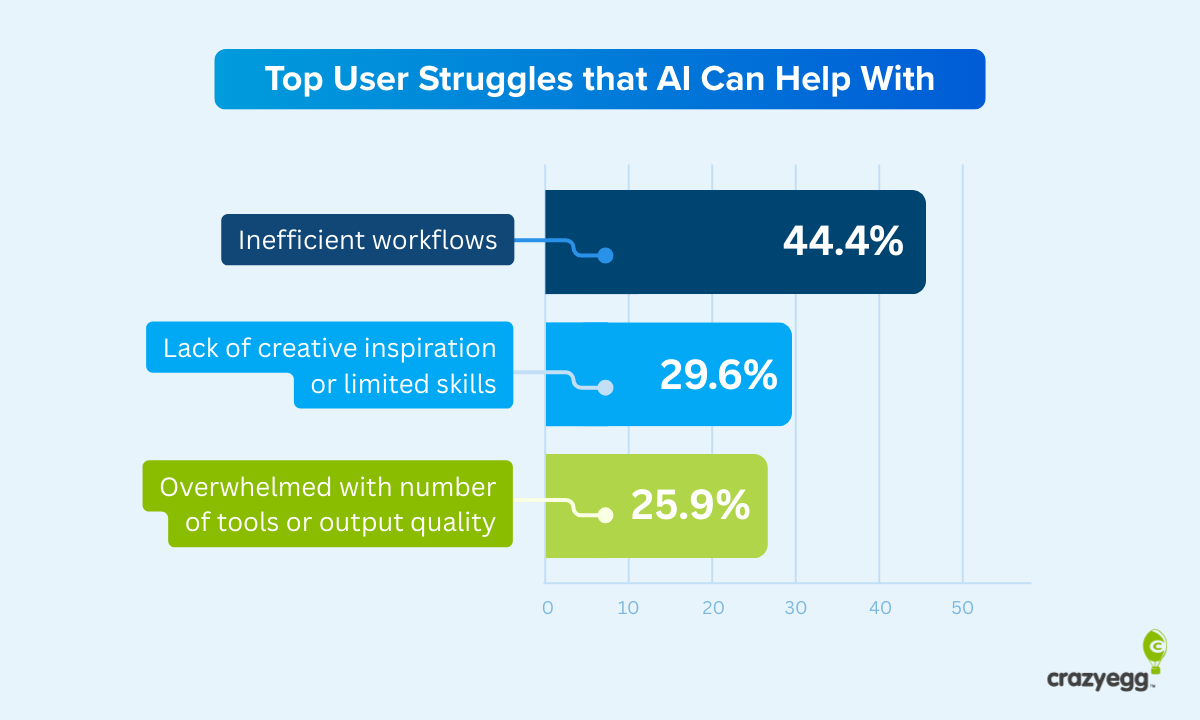
Let’s be honest: many AI products look brilliant in a pitch deck and slightly terrifying in real life. The demo sparkles. The founder says “agentic workflow orchestration” with a straight face. The investor nods. Then an actual user opens the product and thinks, “Am I supposed to type something? Click something? Train it? Fear it? Offer it a snack?”
The headline number97% of users are confused by your AI productis not meant as a universal scientific statistic. It is a deliberately sharp way to describe a very real problem: most AI products ask ordinary people to understand invisible systems, unpredictable outputs, vague prompts, unclear data usage, and mysterious confidence levels. That is a lot to place on someone who just wanted to write a report, summarize a meeting, improve a spreadsheet, or get a decent product recommendation without feeling like they accidentally joined a graduate seminar in machine learning.
The good news? User confusion is not destiny. AI product confusion is usually a design problem, not a user problem. When teams build clear onboarding, useful defaults, transparent explanations, human controls, and feedback loops, users stop treating AI like a magic box and start treating it like a helpful tool. Below is a practical, SEO-friendly, human-friendly guide to changing that.
Why AI Products Confuse Users in the First Place
Traditional software usually follows visible rules. Click “save,” and something saves. Click “delete,” and something disappearshopefully after a warning, because nobody enjoys surprise digital destruction. AI products are different. They often work through probability, pattern recognition, prediction, and generation. That means users do not always know what the system knows, what it guessed, what it made up, or what it needs from them.
1. The Blank Prompt Problem
A blank text box can be liberating for experts and paralyzing for everyone else. When users see “Ask me anything,” many do not feel empowered. They feel abandoned. They wonder what kind of request works, how much detail to provide, whether the AI remembers previous context, and whether a bad prompt means the product is bad or they are bad at using it.
This is why strong AI product design rarely begins with an empty canvas. It begins with guided examples, templates, starter actions, and visible paths. Instead of “What do you want to do?” try “Summarize a document,” “Draft an email,” “Compare three options,” or “Find risks in this contract.” Users should not need prompt-engineering instincts to experience value.
2. AI Feels Powerful but Unclear
Users can sense when AI is capable. They can also sense when it is slippery. If an AI product gives an answer without explaining where it came from, what it considered, or how certain it is, the user is forced to guess. That creates either blind trust or total distrust. Neither is good.
The best AI UX helps users calibrate trust. It tells them what the system can do, where it may be wrong, what data it used, and when a human should review the result. In plain English: do not make users worship the robot, and do not make them wrestle it in the parking lot. Help them understand it.
3. Users Do Not Know Who Is in Control
One of the biggest sources of AI product confusion is control. Is the AI making a recommendation, taking an action, changing a file, sending a message, or merely drafting something for review? If the product does not make that clear, users get nervous fast.
Control should be visible at every important moment. Before the AI acts, show what will happen. After it acts, show what changed. When something goes wrong, offer undo, edit, retry, and feedback options. Users do not need full technical control over the model. They need practical control over their work.
The Real Cost of Confusing AI UX
Confusion is not just a tiny usability flaw. It is a growth leak with a fancy hat. When users do not understand your AI product, they do not explore it, trust it, recommend it, or renew it. They might sign up because the promise sounds exciting, but they quietly disappear after the first awkward session.
Low Activation
Activation happens when a user experiences the first meaningful value of your product. In AI products, that moment often arrives too late. The user must create an account, connect data, read vague onboarding screens, face a blank prompt, and guess what to ask. By then, the average person has already mentally returned to their old workflow.
Weak Trust
Trust is especially fragile in AI because the product can sound confident even when it is wrong. A normal software bug usually looks like a bug. A bad AI output can look polished, fluent, and suspiciously convincing. That makes users cautious, and rightly so.
Poor Retention
If users need to relearn the product every time they open it, retention suffers. AI products must reduce cognitive load over time, not increase it. The product should learn user preferences, keep helpful context, explain changes, and make repeated tasks easier.
How to Make Your AI Product Less Confusing
The cure for confusing AI is not more tooltips, more buzzwords, or a mascot named “BrainyBot.” The cure is intentional product design. Here are the most important changes teams can make.
1. Design the First Session Like a Guided Tour, Not a Maze
Your first session should answer three questions quickly: What can this AI do? What should I try first? How do I know whether the result is useful?
A strong first-run experience might include a short product promise, three example tasks, one sample result, and a clear call to action. For example, an AI writing assistant might say: “Start by pasting a rough paragraph. We’ll help you rewrite it for clarity, tone, or length.” That is much better than dropping users into a blank box and hoping creativity appears on schedule.
2. Replace Generic Prompts with Use-Case Templates
Prompting is a skill. Most users did not ask to learn that skill before breakfast. Templates make AI easier because they convert vague intent into structured input.
Instead of asking users to write, “Analyze my sales notes and find customer objections,” provide a template called “Find Customer Objections.” Ask for the notes, the product name, and the desired output format. Then generate a clean response with sections like “Top Concerns,” “Buying Signals,” “Follow-Up Questions,” and “Recommended Next Steps.”
This approach works because it makes the product feel less like a guessing game and more like a helpful workflow.
3. Show Examples Before Asking for Effort
Users understand AI products faster when they can see examples. Show a realistic input and output. Let users preview what “good” looks like. If your AI summarizes meetings, show a messy transcript turning into decisions, action items, owners, and deadlines. If your AI reviews legal language, show how it flags risk without pretending to replace a lawyer.
Examples reduce fear. They also reduce support tickets, which is the product-management equivalent of finding money in your coat pocket.
4. Explain What the AI Used to Create the Answer
When an AI product produces a result, users often wonder, “Where did this come from?” Answer that question inside the interface. Mention whether the system used uploaded documents, account data, web information, previous chat context, or user-entered instructions.
You do not need to reveal every technical detail. Most users are not asking for a model architecture diagram. They want practical transparency: “This summary is based on the uploaded PDF and your notes from April 12.” That one sentence can make the experience feel dramatically more trustworthy.
5. Use Confidence Cues Carefully
Confidence cues can help users understand uncertainty, but they must be presented clearly. A percentage alone may not help. “82% confidence” sounds scientific, but users may not know what it means. Better: “High confidence: this answer is directly supported by three sections in your uploaded document.” Or: “Low confidence: the source text is incomplete, so please review before using.”
Confidence should guide behavior. If confidence is low, suggest a next step: upload more data, review manually, ask a narrower question, or confirm the result with a human expert.
6. Make Errors Recoverable
AI will be wrong sometimes. The question is whether your product handles mistakes gracefully or pretends mistakes are impossible while quietly wearing a fake mustache.
Good AI UX includes easy recovery paths. Add “Try again,” “Edit instructions,” “Show sources,” “Report issue,” “Undo,” and “Compare versions.” If the product takes action, offer a confirmation step before high-impact changes. If the AI modifies content, show a before-and-after view.
7. Build Trust Through Boundaries
Many AI products oversell themselves. They promise magic and deliver a slightly confused intern with excellent grammar. A better approach is to define boundaries. Tell users what the AI is good at and what it should not be used for.
For example, an AI health assistant should clearly explain that it can provide general educational information but not diagnose emergencies. An AI finance tool should clarify when results are estimates and when users should consult a qualified professional. Responsible boundaries do not weaken the product. They make it safer and more credible.
8. Make Privacy Visible, Not Buried
Users are increasingly aware that AI products may depend on data. They want to know what is collected, what is stored, what is used for training, and what they can delete. If these answers are hidden in a 9,000-word policy written in legal fog, trust takes a nap.
Add plain-language privacy explanations at the moment users share data. For example: “Your uploaded file is used to answer this request. It will not be used to train our model unless you enable training in settings.” Clear privacy UX is not just a compliance detail. It is a conversion feature.
AI Onboarding: The Make-or-Break Moment
Onboarding is where many AI products either become useful or become another forgotten tab. The mistake is treating onboarding as a product tour. Users do not want a tour of your buttons. They want progress.
Start with the User’s Job
Ask what the user is trying to accomplish. A marketer may want campaign ideas. A student may want study help. A support manager may want ticket summaries. A founder may want investor updates. The interface should adapt based on that job.
Offer a “First Win” in Under Two Minutes
The first win should be small, useful, and concrete. Generate a summary. Rewrite a paragraph. Categorize five support tickets. Draft a response. Create a checklist. Do not begin with account configuration, complex integrations, or a 14-step “personalization journey.” Nobody wakes up excited to configure a dashboard.
Teach by Doing
The best onboarding teaches users while they complete real work. Instead of explaining every feature, introduce features when they become relevant. If the user asks for a draft, then show tone controls. If the user uploads a file, then show source grounding. If the user rejects an answer, then show feedback options.
Designing AI Products for Human Mental Models
A mental model is the user’s internal explanation of how something works. Confusing AI products fail because the product’s actual behavior does not match the user’s mental model.
Do Not Pretend AI Is Human
Friendly language can be helpful, but over-humanizing AI creates confusion. If the product acts like a person, users may expect human judgment, memory, accountability, or empathy. Instead, present AI as a capable tool with limits. It can assist, suggest, summarize, classify, draft, and detect patterns. It should not pretend to be a flawless colleague named Kevin.
Use Plain Labels
Avoid labels like “semantic inference engine,” “autonomous reasoning layer,” or “dynamic cognition mode.” Use labels like “Summarize,” “Rewrite,” “Find risks,” “Create outline,” “Compare options,” and “Ask about this file.” Clear labels beat clever labels every time.
Show the Workflow
If your AI completes multi-step work, show the steps. For example: “Reading document,” “Finding key points,” “Checking for contradictions,” “Creating summary.” This makes the product feel understandable and reduces anxiety during wait times.
Examples of Better AI UX in Practice
Example 1: AI Customer Support Assistant
Confusing version: “Ask AI anything about your customers.”
Better version: “Choose a task: summarize this ticket, suggest a reply, detect customer sentiment, or find similar past cases.” The product then shows which customer messages it used, drafts a response, and lets the agent edit before sending.
Example 2: AI Analytics Dashboard
Confusing version: “Generate insights.”
Better version: “What changed this week?” “Why did conversions drop?” “Which segment grew fastest?” The AI explains the data range, highlights anomalies, and warns when sample size is too small.
Example 3: AI Writing Tool
Confusing version: “Start writing with AI.”
Better version: “Paste your draft and choose a goal: make it clearer, shorter, more persuasive, more professional, or more casual.” The product shows edits, explains major changes, and allows one-click restore.
The AI Product Clarity Checklist
Before launching your next AI feature, ask these questions:
- Can a first-time user understand what the AI does in 10 seconds?
- Does the product offer examples instead of a blank prompt?
- Does the AI explain what information it used?
- Are users clearly told when the AI may be wrong?
- Can users edit, undo, retry, or override the AI?
- Are privacy and data usage explained in plain English?
- Does onboarding create a real first win quickly?
- Are high-risk actions reviewed before execution?
- Does the product improve with user feedback?
- Is the AI feature solving a real problem, or is it just wearing an “AI-powered” sticker?
How Product Teams Can Reduce AI Confusion
Bring UX, Product, Engineering, Legal, and Support Together
AI clarity is a cross-functional responsibility. Designers understand usability. Engineers understand model behavior. Product managers understand value. Legal and privacy teams understand risk. Support teams understand where users are confused because they hear it in painfully specific detail.
When these teams work together early, AI products become clearer before launch. When they work separately, confusion arrives in production wearing a customer-support headset.
Test with Real Users, Not Just Internal Experts
Internal teams often understand too much. They know the feature, the model, the roadmap, and the intended behavior. Real users do not. Watch new users try the product. Notice where they pause, misinterpret, hesitate, or give up. Those moments are not embarrassing. They are product gold.
Measure Confusion Like a Product Metric
Track activation rate, prompt abandonment, repeated failed outputs, undo usage, support questions, feature discovery, and trust-related feedback. Confusion can be measured. Once measured, it can be improved.
of Real-World Experience: What AI Product Confusion Looks Like in the Wild
In real product work, AI confusion rarely announces itself dramatically. Users do not always say, “I am confused by your probabilistic interface architecture.” They say things like, “I’m not sure what to type,” “Can it see my files?” “Why did it say that?” “Is this safe to send?” or the classic, “I’ll come back to this later,” which is user-speak for “This product has entered the digital attic.”
One common experience is watching users treat an AI product like a search engine when the product was designed as a reasoning assistant. They type two words, receive a weak answer, and assume the tool is not useful. The product team blames the prompt. The user blames the product. The real problem is that nobody taught the user what good input looks like. A few examples, suggested tasks, and guided fields could have saved the session.
Another pattern appears in enterprise AI tools. A company launches an internal assistant trained on documents, policies, and knowledge-base articles. Leadership is excited. Employees are curious. Then users ask questions and receive answers without knowing which sources were used. Even if the answer is correct, trust stays low because the reasoning path is invisible. Add source previews, document titles, timestamps, and “answer based on” labels, and suddenly the same system feels more dependable.
AI writing products show a different issue: users often worry about losing their voice. If the AI rewrite sounds polished but generic, they may reject it even if it is technically “better.” The solution is not simply stronger generation. It is better control. Let users choose tone, preserve key phrases, compare versions, and accept changes selectively. People want assistance, not a personality transplant.
In analytics products, confusion often comes from overconfident insights. An AI dashboard may say, “Revenue dropped because mobile traffic declined.” That sounds useful until the user asks, “Compared with what period? Which segment? Is the sample size large enough? Did anything else change?” Good AI analytics UX should reveal the evidence behind the insight. The product should show the time range, data source, confidence level, and alternative explanations. Otherwise, the insight feels like a magic trick performed in a dark room.
The strongest AI product experiences share one trait: they respect the user’s uncertainty. They do not shame users for not knowing what to ask. They do not hide limitations. They do not force people to trust a black box. They guide, explain, confirm, and recover. They make the user feel smarter, not smaller.
That is the real opportunity. AI products do not win because they are the most complex. They win because they turn complexity into clarity. When users understand what the product can do, how to use it, why it produced a result, and how to stay in control, confusion drops. Adoption rises. Trust grows. And the product finally becomes what the landing page promised before everyone got distracted by the word “agentic.”
Conclusion: Clarity Is the New AI Superpower
The future of AI product design belongs to teams that make intelligence understandable. Users do not need your product to feel magical. They need it to feel useful, safe, clear, and controllable. That means replacing blank prompts with guided workflows, replacing mystery outputs with explanations, replacing hidden data practices with plain-language privacy, and replacing “trust us” with visible evidence.
If users are confused by your AI product, do not blame the users. Improve the product. Start with the first session. Show examples. Explain boundaries. Build recoverable errors. Give people control. Make trust something the interface earns one interaction at a time.
AI may be complicated behind the scenes, but the user experience should not feel like assembling furniture with instructions written by a caffeinated algorithm. Clear AI UX is not decoration. It is the bridge between powerful technology and real adoption.