Few modern mysteries are as emotionally dramatic as a missing Facebook message. One minute it is sitting there in Messenger, possibly containing a dinner plan, a work detail, a suspicious “lol,” or the address of a party you definitely should have written down. The next minute it is gone. Naturally, your brain becomes a detective wearing sunglasses indoors: Can I read erased messages on Facebook? Can deleted Messenger conversations be recovered? Did Facebook hide them somewhere behind a digital sofa cushion?
The honest answer is both helpful and slightly annoying: sometimes you can find what looks “erased,” but truly deleted Facebook messages usually cannot be magically restored. Messenger gives users options like deleting a message for themselves, deleting it for everyone, archiving a chat, exporting Facebook data, and restoring encrypted chat history through secure storage. Those are very different things, even though they all feel like “my message disappeared.”
This guide explains four easy, legitimate ways to look for missing Facebook messages without using shady apps, spyware, fake “recovery” tools, or anything that would make your phone scream internally. These methods are designed for your own account and your own conversations. If a message belongs to someone else, the correct tool is consentnot a suspicious app with a logo that looks like it was designed in a basement at 2 a.m.
Before You Start: Deleted, Archived, Hidden, or Unsent?
Before trying to read erased messages on Facebook, identify what probably happened. A message may be archived, hidden, filtered into message requests, deleted only from your view, deleted for everyone, missing from a new device because encrypted chat storage was not restored, or simply buried under years of memes and birthday greetings.
Archived chats are not erased. They are removed from your main inbox but the conversation history remains available. Deleted chats are different: when you delete a conversation from your account, it is removed from your view and usually cannot be restored. Deleted for everyone messages are removed from the conversation for all participants. Deleted for you messages disappear from your side, while the other person may still have the conversation.
That distinction matters because the best recovery method depends on what actually happened. If you archived a chat, the solution is easy. If you permanently deleted it, your realistic options narrow quickly. If the message appeared in a phone notification before it disappeared, you may still be able to see a preview. If you switched phones, Messenger’s encrypted message storage may help restore older chats when properly set up.
Way 1: Check Archived Chats and Message Requests
The easiest “recovery” win is finding a conversation that was never deleted in the first place. Many people accidentally archive Facebook chats while cleaning up Messenger. It feels like deletion because the thread vanishes from the inbox, but the chat is still there, quietly waiting like a misplaced sock.
How to Check Archived Chats on Messenger
Open Messenger and look for the menu or archive section. On desktop, go to Messenger, open the menu near Chats, and choose archived chats. On mobile, the exact path may vary by app version, but you can usually open the menu and find Archive or Archived Chats. You can also search for the person’s name directly in Messenger. If the thread appears, congratulations: it was hiding, not erased.
Once you find the archived conversation, you can open it and read the messages normally. If you want it back in your main inbox, send a new message or choose the unarchive option if available. This is the least dramatic recovery method, which is good. Digital life already has enough drama without your inbox auditioning for reality television.
Don’t Forget Message Requests and Spam
Some missing Facebook messages are not deleted; they are filtered. Messenger may place messages from people you are not connected with into Message Requests or Spam. This often happens with marketplace buyers, distant relatives, old classmates, event organizers, or someone whose profile photo is a car, a sunset, or a dog wearing sunglasses.
Open Messenger, go to Message Requests, and check both the regular request area and spam or filtered messages. If you are searching for a message from someone outside your friend list, this step is worth doing before assuming the message was erased.
Way 2: Download Your Facebook or Messenger Data
If the conversation still exists in your account data, Facebook’s information export tool may help you find it. This method is especially useful when you need old Messenger conversations for personal records, business details, receipts, addresses, names, dates, or that one important instruction someone sent before vanishing into the social media fog.
How Facebook Data Download Helps
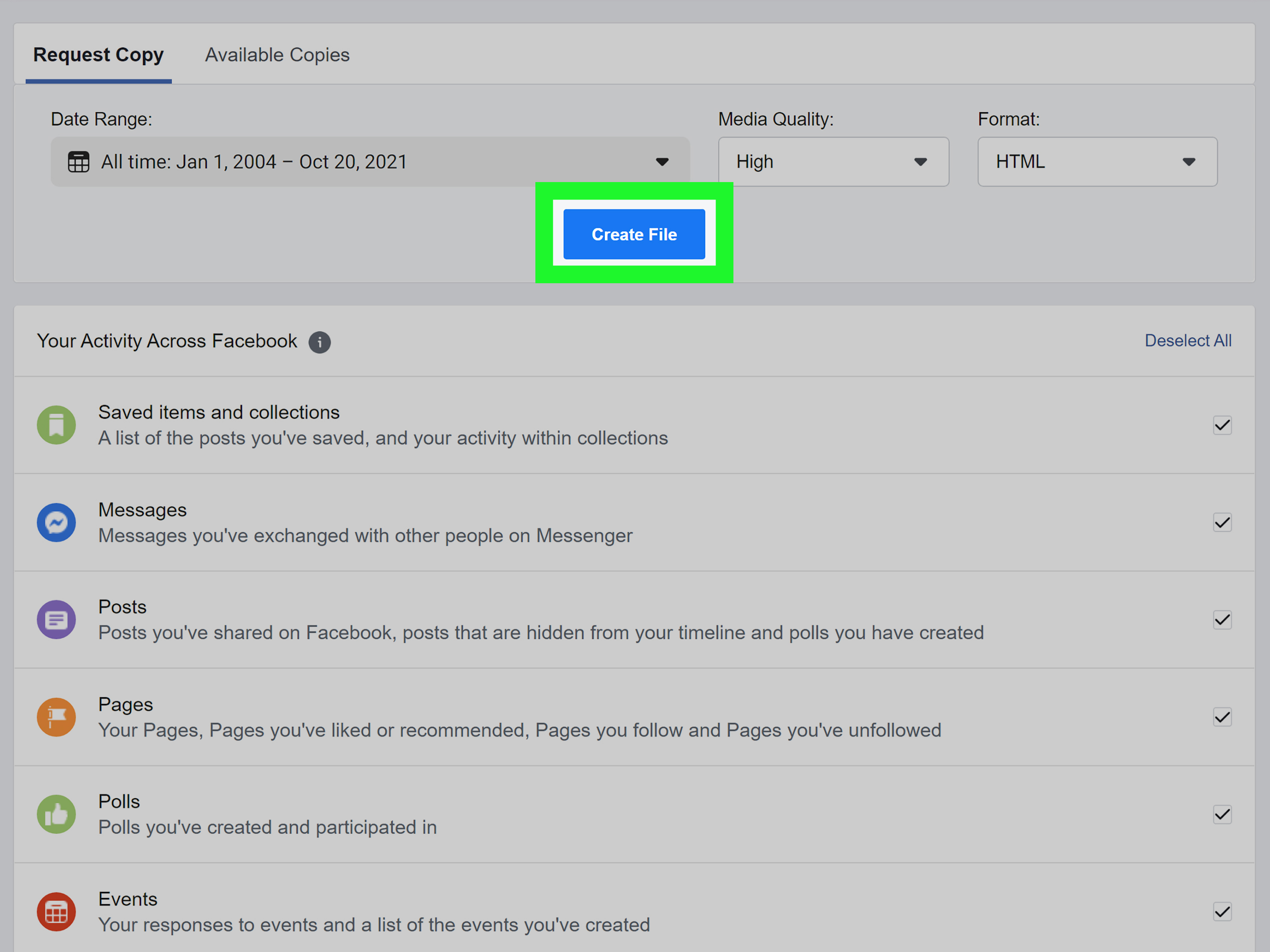
Facebook allows users to request a copy of their information through Accounts Center. Depending on the options available in your region and account, you may be able to download Messenger-related data in formats such as HTML or JSON. HTML is easier for most people to read in a browser. JSON is more technical, but useful if you want structured data.
To try this method, open Facebook settings, go to Accounts Center, choose your information and permissions, and look for the option to download or export your information. Select messages or Messenger data if available, choose a date range, pick a format, and submit the request. When the file is ready, download it and search within the message folders for the conversation you need.
What This Method Can and Cannot Do
This method can help you read messages that remain available in your Facebook account data. It may also help organize old conversations that are painful to scroll through manually. However, it is not a time machine. If you permanently deleted a chat and Facebook no longer includes it in your available account data, downloading your information will not resurrect it with thunder, lightning, and a dramatic soundtrack.
Use this method when you need a careful search of your own Messenger history. It is also smart to download important conversations before deleting anything, especially for business agreements, customer conversations, legal matters, housing discussions, or sentimental chats you may want later.
Way 3: Check Notification History on Your Phone
Sometimes the message itself is gone from Messenger, but the phone notification preview remains. This is not guaranteed, and it depends heavily on your phone settings, notification permissions, lock screen preview settings, and whether you cleared notifications. Still, it is one of the few practical ways to read part of an erased or unsent Facebook message if your device captured it before the sender deleted it.
Android Notification History
Many Android phones include Notification History. If it was turned on before the Messenger message arrived, you may be able to view recent dismissed notifications. Go to Settings, open Notifications, and look for Notification History. The wording may vary by phone brand, but Android usually keeps this feature near notification settings.
If Messenger notifications were enabled and the message preview was shown, Notification History may display the text preview. There are limitations. Notification history is often short-term, may only keep recent notifications, and will not help if the message arrived before the feature was enabled. It may also show only a preview, not the full message.
iPhone Notification Center
On iPhone, Notification Center shows recent notifications that have not been cleared. From the lock screen, swipe up from the middle. From another screen, swipe down from the top-left area to open Notification Center. If the Messenger notification is still there, you may see the message preview.
Again, there are limits. If you cleared the notification, disabled previews, or received the message too long ago, it may not be available. iPhone does not provide the same built-in notification history feature that many Android users rely on. Think of it more like checking the porch for a package before the wind carries away the label.
A Privacy Reminder About Notifications
Notification previews are convenient, but they can expose private messages on your lock screen. If you regularly receive sensitive Messenger conversations, consider changing notification previews to show only when unlocked. Convenience is nice; accidentally broadcasting your private chats to the coffee shop line is less nice.
Way 4: Restore Encrypted Chats or Ask the Other Person
Messenger now uses end-to-end encryption for personal messages and calls by default in many situations. Encryption is good for privacy, but it also changes how message history is stored and restored. If you move to a new phone or reinstall Messenger, some chat history may not appear unless secure storage was enabled and restored properly.
Restore Messenger Chats With Secure Storage
Messenger’s secure storage feature can save encrypted chat history remotely so you can restore it when logging in on a new device. Depending on your setup, you may restore chats with a PIN, an Apple account on iOS, a Google account on Android, a one-time code, or a 40-character code.
To check this, open Messenger, go to settings, choose Privacy & Safety, then look for End-to-end encrypted chats and Message Storage. If secure storage was enabled before the messages disappeared from a new device, restoring your chat history may bring back conversations that were missing because of device transfernot because they were deleted.
This method is best for people who changed phones, reinstalled Messenger, cleared app data, or logged in on a new device and noticed old messages were gone. It is not designed to recover messages you intentionally deleted from your account.
Ask the Other Participant for a Copy
If you deleted a message only for yourself, the other participant may still have the conversation. The simplest solution is also the most human: ask them to copy the text, send a screenshot, or forward the important detail. This works especially well for addresses, dates, instructions, receipts, photos, and shared links.
Be polite and specific. Instead of saying, “Send me everything we ever discussed since 2017,” try: “Could you resend the address you sent me last Thursday? I accidentally deleted the chat on my side.” People are more likely to help when the request does not sound like you are assembling evidence for a courtroom drama.
Methods You Should Avoid
Search results for “how to read erased messages on Facebook” are full of tempting claims. Be careful. Apps that promise to recover deleted Messenger messages may ask for broad phone permissions, notification access, storage access, or login credentials. Some are harmless but useless. Others are privacy disasters wearing a fake mustache.
Do Not Use Spyware or Stalkerware
Avoid any app that claims it can secretly read someone else’s Facebook messages, monitor another person’s phone, capture deleted chats without consent, or bypass Messenger security. That crosses ethical and legal lines and can put both people at risk. Stalkerware and spyware are serious privacy threats, and installing them on someone else’s device without permission is not a “tech trick.” It is surveillance.
Do Not Share Your Facebook Password
Never enter your Facebook login into a third-party “message recovery” website. A real recovery method should not require you to hand your account to a random page with twelve pop-ups and a countdown timer. If a service promises instant deleted-message recovery after you sign in, close the tab and maybe give your browser a comforting pat.
Do Not Expect Deleted-for-Everyone Messages to Return
If someone deleted a message for everyone before you saw it, there may be no legitimate way to read it inside Messenger. A notification preview may be the only remaining clue, and only if your phone captured it before the deletion. Messenger is built to respect deletion choices, especially in encrypted conversations.
Quick Comparison: Which Method Should You Try First?
| Situation | Best Method | Chance of Success |
|---|---|---|
| The chat disappeared from your inbox | Check archived chats | High if it was archived |
| You need older Messenger history | Download Facebook data | Moderate if data still exists |
| A message was deleted shortly after arrival | Check phone notification history | Possible if previews were saved |
| Messages vanished after changing phones | Restore encrypted chats with secure storage | Good if storage was enabled |
| You deleted the chat only on your side | Ask the other person | Good if they still have it |
Real-World Experiences: What Usually Happens When People Try to Read Erased Facebook Messages
In real use, most “erased message” situations fall into a few familiar patterns. The first is the accidental archive. Someone cleans up Messenger, swipes a little too confidently, and suddenly a conversation disappears. Panic arrives. Coffee gets ignored. Then they search the person’s name, find the archived thread, and realize the chat was never gone. This is the happy ending version, and it is more common than people think.
The second experience is the “new phone shock.” A person buys a new phone, logs into Messenger, and notices that some older encrypted chats are missing. This can feel like Facebook deleted years of history overnight. In many cases, the issue is not deletion but restoration. End-to-end encrypted chats may require secure storage, a PIN, or another recovery method to bring the full history onto the new device. The lesson is simple: before changing phones or uninstalling Messenger, check your encrypted chat storage settings. Future you will send present you a thank-you card.
The third experience involves notification previews. Someone receives a Messenger notification, sees the first few words, gets distracted, and later opens the chat to find the message gone. On Android, notification history sometimes saves the preview. On iPhone, Notification Center may still show it if it has not been cleared. This can help with short messages like “The code is 4821” or “Meet at 7,” but it rarely recovers long conversations. Notification history is a clue board, not a full archive.
The fourth experience is the painful one: the message was truly deleted. The user downloads Facebook data, searches archived chats, checks notifications, restores encrypted storage, and still finds nothing. That is frustrating, but it is also how deletion is supposed to work. A delete button that secretly keeps everything available forever would not be much of a delete button. It would be more like a “hide this until I become emotionally invested in finding it again” button.
The fifth experience is a safety lesson. Many people, after failing to recover messages, look for third-party recovery apps. Some apps only log future notifications after you install them, which means they cannot recover old deleted messages. Others request invasive permissions or encourage behavior that violates privacy. The safest approach is to use official tools, device notification settings, account exports, and direct communication. If a method sounds too powerful, too secretive, or too eager for your password, treat it like a raccoon offering financial advice.
The best long-term habit is prevention. Archive instead of delete when you are unsure. Download important conversations before clearing your inbox. Turn on secure storage for encrypted Messenger chats. Save critical details outside Messenger, such as in notes, contacts, calendars, or cloud documents. Messaging apps are great for conversation, but they are not always the best filing cabinet. A filing cabinet, at least, rarely updates its encryption settings while you sleep.
Conclusion
Reading erased messages on Facebook is possible only in certain situations. If the conversation was archived, filtered, included in your downloadable Facebook data, captured in a phone notification, or missing because encrypted chat storage was not restored, you may have a practical path forward. If the message or chat was permanently deleted from your account, there may be no legitimate way to bring it back.
The four safest methods are simple: check archived chats and message requests, download your Facebook or Messenger data, review phone notification history, and restore encrypted chats or ask the other participant for a copy. These approaches respect privacy, protect your account, and avoid risky recovery scams. The internet may promise magic, but in Messenger recovery, boring official tools usually beat mysterious miracle apps every time.
Note: This guide is for recovering or locating messages from your own Facebook account and conversations you are authorized to access. Do not use spyware, stalkerware, password-stealing sites, or tools that claim to secretly read another person’s private messages.