There is a special kind of confidence required to hand a photograph to the internet and say, “Please fix this.” It is the same confidence involved in leaving a sandwich unattended near a Labrador: a good outcome is possible, but history suggests preparing emotionally.
Photoshop requests go hilariously wrong when a simple editing brief collides with vague wording, literal interpretation, mischievous designers, or software that is more imaginative than helpful. Ask to remove a distracting person, and the editor may remove everyone. Ask to look taller, and your legs may become regional infrastructure. Ask to place the Eiffel Tower under your finger, and the internet may obey with alarming enthusiasm.
The funniest Photoshop fails are not always bad edits. Many are polished, believable, and technically impressive. Serious skill applied to a ridiculous interpretation creates the perfect visual joke.
Why Photoshop Requests Go Wrong
Vague Instructions Invite Chaos
Most people describe a feeling instead of an edit. “Make me look cooler” could mean better color, improved posture, a cleaner background, or a leather jacket in front of an exploding helicopter. Professional retouching needs specifics: what should change, what must stay, how realistic the result should be, and where the image will appear.
Without those details, a design brief becomes an improv prompt. The client assumes the editor understands the hidden intention. The editorespecially a funny onepretends language has no context.
Literal Interpretation Became an Internet Art Form
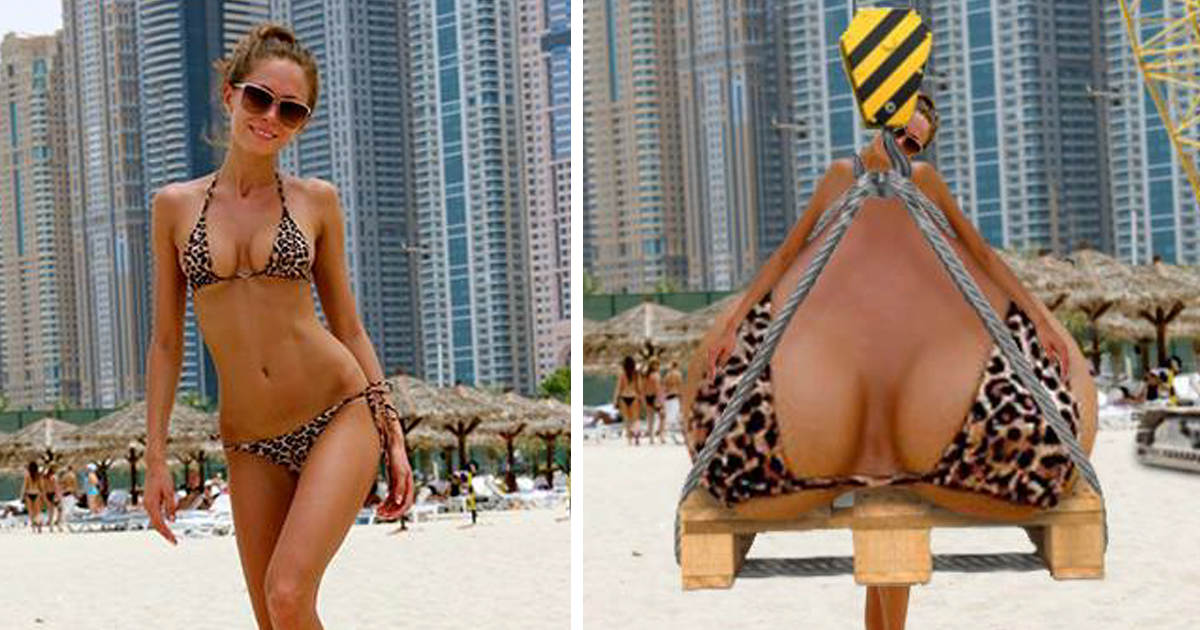
Designer James Fridman became widely known for answering photo-editing requests with polished, deliberately literal twists. Coverage of his work shows a familiar formula: find the ambiguity, obey the words instead of the intended meaning, and deliver the punch line with a straight face. He has also used some responses to challenge unnecessary body criticism and encourage self-acceptance.
“Make the waterfall closer” can become a waterfall invading personal space. “Remove the man behind me” may result in the wrong person disappearing. Grammar becomes a trapdoor, and the before-and-after image supplies both setup and punch line.
The Internet Turns One Request Into a Contest
Once a photo reaches a large community, usefulness is no longer the only goal. Dozens of strangers compete for the funniest interpretation. A documented vacation-photo request involving the Eiffel Tower escalated into increasingly bizarre compositions, while other open editing requests have become collaborative Photoshop free-for-alls.
Classic Photoshop Requests That Backfire
“Remove That Person”
Object removal sounds simple until the unwanted person overlaps the subject, blocks scenery, or casts a shadow across the frame. A prank editor may replace the person with a shrub, leave a human-shaped hole, or delete everyone for maximum efficiency.
Adobe’s Content-Aware Fill can replace selected areas using surrounding visual information, while Generative Fill can add or remove content with prompts. Both can speed up difficult edits, but selections and results still require human review. Otherwise, a clean beach may acquire an unexplained third foot.
“Make Me Taller”
A restrained retoucher may adjust framing, posture, or proportions. A mischievous editor stretches the legs until the subject can inspect second-story gutters without a ladder.
The joke reveals a common communication problem: clients request confidence, elegance, or strength through body changes. Often, lighting, composition, expression, and wardrobe cleanup can create the desired impression without turning someone into a fashionable giraffe.
“Make the Background More Exciting”
“More exciting” is dangerously broad. One editor adds dramatic clouds. Another adds dinosaurs, meteors, three moons, and a celebrity holding a garden rake. Background replacement is ideal comedy territory because the subject can remain normal while the universe behind them resigns from realism.
The best versions carefully match perspective, lighting, color, grain, and depth of field. The viewer laughs at the concept and then laughs again at the professional effort invested in making nonsense look expensive.
“Put Me Next to a Celebrity”
Photographers have publicly shared unusual requests such as hugging wild animals or appearing in selfies with famous performers. Some are sincere fantasy composites, but incompatible source images create obvious trouble. Different camera angles, lighting, resolution, and scale can make the celebrity resemble a cardboard display at a shopping mall.
“Make Me Look Badass”
The responsible edit adds contrast, sharpens the eyes, and improves posture. The internet edit adds lightning, wolves, motorcycles, tactical smoke, and a flaming title suitable for an energy drink. Audiences recognize the clichés instantly, which makes escalation irresistible.
“Fix My Face”
Requests to erase wrinkles, reshape bodies, enlarge eyes, or slim faces may begin as harmless polishing. Excessive retouching, however, can suggest that an ordinary human face is an unfinished draft. Research reported by the American Psychological Association has connected heavy social-media use with body-image concerns among young people, while reduced use improved how some participants felt about their appearance.
A smart humorous editor targets the wording or unrealistic standard, not the requester’s insecurity. A joke that encourages self-acceptance can feel kind. A joke aimed at someone’s vulnerability is simply cruelty wearing a novelty hat.
Why Funny Photoshop Fails Work
Expectation Meets Literal Meaning
Comedy thrives on the gap between what someone expects and what arrives. Photoshop makes that gap visible. The requester imagines a subtle improvement; the editor delivers the strictest possible interpretation.
Good Technique Strengthens the Joke
A rough edit may earn a smile, but realistic shadows, clean masks, matching reflections, and consistent focus briefly persuade the eye. For half a second, the viewer accepts that a giraffe attended the wedding. That half-second is where the joke lands.
Online Communities Escalate Everything
One participant adds a shark. The next gives the shark a business suit. Another gives it a performance review. Real editing requests are so varied that researchers have created large datasets from Reddit requests and human-made edits, showing how difficult authentic user instructions remain for automated systems.
When the Joke Stops Being Funny
Consent and Context Matter
Someone who submits a picture to a known comedy editor may expect a prank. Other people in the photo may not. Before publishing, editors should consider permission, privacy, reputation, and whether the image involves children, grief, relationships, or sensitive events.
A birthday-card composite is entertainment. A manipulated news photograph is different. The Associated Press requires news images to remain accurate and generally prohibits adding or subtracting elements. The National Press Photographers Association likewise emphasizes accuracy, context, and resistance to manipulation.
Advertising also carries higher stakes. Altered product results, testimonial photos, or body transformations can mislead consumers. Federal Trade Commission guidance considers the overall impression created by an advertisement, including images, and has challenged materially altered demonstrations without adequate disclosure.
Humor Should Punch Up
The safest target is the vague wording, the absurd situation, or a visual clichénot a person’s body, identity, or pain. A strong joke lets the requester laugh with the audience instead of becoming the price of admission.
Generative AI Makes the Results Fasterand Stranger
Modern editing tools can interpret prompts, extend canvases, replace objects, and invent scenery quickly. A human once needed serious time to add six raccoons to a family portrait. Software can now produce several raccoon proposals before anyone reconsiders the brief.
Generative tools still inherit language ambiguity. “Remove the car” may remove the correct vehicle, replace it with another, alter the road, or redesign the neighborhood. Prompt-based editing requires clear selections and close inspection of hands, reflections, signs, repeated textures, and background geometry.
As realistic manipulation becomes easier, transparency becomes more valuable. Photoshop supports Content Credentials that can attach attribution and editing history during export, while the C2PA standard is designed to record and verify the provenance of digital media. These systems do not guarantee truth, but they can provide useful context about a file’s origin and changes.
How to Write a Photoshop Request That Will Not Backfire
Describe the Exact Change
Replace “Make this better” with “Remove the trash can on the left and rebuild the brick wall behind it.” Name the object, its location, and the desired replacement. State whether the result should look realistic, cinematic, humorous, or intentionally surreal.
Explain the Purpose and Boundaries
Say where the image will be used and what must remain unchanged. Examples include keeping facial features natural, preserving body proportions, retaining every person in the group, or protecting a logo from alteration. Editors are talented, not telepathic.
Provide the Original File
High-resolution originals provide cleaner edges and more editing flexibility. Screenshots and compressed social-media downloads often contain artifacts that become obvious after retouching.
Approve a Preview
Review a low-resolution proof before final polishing. Confirm composition, realism, and scope. It is easier to move a digital palm tree before it receives realistic shadows, individually masked leaves, and a union representative.
What Designers Can Learn
Funny Photoshop requests are compact lessons in communication. Designers should restate the brief, identify assumptions, define subjective words, and confirm what cannot change. Technical skill matters, but judgment, empathy, humor, and restraint often determine whether an image succeeds.
They also prove that mistakes can become creative material. A bizarre mask, strange clone, or accidental AI generation may reveal a better idea. The professional skill lies in knowing whether to develop it, delete it, or save it in a folder labeled “Absolutely Not for the Client.”
Conclusion: Be Careful What You Ask Photoshop to Do
When Photoshop requests go hilariously wrong, the disaster usually begins before the software opens. The brief is vague, the expectation is hidden, or the internet has entered a situation where self-control was never likely.
The best Photoshop fails combine ambiguity, technical skill, and surprise. They transform ordinary snapshots into visual punch lines while revealing useful truths about communication, beauty standards, digital trust, and human creativity.
Ask an editor to clean up your vacation photobut explain who should disappear, what belongs behind them, and whether “make the landmark closer” is a genuine instruction. Otherwise, you may receive exactly what you requested, which is frequently the problem.
Experiences Related to Photoshop Requests Gone Wrong
The Family Photo With a Complicated Empty Seat
A common real-world request is to remove an ex-partner from a family photograph. Technically, the editor may need to rebuild clothing, furniture, arms, shadows, and background objects hidden behind that person. Emotionally, the image may represent a breakup or painful family change.
Now imagine the brief says, “Please remove him from our lives.” A prank editor could erase the man from every framed photograph in the room, delete his chair, and replace his coffee mug with a tiny memorial plaque. Funny as a social post, perhaps; less useful when the requester needs a holiday card by Tuesday.
The experience teaches a simple lesson: separate emotional language from production instructions. “Remove the man in the blue shirt and rebuild the couch behind his right shoulder” is not poetic, but it is wonderfully hard to misunderstand.
The Vacation Photo That Invited Everyone
Tourists often pose as though they are touching or holding distant landmarks. When the perspective misses, someone asks the internet to fix it. One editor moves the landmark correctly. Another places it in the traveler’s palm. Others shrink the tourist, enlarge the building, rotate the planet, or replace the skyline entirely.
A public request creates a public game. Private client work belongs with a trusted editor. A giant online community is appropriate only when the requester is ready to become the main character in a collaborative joke.
The Headshot That Needed “More Confidence”
A professional asks for a more confident headshot. Does that mean straighter posture, warmer color, stronger contrast, or an eyebrow raised high enough to negotiate a merger alone?
A thoughtful editor offers restrained options. A comedic editor adds a corner office, private jet, bestselling book, and a profit chart rising out of the frame. The absurd version is funny because it visualizes the emotion instead of solving the photographic problem.
The lesson is to pair mood words with visible changes: “Straighten my shoulders, soften the under-eye shadows, and keep my expression natural.”
The Wedding Photo With “Nobody Else”
Wedding photographers routinely remove tourists, signs, phones, and parked cars. Trouble begins when the request says, “Make it look like nobody else was there.” The couple may mean two strangers near the fountain. A literal editor could remove the officiant, wedding party, musicians, and every sign of organized society.
Mark unwanted people on a reference copy and keep the original file untouched. “Nobody else” is a feeling. A red circle is a production system.
The Pet Portrait That Became Royal
Pet owners request cleaner backgrounds, brighter eyes, removed leashes, and improved fur detail. Then someone says, “Make my cat look majestic,” and a gateway opens.
The practical edit improves lighting and adds a studio background. The inevitable internet version adds a velvet robe, jeweled crown, marble staircase, ancestral portraits, and nervous servants presenting tuna on silver trays. The cat changes very little because cats already behave as though these assets are overdue.
This is the nicest kind of Photoshop request gone wrong: harmless, affectionate, and more expressive than a perfectly realistic edit. Sometimes the wrong result is emotionally right.
Note: This original article synthesizes documented Photoshop-request culture, professional editing practices, current image-editing technology, body-image research, and visual-media ethics. Examples are paraphrased or presented as representative scenarios rather than copied from source material.