A vibrating braille display sounds like something a clever engineer might build after looking at a regular refreshable braille display and asking, “What if we made this smaller, cheaper, and a little buzzier?” That question is more serious than it sounds. Portable braille technology has become one of the most important areas in assistive technology because reading is not supposed to be chained to a desk, a bulky machine, or a single expensive device.
Traditional refreshable braille displays use tiny moving pins that rise and fall to form braille characters. They can connect to smartphones, tablets, laptops, and screen readers, giving blind and low-vision users tactile access to text, menus, messages, books, and documents. A vibrating braille display takes a different approach: instead of relying only on raised pins, it uses controlled vibration patterns to represent braille dots or characters. The idea is simple in theory, but delightfully tricky in practicebecause fingertips are smart, but they are also picky little critics.
The phrase “vibrating braille display is portable” points to a bigger shift in accessibility design: devices are getting smaller, more connected, and more focused on real-life use. A portable braille display should work on the bus, in class, at work, in a coffee shop, or while sitting on the couch pretending to read an important document when you are actually browsing recipes. Portability is not a luxury feature. For many users, it is the difference between access that technically exists and access that actually fits daily life.
What Is a Vibrating Braille Display?
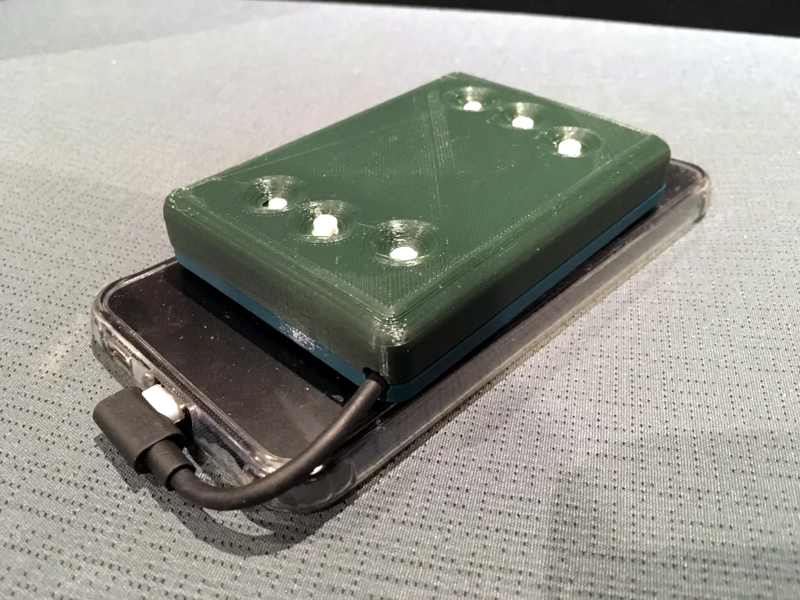
A vibrating braille display is a tactile device that communicates braille information through vibration rather than only through mechanically raised dots. In one experimental approach, small vibration motors correspond to the six dots of a standard braille cell. When a character is displayed, the relevant motors vibrate so the reader can feel which dots are active.
This is different from a conventional refreshable braille display, where pins physically pop up under the user’s fingers. Traditional refreshable braille displays are widely used and commercially available. Vibrating braille displays, by contrast, are more experimental and often appear in prototypes, research projects, or DIY accessibility builds. Their biggest appeal is cost and simplicity. Vibration motors are inexpensive, widely available, and already used in phones, game controllers, watches, and other portable electronics.
However, there is a reason refreshable braille displays have not all turned into tiny buzzing rectangles overnight. Braille is precise. Each dot must be felt clearly and separately. If one motor shakes the whole case, the reader may feel a general buzz instead of a clean dot pattern. That is like trying to read a printed book while someone gently taps the table with a spooninteresting, but not exactly ideal for comprehension.
How Portable Braille Displays Work
Most modern portable braille displays connect to a computer or mobile device through Bluetooth or USB. Once connected, a screen reader sends text to the display, and the device converts that information into braille. The user reads the braille line by line and can often type using a Perkins-style braille keyboard. Many displays also include cursor routing buttons, navigation keys, internal note-taking tools, and file support.
Popular examples include 20-cell, 40-cell, and 80-cell displays. A 20-cell device is typically easier to carry and may fit in a backpack or purse. A 40-cell display offers more reading space, which can be useful for editing documents, coding, studying, or working with longer lines of text. Larger displays may feel closer to a full workstation, but they are less pocket-friendly. As with most technology, the perfect size depends on whether the user wants maximum portability, maximum reading comfort, or a little bit of both.
Traditional Refreshable Braille vs. Vibrating Braille
Traditional refreshable braille displays usually depend on arrays of moving pins. These pins are arranged into cells, and each cell represents one braille character. When the text changes, the pins refresh. This gives users crisp tactile feedback and supports fast reading when the display is well designed.
A vibrating braille display attempts to reduce complexity by replacing moving pin mechanisms with vibration feedback. Instead of feeling raised dots, the reader feels vibration cues. In a six-dot system, each motor can represent one braille dot. In other vibrotactile systems, the device may use rhythm, timing, or location-based vibration to represent letters or patterns. This opens the door to cheaper and lighter designs, but it also introduces challenges in accuracy, speed, and user training.
The biggest question is not whether vibration can represent braille. It can. The better question is whether vibration can represent braille comfortably, quickly, reliably, and clearly enough for real-world reading. That is where engineering meets human touch, and human touch is not easily fooled.
Why Portability Matters So Much
Portable assistive technology gives users more control over when and where they access information. A braille display that works only at a desk is useful. A braille display that connects to a phone and slips into a bag is life-changing. It can support reading email, checking calendar appointments, reviewing class notes, editing assignments, navigating apps, and reading books from accessible libraries.
For students, portability means moving from classroom to classroom without dragging around a mini command center. For professionals, it means checking information quietly in a meeting without relying only on speech output. For travelers, it means reading directions, documents, or messages without broadcasting private information through audio. For readers, it means carrying a library in a device small enough to travel with them.
This is why portable braille displays such as the Orbit Reader 20, APH Chameleon 20, HumanWare Brailliant BI 20X, and Freedom Scientific Focus Blue models matter. They show how modern braille access has moved from specialized stationary equipment toward everyday mobile computing.
The Design Challenge: Making Vibration Feel Like Information
Building a vibrating braille display is not as simple as gluing six tiny motors into a box and calling it a day. If the motors are mounted directly to the same case, their vibrations can spread through the entire device. The user may struggle to tell whether dot one, dot four, or the whole gadget is simply enthusiastic.
To solve this, designers may isolate each motor mechanically so that vibration travels mainly to the intended tactile point. Springs, flexible mounts, separate actuators, and dampening materials can help. The goal is to make each vibration feel local, distinct, and repeatable. In a successful design, the fingertip should perceive separate tactile signals rather than one blended buzz.
Speed is another issue. A traditional braille reader may move quickly across a line of raised dots. Vibrotactile output may require timing patterns, pauses, or sequential cues. That can slow reading down, especially if characters must be presented one at a time. A vibrating display may be better suited for short messages, alerts, labels, notifications, or learning tools than for reading long novels at high speedat least with today’s prototype-level designs.
Real-World Portable Braille Display Examples
Although vibrating braille displays are still emerging, portable refreshable braille displays are already well established. Looking at real devices helps explain what users expect from portable tactile technology.
Orbit Reader 20 Plus
The Orbit Reader 20 Plus is known as an affordable refreshable braille display, book reader, and note-taker. It can connect to a computer or smartphone through USB or Bluetooth, and it also works as a standalone reading device. Its 20-cell format makes it compact enough for mobile use while still supporting practical reading and writing tasks.
APH Chameleon 20
The APH Chameleon 20 is designed with students in mind. It includes a 20-cell refreshable braille display, a Perkins-style keyboard, and multiple connectivity options. It can work as a standalone notetaker or as a connected display for editing assignments and using digital content. For students, that combination of portability and classroom-friendly functionality is a big deal.
HumanWare Brailliant BI 20X
The Brailliant BI 20X is a compact 20-cell display built for mobility, reading, and productivity. It includes features such as internal storage, braille input, and support for reading resources. For users who want a portable device that feels polished and efficient, this type of smart braille display shows how far the category has come.
Freedom Scientific Focus Blue
Freedom Scientific’s Focus Blue displays are available in different cell counts, including compact and larger models. They are designed for durability, Bluetooth and USB-C connectivity, and use with screen readers. The smaller Focus 14 Blue is especially relevant to portability because it is built for users who want a braille interface that can go almost anywhere.
Where a Vibrating Braille Display Could Shine
A portable vibrating braille display may not replace every refreshable braille display, but it could be valuable in specific use cases. For example, it might work well as a low-cost learning tool for braille beginners. Instead of buying an expensive multi-cell display immediately, a user could practice dot recognition through vibration. Schools, makerspaces, and accessibility labs could use such devices to teach tactile concepts.
It could also serve as a notification device. Imagine a small wearable or pocket-sized unit that silently communicates basic information: a calendar alert, a room number, a short text confirmation, or a navigation cue. In these cases, the device does not need to present a full page of text. It needs to deliver compact tactile information quickly and privately.
Another promising area is deafblind communication. Audio output is not useful for everyone, and visual notifications are not accessible to everyone. A vibrotactile device can provide another channel of communication when speech and screen magnification are not enough. This is where vibration-based braille concepts become more than clever engineeringthey become part of inclusive communication design.
Benefits of a Portable Vibrating Braille Display
Lower Potential Cost
Conventional refreshable braille technology can be expensive because it requires precise mechanical components. Vibration motors are generally cheaper and easier to source. If designers can solve clarity and durability challenges, vibrating braille could make tactile access more affordable.
Compact Construction
Vibration components can fit into small devices. That makes them attractive for portable prototypes, wearables, phone accessories, and pocket-sized tools. A smaller device is easier to carry, easier to charge, and easier to integrate into daily routines.
Silent or Low-Audio Interaction
While vibration is not always completely silent, it can be more private than speech output. Users may prefer tactile feedback in classrooms, meetings, libraries, public transportation, or other places where audio would be distracting.
Creative Accessibility Design
Vibrotactile braille encourages designers to think beyond the traditional line of pins. It may inspire hybrid devices that combine raised dots, vibration, audio, gestures, and smartphone connectivity. Accessibility improves when engineers stop assuming there is only one correct interface.
Limitations and Practical Concerns
The first limitation is reading speed. Braille users who are comfortable with traditional raised-dot displays may find vibration slower or less natural. Reading by vibration often requires interpretation of patterns, timing, or location. That can increase mental effort.
The second limitation is precision. Raised dots provide stable spatial information. Vibration is dynamic and can spread through materials. If the device is not carefully designed, dot separation becomes muddy. Nobody wants to play “guess the letter” with an important password, address, or medical form.
The third issue is fatigue. Continuous buzzing may become tiring during long reading sessions. A vibrating alert is helpful. A vibrating paragraph may be less charming after ten minutes. Designers must consider intensity, duration, motor placement, and user control settings.
Finally, users have different tactile sensitivity levels. A vibration pattern that works perfectly for one person may be too weak, too strong, or too confusing for another. Adjustable feedback settings would be essential in any serious portable vibrating braille product.
How It Fits Into the Future of Assistive Technology
The future of portable braille technology will probably not be one single device. Instead, users may choose from a range of tools: compact braille displays for phones, larger displays for work, book-reader-style devices for long reading, tactile graphics displays for diagrams, and vibrotactile devices for alerts or experimental communication.
That variety matters. Accessibility is personal. Some users prefer speech output, some prefer braille, and many use both depending on the situation. A person may listen to an article while walking, read braille while editing, and use vibration alerts while in a noisy room. The best assistive technology does not force one method. It gives users options.
Portable vibrating braille displays are exciting because they push the industry to ask hard questions. Can tactile literacy tools become cheaper? Can a braille interface fit into smaller devices? Can vibration support meaningful reading, not just alerts? Can open-source builders and researchers create useful tools that commercial manufacturers later refine? These are the kinds of questions that move accessibility forward.
Buying or Evaluating a Portable Braille Display
If you are considering a portable braille display today, focus on practical needs rather than buzzwords. A device may sound futuristic, but the best product is the one that fits the user’s reading habits, devices, budget, and learning goals.
Check Compatibility
Make sure the display works with the user’s preferred screen reader and operating system. Common screen readers include VoiceOver, JAWS, NVDA, and other platform-specific tools. Bluetooth support is especially important for smartphones and tablets.
Choose the Right Cell Count
A 14-cell or 20-cell display is easier to carry. A 40-cell display offers more text per line. Students, professionals, and heavy readers may prefer different sizes. Portability is wonderful, but too few cells can make some tasks feel like reading a sentence through a keyhole.
Consider Battery Life and Charging
USB-C charging, long battery life, and stable Bluetooth performance can make daily use much easier. A portable device should not create a new hobby called “hunting for outlets.”
Test the Tactile Feel
For refreshable braille displays, dot firmness and key comfort matter. For vibrating braille concepts, clarity and separation matter even more. The device should feel readable, not like a tiny appliance having an emotional moment.
Experience-Based Reflections: Living With Portable Tactile Technology
The most important thing about a portable braille display is not what it looks like on a product page. It is what happens after the box is opened and the device becomes part of normal life. A portable tactile device has to survive backpacks, kitchen tables, school desks, coffee shop counters, and the occasional “Where did I put it?” panic. That daily reality is where good accessibility design proves itself.
One of the first experiences users often notice is the freedom of reading without audio. Screen readers are powerful, but audio is not always ideal. In a quiet classroom, a meeting, or a shared bedroom, listening to every notification or paragraph through speech can feel awkward. A braille display lets information move through the fingertips instead. That privacy can be surprisingly empowering. You can check a message without announcing it to the room. You can review spelling, punctuation, and formatting in a way speech may not fully capture. You can slow down, reread, and physically inspect words.
A vibrating braille display adds a different type of experience. It feels more like learning a tactile code inside a tactile code. At first, vibration patterns may seem unusual because they do not have the fixed shape of raised braille dots. The user has to trust timing, location, and rhythm. When the vibration is well isolated, the experience can feel clever and immediate. When it is poorly isolated, everything turns into a fuzzy buzz, and the brain starts filing complaints.
In practical use, a vibrating braille display may be most enjoyable for short bursts of information. Quick labels, simple characters, alerts, or practice drills make sense. Long-form reading is harder because the user has to process many vibration signals in sequence. That does not make the idea weak; it simply means the tool has a natural lane. A bicycle is not a cargo truck, but nobody calls bicycles useless. They are brilliant when used for the right trip.
Portability also changes how often people practice. A braille learner with a small tactile device nearby may practice for five minutes several times a day. That matters. Skills grow through repetition, not through one heroic weekly study session fueled by determination and snacks. A compact vibrating braille tool could support this kind of casual learning, especially if paired with an app that turns practice into short exercises.
For students, portable tactile technology can reduce friction. A device that connects to a phone, tablet, or laptop allows a student to move between reading, typing, and reviewing assignments. For adults, it can support work tasks such as checking notes, reviewing documents, or navigating email. For travelers, it can make digital information more discreet and manageable. The common theme is control. The user decides how, when, and where to access information.
There is also an emotional side to portability. Assistive technology should not feel like a punishment for needing access. It should feel like a capable tool. A good portable braille display says, “Take your books, your work, and your messages with you.” A good vibrating braille concept says, “Maybe tactile information can be even smaller, cheaper, and more flexible than we thought.” That kind of possibility matters because accessibility is not finished. It is still being invented, tested, improved, and occasionally held together by a prototype spring mount and the stubborn optimism of engineers.
The best experience comes when technology respects the user’s time. Pairing should be simple. Navigation should be logical. Feedback should be adjustable. The device should not require a secret handshake, three firmware updates, and a deep breathing exercise before breakfast. Portable braille technology succeeds when it disappears into the routine and lets the user focus on reading, writing, learning, working, and living.
Conclusion
A vibrating braille display is portable, creative, and full of promise, but it is not magic. It is an experimental answer to a very real challenge: how to make tactile digital information more affordable, compact, and available in everyday settings. Traditional refreshable braille displays remain the stronger option for serious reading and writing today, especially when users need reliable dot clarity and screen reader integration. Still, vibrotactile braille has a meaningful place in the future of accessibility.
The best way to understand this technology is to see it as part of a larger movement. Portable braille displays, smart notetakers, Bluetooth screen reader support, accessible libraries, and tactile research all point in the same direction. Digital information should not belong only to screens and speakers. It should also belong to fingertips.
Whether used for learning, alerts, communication, or future low-cost tactile devices, the portable vibrating braille display reminds us that accessibility innovation often begins with a simple question: can we make this easier to carry, easier to afford, and easier to use? When the answer is yesor even “not yet, but we are getting closer”that is worth paying attention to.