So, you have decided that your old Clash of Clans name has aged about as well as a rushed Town Hall upgrade. Maybe you chose it years ago when “xX_DragonBoss_420_Xx” felt powerful. Maybe your clanmates keep roasting you in chat. Or maybe you simply want a cleaner, cooler, more memorable player name before your next Clan War.
Good news: changing your name in Clash of Clans is quick, simple, and built directly into the game. You do not need a third-party app, a mysterious “free gems” website, or a wizard hiding in the Builder Base. You only need the right menu, a valid new name, and in some cases, enough Gems.
This guide explains exactly how to change your name in Clash of Clans, what requirements you must meet, how much it costs, why the option may not appear, and how to choose a name you will not regret seven minutes later.
Can You Change Your Name in Clash of Clans?
Yes, you can change your player name in Clash of Clans. The feature becomes available once your village reaches Town Hall level 5. If you are below Town Hall 5, the name-change option may not appear yet, so keep upgrading your village before trying again.
Your first name change is free. After that, every additional name change costs Gems. The cost starts at 500 Gems and increases by 500 Gems each time you rename your account, with a maximum cost of 10,000 Gems. That means you should choose carefully unless you enjoy turning your gem stash into confetti.
How to Change Your Name in Clash of Clans
Follow these steps to change your Clash of Clans username on iPhone, iPad, Android, or supported devices running the game.
Step 1: Open Clash of Clans
Launch Clash of Clans and make sure you are logged into the correct village. This matters if you use multiple accounts through Supercell ID. Before renaming anything, double-check that you are not accidentally editing your mini account, your rushed donation account, or that one forgotten village you only open during events.
Step 2: Go to Settings
Once your village loads, tap the gear icon to open the game settings. The Settings button is usually located on the main village screen. If your screen is full of collectors, builders, offers, and event buttons, take a breath. The gear icon is there, quietly judging your base layout.
Step 3: Select More Settings
Inside the Settings menu, look for More Settings. Tap it to open additional account and game options. This is where Clash of Clans keeps several useful tools that are easy to miss if you usually sprint straight into attacks.
Step 4: Tap Change Name
Find and tap Change Name. If this is your first name change and your account is eligible, the game should let you rename your village without spending Gems. If you have already changed your name before, Clash of Clans will show the Gem cost before you confirm.
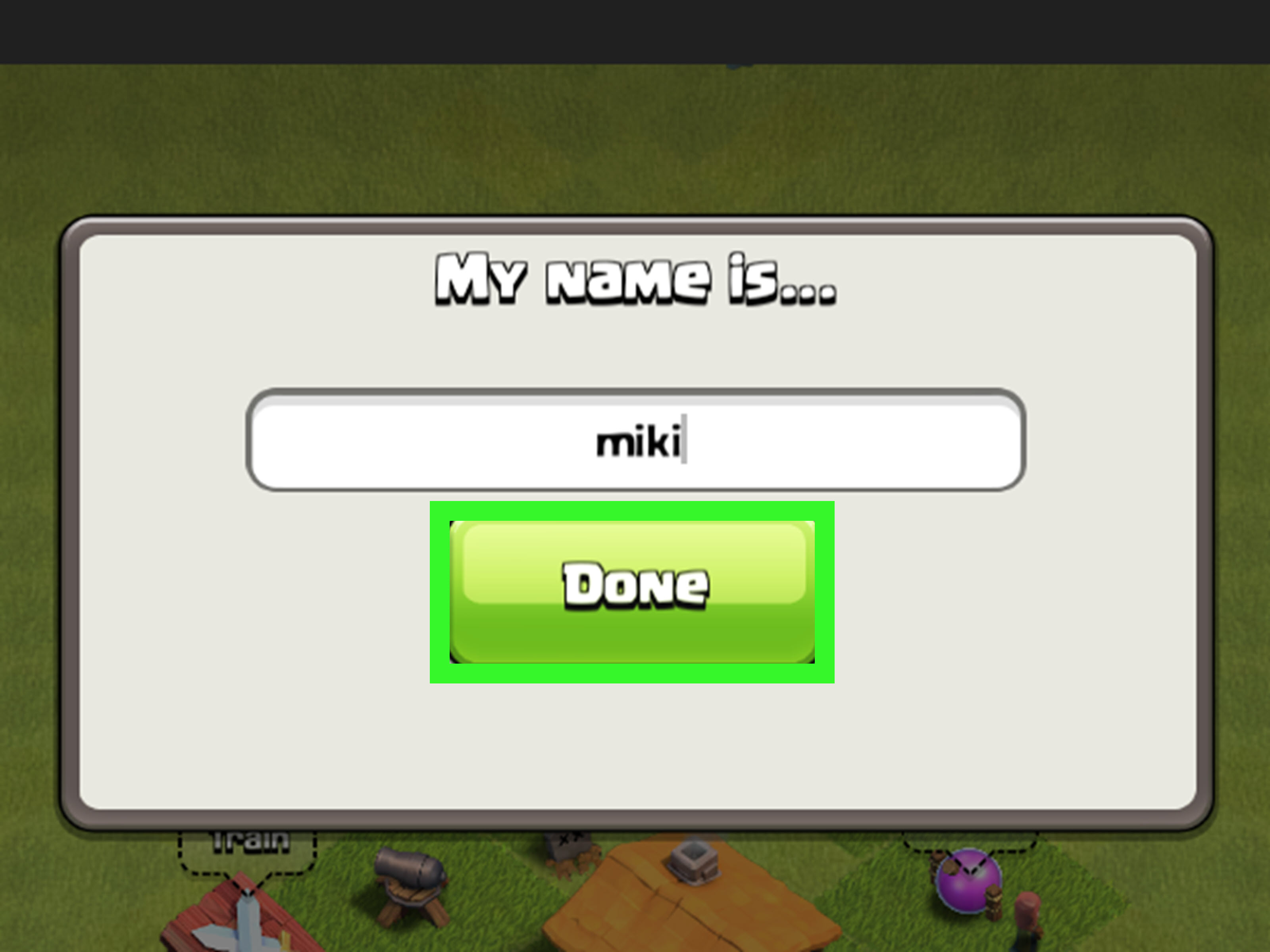
Step 5: Enter Your New Name
Type the new player name you want to use. You may need to enter it more than once to confirm spelling. Read it carefully. Then read it again. Then imagine your clan leader saying it out loud during war planning. If it still sounds good, continue.
Step 6: Type CONFIRM
To prevent accidental name changes, Clash of Clans requires you to type CONFIRM in capital letters before the change is applied. This final step is the game’s way of asking, “Are you absolutely sure you want to become GoblinGrandpa?”
Step 7: Finish the Name Change
After confirming, your new name should update in the game. Other players will see your new Clash of Clans name in your profile, clan chat, war map, leaderboards, and other in-game areas where your player name appears.
Clash of Clans Name Change Cost
The first Clash of Clans name change is free. After that, the cost increases each time you change your name again. Here is the basic pattern:
- First name change: Free
- Second name change: 500 Gems
- Third name change: 1,000 Gems
- Fourth name change: 1,500 Gems
- Later changes: The price continues rising by 500 Gems
- Maximum cost: 10,000 Gems
There is also a cooldown period after changing your name. You cannot instantly change it again, so do not treat the rename button like a social media status update. Clash of Clans wants your name to mean something, or at least remain stable long enough for your clanmates to recognize you.
Why You Might Not See the Change Name Option
If you cannot find the Change Name button, do not panic. Your account is probably not cursed by the Archer Queen. There are several common reasons the option may not be available.
Your Town Hall Level Is Too Low
The name-change feature unlocks at Town Hall 5. If you are still below that level, upgrade your Town Hall and check again. The game prevents very new accounts from changing names immediately, which helps reduce spam and confusion.
You Recently Changed Your Name
After changing your Clash of Clans name, you must wait through the cooldown period before making another change. If you just renamed yourself yesterday, the game will not let you immediately panic-rename yourself again today.
You Do Not Have Enough Gems
If you have already used your free name change, you need enough Gems for the next one. Since the cost rises with each change, frequent renaming can become expensive fast. If your Gem balance is low, save Gems from achievements, obstacles, events, the Season Pass track, or other in-game rewards.
Your New Name Breaks the Rules
Clash of Clans may reject names that include offensive language, inappropriate content, political messaging, hate speech, bullying, or personal information. Avoid using your real phone number, address, full legal name, or anything that could make other players uncomfortable. A clever name is great. A name that gets moderated is not.
Your Game Needs an Update
If menus look different or buttons do not work, update Clash of Clans through the App Store or Google Play. A weak connection can also cause problems, so switch to stable Wi-Fi or mobile data before trying again.
Tips for Choosing a Good Clash of Clans Name
A good Clash of Clans name should be easy to read, easy to remember, and not embarrassing when your clan leader promotes you to elder. It should fit your playstyle and personality without looking like your keyboard lost a fight.
Keep It Short and Memorable
Names that are too long, messy, or overloaded with symbols are harder for other players to remember. A clean name like StoneRaid, LavaLogic, or QueenCharge is usually stronger than a name filled with random underscores and numbers.
Match Your Playing Style
If you love air attacks, choose something related to dragons, balloons, lightning, or lava. If you are a war strategist, try names that sound tactical. If you mostly donate Wall Breakers by accident, maybe choose something humble. Branding matters, even when your Barbarian King is walking around the outside of the base again.
Avoid Offensive or Risky Names
Do not use slurs, insults, personal information, explicit words, or names designed to annoy other players. Even if a name slips through at first, it may be changed later if reported or moderated. A safe name protects your account identity and keeps your clan looking professional.
Do Not Copy Famous Player Names Exactly
Using a name inspired by a favorite player or creator is fine, but copying someone exactly can make your account look fake. Instead, create a variation that feels personal. You are building your own village, not borrowing someone else’s clan castle.
Say It Out Loud
Before confirming your new name, say it out loud. If it sounds awkward, confusing, or like something you would not want to explain in clan chat, rethink it. The best Clash of Clans names look good on the war map and sound good when clanmates call you by name.
Player Name vs. Clan Name vs. Supercell ID
Many players confuse three different names: your Clash of Clans player name, your clan name, and your Supercell ID or Player ID. They are not the same thing.
Your player name is the name attached to your village. This is what you can change from the in-game settings after meeting the requirements.
Your clan name belongs to the clan itself. Clan names generally cannot be changed freely from the normal settings menu, so choose carefully when creating a new clan.
Your Supercell ID or Player ID is connected to your broader Supercell account identity. Changing your Clash of Clans village name does not necessarily mean every Supercell-related identity label changes in the same way. Always check the specific menu you are using before confirming any name update.
Common Mistakes to Avoid
The biggest mistake is rushing the decision. Your first name change is free, but later changes cost Gems, and the cooldown prevents instant corrections. Spend a few minutes testing name ideas before tapping confirm.
Another mistake is adding too many symbols. Names packed with special characters can look messy and may not display well for every player. Keep your name readable. A clean name often looks more confident than one decorated like a holiday tree.
Also avoid names that depend on your current Town Hall level, clan, or temporary joke. “TH9Legend” sounds less impressive when you are Town Hall 13. “KickedByKevin” may be funny until Kevin leaves the clan. Choose something that can grow with your account.
What to Do If You Regret Your New Name
If you regret your new Clash of Clans name, you usually need to wait until the cooldown ends and pay the required Gem cost if your free change has already been used. Supercell Support generally expects players to use the in-game name-change system rather than manually requesting a new name because they changed their mind.
The best solution is prevention. Before confirming, write down three to five name ideas. Ask a trusted clanmate which one looks best. Check spelling. Avoid inside jokes that may stop being funny. Most importantly, do not rename your account while angry after a failed war attack. Emotional damage is temporary; Gem costs are painfully real.
Quick Checklist Before Changing Your Name
- You are logged into the correct Clash of Clans account.
- Your Town Hall is level 5 or higher.
- You know whether this change is free or paid.
- You have enough Gems if it is a paid change.
- Your new name follows Supercell’s rules.
- The spelling is correct.
- You are comfortable keeping the name after the cooldown begins.
Personal Experience: What Changing Your Clash of Clans Name Feels Like
Changing your name in Clash of Clans sounds like a tiny cosmetic update, but it can feel surprisingly meaningful. Your name is attached to everything you do in the game. It appears when you request troops, donate spells, attack in war, climb the leaderboard, join a new clan, or accidentally three-star the wrong base in friendly challenges. In a game built around long-term progress, your name becomes part of your reputation.
Many players start Clash of Clans with a random name because they are eager to get into the action. At the beginning, you are just trying to build cannons, upgrade collectors, and figure out why giants keep walking into spring traps. The name does not seem important. Then months or years later, you realize your village has grown, your heroes are stronger, your clan actually depends on you, and your old name looks like it was invented by a sleepy goblin with access to numbers.
That is when a name change can feel like a fresh start. It is not just about looking cooler. It can make your account feel more polished. If you are joining a competitive clan, a clean and mature name may make a better first impression. If you create content, manage a clan, or play with friends, a memorable name helps people recognize you faster. Even casual players can enjoy the feeling of finally having a name that fits their village.
The smartest approach is to treat your new name like a small brand. Think about the kind of player you are. Are you the calm war planner who studies every trap location? Are you the fearless attacker who drops balloons like confetti? Are you the clan comedian who keeps chat alive during quiet hours? A good name can reflect that personality without trying too hard.
It also helps to think long term. A name based on your current Town Hall, favorite troop, or clan might not age well. Today you may love Electro Dragons, but next season you might become a Root Rider fan. Today you may be in one clan, but next year you could be leading another. Choose a name flexible enough to follow you through upgrades, balance changes, new strategies, and every heroic moment when your Archer Queen survives with one pixel of health.
Another useful lesson: simple names usually win. Players often think a powerful Clash of Clans name needs symbols, numbers, and dramatic spelling. In reality, the best names are often short, readable, and confident. If your clanmates can type it quickly in chat, remember it after one war, and recognize it on the map, you have probably chosen well.
Finally, do not underestimate the Gem cost. The first free name change feels harmless, but later changes can become expensive. Gems are useful for many things, from finishing upgrades to buying items or speeding up progress when needed. Spending them on a name you regret is like using a Rage Spell on a single Wall Breaker. Technically possible, emotionally questionable.
So before you confirm your new Clash of Clans name, pause for a moment. Look at the spelling. Imagine seeing it beside a perfect three-star attack. Imagine seeing it in clan chat every day. If it still makes you smile, go for it. A great name will not upgrade your heroes or fix your funnel, but it can make the game feel a little more yours.
Conclusion
Changing your name in Clash of Clans is easy once you know where to look. Open Settings, go to More Settings, tap Change Name, enter your new name, and confirm the update. Just remember the important details: you need Town Hall 5, your first change is free, later changes cost Gems, and you may need to wait through a cooldown before changing it again.
The best Clash of Clans name is not just flashy. It is readable, rule-friendly, memorable, and flexible enough to grow with your village. Choose wisely, because your name follows you into clan chat, war attacks, donations, and every glorious moment when your troops completely ignore the Town Hall for no logical reason.
Note: Game menus, wording, and requirements may change after updates. Always check the current in-game Settings menu before spending Gems on a name change.