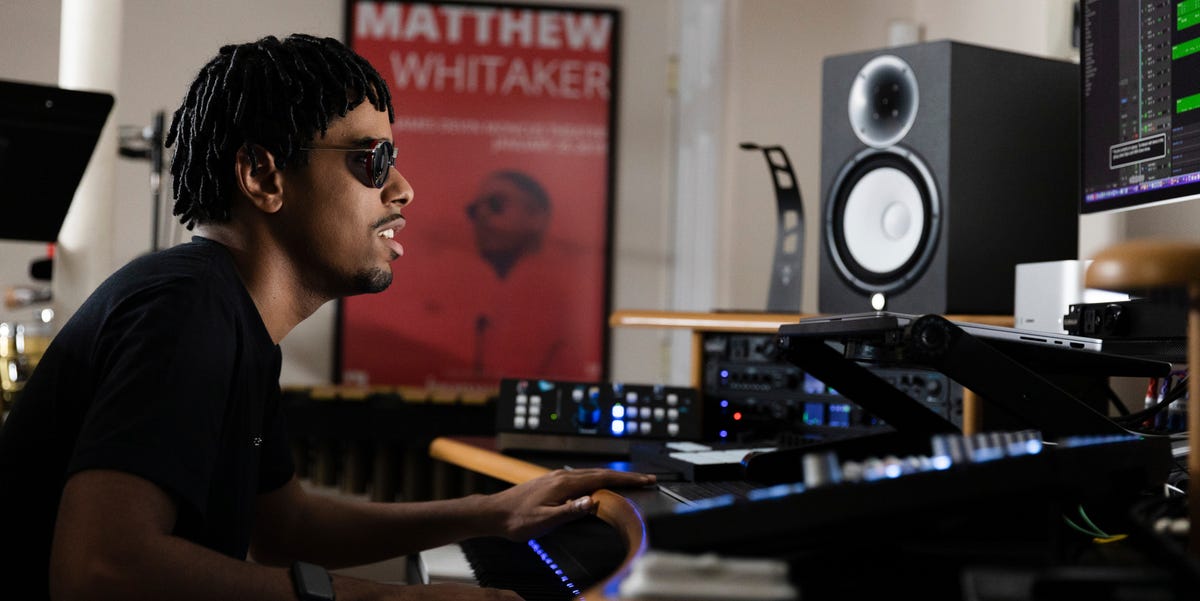
Matthew Whitaker does not make music the way most people imagine music production. There is no dramatic movie scene where a producer leans over his shoulder and says, “Make the snare brighter, kid.” There is no blinking cursor waiting for someone else to explain the screen. Instead, Whitaker, a Grammy-winning jazz pianist, organist, composer, arranger, and producer, sits at the center of a modern digital studio where technology speaks, listens, records, edits, andmost importantlygets out of the way.
The groundbreaking software behind much of that workflow is Apple’s Logic Pro, working alongside VoiceOver, the built-in screen reader on macOS. Whitaker first explored home recording with GarageBand, Apple’s beginner-friendly music app, before moving into Logic Pro around 2015. That upgrade matters. GarageBand is like a friendly neighborhood kitchen; Logic Pro is the professional studio with every drawer labeled, every spice available, and enough buttons to make a spaceship jealous.
For Whitaker, who is blind, Logic Pro is not simply a digital audio workstation. It is a creative command center. It lets him record MIDI performances, build arrangements, edit audio, add effects, shape tempo, and produce music with a level of independence that would have been far harder in an earlier era of studio technology. The result is not “accessible music” as a separate category. It is musicbold, complex, joyful, swinging, and alivemade possible by talent first and technology that knows how to serve talent second.
Who Is Matthew Whitaker?
Matthew Whitaker is one of those musicians whose biography sounds like someone forgot to include the slow part. His passion for music began when he was three years old, after receiving a small keyboard from his grandfather. By childhood, he was already performing, absorbing songs by ear, and developing the kind of musical memory that makes other musicians quietly check whether they practiced enough this week.
He has since become known as a multi-instrumentalist, bandleader, composer, and arranger. His career includes performances on major stages, appearances on national television, film scoring, documentary work, and a Grammy win for his contribution as an arranger on “Super Mario Praise Break” with Bryan Carter and Charlie Rosen. He has also been recognized for work across jazz, television, film, and accessibility advocacy.
But the most interesting part of Whitaker’s story is not simply that he is a brilliant musician who happens to be blind. It is that he treats technology as part of the band. Logic Pro, VoiceOver, MIDI keyboards, plug-ins, audio effects, and screen-reader commands all become tools in the same musical universe as piano voicings, organ drawbars, gospel harmony, jazz improvisation, and rhythmic surprise.
The Software at the Center: Logic Pro and VoiceOver
Logic Pro is Apple’s professional music production software for Mac. In plain English, it is a digital audio workstation, often shortened to DAW. A DAW is where musicians record tracks, edit performances, arrange songs, mix audio, add virtual instruments, and polish a project until it sounds less like a basement demo and more like something that deserves good headphones.
For many producers, Logic Pro is attractive because it includes a large library of plug-ins, software instruments, loops, samples, and sound design tools. For Whitaker, the power of Logic Pro becomes even more meaningful because it works with VoiceOver. VoiceOver reads interface elements aloud and allows users to navigate a Mac with keyboard commands, gestures, or braille devices. In a music production environment, that means menus, controls, tracks, plug-ins, and project positions can become usable without sight.
This is where the story becomes bigger than one famous artist using one famous app. Logic Pro’s accessibility settings allow VoiceOver to announce playhead positions during playback, recording, and scrubbing. Plug-ins can open in a controls view so parameters are available to VoiceOver. That might sound small if you have never had to mix a song without seeing a screen. In reality, it is the difference between “I need someone to adjust this for me” and “I can shape this sound myself.”
Why This Is Groundbreaking
The word “groundbreaking” gets tossed around so often in tech writing that it sometimes needs a nap. But here, it fits. Accessible music production software does not merely add convenience. It changes who gets to participate fully in the recording process.
Traditional studios have often depended heavily on visual interfaces: waveforms, meters, grid views, colored tracks, tiny knobs, plug-in windows, and timelines that assume the producer can see everything at once. That design can be fast for sighted users but exhausting or impossible for blind and low-vision musicians if accessibility is an afterthought.
Logic Pro with VoiceOver turns many of those visual tasks into navigable, audible, keyboard-driven actions. Whitaker can record, stop, play back, move through a project, use MIDI, add effects, and experiment. The screen does not disappear; it becomes translated. Instead of forcing the musician to adapt completely to the machine, the machine begins to adapt to the musician. Imagine a studio assistant who never drinks your coffee, never complains, and reads every control aloud. That is the dream, minus the coffee theft.
How Matthew Whitaker Uses Logic Pro to Produce Music
Recording Ideas Quickly
One of the most important jobs of production software is capturing ideas before they run away. Musicians know the feeling: a melody arrives, taps you on the shoulder, and if you do not record it fast enough, it leaves town with no forwarding address.
Whitaker can open a Logic Pro session, connect a MIDI keyboard, choose sounds, set a tempo, and record ideas directly into the project. MIDI is especially useful because it captures performance data such as notes, timing, and velocity. That means a keyboard performance can later trigger different sounds: piano, organ, synth, strings, bass, or something strange enough to make a cat leave the room.
For a jazz musician, this flexibility is huge. Jazz depends on spontaneity, but production depends on organization. Logic Pro gives Whitaker a way to capture the spark and then arrange it with precision.
Working With Tempo and Feel
Tempo is not just speed. It is personality. A song at 92 BPM can stroll. A song at 192 BPM can sprint down the block wearing shiny shoes. Whitaker has demonstrated working with fast tempos in Logic Pro, setting the project tempo and recording complex keyboard parts into the software.
Logic Pro also includes tempo-related tools such as Smart Tempo, which can analyze recordings and help create tempo maps. For musicians who do not always want to play to a rigid metronome, this is especially useful. A performance can breathe naturally, and the software can help the project follow that human feel instead of flattening it into a robotic grid. Nobody wants gospel-jazz fusion to sound like it was assembled by a toaster with a business degree.
Adding Effects and Sound Design
Whitaker has shown how audio tracks in Logic Pro can be transformed with effects, including pitch changes and vocal processing. This is part of what makes modern music production so playful. A recorded voice can become deep, high, wide, distant, warm, robotic, or dreamlike. A keyboard can become a horn section, a cinematic pad, or a rhythm machine.
For a producer, effects are not decorations. They are storytelling tools. Reverb can place a sound in a cathedral or a bedroom. Delay can make a phrase bounce like a basketball in a subway station. Compression can make a track feel tighter and more immediate. EQ can carve space so each instrument has room to speak without elbowing the others.
Accessible plug-in controls matter because they allow blind musicians to make those creative choices independently. If a producer can hear the change, navigate the parameter, and adjust the setting, the decision stays in the artist’s hands.
VoiceOver: The Invisible Studio Partner
VoiceOver is not music software by itself, but in Whitaker’s workflow it becomes essential. It tells him where he is in a project, helps him navigate controls, and supports the keyboard-driven actions that make production possible. He has described using simple commands such as recording and playback controls while moving through a session.
There is a funny tension here: when producing music, a screen reader is both helpful and potentially distracting. Spoken feedback is useful when navigating, but once a musician is listening deeply to a track, extra speech can get in the way. Whitaker has noted that he may turn VoiceOver off at certain moments so he can focus on the sound. That small detail reveals a sophisticated workflow. Accessibility is not about having every tool talk all the time. It is about having control over when information appears, how it appears, and when silence is more valuable.
In other words, good accessibility does not shout. It performs like a great rhythm section: steady when needed, quiet when the solo begins.
From GarageBand to Logic Pro: Why the Upgrade Matters
GarageBand is often the first music production app people meet. It is friendly, approachable, and powerful enough to create real music. For many young creators, GarageBand is the gateway drug of digital music productionlegal, free on many Apple devices, and dangerously good at making people say, “Maybe I should start a podcast.”
Logic Pro is the next step. It offers deeper editing, more advanced mixing, expanded sound libraries, professional plug-ins, detailed automation, and serious arrangement tools. For Whitaker, moving from GarageBand to Logic Pro meant entering a more flexible production environment. It gave him room to create at a professional level while keeping the accessibility advantages of the Apple ecosystem.
This progression also mirrors the journey of many producers. Start with simple tools. Learn the basics. Build confidence. Then move into a professional platform when your ideas demand more space. The difference in Whitaker’s case is that accessibility is not optional. A professional tool that is not accessible is not truly professional for everyone.
Accessible Music Technology Is Not a Bonus Feature
One of the biggest lessons from Whitaker’s work is that accessibility should not be treated like a “nice extra” buried somewhere between dark mode and sticker packs. It is a creative infrastructure. When music software is accessible, more people can compose, record, produce, mix, teach, collaborate, and release music.
Blind musicians have always created extraordinary art. What changes with accessible software is the degree of independence available in the production process. Instead of relying on another person to interpret a screen, adjust a plug-in, or manage a session, an artist can work directly with the tools. That independence can change the mood of the room. It can speed up experimentation. It can protect creative privacy. It can also reduce the awkward sentence every artist hates: “Can you move that thing slightly to the left? No, the other left. No, the tiny thing. No, not that tiny thing.”
Whitaker’s advocacy also points toward a better future for music software design. Developers who listen to blind and low-vision users can build interfaces that are clearer, more logical, and more efficient for everyone. Accessibility often improves usability across the board. Captions help more than deaf viewers. Keyboard shortcuts help more than power users. VoiceOver-friendly controls help more than blind producers. Good design has a habit of inviting more people to the party.
What Producers Can Learn From Matthew Whitaker’s Workflow
First, learn your tools deeply.
Whitaker’s use of Logic Pro shows that talent and technology work best when the artist understands the system. The software is powerful, but it does not create taste. It does not replace musicianship. It simply gives musical ideas a place to grow.
Second, build a workflow that supports speed.
Creativity often arrives quickly. A DAW should help you capture ideas before they fade. Templates, keyboard commands, accessible navigation, and familiar instruments all reduce friction. The less time you spend fighting the interface, the more time you spend making music.
Third, accessibility and professionalism belong together.
A tool is not truly advanced if it leaves out talented users. Logic Pro’s accessibility features show how professional software can support different ways of working without lowering the creative ceiling.
Experience Section: What It Feels Like to Produce Music With Accessible Software
To understand the importance of the software that helps Matthew Whitaker produce music, imagine building a song in a room where every object matters but not every object is visible. The kick drum has to land correctly. The bass must lock in. The piano voicing needs warmth, not mud. The organ should growl, not swallow the singer. The tempo has to move with life. Now imagine doing all of that while the visual interface is translated into sound, commands, memory, and muscle movement.
That experience changes the relationship between musician and machine. For a sighted beginner, music software can feel like staring at an airport control tower designed by someone who really loved tiny icons. For a blind producer, the challenge is different: the software must communicate its structure clearly enough to be navigated without visual scanning. Tracks, regions, plug-ins, menus, and parameters need to behave predictably. When they do, the studio becomes a place of independence. When they do not, creativity gets stuck behind a bad user interface, which is a terrible place for creativity to be. Creativity prefers snacks, fresh air, and a working shortcut key.
Accessible production also affects confidence. When an artist can open a session, record a part, play it back, change a sound, add an effect, and save the project independently, the computer becomes less like a gatekeeper and more like an instrument. That matters emotionally as much as technically. The artist does not have to wait for permission. The idea does not have to be explained before it is tested. A strange sound can be tried privately. A mistake can be fixed without ceremony. A new groove can be chased at midnight because inspiration apparently has no respect for normal sleeping hours.
Matthew Whitaker’s example also highlights the value of repetition and personal setup. A blind producer may rely heavily on consistent keyboard commands, familiar project templates, named tracks, predictable plug-in behavior, and well-organized sound libraries. Over time, the studio becomes a mental map. The artist knows where things are, how they respond, and how to move through them quickly. That is not a limitation. Many great producers work from highly personalized setups. The difference is that accessibility makes the setup usable in the first place.
There is also a listening advantage built into this kind of workflow. When the screen is not the main focus, the ear takes the lead. That does not mean blind musicians magically hear better; it means the production process can become intensely audio-centered. Decisions are made by what the track does, not by what the waveform looks like. Does the chord lift the chorus? Does the reverb blur the phrase? Does the rhythm section breathe? Does the mix feel like a room full of musicians or a drawer full of cables? These are musical questions, and accessible software helps keep them at the center.
For young producers, educators, and developers, the lesson is clear: accessibility is not charity, and it is not a side quest. It is part of the future of music. The more flexible the tools become, the more voices can enter the studio. Matthew Whitaker’s use of Logic Pro and VoiceOver proves that when technology is designed with real users in mind, it does not reduce artistry to convenience. It amplifies artistry. It lets the musician move faster, dig deeper, and turn a blank session into something that swings, sings, and refuses to sit politely in the corner.
Conclusion
The groundbreaking software that helps Matthew Whitaker produce music is not a mysterious secret app hidden in a jazz cave. It is the powerful combination of Logic Pro and VoiceOver, supported by a broader ecosystem of accessible Apple tools, MIDI instruments, plug-ins, and production techniques. What makes it remarkable is not only what the software can do, but what it allows Whitaker to do independently.
Logic Pro gives him a professional studio inside a Mac. VoiceOver helps make that studio navigable. Together, they support a creative process where recording, arranging, editing, experimenting, and producing can happen on Whitaker’s terms. His story is a reminder that the future of music technology should not be measured only by louder synths, shinier plug-ins, or artificial intelligence that writes a chorus before breakfast. It should also be measured by access: who can create, who can control the tools, and whose musical imagination gets room to run.
Matthew Whitaker already has the musicianship. The software simply opens more doors. And when an artist like him walks through those doors, the rest of us get to hear what possibility sounds like.