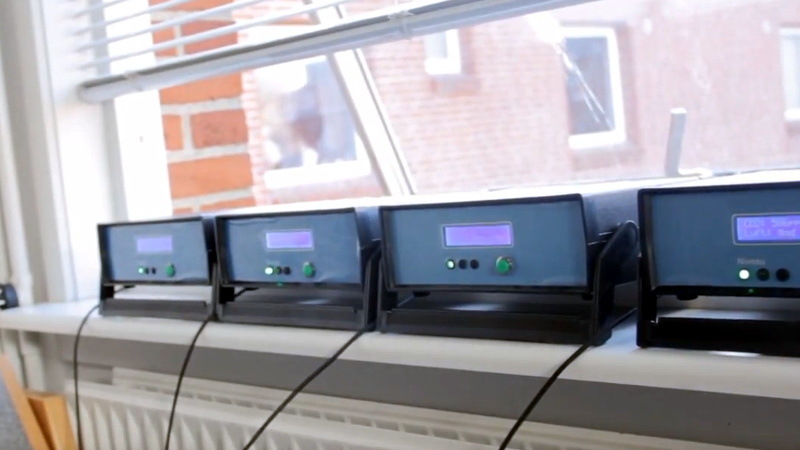
If you have ever looked at a single air quality monitor and thought, “Nice, but what is the kitchen doing while the bedroom slowly turns into a sleepy CO2 cave?” then congratulations: you are ready to build an army. Not one sensor. Not two. A full squad of ESP32-powered air quality nodes quietly reporting from the rooms, corners, and trouble spots that your lungs actually care about.
The appeal is obvious. The ESP32 is cheap, Wi-Fi friendly, flexible, and just powerful enough to feel clever without becoming high-maintenance. Pair it with the right particulate, CO2, VOC, temperature, and humidity sensors, and suddenly your home office, workshop, classroom, or apartment becomes a living map of what the air is doing all day. That is useful because indoor air is rarely “fine” in a single, universal sense. It changes with cooking, candles, traffic infiltration, ventilation, cleaning products, wildfires, pets, printers, hobbies, and the deeply suspicious act of someone reheating fish in a shared space.
Building a fleet of sensors is not just a fun weekend electronics project. It is a practical way to understand patterns that one monitor will miss. A lone sensor can tell you something. A network can tell you where, when, and why. That is the difference between checking the weather and owning the radar.
Why Build a Sensor Army Instead of a Single Monitor?
Air quality is local in the most annoying way possible. The living room may look fine while the kitchen spikes during dinner. The bedroom may quietly accumulate CO2 overnight. A garage workshop can look perfectly normal until a solvent, 3D printer, or dusty cutting job sends the numbers climbing. One reading from one box in one room is better than guessing, but it is still guessing with extra confidence.
A distributed network solves that. You can place one node outdoors for context, one near the kitchen, one in bedrooms, one in a home office, one in the garage, and one near your HVAC return. Once that data starts rolling in, trends jump out fast. You may discover that your “good ventilation” is only good in one room, that your air purifier is heroic in a 10-foot radius and lazy everywhere else, or that your morning toast routine is basically a tiny industrial event.
There is also a practical health reason to care. Fine particles, especially PM2.5, are the tiny troublemakers that can get deep into the lungs, and sustained exposure is associated with respiratory and cardiovascular harm. That makes particulate sensing one of the most useful parts of a DIY network. Meanwhile, CO2 is not a full indoor air quality scorecard, but it is an extremely helpful clue for understanding ventilation in occupied spaces. Add humidity and temperature, and now your readings become easier to interpret instead of floating around like mysterious numbers from the future.
Choosing the Right Hardware for the Job
The ESP32: The Tiny General in Charge
The ESP32 is ideal for this kind of project because it combines low cost, Wi-Fi, solid library support, and enough processing headroom for sensor polling, local displays, simple dashboards, and network publishing. It also offers light-sleep and deep-sleep modes, which matters if you want battery-powered nodes rather than a spaghetti plate of USB cables draped across your building.
For always-on indoor nodes, a standard ESP32 dev board or ESP32-S3 board is usually the easiest path. For low-power deployments, choose a board and firmware strategy that make sleep mode practical. In other words, do not design a battery sensor and then act shocked when Wi-Fi and a bright display turn it into a gourmet battery toaster.
Particulate Matter Sensors
If your goal is to track smoke, cooking particles, dust, and general airborne gunk, start with a PM sensor. A popular DIY option is the PMSA003I-style sensor family, which reports particle concentrations such as PM1.0, PM2.5, and PM10. For a home network, PM2.5 is the star of the show because it is often the most informative number for health-related monitoring and indoor event detection.
Optical PM sensors are fantastic for spotting trends, spikes, and room-to-room differences. They are not magical truth machines. Humidity, particle type, and calibration all affect results. That does not make them useless. It just means you should treat them like measuring instruments, not fortune cookies.
True CO2 Sensors vs. “Sort Of CO2-ish” Readings
This is where many builds either become respectable or wander off into nonsense. If you want actual CO2 data, use a true CO2 sensor such as an SCD40 or SCD41 class device. These sensors directly measure CO2 and are far more useful for ventilation insights than “equivalent CO2” values inferred from VOC data.
That distinction matters. A VOC sensor can be useful for tracking changes in indoor pollution from cleaners, cooking, or off-gassing, but it should not be asked to cosplay as a ventilation expert. True CO2 sensing costs more, but it gives your network a much stronger backbone.
VOC, Temperature, and Humidity Sensors
VOC sensors are best used as trend indicators. They can tell you that the air chemistry is changing, which is exactly what you want during activities like painting, using cleaning products, or firing up a printer enclosure. They are less useful when people expect a perfect lab-grade explanation of exactly which compound is present and in what absolute amount. That is not a flaw in your build. That is a mismatch between sensor class and expectation.
Temperature and humidity are essential sidekicks because they help explain everything else. High humidity can skew particle readings, comfort changes how people respond to ventilation, and moisture problems often travel with indoor air quality issues. The best sensor networks do not chase one number. They collect enough context to make each number meaningful.
How to Design the Network So It Scales
Think in Roles, Not Just Devices
The smartest DIY sensor fleets are not identical clones. They are specialized units. One outdoor reference node tells you what is coming in from outside. Kitchen and living room nodes catch daily activity spikes. Bedroom nodes reveal overnight ventilation problems. A garage or hobby-space node watches for event-driven pollution. If you have a central HVAC system, a node near a return vent can tell you what the house is feeding back into circulation.
A practical architecture looks like this: each ESP32 reads local sensors, timestamps the data, and publishes it over Wi-Fi using MQTT, HTTP, or another lightweight protocol. A central dashboard then stores and visualizes the readings. Home Assistant, InfluxDB, Grafana, Node-RED, and similar tools are popular choices because they let you build alerts, trends, and room-by-room comparisons without reinventing the software wheel in your garage.
Power and Enclosures Matter More Than Beginners Expect
Indoor plug-in nodes are much easier than battery builds, especially when you are using particulate sensors with fans or CO2 modules that prefer steady operation. Battery power makes sense for low-duty-cycle, trend-oriented nodes, but it requires more discipline around sleep intervals, radio activity, and display usage.
Enclosures should protect the electronics without smothering the sensors. That means vents, thoughtful airflow, and no plastic box that traps heat like a tiny sauna. Sensor placement inside the enclosure matters too. If your ESP32 board warms the air around your temperature sensor, your readings will be “accurate” only in the sense that they accurately describe the climate inside your bad decision.
Calibration, Placement, and the Art of Not Fooling Yourself
This is the part that separates a cool project from a trustworthy one. Low-cost sensors can be extremely useful, but only if you respect their limitations. Many low-cost PM sensors are sensitive to humidity and can over- or under-report depending on conditions. Sensor-to-sensor drift is real. Placement errors are real. Poor airflow is real. Mounting a node directly beside a toaster and calling it “the room average” is also, sadly, very real.
For indoor deployment, place sensors around breathing-zone height when possible, roughly three to six feet off the floor. Keep them away from obvious pollution sources if your goal is representative room measurements, and also away from pollution sinks like air cleaners if you want a true room average. Put differently: do not install your bedroom monitor directly on top of the purifier and then brag that your room is cleaner than the Alps.
Outdoor nodes need even more care. Shield them from rain, direct sun, and weird airflow pockets. If you want better trust in PM data, compare your outdoor readings against a nearby trusted source when possible. A low-cost network becomes much more useful when at least one node has been checked against a reference monitor, a co-location period, or a reliable public data source. That gives you a correction point instead of pure hope.
CO2 sensors deserve their own caution label. They are excellent for tracking occupancy and ventilation patterns, but they should be interpreted carefully. A rising CO2 line often means the room is occupied and not exchanging air quickly enough. It does not mean every other pollutant in the room is necessarily high, and a low CO2 reading does not automatically mean the air is otherwise pristine. Ventilation is one chapter of the story, not the whole book.
If you convert PM2.5 into AQI for dashboards, use the current U.S. AQI approach rather than outdated breakpoint tables floating around old blog posts. That is a small detail that makes a big difference when your system is meant to trigger alerts or tell people whether to ventilate, filter, or back away from the frying pan.
What an ESP32 Sensor Army Can Actually Teach You
Once the nodes are live, the data gets interesting fast. The kitchen monitor may spike during searing, frying, or even making toast. The bedroom monitor may reveal that CO2 climbs overnight with the door closed, even when the rest of the home looks fine. An office node may show VOC bumps right after cleaning, while an outdoor node shows that opening a window is brilliant on some days and a terrible idea on smoky ones.
That is where the project becomes more than a gadget. You can test ventilation strategies, compare air purifier settings, study how quickly different rooms recover after pollution events, and build automation rules. Maybe the HVAC fan turns on when PM2.5 rises. Maybe an alert fires when bedroom CO2 stays elevated for hours. Maybe your dashboard warns you that the “fresh air” outside is currently a smoke-flavored lie.
In larger spaces, a sensor army also helps identify inequity inside the same building. One classroom may have decent ventilation while the one next door runs stale all afternoon. One bedroom may trap heat and particles because of weak circulation. One workshop may need source capture, not just a purifier in the corner pretending to be helpful.
Common Mistakes That Make DIY Air Data Weird
Mistake #1: Trusting Every Reading Immediately
New sensors often need warm-up time, stabilization, or baseline adjustment. A fancy graph from the first five minutes is entertainment, not insight.
Mistake #2: Treating VOC Readings Like a Chemical Lab Report
VOC sensors are superb for trend detection, not compound-by-compound truth. Use them to see changes and events, not to declare that your hallway contains exactly 47 molecules of villainy.
Mistake #3: Ignoring Humidity and Temperature
Without environmental context, your PM and VOC interpretations get shakier. Humidity can distort PM behavior, and thermal conditions can affect both sensor response and human comfort.
Mistake #4: Poor Placement
Behind a curtain, next to a vent, above a toaster, beside an air purifier, in direct sun, or inside an airless decorative box: these are all classic ways to generate crisp charts and questionable conclusions.
Field Notes: What the Experience of Building a Sensor Army Is Really Like
The experience of building an army of ESP32 air quality sensors is equal parts science, detective work, and mild domestic comedy. At first, the project feels like a straightforward electronics build: connect a board, wire a sensor, flash firmware, watch numbers appear. That lasts for about fifteen minutes. Then the numbers start doing things, and suddenly you are no longer “building a monitor.” You are investigating a building.
The first surprise is usually how dramatic ordinary life looks on a graph. Toasting bread can resemble a pollution event. Pan-frying dinner can launch PM2.5 like a fireworks finale. Vacuuming can take settled particles and throw them back into the air like a glitter cannon for dust. A good sensor network turns invisible habits into visible patterns, and once you see those patterns, it is hard to unsee them.
The second surprise is that no two rooms behave the same way. A bedroom with the door closed can show a slow overnight CO2 rise that never appears in the hallway. A home office may remain stable until a cleaner, candle, or printer wakes up the VOC sensor. A garage node might stay quiet for days and then lose its mind the minute paint, solvents, or sawdust enter the picture. That is when the value of the “army” becomes obvious. One monitor gives you a headline. Six monitors give you a map.
There is also a very humbling stage where you realize sensors are honest, but not always simple. A particulate sensor near a humidifier may become melodramatic. A poorly placed node near an air purifier may act like the room is spotless when only that tiny bubble is clean. A temperature sensor tucked too close to warm electronics starts reporting a climate that exists mainly inside the enclosure. The lesson is not that sensors are bad. The lesson is that the air around the sensor is exactly what it measures, whether or not that is the air you meant to measure.
One of the best experiences in a project like this is testing interventions and seeing immediate results. Turn on a HEPA purifier and watch a room recover faster after cooking. Open windows on a clean day and see CO2 drop. Open them on a smoky day and watch yourself make the opposite of progress. Run a bathroom or kitchen exhaust fan and compare decay curves. These little experiments turn “air quality advice” into something tangible. You stop guessing and start learning how your actual space behaves.
Another memorable part is how quickly the project changes your habits. You begin to pre-ventilate before cooking, shut windows during bad outdoor conditions, and notice that some “fresh-smelling” products make the VOC trend line climb like it is training for a marathon. You become the kind of person who can say, with complete sincerity, “The bedroom needs more nighttime air exchange,” which is either impressive or a warning sign, depending on your audience.
Most of all, building a sensor army teaches patience. Good data comes from stable placement, repeated observation, and comparing trends over time. The goal is not to worship every spike. It is to understand what repeated patterns mean and which actions improve them. That is what makes the project so satisfying. You are not building gadgets for shelf décor. You are building a system that helps you see your environment clearly, and maybe breathe a little easier while you are at it.
Conclusion
Building an army of ESP32 air quality sensors is one of those projects that starts as maker fun and ends as real infrastructure. The hardware is accessible, the data is useful, and the lessons arrive quickly. With the right combination of PM, CO2, VOC, temperature, and humidity sensing, you can transform a handful of inexpensive nodes into a room-by-room intelligence network for your air.
The key is to build with discipline. Choose the right sensors, respect calibration and placement, keep the architecture simple, and treat the readings as evidence instead of decoration. Do that, and your ESP32 fleet will tell you more than whether the air is “good” or “bad.” It will tell you how your spaces actually behave, which is far more valuable. And once you have that kind of visibility, going back to a single mystery box in one room feels a little like trying to defend a castle with one sleepy guard and a strongly worded note.