Note: This article is written for web publication and focuses on Bluelounge’s Saidoka iPhone Charging Dock as a legacy iPhone accessory, especially for older Lightning iPhones and collectors of minimalist desktop gear.
Some gadgets scream for attention. Others sit quietly on your desk, solve one annoying problem, and make you wonder why your charging cable had been living like a wild garden snake for so many years. Bluelounge’s Saidoka iPhone Charging Dock belongs to the second group. It was not designed to turn your workspace into a sci-fi cockpit. It was designed to keep your iPhone charged, visible, and usable while you worked.
That sounds simple, but anyone who has ever picked up a phone with 4% battery and a cable dangling behind the desk knows that simple can feel luxurious. Saidoka was Bluelounge’s answer to the everyday problem of the desk iPhone: you want it close enough to see notifications, stable enough not to slide around, angled enough to use comfortably, and tidy enough that your workspace does not look like a cable convention held a late-night afterparty.
Although Saidoka is now best understood as a legacy accessory rather than a modern universal dock, it remains a fascinating example of smart product design. It was made during the era when the iPhone 5, iPhone 5c, iPhone 5s, and early Lightning-based iPhones defined Apple’s mobile design language. Today, when iPhone 15 and later models use USB-C, Saidoka is not a one-size-fits-all answer for every current iPhone owner. Still, for older iPhone users, design collectors, or anyone studying how small accessories can improve daily routines, this compact charging dock deserves a closer look.
What Is Bluelounge’s Saidoka iPhone Charging Dock?
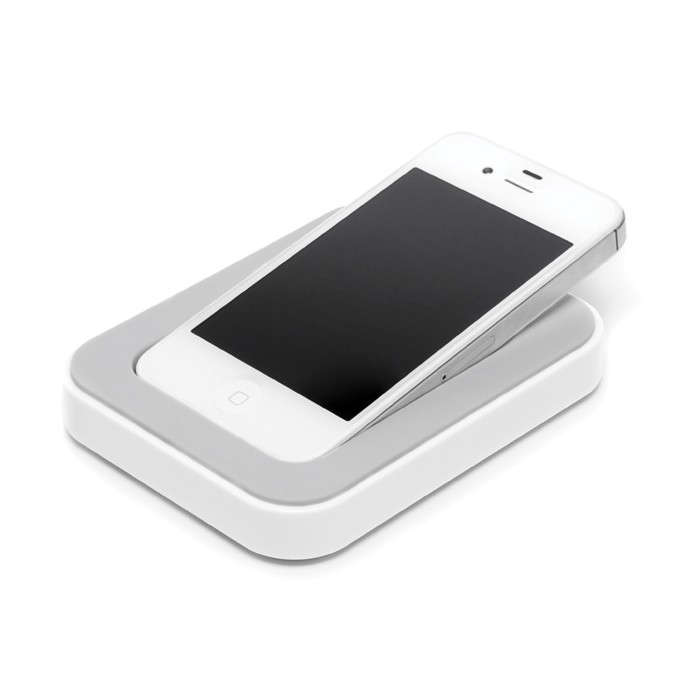
Bluelounge’s Saidoka is a desktop iPhone charging dock designed to hold an iPhone at a low, keyboard-like angle while charging. Unlike upright docks that present the phone like a tiny billboard, Saidoka reclines the device so it can sit beside a keyboard, trackpad, or notebook without towering over the workspace.
The idea is wonderfully practical: instead of laying your iPhone flat on the desk, where every notification requires a neck bend worthy of a yoga warm-up, Saidoka lifts and angles the screen. You can glance at incoming messages, tap through apps, check the time, answer calls, or use the phone as a small side display while it stays connected to power.
The product was offered in versions for Apple’s older 30-pin connector and the Lightning connector. The Lightning version was especially relevant for the iPhone 5 generation and similar compact iPhones. It also came in black and white, keeping with Bluelounge’s familiar minimalist style. No neon racing stripes. No giant logo shouting across the desk. Just a smooth, low-profile accessory that looked like it understood the assignment.
Design: Minimal, Low, and Very Bluelounge
Bluelounge has long been associated with cable management and everyday organization products, so Saidoka fits the brand’s broader personality. It is not flashy; it is functional with a design-school haircut. The dock uses a rounded rectangular body with a gentle interior slope leading to the connector. The overall look is clean and compact, making it easy to place next to a keyboard, monitor stand, bedside lamp, or office notebook.
One of Saidoka’s most distinctive features is its angle. Many docks hold a phone nearly upright, which is useful for viewing but not always comfortable for typing or tapping. Saidoka takes a different approach. It places the phone closer to the angle of an Apple keyboard or Magic Trackpad. That makes the phone feel more like part of the desk setup rather than a separate object demanding attention.
This matters more than it sounds. A phone sitting upright can be great for video calls, but it can also wobble when you tap it. A phone lying flat can be stable, but the screen is harder to read. Saidoka lands between those extremes. It gives the iPhone a natural viewing position while keeping the center of gravity low, which is exactly what you want from a device you will poke, swipe, silence, and occasionally glare at when another notification arrives.
Micro-Suction Rails: The Small Detail That Does Big Work
A charging dock is only useful if it stays where you put it. Saidoka used micro-suction rails on the underside to help grip smooth desk surfaces. These rails were not traditional sticky adhesive strips that leave residue and make your desk feel like it lost a fight with tape. Instead, micro-suction technology helps the dock cling to clean, flat surfaces while still allowing repositioning.
That little detail supports the whole experience. You can dock the phone, tap the screen, and remove the phone without the dock sliding across the desk like a tiny plastic sled. On a smooth desk, the grip helps Saidoka feel more permanent, even though you can still move it when your workspace changes.
Of course, micro-suction works best on clean, non-porous surfaces. A dusty, textured, or uneven desk will reduce its grip. That is not a design failure; it is physics being dramatic. Wipe the surface, keep the rails clean, and the dock behaves much better.
Compatibility: Great for Older iPhones, Not for Every Modern Model
Compatibility is the most important thing to understand before getting excited about Saidoka. The Lightning version was designed around older Lightning iPhones, especially smaller models from the iPhone 5 era. Some listings and users have associated it with models such as iPhone 5, iPhone 5s, iPhone 5c, and the original iPhone SE form factor. That makes it appealing if you still use one of those phones as a desk device, music player, alarm clock, testing phone, or nostalgic pocket computer.
However, modern iPhones are larger, heavier, and many current models no longer use Lightning at all. Apple moved iPhone 15 and later models to USB-C, so a Lightning Saidoka dock will not connect to those phones. Even with Lightning iPhones, phone size and case thickness matter. The dock was designed around a snug, neat fit, not the bulky armored case your phone wears when it is preparing for a mountain expedition.
Saidoka included a removable rubber insert or tray that helped accommodate a phone with or without certain slim cases. That was clever, but it did not magically make the dock universal. Users with thick cases often had to remove the case or accept a less ideal fit. In practical terms, Saidoka is best for naked iPhones, very slim skins, or carefully matched older models.
Charging and Desk Use: Why the Angle Matters
The best thing about the Saidoka iPhone dock is not merely that it charges a phone. Any cable can do that, assuming you can find it before it slides behind the desk and joins the kingdom of lost accessories. The magic is that Saidoka turns charging into a usable position.
When an iPhone sits in Saidoka, it becomes a small control panel. You can check notifications without lifting the device. You can keep a messaging app open. You can monitor a timer, glance at a calendar, control music, or keep a two-factor authentication code visible while logging into accounts. In a work setup, that can be surprisingly helpful.
The low angle is especially good for short interactions. You are not meant to write a novel on the phone in the dock, unless you enjoy wrist discomfort and questionable life choices. But for quick taps, swipe gestures, music controls, calendar checks, and incoming alerts, the angle feels natural. The phone is close, charged, and visible without becoming the main character of your desk.
Build Quality and Everyday Practicality
Saidoka’s build was simple: a compact plastic body, a recessed charging area, soft lining where the phone rests, micro-suction underneath, and a cable connection for power. Some reviewers noted that the glossy plastic shell felt light or somewhat hollow, but the dock’s practical design still made it useful. This was not a heavy metal sculpture pretending to be office equipment. It was a compact desktop accessory focused on convenience.
The included micro-USB cable was another interesting choice. Instead of requiring a full Lightning cable to plug into the back of the dock, Saidoka used its own dock connector setup and connected to a computer USB port or wall adapter. For the time, that helped reduce desk clutter and made the dock feel like a dedicated station rather than a loose cable wearing a fancy hat.
As with many docks, the main limitation was device fit. A precise dock can feel elegant when the phone matches it perfectly. That same precision becomes frustrating if your case adds too much thickness or the phone dimensions do not align. Saidoka rewards users who appreciate a clean, intentional setup. It is less forgiving for people who change phones, cases, and cable types every six months.
Saidoka vs. Upright iPhone Docks
Compared with a traditional upright iPhone dock, Saidoka feels more like a desk companion than a display stand. Upright docks are useful when you want the phone facing you directly, especially for FaceTime, StandBy-style viewing, or glanceable widgets. But upright docks can be awkward for typing because the phone may move when you tap it, and the screen can sit too high or too vertical for relaxed use.
Saidoka goes the other way. It emphasizes hands-on access. The phone is lower, closer, and easier to tap while seated at a desk. This makes it better for productivity workflows where the iPhone is secondary to a laptop or desktop computer. Think of it as a sidecar, not a podium.
That difference gives Saidoka its personality. It is not trying to replace a monitor, smart display, or MagSafe stand. It is trying to make your phone behave politely while charging. In a world full of accessories that act like they are solving world peace because they hold a cable, that restraint is refreshing.
Who Should Consider a Bluelounge Saidoka Dock Today?
Saidoka is not the obvious choice for everyone in 2026. If you own an iPhone 15 or newer, you should look for a USB-C dock or a MagSafe-compatible charging stand. If you use a large iPhone Pro Max model, Saidoka’s original design language will likely feel too small and too specific. And if you never remove your rugged case, this dock may look at your phone and politely resign.
However, Saidoka still makes sense for certain users. It is a good fit for people who keep an older Lightning iPhone on a desk as a backup phone, music controller, smart-home remote, development test device, alarm clock, or minimalist communication tool. It also appeals to collectors of Apple-era accessories and fans of Bluelounge’s cable-management design.
For a home office, a used or well-preserved Saidoka can still bring order to an older-device setup. For a nightstand, it can keep a compact iPhone from vibrating itself into the mysterious gap between bed and wall. For a writing desk, it gives the phone a place to live so it stops migrating under papers, notebooks, receipts, and that one pen you keep because it “still might work.”
Pros and Cons of Bluelounge’s Saidoka iPhone Charging Dock
Pros
Saidoka’s biggest strengths are its viewing angle, compact footprint, clean design, and micro-suction stability. It makes an older iPhone easier to use while charging and keeps the desk looking intentional. The removable insert adds some flexibility, and the black or white finishes pair well with many Apple-style setups.
Cons
The biggest drawback is compatibility. Saidoka was created for a much earlier iPhone era. It is not ideal for large modern iPhones, thick cases, or USB-C models. Its plastic construction may not satisfy users who prefer heavy aluminum docks, and availability today may depend on used markets, old retail stock, or specialty sellers.
Buying Advice: What to Check Before You Buy
If you are shopping for a Bluelounge Saidoka iPhone Charging Dock today, check three things before clicking “buy.” First, confirm the connector. Make sure you are looking at the Lightning version if your phone uses Lightning, or the 30-pin version if you are buying it for a much older iPhone or iPod. These are not interchangeable.
Second, confirm your phone model and case thickness. Saidoka was made for smaller older iPhones, so do not assume it will fit every Lightning device. If the seller provides model compatibility, read it carefully. If the listing only says “iPhone dock” and nothing else, treat it like a mystery box with better lighting.
Third, inspect condition. Since Saidoka is a legacy accessory, used units may have worn micro-suction rails, missing inserts, missing cables, scratches, or connector wear. A dock without strong grip can still charge, but it loses part of what made Saidoka special. A missing tray may affect fit. A damaged connector is a deal-breaker unless you enjoy buying desk ornaments with emotional baggage.
Extended Experience Notes: Living With a Dock Like Saidoka
Using a dock like Bluelounge’s Saidoka changes the way a phone behaves on a desk. Without a dock, the phone becomes a wanderer. It starts near the keyboard, moves beside the coffee cup, slides under a notebook, and eventually ends up under a stack of papers as if it has chosen a career in archaeology. With Saidoka, the phone has a home. That alone makes the workspace feel calmer.
The best experience comes during ordinary workdays. You sit down, place the iPhone in the dock, and it immediately becomes part of the setup. The screen is visible enough to check notifications, but not so upright that it demands constant attention. That balance matters. A phone flat on the table is easy to ignore until you miss something important. A phone standing upright can become too tempting, like a tiny glowing vending machine full of distractions. Saidoka sits in the middle: useful, available, but not obnoxious.
For people who work with two-factor authentication codes, calendar reminders, timers, or quick messaging, the dock can save tiny bits of friction all day long. You do not need to pick up the phone, unlock it, set it down, lose the cable, and repeat the ritual like a very boring magic trick. The phone is already positioned where your eyes and hands expect it to be. That sounds minor until you notice how often you reach for your phone during a normal work session.
On a nightstand, the experience is different but still useful. A docked phone is easier to find in the dark. It is less likely to slide off the edge when it vibrates. The angle makes alarms and incoming calls easier to see. It also discourages the classic half-awake cable hunt, where you pat around the nightstand at 1:00 a.m. looking for the charger and accidentally knock over everything except the charger.
The main thing you learn from using a dock like Saidoka is that good accessories do not need to do much. They need to do one job repeatedly without becoming annoying. Saidoka’s job is to make an iPhone charge in a better position. It does not try to be a speaker, lamp, smart hub, or motivational life coach. It simply lifts the phone, angles the screen, grips the desk, and reduces cable chaos. In daily use, that restraint is exactly why it works.
There is also a small emotional benefit to giving your devices intentional places. A desk with a dock, cable organizer, keyboard, and clean charging zone feels more prepared. It nudges you toward better habits. You are more likely to keep the phone charged. You are less likely to leave the cable hanging. You are less likely to waste time searching for the phone under yesterday’s to-do list. Saidoka may be a small accessory, but small accessories often decide whether a workspace feels smooth or mildly cursed.
Conclusion: A Smart Little Dock From a More Compact iPhone Era
Bluelounge’s Saidoka iPhone Charging Dock is a reminder that thoughtful design does not always need to be loud, expensive, or overloaded with features. Its low-angle shape, desk-friendly footprint, micro-suction grip, removable insert, and minimalist finish made it a clever companion for older iPhones. It helped turn the iPhone from a loose object on the desk into a usable, visible, always-charging side tool.
Today, Saidoka is not the best dock for every iPhone owner. Newer USB-C iPhones need newer charging solutions, and larger devices may not fit the original design comfortably. But for users with compatible older iPhones, collectors of Apple accessories, and fans of clean desktop organization, Saidoka still has charm. It solved a real problem with a simple idea: put the phone where you can see it, keep it charged, and stop letting the cable run your desk like it pays rent.