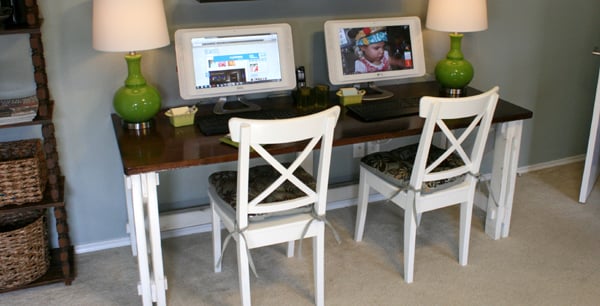
A computer desk reveal is rarely just about showing off a shiny new tabletop. It is really the dramatic final scene in a small domestic sagaone involving tangled charging cables, a coffee mug balanced too close to the keyboard, and at least one mystery adapter nobody is brave enough to throw away.
This workspace makeover began with a simple goal: create a home office setup that looked calm, supported long work sessions, and did not require a five-minute excavation every time a pen was needed. The finished desk combines a generous work surface, ergonomic computer placement, practical storage, controlled lighting, and cable management that keeps the floor from resembling an electronic jungle.
The Before: A Desk That Worked Against the Workday
Before the makeover, the workstation technically qualified as a desk because a computer was sitting on it. That was about the extent of its credentials. The surface was too shallow for comfortable monitor placement, paperwork had no assigned home, and every cable traveled in a different direction as though participating in a poorly organized fire drill.
None of these problems seemed serious alone. Together, however, they created constant friction. The workstation encouraged leaning forward, shifting papers, hunting for chargers, and stopping work to reorganize the same objects repeatedly. The makeover therefore started with behavior rather than decoration: What happens at the desk, which tools are used most often, and where does clutter naturally collect?
The Design Brief for the New Computer Desk
Enough Surface Area Without Taking Over the Room
The selected desk is approximately 60 inches wide and 30 inches deep. Those measurements are examples rather than universal rules, but the extra depth makes a noticeable difference. It allows the monitor to sit farther back while leaving space for a keyboard, mouse, notebook, and coffee without turning every task into a game of desktop Tetris.
A Stable Frame and a Comfortable Edge
Stability matters more than decorative drama. A beautiful desk that wobbles during typing quickly becomes a very expensive percussion instrument. The finished setup uses a rigid frame with adjustable feet, which helps compensate for a slightly uneven floor. The front edge is smooth and gently rounded, reducing uncomfortable pressure against the forearms.
The Ergonomic Computer Desk Setup
The Chair Came First
The most useful setup decision was adjusting the chair before positioning the monitor and accessories. The seat height allows the feet to rest flat on the floor, the lower back receives support, and the shoulders can remain relaxed. The armrests sit low enough that they do not lift the shoulders or prevent the chair from moving close to the desk.
Monitor Height and Viewing Distance
The main monitor is centered directly in front of the chair, approximately an arm’s length away. Its upper edge sits around eye level, with the most frequently viewed area slightly lower. This position helps avoid repeatedly bending the neck downward or tilting the head back.
Keyboard, Mouse, and Laptop Placement
The keyboard is centered with the body rather than centered with the entire desk. That distinction sounds minor until a number pad shifts the letter keys several inches to one side. The mouse sits close to the keyboard so the upper arm can remain near the torso, while the wrists stay relatively straight instead of bending sharply upward.
The laptop now rests on a stand beside the main monitor and uses an external keyboard and mouse. Raising a laptop screen without adding external input devices simply trades neck strain for shoulder strain, which is not the sort of promotion anyone requested. The stand also creates a small storage area underneath for a notebook and compact docking hub.
Cable Management: The Unsung Hero of the Reveal
Cable management delivered the biggest visual transformation. Instead of trying to hide every wire individually, the setup treats cables as a system. A power strip is securely mounted beneath the rear portion of the desk, keeping bulky adapters off the floor. Data and charging cables run through an under-desk tray, then rise through a single sleeve near the monitor arm.
Reusable hook-and-loop ties hold cable groups without crushing them, and small labels identify chargers at both ends. Enough slack remains for the monitor arm and adjustable accessories to move safely. Cables are not stretched across walkways, trapped under furniture legs, or bent tightly around sharp corners.
Electrical safety deserves more attention than aesthetics. Power strips should be used within their rated capacity, damaged cords should be replaced, and one power strip should not be plugged into another. A clean setup is satisfying; a clean setup that does not create a fire risk is even more fashionable.
Lighting That Supports the Screen Instead of Fighting It
The desk sits perpendicular to the nearest window. This orientation helps reduce direct glare from sunlight behind the screen and bright reflections from a window behind the chair. Adjustable blinds soften strong afternoon light without turning the room into a cave.
A task lamp provides focused light for writing and reading. It sits on the side opposite the writing hand, which reduces shadows across paper. The lamp head is angled toward the work surface rather than the monitor, and its brightness is moderate enough to create contrast without overpowering the screen.
Screen brightness is adjusted to suit the room instead of being permanently set to “small artificial sun.” Text size is large enough to read without leaning forward. During long computer sessions, regular visual breaks and changes in focus are built into the routine. Good lighting cannot make eight uninterrupted hours at a screen ideal, but it can make the workday considerably less punishing.
Storage and Desk Organization That Survives Real Life
The Reach-Zone Method
Rather than covering the desk with organizers, the setup uses three practical zones. The primary zone contains the keyboard, mouse, notebook, and penitems used constantly. The secondary zone holds headphones, a charger, and reference materials used several times a day. Less frequently used supplies live in a drawer unit beside the desk.
This arrangement prevents the classic organizer paradox: buying twelve containers to manage six objects, then needing a larger desk to hold the containers. Open surface area is valuable. It allows documents to spread out temporarily and makes cleaning faster.
Vertical Space and a Deliberate Display
A narrow wall shelf above the desk stores two books, a small plant, and one framed print. Keeping the display restrained gives the workspace personality without creating visual noise. The plant adds softness, the print provides color, and the books make the office look intellectual even when one of them has not been opened since 2019.
Small Productivity Details That Make a Big Difference
The computer desk reveal includes several minor upgrades that do not photograph dramatically but improve everyday use. A charging station near the back corner gives the phone and wireless earbuds a dedicated landing place. A coaster protects the desktop and quietly acknowledges that beverages will appear regardless of official office policy.
The setup also leaves open space beneath the desk. Boxes, spare equipment, and abandoned packaging were removed so the legs can shift freely. This seemingly boring improvement makes it easier to change posture throughout the day. The best workspace is not one that forces a single “perfect” pose; it supports movement, adjustment, and brief breaks.
What We Changed After the First Setup
The first version looked excellent and worked only moderately well. The monitor was initially mounted too high because the screen appeared more impressive in photos. After a full afternoon, the neck offered a strongly worded review. Lowering the display by about two inches immediately felt more natural.
The task lamp also moved from the rear corner to the side of the desk. Its original position created a reflection on dark screen areas. The headphone hook shifted underneath the opposite edge because the first location encouraged the headphone cable to cross the writing area.
Finally, the decorative storage box on the desktop was removed. It looked polished but collected unrelated objects at extraordinary speed. Within three days, it contained receipts, batteries, two screws, and a key of unknown origin. Attractive storage is useful only when it has a defined purpose.
The Final Computer Desk Reveal
The finished workspace feels larger even though the room did not gain a single square foot. The monitor appears to float above the desk, cables disappear into a controlled path, and the warm surface remains mostly open. Black accessories create a consistent visual line, while wood, fabric, and greenery keep the setup from feeling cold.
More importantly, the desk now supports the work performed there. The screen is easier to view, the keyboard and mouse are comfortably placed, frequently used items are close, and distractions have fewer places to accumulate. The transformation proves that a successful workspace makeover is not about buying the greatest number of accessories. It is about removing friction and assigning every remaining object a sensible role.
Extended Experience: What Daily Life With the New Desk Actually Feels Like
Day One: Everything Feels Suspiciously Organized
The immediate benefit is not raw productivity; it is reduced hesitation. The charger is where expected. The notebook opens without moving three other objects. The mouse has enough room for broad movement. Starting a task takes fewer tiny decisions, and that makes the desk feel calmer before any meaningful work begins.
Day Three: The Setup Meets Its First Deadline
A desk reveal becomes real when the schedule gets messy. During a deadline, papers spread across the open portion of the surface, two devices need charging, and a video call begins while notes are still being organized. This is where the extra depth and defined zones prove useful.
The desk does not remain perfectly styled, but it remains functional. Temporary clutter stays mostly within the open work area instead of blocking the keyboard. The monitor arm allows the screen to move slightly backward, creating more room for documents. At the end of the day, returning the desk to baseline takes only a few minutes because storage locations were decided in advance.
Day Five: The Body Notices the Difference
The most valuable habit is changing position rather than trying to freeze in an ideal posture. Sometimes the chair reclines slightly for reading. Sometimes the desk is used while standing for a short call or administrative task. At other times, stepping away for water provides the reset. The ergonomic setup makes neutral positions easier, but regular movement still does much of the practical work.
Week Two: Personal Habits Begin to Shape the Space
The desk exposes bad habits quickly. The tray near the corner begins collecting receipts, so it receives a weekly reset. The charging cable tends to slide behind the desk, so a small magnetic cable holder is added. Afternoon glare appears during one specific hour, leading to a new position for the blinds. A good computer desk setup evolves through observation rather than achieving perfection on installation day.
The Most Unexpected Improvement
The biggest surprise is how the desk changes the transition into work. A cluttered workstation can make even a simple task feel unfinished before it begins. A clear, prepared surface provides a visual starting signal. Sitting down becomes less like entering a storage area and more like entering a place designed for concentration.
That psychological effect does not require expensive furniture. Similar improvements can come from raising a monitor safely, relocating a lamp, clearing the leg area, bundling cables, or removing supplies used once a month. The reveal is satisfying because it looks better, but the lasting reward is that the space asks less effort from the person using it.
Lessons Worth Keeping
First, ergonomics should guide decoration, not be added after the desk is styled. Second, cable management works best when power, data, and charging needs are planned together. Third, empty surface area is a feature, not evidence that more accessories are required. Finally, every setup needs a trial period. A monitor position that looks correct may feel wrong after four hours, and a storage solution that seems clever may become a junk drawer with excellent branding.
The experience of using the finished desk confirms that the strongest choices are often the least glamorous: stable furniture, comfortable equipment placement, controlled glare, safe power distribution, easy access to daily tools, and room to move. Those details rarely dominate reveal photographs, yet they determine whether the workspace remains useful after the applause ends.
Conclusion
This computer desk reveal transformed an awkward, clutter-prone corner into a practical home office setup with better ergonomics, cleaner cable management, smarter storage, and a warmer visual identity. The makeover succeeded because every decision answered a real problem. The monitor arm created space, the deeper surface improved viewing distance, the mounted power strip controlled cords, and simple organization reduced daily friction.
A polished desk does not need to be expensive or perfectly minimalist. It needs to fit the room, the equipment, and the person using it. Start with comfort, preserve open space, control the cables, test the lighting, and adjust the layout after living with it. That approach produces a workspace that looks ready for a revealand, more importantly, remains ready for work.