TikTok watch history is the digital equivalent of crumbs on your shirt after eating cookies in bed. It tells a story. Sometimes that story is “I watched one dog grooming video and now my For You Page thinks I run a luxury poodle salon.” Other times, it is simply useful: you need to find that one recipe, outfit idea, workout tip, comedy clip, or oddly satisfying carpet-cleaning video you forgot to save.
The good news is that TikTok lets you view, download, and delete parts of your activity history. The slightly less glamorous news is that the buttons may move around depending on your app version, region, device, and whether TikTok is testing a new layout on your account. Because apps apparently enjoy rearranging furniture while we sleep.
This guide explains how to clear your TikTok watch history, how to download your TikTok data before deleting anything, what deletion actually does, and what to try if the Watch History option is missing. It also covers related privacy steps like clearing search history, refreshing your For You feed, and avoiding the classic mistake of thinking “clear cache” means “erase my TikTok soul.” It does not.
What Is TikTok Watch History?
TikTok watch history is a list of videos you have watched while using the TikTok mobile app. It is usually found inside your account settings under the Activity Center. Depending on your current app version, TikTok may show recently watched videos from a set period, commonly up to 180 days. This makes it easier to reopen videos you forgot to like, save, or share.
Your watch history is different from your liked videos, saved favorites, search history, comments, direct messages, and profile view history. Think of TikTok activity like a messy kitchen drawer. Everything is related, but the scissors, batteries, tape, and mysterious keys are not the same item.
Watch History vs. Search History
Watch history records videos you viewed. Search history records terms you typed into TikTok search. If you watched a video about “easy ramen hacks,” that may appear in your watch history. If you typed “easy ramen hacks” into the search bar, that belongs to your search history. Clearing one does not automatically clear the other.
Watch History vs. Cache
The TikTok cache stores temporary files that help the app load faster. Clearing cache may free storage space, but it is not the same as deleting your watch history. If your goal is privacy or removing watched videos from your activity list, go to Watch History, not just cache settings.
Should You Download Your TikTok Watch History Before Deleting It?
If you care about keeping a record, yes. Download your TikTok data before deleting watch history. Once you remove videos from your visible watch history, you may not be able to restore that list inside the app. Downloading your data gives you a backup that may include watch video history, comment history, profile information, privacy settings, and other account activity.
This is especially helpful if you use TikTok for research, content planning, trend tracking, product discovery, or finding sources for a creator project. Maybe you watched fifteen videos about tiny home organization and now need to remember which creator showed the magnetic spice rack. Download first, delete later. Future you will be less annoyed.
How to Download Your TikTok Data
Before clearing your TikTok watch history, follow these steps to request a copy of your data:
- Open the TikTok app.
- Tap Profile at the bottom right.
- Tap the Menu button, usually shown as three horizontal lines at the top right.
- Select Settings and privacy.
- Tap Account.
- Choose Download your data.
- Select the information you want to include.
- Choose a file format, usually TXT or JSON depending on what TikTok offers in your account.
- Tap Request data.
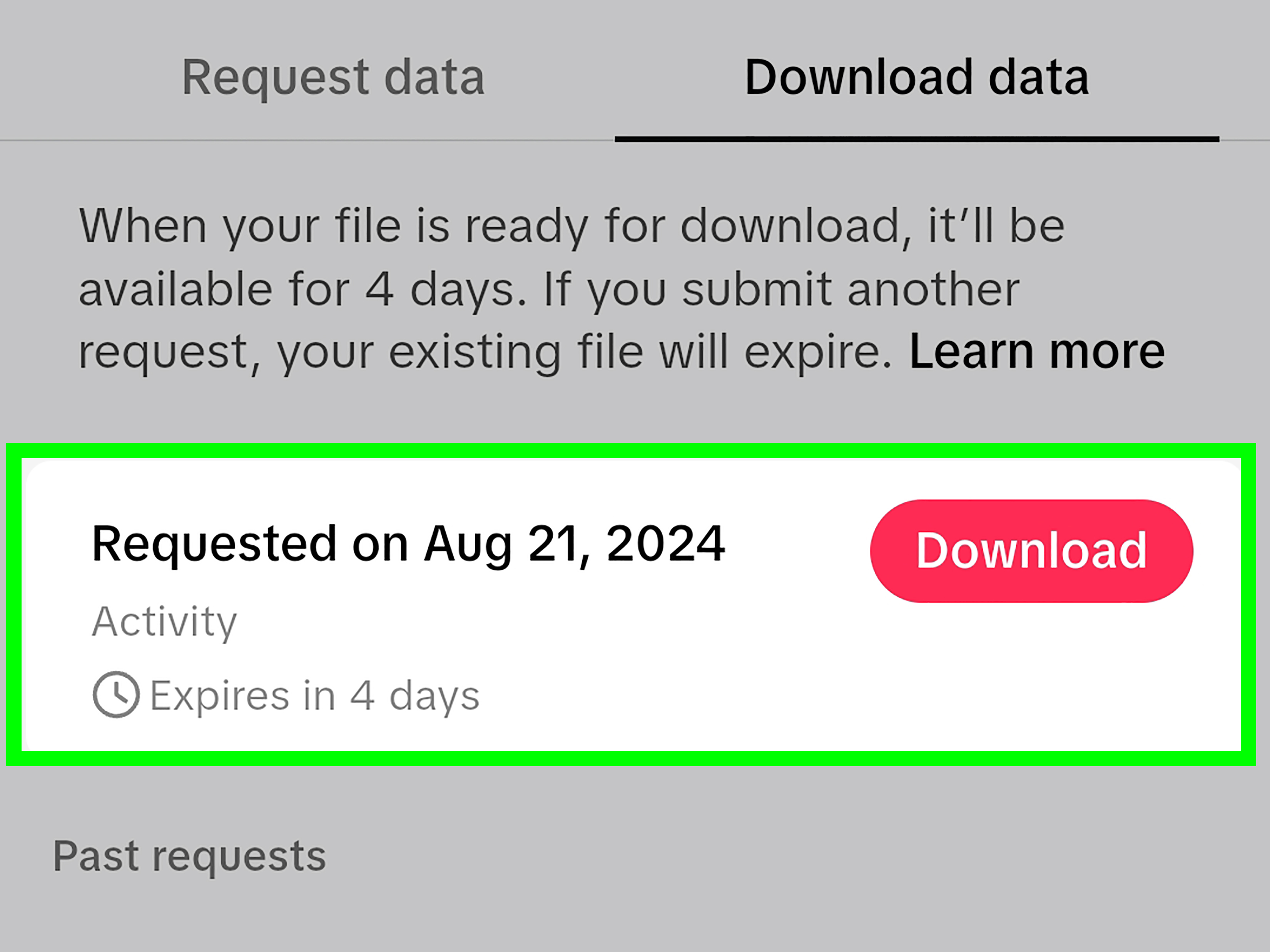
After the request is submitted, TikTok prepares the file. This can take a few days. When the file is ready, you should receive an in-app notification. Return to Download your data, open the Download data tab, and download the file while it is still available. TikTok data files are usually available for only a limited time after they are prepared, so do not treat the notification like a gym membership email and ignore it forever.
TXT or JSON: Which Format Should You Choose?
Choose TXT if you want a simpler file you can read more easily. Choose JSON if you are comfortable with structured data or want to analyze your activity in a spreadsheet, database, or script. For most everyday users, TXT is easier. For creators, marketers, researchers, and spreadsheet enjoyers, JSON can be more useful.
What If Recent Videos Are Missing From the Download?
Some recently generated activity may not appear immediately in your exported data. If you need the most recent watch history, wait a day or two and request another file. Data exports are useful, but they are not magic crystal balls with same-second updates.
How to Clear Your TikTok Watch History on iPhone and Android
The current mobile path is usually similar on iPhone and Android:
- Open TikTok.
- Tap Profile.
- Tap the Menu icon at the top right.
- Tap Settings and privacy.
- Tap Activity Center.
- Select Watch history.
- Tap Select.
- Choose individual videos or tap Select all watch history, if available.
- Tap Delete.
- Confirm by tapping Delete again.
That is the cleanest route. If TikTok changes the wording slightly, look for similar labels such as Activity center, Watch history, Viewing history, or Video browsing history. The feature usually lives near other activity tools, not inside your public profile page.
How to Delete Only Certain Videos
You do not have to erase everything. If you only want to remove a few videos from your watch history, open Watch history, tap Select, choose the videos you want gone, and delete those selected items. This is useful when your watch history is mostly helpful, except for that one random video you opened because the caption said, “Wait for it.” Spoiler: we all waited. Nothing happened.
How to Delete All Watch History
If your account shows a Select all watch history option, use it to remove the entire visible list. Confirm the deletion when TikTok asks. If you do not see a select-all option, you may need to manually select videos, update the app, or check whether your account has a slightly different interface.
Can You Clear TikTok Watch History on Desktop?
TikTok’s desktop website is useful for watching videos, uploading content, checking messages, and adjusting some account settings, but it may not offer the same full Watch History view available in the mobile app. If you cannot find watch history on TikTok.com, use the mobile app instead.
For desktop users who want a record of watched videos, downloading TikTok data is the better route. Log in to your account, look for account privacy or data settings, and request your data if the option is available. If the browser version does not show the same settings, open the TikTok app and request the file from there.
What Happens After You Delete TikTok Watch History?
Deleting TikTok watch history removes videos from the watch history list you can view in your Activity Center. It helps clean up your account activity screen and can make it harder for someone using your phone to see what you recently watched.
However, deleting visible watch history is not the same as fully resetting your TikTok recommendations or deleting every piece of data TikTok may use to personalize your experience. Recommendation systems can rely on multiple signals, including videos you like, share, comment on, skip, search for, save, follow, mark as “Not interested,” and watch repeatedly. In other words, the For You Page is not powered by one lonely button sitting in a basement.
Will Clearing Watch History Reset the For You Page?
Not completely. Clearing watch history may remove your visible watched-video list, but it does not guarantee a brand-new For You feed. If your goal is to change recommendations, use additional controls:
- Press and hold a video and tap Not interested.
- Unfollow accounts that no longer match your interests.
- Clear search history if old searches are influencing your browsing.
- Adjust content preferences if available.
- Use TikTok’s Refresh your For You feed option if your app provides it.
- Start intentionally watching, liking, and saving the types of videos you want more often.
If your feed is stuck in a strange loop, do not panic. TikTok recommendations can change quickly when you consistently interact with different content. The app is observant. Sometimes too observant. Like a raccoon with Wi-Fi.
How to Refresh Your TikTok For You Feed
If clearing watch history is not enough, refreshing your For You feed may help. This option is designed for users who want recommendations to feel fresh again.
- Open TikTok.
- Go to Profile.
- Tap the Menu icon.
- Choose Settings and privacy.
- Tap Content Preferences.
- Select Refresh your For You feed.
- Read the warning and confirm if you want to continue.
This does not delete your account, videos, drafts, liked videos, comments, or messages. It is more like telling TikTok, “Let us pretend the last month of my attention span never happened.” After refreshing, your new interactions will help shape your feed again.
How to Clear TikTok Search History Too
Because watch history and search history are separate, privacy-minded users should clear both. The path may vary, but try this:
- Open TikTok and tap the Search icon.
- Tap the search bar.
- Look for recent searches.
- Tap the X next to a search term, or choose Clear all if available.
You can also check Settings and privacy > Activity Center for search-related history options. If TikTok has moved the feature again, use the search box inside settings and type “search history.” Yes, searching for search history feels ridiculous, but here we are.
What to Do If Watch History Is Missing
If you cannot find TikTok Watch History, try these fixes:
1. Update the TikTok App
Open the App Store or Google Play Store and check for an update. Old app versions may not show the newest Activity Center layout.
2. Search Inside Settings
Open Settings and privacy and use any built-in search option if available. Search for “watch history,” “activity,” or “history.”
3. Check Activity Center Carefully
Some users overlook Activity Center because it sounds like a place where your phone tells you to take more steps. In TikTok, it is where many account activity tools live.
4. Switch Devices
If the option is missing on your tablet, try your phone. If it is missing on Android, check an iPhone if you have access to one, or vice versa. TikTok sometimes rolls out features unevenly.
5. Download Your Data Instead
If the in-app watch history screen is not available, request your TikTok data. The download may include watch video history, giving you a backup way to review activity.
Privacy Tips Before You Delete TikTok Activity
Clearing watch history is useful, but it is only one privacy step. For a cleaner TikTok account, review these areas too:
- Liked videos: Set them to private if you do not want others browsing your likes.
- Profile views: Turn profile view history on or off depending on your comfort level.
- Post view history: Review whether others can see that you viewed certain posts.
- Ad personalization: Check how TikTok personalizes ads and adjust available controls.
- Suggested accounts: Manage whether your account is suggested to contacts, Facebook friends, or mutual connections.
- Comments and mentions: Limit who can comment, mention, tag, Duet, or Stitch your videos.
The best privacy approach is not one giant dramatic button. It is a series of small choices that make your account feel less like an open window during a neighborhood barbecue.
Common Mistakes When Deleting TikTok Watch History
Mistake 1: Clearing Cache and Thinking History Is Gone
Clearing cache may reduce storage, but it does not necessarily erase your watched-video list. Use the Watch History menu for that.
Mistake 2: Forgetting to Download Data First
If you want a copy, request your TikTok data before deleting history. Once you delete items from the app’s visible history, you may not be able to recover them from the Watch History screen.
Mistake 3: Expecting Instant Algorithm Amnesia
TikTok recommendations use more than watch history. Likes, follows, comments, shares, searches, viewing time, and “Not interested” signals can all shape your feed.
Mistake 4: Deleting the Wrong History
Watch history, search history, comment history, and profile view history are different. Clear the one that matches your goal.
Mistake 5: Ignoring App Version Differences
If your friend’s TikTok has a button yours does not, nobody is cursed. TikTok often tests layouts and rolls out features gradually.
Quick Troubleshooting Guide
| Problem | Likely Cause | Best Fix |
|---|---|---|
| Watch History is missing | Old app version or different layout | Update TikTok and check Activity Center |
| Deleted history but FYP looks the same | Recommendations use many signals | Refresh For You feed and use Not Interested |
| Recent videos not in data download | Data export delay | Wait 24–48 hours and request again |
| Cannot download data | Request still processing or expired | Check Download Data tab or submit a new request |
| Cache cleared but history remains | Cache is not watch history | Delete from Watch History directly |
Experience Notes: What It Is Actually Like to Clean Up TikTok Watch History
Clearing TikTok watch history sounds like a simple chore, but in real life it often starts with a very specific emotional event. Maybe your feed suddenly becomes 90% cottagecore chickens because you watched one video about a tiny coop. Maybe a friend borrowed your phone and your Watch History now contains a suspicious amount of prank content. Or maybe you are trying to find one brilliant video you forgot to save, and you realize your history is a museum of every micro-interest your brain has collected since last Tuesday.
The first lesson is this: download before you delete if the content matters. A lot of people clear their watch history because they want a cleaner account, then immediately remember they needed a video from two days ago. That video was going to teach them how to fold fitted sheets, make high-protein pancakes, fix squeaky shoes, or understand a trending audio joke. Once the visible list is gone, finding it again can become a detective mission starring you, a search bar, and several deeply unhelpful keywords.
The second lesson is that clearing history feels satisfying, but it may not instantly transform your For You Page. If TikTok has learned that you enjoy cooking videos, deleting watch history alone may not stop cooking videos from appearing. Your likes, saves, comments, follows, searches, and watch time still send signals. To really reshape the feed, you need to behave like the viewer you want TikTok to think you are. Watch new topics all the way through. Skip videos you dislike. Press and hold videos that feel irrelevant and choose “Not interested.” Unfollow accounts you no longer care about. Refreshing the For You feed can help, but your future behavior does the steering.
The third lesson is that TikTok’s settings can feel like a mini escape room. One person sees Watch History under Activity Center. Another sees a slightly different label. Someone else has to update the app before the option appears. This is normal with large social platforms. Features move, wording changes, and accounts can receive updates at different times. When in doubt, check Profile, Menu, Settings and privacy, then Activity Center. That path solves most of the mystery.
The fourth lesson is practical: clearing watch history is best treated as routine digital hygiene, not a once-in-a-lifetime emergency. If you use TikTok heavily, review your activity every few weeks. Clear search terms you do not need, remove watched videos that clutter your history, check privacy settings, and make sure your feed still matches your current interests. Your taste changes. Last month you may have been learning sourdough. This month you may be into desk setups, budget travel, or calming videos of people restocking refrigerators with the precision of NASA engineers.
Finally, do not feel weird about cleaning up your watch history. Everyone’s TikTok activity is a little chaotic. The app is built for curiosity, and curiosity is not always organized. Download what you want to keep, delete what you do not need, and train your feed with better signals going forward. A cleaner TikTok experience is not about hiding from the algorithm. It is about reminding the algorithm that you are in charge, even if it occasionally thinks you want 47 videos about raccoons stealing cat food.
Conclusion
Learning how to clear your watch history on TikTok is useful for privacy, organization, and resetting the clutter in your Activity Center. The safest process is simple: download your TikTok data first if you want a backup, then open the TikTok app, go to Profile > Menu > Settings and privacy > Activity Center > Watch history, select the videos you want to remove, and delete them.
Just remember that clearing watch history does not automatically wipe every recommendation signal. To improve your For You Page, combine deletion with better habits: mark videos as not interested, refresh your feed if needed, clear search history, update content preferences, and interact with the topics you actually want to see. TikTok learns quickly, so give it better clues.
Note: TikTok menu names and feature locations may vary by app version, device, and region. If a setting is missing, update the app first and check Activity Center or Download Your Data for the closest available option.