Printing double quotes in Java sounds like the kind of tiny task that should take three seconds. Then your compiler suddenly acts like you committed a felony against syntax. You type something innocent like System.out.println("Java says "Hello"");, and Java responds with errors, red squiggles, and the emotional energy of a disappointed math teacher.
The good news is that printing double quotes in Java is simple once you understand one key idea: double quotes already have a special job in Java. They mark the beginning and end of a string literal. So when you want Java to print quotation marks as actual characters, you must tell Java, “Relax, this quote is part of the text, not the end of the string.”
The most common way to do that is with the escape sequence \". In this guide, you will learn how to print double quotes in Java using escape characters, string concatenation, character variables, text blocks, formatted output, and real-world examples such as JSON-like strings, dialogue, file paths, and debugging messages.
Why Double Quotes Need Special Treatment in Java
In Java, a string literal is text enclosed inside double quotes. For example:
Here, the first double quote tells Java, “The string starts here.” The second double quote tells Java, “The string ends here.” That is perfectly fine until you want quotation marks inside the message itself.
For example, this code does not work:
Java sees the quote before Hello and thinks the string has ended. Then it looks at Hello! floating around outside the string like a lost tourist and throws a compile-time error. Java is strict, but at least it is consistent.
To solve this, you use an escape sequence. An escape sequence starts with a backslash. The backslash tells the compiler that the next character should be treated differently from its normal meaning.
The Easiest Way: Use the Escape Sequence \"
The standard way to print double quotes in Java is to place a backslash before each quote you want to display.
Output:
The characters \" do not print the backslash. They print only the double quote. The backslash is there to guide the compiler, not to appear in the final output.
Basic Syntax
Output:
Think of the backslash as a tiny bodyguard for the quotation mark. It steps in and says, “This quote is not ending the string. It is part of the show.”
Step-by-Step: How to Print Double Quotes in Java
Step 1: Start with a Normal Print Statement
Begin with a regular Java print statement:
This prints:
Step 2: Decide Where the Double Quotes Should Appear
Suppose you want the output to look like this:
You need one double quote before Hello and one double quote after it.
Step 3: Escape Each Inner Double Quote
Write each printable quote as \":
Step 4: Run the Program
The output will be:
That is the whole trick. Once you understand this, most quote-related Java problems become much less mysterious.
Printing Double Quotes Around a Word
Here is a common beginner example:
Output:
This example uses string concatenation. The first "\"" prints an opening quote, language prints the variable value, and the second "\"" prints the closing quote.
Printing Double Quotes Inside a Sentence
Many Java programs need to print quoted words inside a sentence. For example:
Output:
This is useful for tutorials, error messages, command-line tools, and any program that explains code to the user.
Using Character Literals to Print Double Quotes
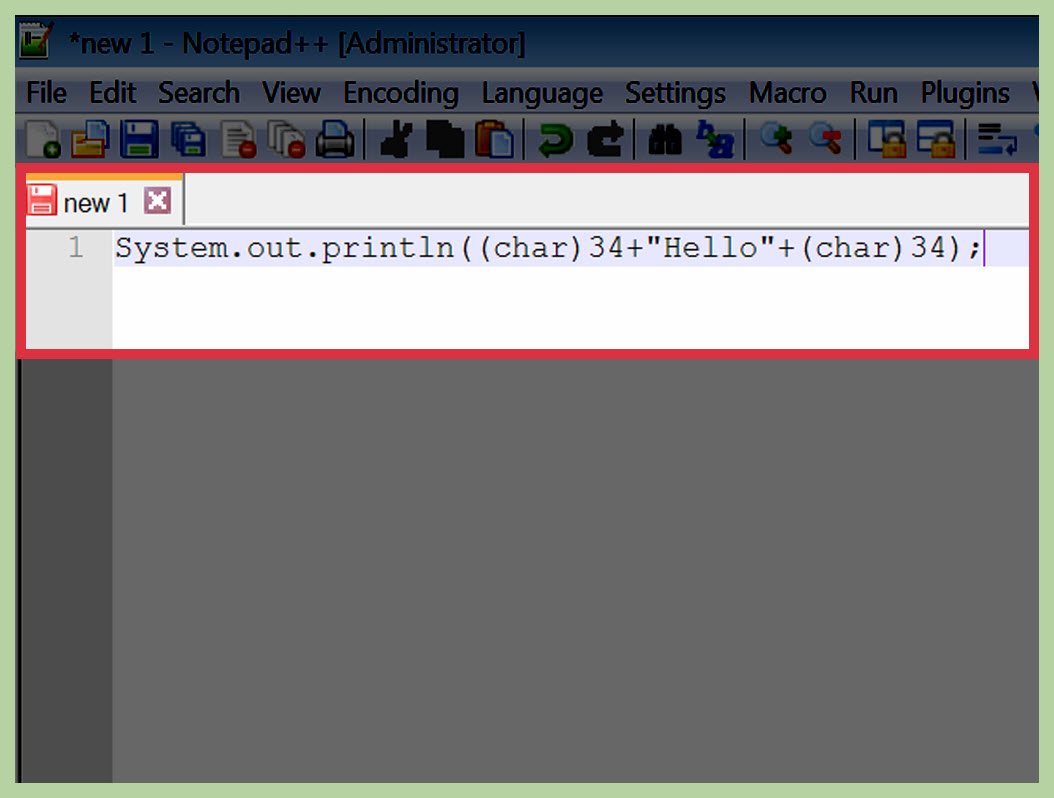
Java also allows you to store a double quote as a character. Since a character literal uses single quotes, you can write a double quote character like this:
Then you can print it with text:
Output:
This method can make your code easier to read when you need to use quotation marks repeatedly. Instead of sprinkling \" everywhere like keyboard confetti, you define one variable and reuse it.
Printing Double Quotes with printf()
The printf() method is useful when you want formatted output. You can still use escaped double quotes inside the format string.
Output:
In this example, %s is replaced by the value of name. The escaped quotes appear before and after the formatted value.
Printing Double Quotes in JSON-Like Output
One of the most common reasons developers need double quotes is to print JSON-like text. JSON uses double quotes around keys and string values, so Java beginners often run into escaping issues here.
Output:
This works, but it can become difficult to read when the JSON gets longer. A short JSON string is fine. A huge one can start looking like a porcupine made of backslashes.
A More Readable JSON Example with Concatenation
Output:
For serious JSON work, developers usually use a JSON library instead of manually building strings. But for learning how quotes work, this example is excellent practice.
Using Java Text Blocks for Multiple Lines
Modern Java supports text blocks, which are multiline string literals written with triple double quotes. Text blocks are especially helpful when your output contains multiple lines, formatted text, or lots of double quotes.
Output:
Inside a text block, ordinary double quotes can usually appear without escaping. That makes text blocks great for displaying dialogue, sample JSON, HTML snippets, SQL queries, and documentation examples.
When Should You Use Text Blocks?
Use text blocks when your string spans multiple lines or contains many quotation marks. For a simple one-line message, \" is still the fastest and clearest choice. For longer structured output, text blocks can save your eyes from a backslash avalanche.
Common Java Escape Sequences You Should Know
Double quotes are only one part of Java escaping. Here are several escape sequences that often appear together:
| Escape Sequence | Meaning | Example Output |
|---|---|---|
\" |
Double quote | " |
\' |
Single quote | ' |
\\ |
Backslash | \ |
\n |
New line | Moves output to the next line |
\t |
Tab | Adds horizontal spacing |
Once you understand escape sequences, Java strings become much easier to control. You can print quotes, tabs, line breaks, file paths, and special formatting without confusing the compiler.
Common Mistakes When Printing Double Quotes in Java
Mistake 1: Forgetting the Backslash
This causes an error because Java thinks the string ends before powerful.
Correct version:
Mistake 2: Escaping the Wrong Quotes
You should escape the quotes inside the string, not the quotes that open and close the string literal.
Correct:
Output:
Mistake 3: Confusing Single Quotes and Double Quotes
In Java, double quotes are used for strings, while single quotes are used for single characters.
This is valid. But this is not:
A string must use double quotes. A character must use single quotes.
Mistake 4: Forgetting to Escape Backslashes Too
If you need to print a backslash, you must write \\. This often matters when printing Windows-style file paths.
Output:
Notice that the quote marks and backslashes both need attention. Java is not being difficult for fun; it is just making sure your string means exactly what you say it means.
Practical Examples of Printing Double Quotes in Java
Example 1: Printing a Quoted Book Title
Output:
Example 2: Printing Dialogue
Output:
Example 3: Printing a Command
Output:
Example 4: Printing Quoted Variables
Output:
Best Practices for Printing Double Quotes in Java
For short strings, use the escape sequence \". It is standard, clear, and understood by Java developers everywhere.
For strings that need many quote marks, consider using a character variable such as char quote = '"';. This can make repeated quote usage easier to read.
For long multiline strings, use text blocks when your Java version supports them. Text blocks reduce visual clutter and make your output look closer to the final result.
For JSON, XML, HTML, or other structured formats, avoid building large strings manually in production code. Use proper libraries when accuracy matters. Manual string construction is fine for small lessons and quick examples, but it can become fragile as your data grows.
Experience Notes: What Developers Learn After Fighting Java Quotes
Most Java beginners meet escaped double quotes early, usually while writing a simple System.out.println() statement. At first, the syntax feels strangely dramatic. You only want to print a sentence, and suddenly there are backslashes everywhere. But this tiny topic teaches several important lessons about programming.
The first lesson is that programming languages use symbols for structure. A double quote is not just decoration in Java. It is part of the grammar of the language. When Java reads your source code, it needs to know where a string begins and ends. That is why inner quotation marks must be escaped. The compiler is not reading your mind; it is reading characters one by one.
The second lesson is that readable code matters. Technically, you can write a long line filled with escaped quotes, concatenation operators, and variables. But after a certain point, that line becomes unpleasant to maintain. If you have ever tried to debug a manually written JSON string with twenty escaped quotes, you know the pain. It feels like counting noodles in a bowl of spaghetti.
One practical habit is to start with the output you want. Write it as a comment first:
Then convert only the inner quotes into escaped quotes:
This simple approach prevents many beginner mistakes. Instead of guessing where the backslashes go, you begin with the final result and work backward.
Another useful experience is testing small pieces of output before placing them into a larger program. If you are building a menu, command message, or formatted report, print one line first. Confirm that the quotes appear correctly. Then add variables, spacing, and additional formatting. Small tests save big headaches.
Developers also learn that escaping rules change depending on context. A double quote inside a normal string needs escaping. A double quote stored as a character can be written as '"'. A double quote inside a Java text block may not need escaping at all. This is why blindly copying code can be risky. The right answer depends on where the quote appears.
Finally, printing double quotes in Java is a small doorway into a larger concept: representing text accurately. Real programs often produce messages for users, logs for developers, commands for terminals, data for APIs, and content for files. In all those places, quotes may matter. A missing quotation mark can break a command. An extra quotation mark can make JSON invalid. A badly escaped string can make a helpful error message look like it was assembled by a sleepy raccoon.
So yes, learning how to print double quotes in Java is a beginner topic. But it is also a practical skill that shows up in debugging, file handling, formatted output, data exchange, and everyday coding. Once you master \", you are not just printing quotes. You are learning how Java understands text.
Conclusion
To print double quotes in Java, use the escape sequence \" inside a string literal. This tells Java to treat the quote as a normal character instead of the end of the string. For example, System.out.println("\"Hello\""); prints "Hello".
You can also use string concatenation, character literals, printf(), or Java text blocks depending on the situation. For short output, escaped quotes are usually best. For longer multiline output, text blocks may be cleaner. For repeated quote characters, a char variable can improve readability.
The main rule is simple: when a double quote appears inside a regular Java string and you want it printed, escape it with a backslash. Once that rule clicks, Java quotes stop being confusing and start behaving like well-trained punctuation.
Note: The examples in this article follow standard Java string literal behavior and are intended for educational publishing. Always test code snippets in your own Java environment before using them in production tutorials or applications.