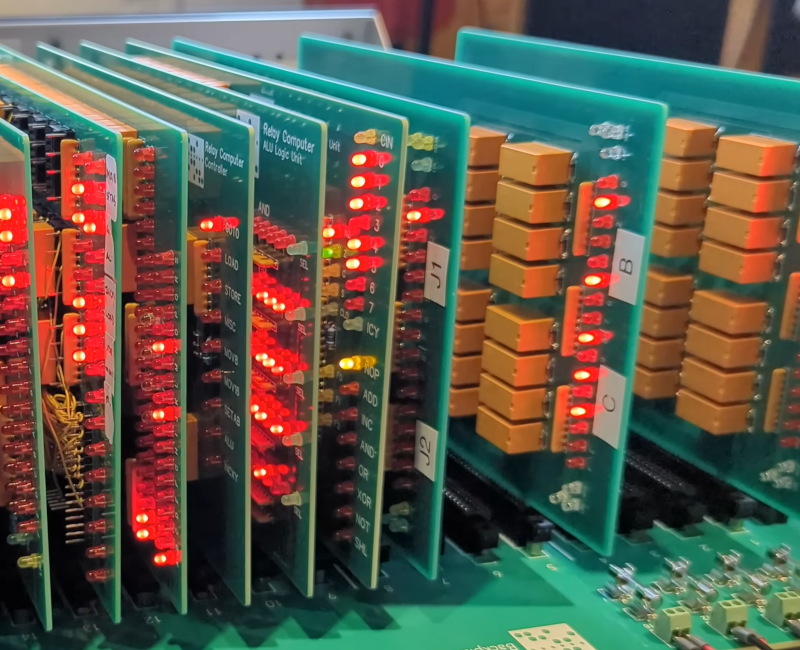
Modern computers perform billions of operations while remaining almost suspiciously quiet. A relay computer takes the opposite approach. It completes one operation at a time, flashes its lights, and announces every decision with a chorus of clicks. It is less like using a laptop and more like watching a mechanical orchestra calculate.
That charm is at the center of DiPDoT’s home-built relay computer, an unfinished but operational machine inspired by the appearance and modular construction of early S-100 systems such as the Altair 8800. Instead of hiding millions of microscopic transistors inside a processor, the project uses electromechanical relays to store bits, route signals, perform arithmetic, and control the sequence of operations.
The machine can already perform simple calculations and generate Fibonacci numbers. More importantly, it makes the normally invisible instruction cycle visible, audible, and wonderfully dramatic. Every click represents a physical decision: open this path, close that one, move a value, add two numbers, or advance to the next instruction.
What Is a Relay Computer?
A relay computer is a digital computer in which electromechanical relays perform many of the switching functions handled by transistors in modern processors. A traditional relay contains a coil, an armature, and one or more electrical contacts. Energizing the coil creates a magnetic field that moves the armature and changes the position of those contacts.
That physical movement produces two stable logical conditions. A contact can be open or closed, just as a binary digit can be zero or one. Once relays are connected in carefully designed networks, they can implement Boolean logic, store state, select data paths, and coordinate a complete computation.
The principle is old, but it is not a party trick. Electromechanical machines played a major role in early computing. Konrad Zuse’s Z3, completed in 1941, used approximately 2,300 relays, performed binary floating-point arithmetic, and had a 22-bit word length. Bell Labs engineer George Stibitz also used telephone relays to demonstrate binary arithmetic and remote computing. The IBM Automatic Sequence Controlled Calculator, commonly called the Harvard Mark I, combined electromechanical components to automate long scientific calculations.
Relays eventually lost the speed contest to vacuum tubes and then transistors. Their educational value, however, never disappeared. In a relay machine, computation is not an abstract cloud of semiconductor activity. It is a set of switches doing exactly what the circuit diagram says.
Why This Computer Looks Like an Altair 8800
At first glance, DiPDoT’s project can be mistaken for an Altair 8800. That resemblance is deliberate. The planned enclosure and front panel borrow the visual language of early microcomputers: rows of indicator lights, physical controls, and removable circuit cards mounted behind the panel.
The design is also influenced by S-100-era modularity. Rather than building an enormous wall of permanently connected relays, the builder divides the computer into functional cards that plug into backplanes. A card may handle registers, arithmetic, sequencing, or another part of the architecture.
This approach offers several advantages:
- Individual modules can be tested separately.
- A defective card can be removed without dismantling the entire machine.
- Revised circuitry can replace an older design.
- Signal paths remain easier to document and troubleshoot.
- The computer gains the gloriously industrial appearance that relay enthusiasts consider a perfectly reasonable design requirement.
The compact Altair-style enclosure also creates a serious constraint: space. The project must fit much of its logic onto a limited number of backplane assemblies. As the relay count and wiring requirements grow, redesigning those backplanes becomes part of the engineering challenge. Relay computers are generous with lessons but notoriously greedy with physical room.
How Relays Become Logic Gates
Series Contacts Create AND Logic
An AND operation should produce a true output only when all required inputs are true. Relay contacts can achieve this by being wired in series. Electricity reaches the output only when every contact in the path is closed.
Imagine two switches controlling a lamp. If both switches must close before the lamp turns on, the circuit behaves like an AND gate. Replace the lamp with another relay coil, and that result can control the next stage of a computer.
Parallel Contacts Create OR Logic
An OR operation becomes true when at least one input is true. Wiring contacts in parallel creates multiple routes to the output. If either route closes, current can flow.
Normally closed contacts can help invert a condition and implement NOT functions. More elaborate relay arrangements can form XOR gates, multiplexers, adders, latches, and conditional control circuits. A double-throw relay is especially useful because it can select between two signal paths, functioning much like a two-to-one multiplexer.
These arrangements are physically large compared with semiconductor gates, but their behavior is refreshingly direct. Series means “all,” parallel means “any,” and a changeover contact means “choose this or that.” The circuit diagram practically narrates its own logic.
The Major Parts of the Relay Computer
Registers: Small Shelves for Binary Values
A register stores a binary value while the processor works with it. In DiPDoT’s architecture, several primary registers are eight bits wide. Additional register sections can be combined for operations involving 16-bit addresses.
Relay-based registers commonly use latching or holding circuits. Once a bit has been loaded, feedback keeps its relay in the selected condition until a clear or replacement signal arrives. Eight such storage positions form an eight-bit register.
Indicator lamps make the contents visible. If the stored value changes from binary 00000101 to 00001000, the corresponding lights change with it. This is debugging without a software window: the computer wears its internal state on its front panel.
The Arithmetic Logic Unit
The arithmetic logic unit, or ALU, performs operations such as addition, incrementing, AND, OR, XOR, and shifting. Its most recognizable building block is the binary full adder.
A full adder combines two input bits with a carry-in value. It produces a sum bit and a carry-out value for the next position. Connecting multiple full adders creates a multi-bit addition circuit. Because the carry may need to move through several stages, relay operating time places a practical limit on speed.
In a modern processor, this activity happens too quickly to observe. In a relay ALU, the calculation travels across actual contacts. The result arrives with enough clicking to make even a modest addition sound like the machine has completed its taxes.
The Program Counter and Memory
The program counter identifies the location of the next instruction. After an instruction is fetched, the counter normally advances. A jump, call, return, or conditional branch can replace the usual next address with a different one.
A relay computer does not have to use relays for every byte of main memory. Many hobby designs use semiconductor memory while keeping the processor’s registers, ALU, buses, and control system electromechanical. This hybrid arrangement provides useful storage without requiring a warehouse full of relay latches.
The Data and Address Buses
A bus is a shared group of conductors that carries values between components. The project architecture calls for an eight-bit data path and a wider address path. Control signals determine which register or functional unit may place a value on a bus and which destination should receive it.
Bus control is critical. Two outputs must not drive incompatible values onto the same wires simultaneously. Proper sequencing therefore prevents electrical conflict as well as logical confusion.
How the Computer Knows the Sequence
A pile of logic gates does not automatically behave like a processor. The control system must activate each part in the correct order. This is where the computer truly “knows the sequence.”
A typical instruction progresses through several smaller operations, often called micro-operations:
- The program counter places an address on the address bus.
- Memory supplies the instruction stored at that address.
- The instruction register captures the instruction.
- The program counter advances.
- The control logic decodes the operation.
- Required operands move into the appropriate registers or ALU inputs.
- The ALU or another unit performs the requested action.
- The result is stored, and the next instruction cycle begins.
These events cannot simply occur whenever they feel inspired. If a destination register closes before a source has placed stable data on the bus, it may store nonsense. If a source disconnects too early, the value may be lost. Timing signals therefore divide execution into controlled phases.
A sequencing unit can use chained relay states, a stepping arrangement, or another clocked state machine to issue those signals. Each state enables a specific set of actions and then hands control to the next state. The instruction decoder modifies the route when different operations require different steps.
This is the electromechanical equivalent of a modern processor’s control unit. The concept remains familiar even though the tempo has changed from nanoseconds to noticeable fractions of a second.
Why the Fibonacci Sequence Is a Meaningful Demonstration
The Fibonacci sequence begins with two starting values, usually zero and one. Every following value is the sum of the previous two:
0, 1, 1, 2, 3, 5, 8, 13, 21, 34, 55, 89…
Generating this pattern tests more than the ability to add. A program must preserve two values, calculate a new one, move values between registers, repeat the process, and branch back to the correct instruction. In simplified form, the loop behaves like this:
- Add register A to register B.
- Store the result in a temporary register.
- Move the old value of B into A.
- Move the new sum into B.
- Return to the beginning of the loop.
That short routine exercises the ALU, registers, buses, program counter, instruction decoder, and sequencing logic. When DiPDoT’s relay computer generates Fibonacci numbers, it demonstrates that these separate systems are cooperating as a programmable machine rather than performing one isolated calculation.
Finite register width also introduces an important lesson. An eight-bit unsigned value can represent numbers from 0 through 255. Without wider arithmetic or explicit overflow handling, the sequence eventually exceeds that range and wraps or produces a carry. Even the limitations are educational because they expose the boundaries imposed by a processor’s architecture.
The Engineering Problems Hidden Behind the Clicking
Contact Bounce and Timing
Relay contacts do not always transition cleanly from open to closed. They may bounce for a brief period, producing several rapid electrical transitions. A design must ensure that this behavior does not accidentally advance a counter twice or corrupt a stored value.
Timing margins help. The controller can wait until signals have settled before capturing data. Builders may also use filtering, carefully chosen relay types, or debouncing circuits where a bouncing edge could affect sequential logic.
Inductive Voltage Spikes
A relay coil is an inductor. When current through it is interrupted, the collapsing magnetic field can create a voltage spike. Flyback diodes or other suppression networks protect driver electronics, although suppression choices may also affect how quickly a relay releases. In a computer whose speed depends on mechanical switching, even protective components can influence timing.
Power, Heat, and Wiring
One energized relay consumes little power; hundreds of energized coils are another matter. The power supply must handle simultaneous loads without allowing its voltage to sag. Wiring must be sized, routed, labeled, and documented carefully.
Most relay-computer failures are not philosophical disagreements with Boolean algebra. They are practical problems: a reversed diode, a poor solder joint, a swapped connector, or one wire disappearing into a colorful bundle with all the innocence of a suspect leaving the scene.
Physical Space
Relay logic occupies substantial volume. A register requires multiple relays, an ALU requires many more, and the control unit multiplies the wiring burden. Modular PCBs and edge connectors help, but compact packaging forces compromises involving connector pin counts, board dimensions, cooling, maintenance access, and signal routing.
Why Build a Relay Computer Today?
No one builds a relay CPU to outperform a modern microcontroller. A tiny inexpensive chip can run millions of times faster while using far less energy. The point is understanding.
A relay computer separates the processor into human-scale pieces. Students can follow a number from a register, across a bus, through an adder, and into a destination. They can watch the program counter change and hear loops repeat. Concepts such as state, clocking, instruction decoding, conditional branching, and memory addressing become physical events.
The project also rewards disciplined engineering. A large system cannot survive vague labels or diagrams that exist only in the builder’s memory. Each module needs a defined interface. Test procedures must be repeatable. Changes must be documented. Those habits transfer directly to PCB design, embedded systems, software architecture, and industrial automation.
Practical Experience: What Working With Relay Logic Teaches You
A typical relay-computer bench session begins with optimism. A newly assembled register card appears straightforward: apply power, set an input pattern, pulse the load line, and admire eight correct indicator lights. The first few bits behave. Then bit six refuses to clear, bit three flickers whenever another relay operates, and the power supply makes a noise that suggests it would like to renegotiate its contract.
The useful response is to stop treating the computer as one giant machine. Test one coil. Confirm its rated voltage and polarity. Check the driver output, suppression diode, normally open contact, normally closed contact, and common terminal. Then test one storage bit before testing the full register. Relay systems strongly encourage hierarchical debugging because guessing across hundreds of wires is an excellent way to lose an afternoon.
Another lesson arrives when the first two modules work separately but fail together. A register may load perfectly during a manual test, while an automatically generated control pulse is too brief or arrives before bus data has stabilized. Lengthening a timing phase can suddenly make the machine reliable. That moment demonstrates why digital design is not concerned only with correct logical values. Those values must also appear at the correct time.
Sound becomes an unexpected diagnostic tool. A repeating program develops a recognizable rhythm. Fetch, decode, execute, and store phases form distinct clusters of clicks. When one click is missing or an extra chatter appears, an experienced builder may notice the fault before looking at an oscilloscope. It is similar to recognizing that a car engine sounds wrong, except the engine is calculating 34 plus 55.
The Fibonacci program offers a satisfying integration test. At first, single-stepping is safest. The builder checks the program-counter address, instruction register, operand registers, ALU result, and write-back destination after every phase. When the sequence produces 0, 1, 1, 2, 3, and 5 correctly, confidence grows. Automatic operation can then begin at a deliberately slow clock rate.
The lights advance, the relays find a rhythm, and the expected values continue through 8, 13, 21, and beyond. A bug may eventually appear at a carry boundary or branch instruction. Instead of ruining the experience, that failure identifies the next subsystem to investigate.
Physical construction also changes design decisions. A beautiful schematic may require an inconvenient number of connector pins. A compact board may leave too little room for probe access. A single control signal may have to drive more coils than expected. Builders learn to budget space, current, contacts, and test points before committing to a layout.
The greatest practical reward comes when the machine completes a loop without manual intervention. The calculation may be slow, but it is undeniably autonomous. The relays are storing state, following instructions, making decisions, and returning to earlier code based on a designed sequence. What sounded like random clicking becomes the audible structure of a program.
Conclusion
“Relay Computer Knows The Sequence” describes more than an entertaining retrocomputing project. It captures the central problem every processor must solve: coordinating storage, arithmetic, data movement, and control in the right order.
DiPDoT’s Altair-inspired machine turns that process into something people can see and hear. Its Fibonacci demonstration shows that an electromechanical collection of registers, buses, relays, and control circuits can execute a repeating program. It is not fast, compact, or quietand those apparent disadvantages make it unusually effective as a teaching machine.
Note: The featured computer is an evolving home-built project, so its layout and specifications may change as modules are redesigned. Anyone experimenting with relay logic should use an appropriately protected low-voltage supply, observe component ratings, and include suitable coil-suppression and overcurrent protection.
Research note: This article synthesizes technical and historical information from the original project coverage, the builder’s project documentation, Computer History Museum records, Smithsonian collections, relay-computer design papers, IBM historical materials, and electronics references from TE Connectivity, DigiKey, SparkFun, All About Circuits, and other established technical sources.