Long-distance love has always required creativity. Before video calls became as common as forgetting your password, couples relied on letters, phone cards, late-night emails, and the occasional pixelated webcam call where someone’s forehead took up 80% of the screen. Then came Skype, the blue-buttoned hero of early internet romance, letting people see each other across oceans, time zones, dorm rooms, and suspiciously messy bedrooms.
But seeing and hearing someone is not the same as being close to them. A video call can carry a smile, a laugh, a sigh, and the classic “Can you hear me now?” ritual. What it cannot easily carry is touch. That missing piece is exactly what inspired the playful, oddly charming, and deeply human idea behind the Skype “Kiss” Interface: a simple piece of hardware that lets a user send a kiss emoji by physically kissing a sensor.
Yes, really. Someone looked at online affection and thought, “Why should romance require keyboard shortcuts?” Honestly, fair question.
The Kiss Interface was a small human-computer interaction project built around a big emotional idea: make digital affection feel more natural. Instead of clicking an emoji menu, searching for lips, and accidentally sending a shrimp, the user kisses a touch-sensitive device. A short kiss sends a kissy-face emoji. A longer kiss sends a red lips emoji. Simple? Absolutely. Silly? A little. Brilliant? More than it first appears.
What Is the Skype Kiss Interface?
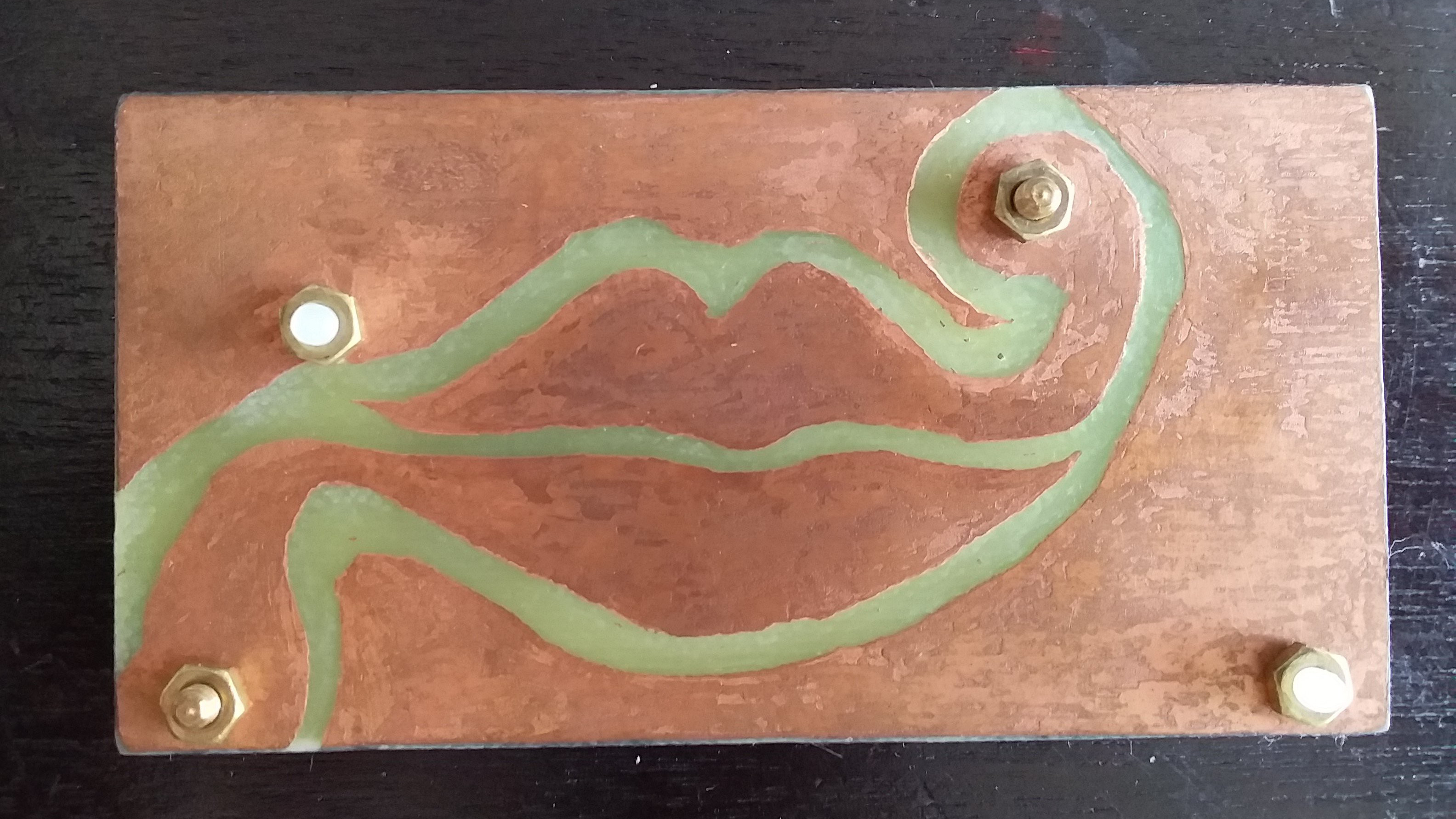
The Skype Kiss Interface is a DIY hardware project created to make long-distance communication feel a little less mechanical. The device was designed for use during Skype chats, where a person could kiss a capacitive touch sensor and automatically send a kiss-related emoji into the conversation.
The idea came from a long-distance relationship in which Skype was the main way to stay connected. Anyone who has ever tried to maintain closeness through a laptop screen knows the problem: emotional moments often get translated into clunky digital actions. You feel affection, then you move your hand to the keyboard, open the emoji menu, choose an icon, and send it. By the time the kiss lands, the moment has already put on its coat and left.
The Kiss Interface cuts out that awkward middle step. It turns the kiss itself into the input method. The result is not a fully realistic remote kissing machine, but rather a more intuitive emotional shortcut. In human terms, it says: “I kissed this device, and it told you I was thinking of you.” That is both nerdy and sweet, which is basically the official flavor profile of good DIY electronics.
How the Kiss Interface Works
At its core, the project uses capacitive touch sensing. Capacitive touch technology detects changes in electrical fields caused by a nearby finger, hand, or in this case, lips. It is the same general family of sensing used in many touchscreens, buttons, and modern interface controls, though the Kiss Interface applies it in a far more romantic and considerably funnier way.
Short Kiss, Long Kiss, Emoji Magic
The device is programmed to respond differently depending on how long the sensor is activated. A quick touch sends a kissy-face emoji. A longer touch, held for about two seconds, sends a red lips emoji. That timing detail matters because it gives the interaction a tiny vocabulary. It is not just “kiss or no kiss.” It becomes “peck” versus “dramatic movie-scene smooch,” minus the orchestra and rain machine.
USB HID Makes It Feel Like a Keyboard
The project uses USB HID, which stands for Human Interface Device. In practical terms, that means the computer can recognize the device much like it recognizes a keyboard or mouse. When the kiss is detected, the hardware sends the right keyboard input to Skype, triggering the emoji. The software does not need to understand romance. It only needs to understand keystrokes. Classic computer behavior: emotionally unavailable, but very punctual.
Why Capacitive Touch Was a Smart Choice
Early experiments with conductive contact required the user’s lips to bridge electrodes. That worked, but kissing exposed copper is not exactly the stuff of Valentine’s Day commercials. Capacitive sensing allowed the creator to place a clear protective layer over the electrodes, so the device could detect the kiss without direct contact with the metal traces. This made the interface more pleasant, safer-feeling, and much less like being dared by an electrical engineering club.
Why This Little Gadget Matters
It would be easy to dismiss the Skype Kiss Interface as a novelty. After all, it sends emojis. It does not transmit warmth, pressure, scent, or the tiny awkward nose-bump that separates real kisses from Hollywood kisses. But the project matters because it tackles a serious design challenge: how can technology carry emotional intention more naturally?
Most online communication platforms are excellent at moving information. They are less graceful at moving affection. A message can say “I miss you,” but the act of typing it is not the same as reaching out. A video call can show your face, but it cannot recreate the physical rituals that make relationships feel real: a touch on the shoulder, a hand squeeze, a hug, or a kiss goodbye.
The Kiss Interface does not solve all of that, and it does not pretend to. Instead, it adds one small, tangible bridge between feeling and sending. That is what makes it interesting. The project is less about emojis and more about emotional ergonomics. It asks whether digital affection should require menus, icons, and mouse clicks, or whether our devices could respond to the gestures we already use in real life.
The Bigger World of Haptic Communication
The Kiss Interface belongs to a broader category of technology called haptic communication. Haptics refers to technology that uses touch, vibration, pressure, motion, or force feedback to create a physical sensation. Your phone buzzing when you tap a button is haptics. A game controller rumbling during an explosion is haptics. A device that tries to send a kiss across the internet is haptics wearing a tiny bow tie and asking for a second date.
Kissenger and Remote Kissing Devices
One of the best-known projects in this space is Kissenger, short for Kiss Messenger. Unlike the Skype Kiss Interface, which sends kiss emojis, Kissenger was designed to transmit physical kiss sensations between two people. Versions of the concept used sensors to measure pressure from a user’s lips and actuators to recreate that pressure on a partner’s device. Some research prototypes explored combining touch with video chat, sound, lights, and even scent.
That makes Kissenger more ambitious as a remote intimacy device, while the Skype Kiss Interface is more minimal and playful. One tries to reproduce the sensation of a kiss. The other makes sending a kiss symbol feel like an actual gesture. Both ideas come from the same emotional problem: video chat brings faces together, but bodies remain stubbornly local.
Touch Bracelets, Hug Shirts, and Digital Presence
Remote touch has appeared in many forms over the years. Couples have used connected bracelets that squeeze, tap, or vibrate when a partner interacts with them. Researchers have explored hug shirts, wearable devices, robotic hugging systems, and tactile displays that add physical feedback to digital communication. Some products are adorable. Some are strange. A few look like props from a romantic comedy written by a robotics lab.
Yet the motivation is consistent: people want more than words and images. They want presence. They want small physical reminders that someone is there, paying attention, and emotionally available even when geography is being rude.
Skype, Digital Romance, and a Changing Internet
Skype helped define internet calling for a generation. It was the platform many families, friends, students, travelers, remote workers, and long-distance couples used before video calling became built into nearly every social app. For many people, “Skype” was not just software; it was a verb, a ritual, and occasionally a test of whether the household Wi-Fi could survive one more laptop.
Although Skype has since been retired for general consumer use, its cultural role remains important. It normalized face-to-face communication over the internet and helped shape expectations for digital closeness. The Kiss Interface is interesting partly because it belongs to that Skype era: a time when video calling felt magical, but still incomplete.
Today, the same idea could be adapted for Microsoft Teams, Zoom, FaceTime, WhatsApp, Discord, or any messaging platform that supports keyboard shortcuts or emoji input. The exact app matters less than the design principle. A kiss-triggered interface could work anywhere a computer accepts input. The romance may move platforms, but the underlying question stays the same: how do we make digital affection feel less like paperwork?
Design Lessons From the Kiss Interface
The most refreshing thing about the Skype Kiss Interface is its restraint. Many tech projects suffer from what engineers lovingly call “scope creep” and what everyone else calls “why does my toaster need Bluetooth?” This device does one thing. You kiss it, and it sends a kiss emoji. That focus is part of its charm.
Good Interfaces Reduce Translation
The project reduces the gap between intention and action. In a normal chat, the user feels affection and translates it into a keyboard or mouse action. With the Kiss Interface, the affectionate gesture becomes the input. That is good interaction design. It makes the technology fit the human behavior instead of forcing the human to adapt to the machine.
Simple Can Be More Emotional Than Advanced
A device does not have to be complex to be meaningful. In fact, simple devices often feel more personal because they are easy to understand. The Kiss Interface does not need artificial intelligence, facial recognition, blockchain, or a subscription plan called SmoochPlus. Its value comes from timing, context, and emotional clarity.
Novelty Works Best When It Solves a Real Problem
This project is funny, but it is not random. It responds to a real frustration in long-distance relationships: the difficulty of expressing affection naturally online. That is why it stands out from ordinary gadget weirdness. A novelty that solves a human problem can become memorable. A novelty that solves nothing usually ends up in a drawer next to expired batteries and a mystery cable.
Could a Kiss Interface Be Useful Today?
Absolutely, though probably not as a mass-market essential. Most people are unlikely to place a dedicated kiss sensor beside their keyboard next to the coffee mug and tax documents. But for certain users, the idea could still be delightful.
Long-distance couples might use it as a private ritual during video calls. Parents traveling for work could send bedtime kiss emojis to children in a more playful way. Makers and students could build similar devices as human-computer interaction experiments. Accessibility designers might explore related gesture-based communication tools for users who prefer physical actions over menus. Streamers could even use a sanitized, cheeky version to trigger on-screen animations, though the internet would need to behave itself for five full minutes, which is historically unlikely.
The modern version could be wireless, app-connected, and customizable. It could send different emoji reactions depending on pressure, duration, or gesture. A peck might send one emoji. A long press could send another. A swipe could send a heart animation. A double kiss could trigger a custom message. Suddenly, the humble kiss sensor becomes a tiny emotional keyboard.
Privacy, Consent, and the Weird Side of Intimate Tech
Any technology connected to intimacy needs careful boundaries. Even a simple emoji-sending device raises questions about consent, context, and privacy. Who is allowed to receive these signals? Can the device accidentally send a kiss to the wrong chat? What happens if the user forgets which window is active and sends a romantic emoji to a project manager named Steve?
More advanced haptic intimacy devices need even stronger safeguards. Remote touch technology can feel personal, vulnerable, and emotionally loaded. Designers should consider secure connections, clear consent controls, easy shutoff options, hygienic materials, transparent data practices, and user comfort. If a device is meant for affection, it should never make the user feel pressured, exposed, or unsafe.
The Kiss Interface avoids many of the heavier concerns because it functions like a physical emoji button rather than a full remote-touch machine. Still, it reminds us that intimate technology should be designed with care. Cute should not mean careless.
Why People Love Oddball Human-Computer Interfaces
Projects like the Skype Kiss Interface are popular because they make technology feel human again. Most digital tools are built for productivity, speed, scale, and efficiency. Those are useful goals, but life is not only spreadsheets and calendar invites. Sometimes life is wanting to send a kiss without opening an emoji panel that contains 47 vegetables.
Oddball interfaces reveal hidden assumptions. We assume keyboards are for typing, buttons are for clicking, and touchscreens are for swiping. Then someone builds a kiss-triggered emoji sender and suddenly the design space expands. What else could become an input? A hug? A handshake? A wink? A plant you water when you miss someone? A lamp that glows when your partner gets home?
These ideas may sound whimsical, but many beloved technologies started as whimsical experiments. The best interfaces often begin with someone noticing that a common action feels unnecessarily awkward. In this case, the common action was sending affection online. The awkward part was making romance pass through a keyboard like a tax form.
Experience Section: What It Feels Like to Send Smooches Through a Kiss Interface
Imagine sitting down for a video call after a long day. Your partner appears on screen, slightly blurry but smiling. The first few minutes are normal: “How was work?” “Did you eat?” “Why is your camera pointed at the ceiling fan?” Then comes that soft pause familiar to long-distance couples. You want to do something affectionate, but the only tools available are words, emojis, and maybe an awkward heart-hand gesture that looks like you are trying to summon a tiny bird.
This is where a kiss interface becomes unexpectedly charming. Instead of reaching for the mouse, you lean toward a small sensor on your desk and kiss it. Instantly, the chat window receives a kiss emoji. It is not the same as kissing the person, of course. Nobody is confusing a circuit board with a soulmate, and if they are, that is a different article. But the gesture changes the emotional texture of the moment. The emoji feels less like a graphic and more like evidence. It says, “I physically did a little thing for you.”
The experience is funny at first. Most people would probably laugh the first time they use it. There is something wonderfully ridiculous about kissing a gadget so it can flirt on your behalf. But that laughter is part of the appeal. Long-distance relationships need rituals, and rituals do not have to be solemn to matter. A silly shared habit can become a private language. One kiss means “good morning.” A long kiss means “I miss you.” Three accidental kisses mean “the cat stepped on the desk.”
There is also a sense of ceremony. Sending an emoji by clicking is effortless, but because it is effortless, it can feel disposable. Kissing a physical interface adds intention. You have to move closer. You have to choose the gesture. You have to participate with your body, even in a small way. That tiny bit of effort gives the message more emotional weight.
For couples separated by school, work, military service, travel, or family responsibilities, these small rituals can be surprisingly comforting. They do not replace visits, hugs, shared meals, or being in the same room. But they can soften the edges of distance. A kiss interface turns the desk into a little emotional station. It becomes a reminder that communication is not only about exchanging information. It is about maintaining closeness through repeated, meaningful gestures.
The device also invites personalization. Users could decorate it, name it, or build it into a small frame next to a webcam. A maker could design a heart-shaped PCB, add soft lighting, or create different responses for different kiss durations. The best version would not try to be sleek corporate hardware. It should feel handmade, a little goofy, and personal. Romance does not always need brushed aluminum. Sometimes it needs a tiny board that says, “I made this because I miss you.”
There are practical quirks, too. Hygiene matters. The surface should be easy to clean. Accidental triggering should be prevented. The device should avoid sending kisses to the wrong window, because nothing ruins a tender moment faster than sending red lips to the family group chat. But these are solvable design problems. The emotional problem it addresses is harder: how to make digital closeness feel less flat.
Used with the right expectations, the Kiss Interface is not a replacement for physical affection. It is a playful emotional amplifier. It gives couples a way to turn an ordinary video call into something more tactile, intentional, and memorable. It is the difference between typing “kiss” and actually performing a small kiss-shaped action. That difference may be tiny in engineering terms, but in relationship terms, tiny rituals often do the heavy lifting.
Conclusion
The Skype Kiss Interface is more than a funny DIY gadget. It is a clever example of how human-computer interaction can make online communication warmer, simpler, and more emotionally expressive. By turning a kiss into an input, the project challenges the idea that affection must always be filtered through keyboards, menus, and emoji panels.
Even though Skype itself belongs increasingly to internet history, the concept still feels relevant. Video calls are everywhere, remote relationships are common, and digital communication still struggles to carry the full richness of touch. Whether through kiss sensors, haptic bracelets, connected lamps, or future tactile systems, designers continue searching for ways to make distance feel less distant.
The Kiss Interface succeeds because it does not overcomplicate the mission. It sends a kiss. That is all. And sometimes, especially when someone you love is far away, that little bit of intentional silliness is exactly what technology should make easier.
Note: This article is based on publicly available information about the Skype “Kiss” Interface project, related haptic communication research, remote kissing devices, and the broader history of Skype-era digital communication. Source links have been intentionally omitted for clean web publication.