If 2021 taught PC builders anything, it was this: a fast processor without proper cooling is basically a sports car stuck in traffic. Ryzen 5000 chips were everywhere, Intel’s hotter desktop parts still knew how to throw a thermal tantrum, and suddenly the humble CPU cooler became the grown-up in the room. Whether you were building a quiet workstation, a flashy RGB gaming tower, or a machine that existed mainly to bully spreadsheets and frame rates, your cooler mattered.
This guide rounds up the best CPU coolers in 2021, mixing elite air towers with liquid AIO options that actually made sense for real-world builds. The goal is not to crown the biggest radiator and call it a day. It is to find coolers that balanced thermal performance, acoustics, price, compatibility, and ease of installation. In other words, coolers that did not just win benchmarks, but also won the far more important award of not making you regret your purchase on installation day.
Quick Picks: The Best CPU Coolers in 2021
| Rank | Cooler | Type | Best For |
|---|---|---|---|
| 1 | Noctua NH-D15 | Air | Best overall air cooler |
| 2 | ARCTIC Liquid Freezer II 280 | Liquid AIO | Best overall liquid cooler |
| 3 | be quiet! Dark Rock Pro 4 | Air | Best silent premium air cooler |
| 4 | Corsair iCUE H100i Elite Capellix | Liquid AIO | Best 240mm RGB AIO |
| 5 | Scythe Fuma 2 | Air | Best value high-end air cooler |
| 6 | NZXT Kraken X63 | Liquid AIO | Best-looking 280mm AIO |
| 7 | DeepCool Assassin III | Air | Best brute-force air cooling |
| 8 | Lian Li Galahad AIO 240 | Liquid AIO | Best stylish liquid cooler |
| 9 | ARCTIC Freezer 34 eSports DUO | Air | Best budget-performance air cooler |
| 10 | Cooler Master Hyper 212 Black Edition | Air | Best budget classic |
Air vs. Liquid CPU Coolers in 2021
Before jumping into the list, it helps to settle the oldest PC-building argument after “How much RGB is too much RGB?” Air coolers and liquid coolers both had a strong case in 2021.
Air coolers remained the price-to-performance champions. They were simpler, easier to maintain, and often surprisingly competitive with AIO liquid coolers. A big dual-tower air cooler could tame mainstream enthusiast CPUs while staying quiet enough that you could still hear your own thoughts.
Liquid coolers offered higher cooling potential, cleaner socket-area clearance, and that unmistakable modern-builder look. A good 240mm or 280mm AIO made sense for overclocked chips, cramped RAM layouts, and people who wanted top-tier temperatures without installing a metal skyscraper on the motherboard.
The catch was the same then as it is now: there was no universally “best” type. The right answer depended on your CPU, your case, your noise tolerance, and how much patience you had for cable management. Some builders wanted absolute performance. Others just wanted a cooler that fit on the first try and did not sound like a tiny leaf blower.
The 10 Best CPU Coolers in 2021
1) Noctua NH-D15
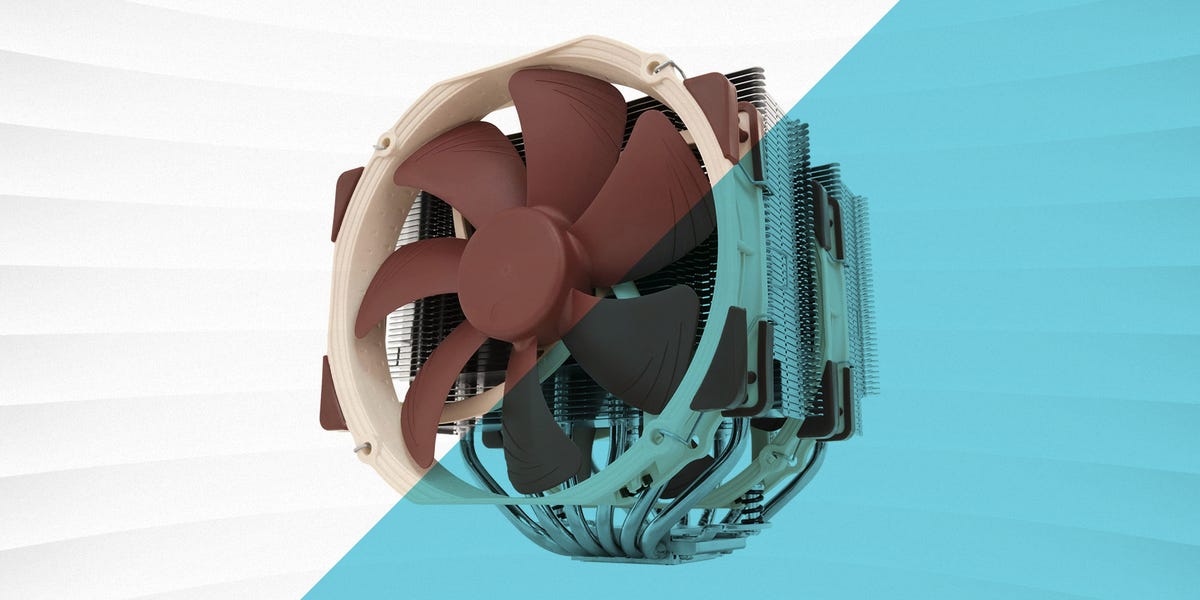
The Noctua NH-D15 was the giant everyone knew, respected, and quietly measured their own cooler against. In 2021, it still felt like the benchmark for high-end air cooling. With its dual-tower design, six heatpipes, and dual 140mm fans, it delivered the kind of thermal performance that made many AIO buyers pause and reconsider their life choices.
What made the NH-D15 special was not just raw cooling. It was the total package: excellent acoustics, premium build quality, and a track record so reliable it practically came with emotional support. Yes, it was large. Yes, RAM and case clearance had to be checked before clicking “buy now” like a caffeinated raccoon. But if your case could handle it, this cooler made a powerful case for staying with air.
2) ARCTIC Liquid Freezer II 280
The ARCTIC Liquid Freezer II 280 was one of the smartest AIO picks of 2021 because it did the boring stuff brilliantly. It cooled well, ran quietly, and usually cost less than some flashier competitors that spent half their budget on looking dramatic in marketing photos. Its 280mm format hit a sweet spot between performance and practicality, making it a favorite for builders who wanted strong thermals without jumping to a larger 360mm setup.
ARCTIC also built a reputation around efficient engineering instead of nightclub lighting. That gave this cooler an almost suspiciously sensible vibe. It was not trying to become the star of your build. It was trying to keep your CPU from becoming the star of your support ticket. For a lot of 2021 systems, that was exactly the right energy.
3) be quiet! Dark Rock Pro 4
The Dark Rock Pro 4 was the cooler for people who looked at beige Noctua fans and politely said, “No thank you, I dress in black.” This dual-tower monster combined premium thermal performance with one of the cleanest aesthetics in the entire category. It looked expensive because, frankly, it was trying to look expensive.
More important, it backed up the style with substance. The cooler’s near-silent reputation made it a favorite for quiet gaming rigs and productivity builds. If you wanted a system that could handle serious CPU loads without sounding like it was preparing for takeoff, the Dark Rock Pro 4 was one of the safest premium picks on the board.
4) Corsair iCUE H100i Elite Capellix
The Corsair iCUE H100i Elite Capellix was one of the easiest recommendations for builders who wanted a 240mm AIO with strong performance and strong visual flair. In 2021, it hit a sweet spot between mainstream compatibility and premium features. It delivered capable cooling for gaming and content-creation builds, while the Capellix RGB lighting gave the pump block and fans the kind of glow that says, “I did not buy tempered glass just to hide my hardware.”
This cooler also benefited from Corsair’s broader ecosystem. If your build already leaned into iCUE gear, the H100i Elite Capellix felt like a natural fit. It was not the cheapest option, but it was polished, widely available, and easy to picture inside the kind of modern build that spent as much time on Instagram as it did in BIOS.
5) Scythe Fuma 2
The Scythe Fuma 2 was one of the smartest air-cooling buys of 2021 because it delivered premium-class behavior without demanding premium-class money. That is the sort of sentence PC builders love. Its asymmetric dual-tower design improved memory compatibility, and its overall height made it easier to fit into popular mid-tower cases than some of the largest flagship towers.
The Fuma 2 became a favorite among value-focused enthusiasts for good reason. It punched above its price, stayed civilized acoustically, and avoided some of the fitment drama that can turn a cooler install into a mild personal crisis. If the NH-D15 was the heavyweight champion, the Fuma 2 was the clever contender that made everyone recalculate the bracket.
6) NZXT Kraken X63
The NZXT Kraken X63 was a 280mm AIO for builders who cared deeply about looks but still wanted credible performance. NZXT understood presentation better than most brands in this space, and the Kraken line had a clean, premium aesthetic that fit beautifully into modern minimalist gaming builds. In 2021, that mattered more than ever, because a lot of PCs were built to be seen as much as used.
Thankfully, the X63 was not just a pretty face with a pump attached. It delivered the thermal headroom expected from a quality 280mm AIO, and NZXT’s CAM ecosystem made monitoring and tuning approachable for people who wanted control without turning fan curves into a second job. For builders who wanted a cooler that matched a tidy, modern case interior, the Kraken X63 stayed high on the shortlist.
7) DeepCool Assassin III
The DeepCool Assassin III was not subtle. It was big, powerful, and impossible to mistake for a stock cooler. This was a serious high-end air cooler designed for people who wanted maximum air-cooling headroom and were willing to make room for it. With seven heatpipes and a physically imposing layout, it earned its place as one of the best brute-force air options available around 2021.
What separated it from “just another giant cooler” was how well it balanced that muscle with a fairly refined overall experience. It was clearly aimed at enthusiasts who wanted top-tier thermal performance but preferred the simplicity of air over the plumbing-adjacent vibes of liquid cooling. In the right case, the Assassin III looked less like a component and more like a warning label.
8) Lian Li Galahad AIO 240
The Lian Li Galahad AIO 240 became a popular choice because it delivered a rare combo in 2021: it looked premium, cooled well, and did not feel like a compromise buy. Lian Li already had credibility with style-conscious builders thanks to its cases, and the Galahad extended that reputation into cooling with attractive lighting and a very polished overall presentation.
This cooler made particular sense for mainstream gaming systems where a 240mm radiator was easier to fit than a 280mm or 360mm unit. It gave builders strong all-around performance without demanding a giant chassis. In other words, it was the kind of AIO that made your build look like you planned it, even if the planning mostly involved opening twelve tabs and muttering at compatibility charts.
9) ARCTIC Freezer 34 eSports DUO
The Freezer 34 eSports DUO was one of the best examples of a budget-minded cooler that did not feel cheap. ARCTIC understood something many brands still forget: performance per dollar is a language PC builders speak fluently. This cooler provided dual-fan airflow, respectable thermals, and a compact enough form factor to avoid many of the clearance headaches associated with larger towers.
It was especially attractive for mid-range gaming builds where spending wildly on a cooler made no sense. Pair it with a sane CPU and a decent airflow case, and it delivered exactly what most buyers actually needed: reliable temperatures, manageable noise, and enough savings left over for better RAM, storage, or takeout after the build was finally done.
10) Cooler Master Hyper 212 Black Edition
The Hyper 212 series has been around so long it practically deserves its own documentary, and the Black Edition kept that legacy alive in 2021. It was not the biggest, quietest, or most powerful cooler on this list, but it remained one of the most recognizable budget upgrades in PC building for a reason. It was affordable, familiar, widely supported, and good enough for countless mainstream systems.
The Black Edition added a cleaner, more modern visual style to a classic formula. That mattered. Plenty of builders wanted a cooler that felt like an upgrade without turning the system into a science project. For mid-tier CPUs and practical budgets, the Hyper 212 Black Edition stayed exactly what it had always been: the dependable friend who shows up on time and does not ask for applause.
How to Choose the Right CPU Cooler
Match the Cooler to the CPU
Not every processor needs a giant cooler. A mid-range chip running stock settings can be perfectly happy with a good budget air tower. But if you are using a hotter enthusiast CPU, overclocking, or running sustained productivity loads, investing in a stronger air cooler or an AIO makes a lot more sense. Buying too little cooler is how throttling enters the chat.
Check Case and RAM Clearance
This is the part builders ignore right before they discover that “should fit” is not the same as “does fit.” Large air coolers can interfere with tall memory modules or narrow cases. Liquid coolers avoid some socket-area crowding, but radiator support at the front or top of the case becomes the new problem. Before buying anything, verify cooler height, radiator size, and motherboard clearance like your sanity depends on it. Because it does.
Think About Noise, Not Just Temperature
The best CPU cooler is not automatically the one with the lowest peak temperature. Noise matters. A slightly warmer but significantly quieter system is often the better daily experience. This is why coolers like the NH-D15, Dark Rock Pro 4, and Liquid Freezer II developed such loyal followings. They did not just cool well. They cooled well without sounding annoyed about it.
Do Not Pay Extra for Features You Do Not Need
RGB can look fantastic. LCD pump heads can be fun. Brand ecosystems can be convenient. But if your goal is simply solid cooling on a reasonable budget, focus on fit, thermals, acoustics, and reliability first. It is okay to pay for flair. Just do not accidentally pay for flair instead of performance.
Real-World Builder Experiences With CPU Coolers
One thing spec sheets never fully capture is how a cooler feels to live with after the benchmark charts are over. Builders often go into a project obsessed with maximum cooling, then discover that the day-to-day experience is shaped just as much by fitment, noise, and installation as by a few degrees on a graph.
A common experience with large air coolers is surprise. First comes the box. Then comes the moment you hold the heatsink and realize you did not buy a cooler so much as a compact metal monument. Coolers like the NH-D15, Dark Rock Pro 4, and Assassin III can be astonishingly effective, but they also make you think very carefully about RAM height, motherboard access, and whether your case manufacturer was feeling optimistic when writing its clearance specs.
Yet once installed, many builders end up loving these giant air towers. They are simple. They are dependable. There is no pump to think about, no radiator position to argue over, and no tubes bending across the case like a sci-fi vine. For people who value low maintenance, air cooling often becomes the favorite not because it is glamorous, but because it quietly does its job year after year.
Liquid AIO coolers create a different kind of experience. They usually make the area around the CPU socket look cleaner, which is a huge relief when you are working with taller RAM or just want your build to look organized. AIOs like the Arctic Liquid Freezer II 280, Corsair H100i Elite Capellix, and NZXT Kraken X63 also tend to feel more “premium” during the build process. The radiator, fans, pump block, and cables make the install seem more high-tech, even if the cable routing occasionally feels like solving a puzzle designed by a person who dislikes joy.
What builders often notice after installation is that liquid cooling is as much about the whole system as the cooler itself. Radiator placement changes airflow. Fan curves affect noise character. Top-mounting a radiator can improve the look of a build but may interact differently with case thermals than front-mounting it. In other words, the cooler is only part of the story. The case and airflow plan still matter. A lot.
Another recurring experience is that “best cooler” is highly personal. Some builders buy a Hyper 212 Black Edition or Freezer 34 eSports DUO, install it in twenty minutes, see perfectly acceptable temperatures, and never think about cooling again. That is a win. Others enjoy tuning pump profiles, fan curves, and RGB until the PC feels like a living room exhibit. Also a win. The best CPU cooler in 2021 was never just the one with the biggest number attached to it. It was the one that matched the builder’s goals without creating new problems.
And perhaps the most universal experience of all is the moment after the build powers on successfully and temperatures look good. There is a very specific kind of relief there. You hear the fans spin, the BIOS loads, the idle temps behave, and for a few glorious seconds you feel smarter than you probably are. A good CPU cooler helps create that moment. It turns an anxious build into a stable, quiet, capable machine. For PC builders, that is not a small thing. That is the whole game.
Final Verdict
The best CPU coolers in 2021 proved that builders had more good choices than ever. If you wanted the best all-around air cooler, the Noctua NH-D15 still towered above the field in more ways than one. If you wanted the best liquid option for mainstream enthusiast builds, the ARCTIC Liquid Freezer II 280 was incredibly hard to beat. For silence, the Dark Rock Pro 4 remained a premium favorite. For value, the Scythe Fuma 2 and Freezer 34 eSports DUO made a strong argument that smart money often spends better than flashy money.
The real lesson is simple: buy the cooler that fits your CPU, your case, your budget, and your tolerance for installation drama. Do that well, and your processor stays cool, your system stays quiet, and your PC avoids the tragic fate of sounding like it is trying to leave the room.