USB-C was supposed to make life simple. One connector, reversible plug, fewer drawers full of mystery cables, and no more ritualistic flipping of a plug three times before it fits. Then USB Power Delivery walked in wearing a lab coat and said, “What if this tiny connector could also negotiate 5 V, 9 V, 15 V, 20 V, 28 V, 36 V, 48 V, and enough power to make your old barrel-jack charger feel unemployed?”
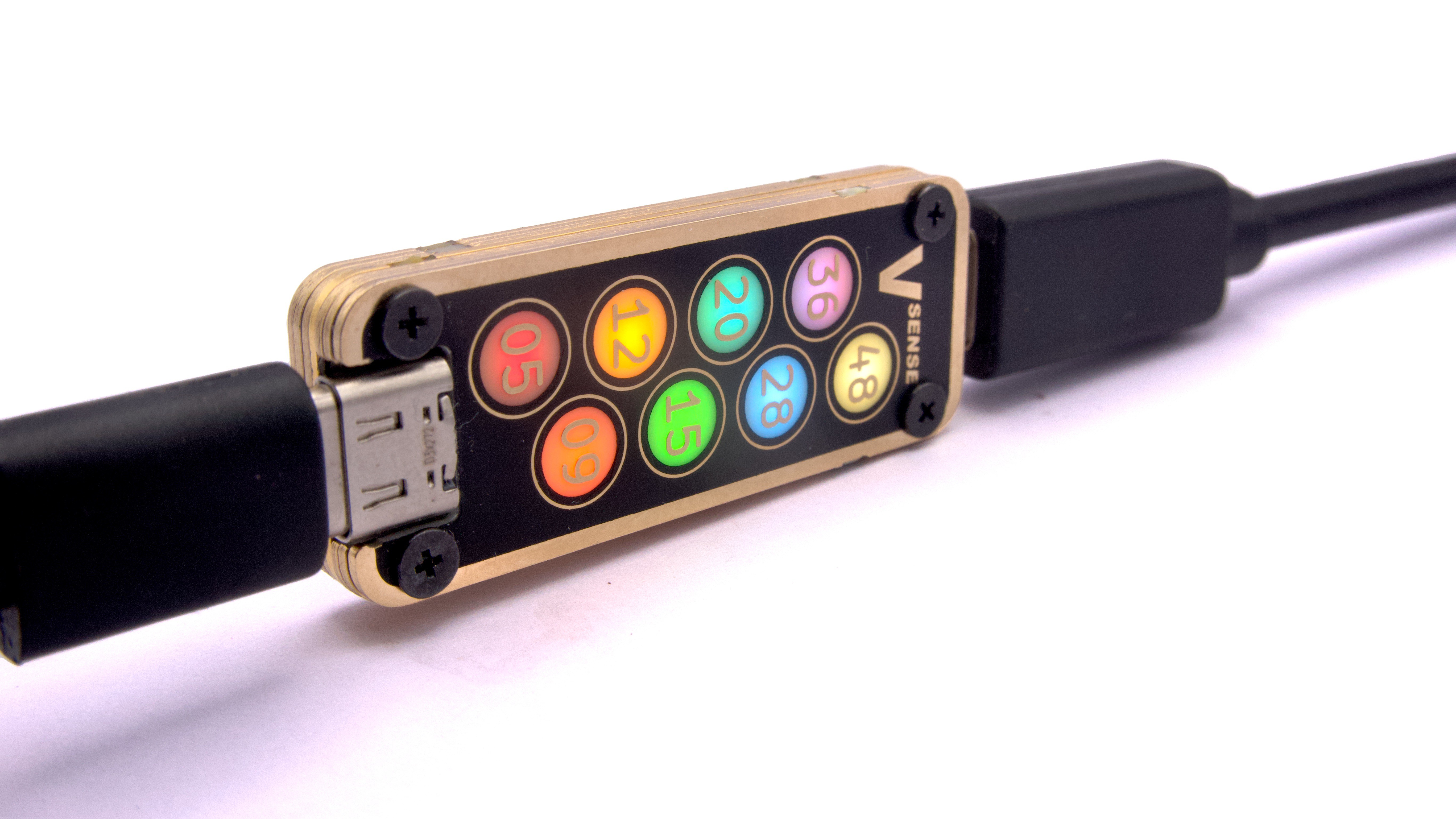
That is where the USB-C Rainbow Ranger idea shines. More specifically, the project known as USB VSense from Meticulous Technologies gives USB-C voltage sensing a delightfully visual twist: instead of forcing users to stare at a small numeric screen, it uses labeled, color-coded LEDs to show which voltage mode is active. It is part tool, part diagnostic helper, and part tiny electric mood ring for your charging setup.
For anyone who works with USB-C chargers, battery packs, dev boards, laptops, docking stations, portable monitors, or suspicious cables from the “miscellaneous technology swamp,” a quick USB-C voltage indicator can save time. It cannot magically fix a bad charger, but it can tell you whether the charger and device have negotiated the power level you expected. In the age of USB-C Power Delivery, that is not a luxury. That is sanity with LEDs.
What Is the USB-C Rainbow Ranger?
The USB-C Rainbow Ranger is best understood as a compact inline voltage indicator. You place it between a USB-C power source and a USB-C device, and it visually reports the voltage present on the line. The real-world project behind this idea, USB VSense, is designed to provide a fast, clear, and low-friction way to understand what your USB-powered device is actually receiving.
Unlike a full-featured USB meter that may show voltage, current, wattage, accumulated energy, protocol details, and possibly enough menu screens to qualify as a tiny tax form, this device focuses on one thing: voltage awareness. It answers the practical question, “What voltage is happening here?” quickly enough that you do not need to pause your workflow.
A Simple Idea With Serious Usefulness
USB-C charging often feels invisible. You plug in a device, see a battery icon, and hope that “fast charging” is not just marketing confetti. But the charger, cable, and device must cooperate. A phone may request 9 V, a laptop may need 20 V, and newer high-power equipment can use Extended Power Range levels such as 28 V, 36 V, or 48 V. If the cable or charger cannot support the requested level, the system may fall back to something lower.
The Rainbow Ranger approach makes that invisible negotiation visible. A red light might show 5 V. Orange can represent 9 V. Green, lime, blue, purple, and white can step through higher levels. Suddenly, a hidden charging conversation becomes a little dashboard you can read from across the desk.
Why USB-C Voltage Sensing Matters
USB-C is not merely a shape. That is the first thing every frustrated buyer eventually learns. A USB-C cable may support only basic charging, USB 2.0 data, high-speed data, video, 60 W power, 100 W power, or up to 240 W under USB Power Delivery Extended Power Range. The connector looks the same, because apparently the universe enjoys practical jokes.
Voltage sensing matters because power delivery is negotiated, not assumed. In older USB days, 5 V was the safe default expectation. Today, USB Power Delivery can raise the voltage after the source and sink agree on a contract. That is brilliant engineering, but it also creates confusion. When your laptop charges slowly, your handheld console refuses to behave, or your dev board browns out like it just heard bad news, voltage is one of the first clues worth checking.
Common Diagnostic Scenarios
Imagine plugging a laptop into a compact charger that claims “high speed” but only negotiates 9 V when the laptop expects 20 V. The computer may still charge, but slowly, or it may simply maintain battery level under light use. A USB-C voltage indicator can show the mismatch immediately.
Or consider a maker testing a USB-C PD trigger board for a project. The board is expected to request 15 V, but the line remains at 5 V. That suggests the negotiation did not happen, the trigger configuration is wrong, or the power source does not offer the requested profile. Without a quick visual tool, the maker may spend half an afternoon blaming firmware, solder joints, the moon phase, and finally the innocent cable.
A voltage indicator is also useful for checking power banks, docking stations, hubs, and travel chargers. Many accessories share power across multiple ports. A charger that provides 65 W on one port may reduce output when a second device is connected. Watching voltage behavior helps reveal when a setup is performing as expected and when it has quietly entered “budget mode.”
How the Rainbow LED System Works
The charming part of the USB-C Rainbow Ranger concept is the display philosophy. Instead of asking users to read a number, it maps voltage levels to dedicated indicators. The result is fast pattern recognition. Humans are very good at noticing color and position. We are less good at reading tiny screens while crawling behind a desk with one hand holding a charger and the other hand questioning our life choices.
USB VSense uses individual color-coded indicators for several commonly encountered USB-C voltage levels: 5 V, 9 V, 12 V, 15 V, 20 V, 28 V, 36 V, and 48 V. Each level has its own labeled light, making the tool readable at a glance. The project also uses blinking behavior to indicate deviations outside normal voltage ranges, which adds a second layer of diagnostic value.
Why Blinking Alerts Are Clever
A steady light can say, “Everything looks normal.” A blinking light can say, “Please pay attention before your electronics begin writing their farewell letters.” For example, if a voltage is slightly under or over a known level, the indicator can use a slow or rapid blink to warn the user that the line is not sitting where it should.
This matters because not every problem is a total failure. A charger may not be dead; it may simply be sagging under load. A cable may not be broken; it may be too limited for the current being requested. A hub may not be useless; it may be dividing its power budget differently than expected. Voltage deviation alerts give users a quick reason to investigate before blaming the most expensive component on the desk.
USB Power Delivery: The Quick Human-Friendly Version
USB Power Delivery, commonly called USB PD, is a protocol that lets compatible devices negotiate power over USB-C. Instead of always delivering a fixed 5 V, the power source and connected device communicate and agree on a suitable voltage and current. This is how a single USB-C charger can power phones, tablets, laptops, portable monitors, soldering irons, mini PCs, and a growing list of gadgets that seem determined to remove every old round charging plug from history.
Standard Power Range USB PD covers familiar levels up to 20 V and 100 W under suitable cable and charger conditions. Extended Power Range, introduced with USB PD 3.1, raises the ceiling to 240 W using higher fixed voltage levels such as 28 V, 36 V, and 48 V at up to 5 A. That opens the door for larger devices to run from USB-C, but it also makes cable quality, labeling, and power negotiation more important.
Why 240 W Is a Big Deal
At 240 W, USB-C is no longer just the phone charger in your backpack. It becomes a serious DC power interface for laptops, displays, docks, and specialized equipment. This is exciting because it reduces charger clutter, but it also means users need clearer ways to confirm what their setup is doing.
A 240 W-capable charger does not automatically deliver 240 W to everything. The device must request power, the charger must offer it, and the cable must be capable of handling it safely. If any piece of the chain is not up to the task, the system negotiates something lower or refuses the high-power mode. A voltage indicator will not show every detail of that negotiation, but it can reveal the most obvious result: the voltage that actually appears on VBUS.
Design Choices That Make USB VSense Stand Out
The most interesting design decision is restraint. Many USB meters try to become pocket oscilloscopes, protocol analyzers, data loggers, and tiny cyberpunk dashboards all at once. That can be useful, but not everyone needs a screen full of numbers. USB VSense chooses a narrower mission: make voltage mode obvious.
That mission leads to several smart choices. The project uses a compact inline form factor, low current consumption, labeled LEDs, and a durable stacked PCB construction. It is designed to pass through USB 2.0 data, CC, and sideband lines while monitoring voltage. The result is more like a dedicated shop tool than a general-purpose meter.
The Stacked PCB “Oreo” Construction
One of the most memorable details is the stacked PCB body. Instead of hiding the electronics inside a plastic shell, the device uses multiple printed circuit boards as both structure and enclosure. This gives it a rugged, maker-friendly identity. It also means the physical appearance can be customized more easily than a molded case.
That may sound like style for style’s sake, but it has practical advantages. PCB layers can be precisely routed, bolted together, and shaped around components. For a slim inline tool with USB-C connectors at both ends, mechanical strength matters. Anyone who has bumped a dongle sideways while it was plugged in knows the fear of hearing a tiny crack and immediately pretending they did not.
Who Needs a USB-C Voltage Indicator?
The obvious audience is electronics enthusiasts, hardware developers, repair technicians, and USB-C tinkerers. If you build projects powered by USB-C, a voltage indicator can help validate chargers, PD trigger boards, cables, and power banks. It is the sort of tool that prevents long debugging sessions caused by very simple power assumptions.
But the audience is broader than engineers. Travelers can use a device like this to confirm whether a compact charger is actually fast-charging a phone or tablet. Laptop users can check whether a dock is passing through the expected voltage. Content creators with cameras, lights, and portable monitors can troubleshoot power issues before a shoot turns into an interpretive dance called “Why Is This Battery Dead?”
For Makers and Developers
Makers often use USB-C because it is convenient, available, and increasingly powerful. A project may need 9 V for a motor driver, 12 V for a small amplifier, 15 V for a prototype rail, or 20 V for a compact power supply stage. A voltage indicator helps confirm that the requested level is present before connecting the rest of the circuit.
It is especially helpful during early prototyping, when one wrong assumption can lead to unstable behavior. A microcontroller resetting randomly may not have a code problem. A motor driver refusing to start may not be defective. Sometimes the answer is simply, “The charger never left 5 V.” That is not glamorous, but neither is chasing imaginary bugs for three hours.
For Everyday Users
Everyday users benefit from visibility. A phone that says “charging” may not be charging quickly. A laptop connected to a weak charger may discharge under load even while plugged in. A power bank may advertise impressive output, but only on one port, only with the right cable, and only when Mercury is not in retrograde. A simple color indicator cuts through that uncertainty.
You do not need to understand every detail of USB PD to appreciate a light that says, “Yes, this is at 20 V,” or “No, you are still at 5 V.” That is the beauty of the Rainbow Ranger idea: it turns a technical measurement into a readable signal.
What It Does Not Replace
A USB-C voltage indicator is not a full replacement for a professional USB protocol analyzer, bench multimeter, oscilloscope, or safety-certified test setup. It does not tell the complete story of current draw, power over time, ripple, transient behavior, cable e-marker details, or every PD message exchanged between devices.
That limitation is not a flaw. It is the point. A screwdriver is not a drill press, and nobody complains that it lacks Bluetooth. A focused inline voltage indicator gives fast answers to common questions. When deeper analysis is needed, you reach for deeper tools.
Buying or Building: Why Open Hardware Matters
The open-source angle makes the project more interesting. Hardware files, firmware, and documentation allow curious users to study how the device works, modify it, repair it, and potentially build variants. For the maker community, this transforms a product from a sealed gadget into a learning platform.
Open hardware also helps build trust. When a device is meant to sit between a charger and expensive equipment, transparency matters. Users can inspect design choices, component selections, and firmware behavior. Even those who never open a design file benefit from a culture where others can review and improve the work.
Practical Examples: Where the Rainbow Ranger Saves the Day
Example 1: The “Fast Charger” That Was Not So Fast
You plug your phone into a charger labeled with a heroic wattage number. The phone says it is charging, but the battery percentage rises like it is walking through oatmeal. A USB-C Rainbow Ranger-style indicator shows the line sitting at 5 V instead of 9 V. Now you know the fast-charge handshake failed, the cable may be limited, or the charger is not offering the expected mode.
Example 2: The Laptop Dock Mystery
A laptop connected through a dock works fine for display output but slowly loses battery during heavy use. The indicator shows a lower voltage than expected. That points toward a power budget issue, an underpowered charger, or a dock that cannot pass through enough power under the current configuration.
Example 3: The Maker Bench Debugging Shortcut
A developer sets a PD trigger board to request 15 V for a prototype. The circuit misbehaves. Before inspecting every solder joint under magnification, the developer inserts a voltage indicator and sees only 5 V. The problem is not the load circuit; it is the PD negotiation or trigger setup. Debugging time drops from “entire Saturday” to “before the coffee gets cold.”
Experience Notes: Living With a USB-C Rainbow Ranger
Using a visual USB-C voltage indicator changes the way you think about charging. At first, it feels like a novelty. You plug in a device, a colored LED appears, and your brain says, “Neat.” Then, after a few days, it becomes one of those tools you keep reaching for because it answers questions before they become problems.
The biggest experience upgrade is confidence. With ordinary charging, you usually trust icons and assumptions. A laptop icon says charging, but not how well. A phone says fast charging, but not whether the charger settled into the expected voltage range. A USB-C Rainbow Ranger gives you an immediate physical signal. You can see when a phone jumps from 5 V to a higher charging mode. You can notice when a device drops back down as the battery fills. You can spot when a cable that looks perfectly respectable is quietly holding the whole setup back.
On a workbench, the experience is even better. USB-C has become a convenient power source for small projects, but convenience can hide complexity. When building a prototype, I would rather confirm the input voltage in two seconds than discover later that the power stage was never receiving the rail I expected. A color-coded indicator makes that check almost automatic. Plug in the source, glance at the light, continue. It is not dramatic, and that is exactly why it is useful.
The visual design also reduces friction. Full USB meters are excellent when you need details, but they can be overkill for quick checks. A tiny screen with multiple readings is powerful, yet it demands attention. Color-coded voltage indicators work more like status lights on lab equipment. They fade into the background until something changes. That makes the device useful not only for active testing but also for passive monitoring.
There is also a surprisingly human benefit: it makes USB-C feel less mysterious. Modern charging can seem like wizardry performed by tiny negotiators inside the cable. The Rainbow Ranger idea turns that negotiation into something visible. Red means basic. Orange means a higher mode. Blue, purple, or white means the serious stuff is happening. That kind of feedback teaches users through repetition without requiring them to read a specification document the size of a small household appliance.
For travel, I would treat it like a charger sanity checker. Hotel outlets, compact GaN chargers, multi-port adapters, and borrowed cables can produce confusing results. A quick indicator helps identify which combination actually gives the best charging mode. It also helps avoid blaming the wrong item. Sometimes the charger is fine and the cable is the problem. Sometimes the device refuses a mode because another port is in use. Sometimes the “100 W” charger is only feeling generous under very specific conditions.
The best tools are not always the ones with the most features. They are the ones that remove uncertainty at exactly the right moment. A USB-C Rainbow Ranger-style voltage sensor does that with a little electronic theater: plug, glow, understand. It is stylish, practical, and just nerdy enough to make your desk look like it is preparing for a tiny spacecraft launch.
Conclusion: A Tiny Tool for a Very USB-C World
USB-C is becoming the universal power connector people always wanted, but universal does not mean simple. Between USB PD, EPR, cable ratings, power sharing, fast charging, and device-specific behavior, the modern charging chain can be surprisingly complex. The USB-C Rainbow Ranger concept cuts through that complexity by making voltage visible.
USB VSense proves that a diagnostic tool does not need to be intimidating to be useful. With color-coded LEDs, compact construction, low power draw, and support for modern high-voltage USB-C ranges, it offers a practical way to see what your devices are doing. It is a cheerful little reminder that good engineering can be both serious and stylish.
In other words, the USB-C Rainbow Ranger does not just sense volts. It gives them stage lighting.