The Cherry G84-4100 is not the kind of keyboard that enters the room wearing RGB sunglasses and shouting about esports. It is compact, wired, practical, and deeply uninterested in your desk setup mood board. That, oddly enough, is exactly why it remains interesting.
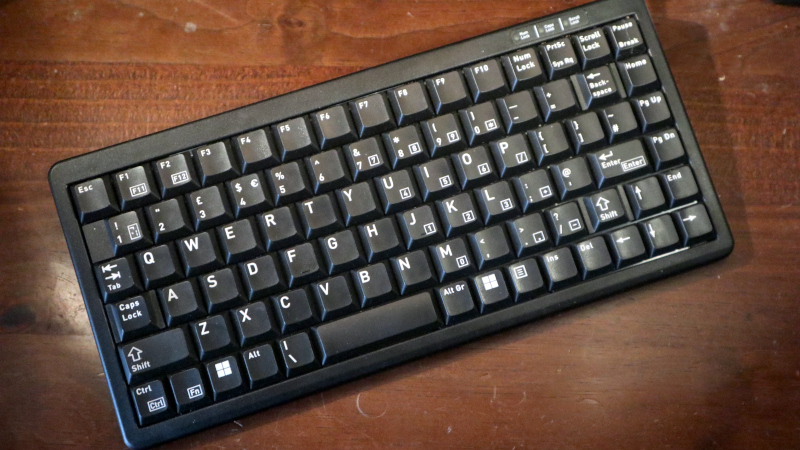
Designed for tight workspaces, industrial environments, point-of-sale stations, medical desks, rack-mounted systems, and portable setups, the Cherry G84-4100 compact keyboard is a small mechanical board with a very specific personality. It uses Cherry ML low-profile mechanical switches, has a space-saving 75% style layout, and skips the numeric keypad in favor of a narrow footprint. In a world full of flashy custom keyboards, the G84-4100 feels like a tool pulled from a serious workstation drawer: not glamorous, but ready to work.
This review looks at the Cherry G84-4100 keyboard from a practical angle: typing feel, build quality, layout, switch performance, portability, compatibility, and whether it still makes sense for modern users. Spoiler: it does, but only for the right kind of typist. If you want a feather-soft luxury board with gasket mounting and artisan keycaps shaped like tiny frogs, keep browsing. If you want a compact mechanical keyboard that can survive years of office abuse and still ask for overtime, read on.
What Is the Cherry G84-4100?
The Cherry G84-4100 is a compact wired mechanical keyboard built around Cherry ML technology. Unlike full-size keyboards, it removes the dedicated number pad and compresses navigation keys into a smaller layout. Most versions come in either 83-key or 86-key arrangements, depending on whether the model includes Windows keys. The keyboard is commonly available in black or light gray, with several regional layouts including US, UK, German, French, and other international variants.
Physically, the board measures about 282 mm wide, 132 mm deep, and roughly 26 to 27 mm tall, depending on the specification sheet or revision. In normal human terms, that means it is much smaller than a full-size office keyboard and narrow enough to leave real room for a mouse, notebook, coffee mug, or emergency snack supply. It is wired through USB, and many versions include or support PS/2 compatibility through an adapter. That old-school PS/2 support is not just nostalgia; it can matter for legacy workstations, industrial PCs, embedded systems, and older machines that refuse to retire gracefully.
Design and Build Quality
The G84-4100 has a simple plastic chassis with a low-profile wedge shape. It is not heavy in the boutique mechanical keyboard sense. You will not confuse it with a five-pound aluminum rectangle machined by keyboard monks. At around 400 grams without packaging, it is light, easy to move, and suitable for portable or cramped environments.
That lightweight design is part of its purpose. This keyboard was not created to impress livestream viewers. It was created to fit where normal keyboards are too wide, including service counters, server racks, medical carts, financial terminals, and mobile workstations. The case is basic, but not flimsy in the disposable bargain-bin sense. It feels more like commercial equipment: plain, a little severe, and clearly built for function.
The key legends are typically laser-etched on ABS keycaps. ABS can develop shine over time, especially under heavy typing, but the legends are meant to withstand serious daily use. Status LEDs are built into the housing, and some versions include fold-out rear feet for typing angle adjustment. There is no backlighting, no wireless mode, no software suite, no macro layer, and no dramatic startup animation. The G84-4100 wakes up, types, and minds its business.
Cherry ML Switches: The Star and the Debate
The most important feature of the Cherry G84-4100 is its use of Cherry ML low-profile mechanical switches. Cherry ML switches are tactile, short-travel mechanical switches with Gold Crosspoint contacts. They are not Cherry MX switches, and that distinction matters. Many keyboard buyers hear “Cherry mechanical” and immediately think of MX Red, Brown, Blue, or Black switches. The G84-4100 belongs to a different branch of the Cherry family tree.
Cherry ML switches have a shorter travel than traditional MX switches and a compact switch body designed for slim keyboards. Depending on the source and exact switch specification, you will commonly see figures around 45 cN actuation force, a tactile pressure point near 50 cN, and roughly 3 mm of total travel. On the G84-4100, CHERRY’s current product listing describes the board as mechanical with tactile switching characteristics and a 50 cN actuating force.
How do they feel? In one word: particular. In three words: small, tactile, firm. Cherry ML switches have a crisp tactile event, but they can feel scratchier than modern low-profile mechanical switches from brands like Kailh, Keychron, or Logitech. They also respond best when pressed near the center of the keycap. Off-center presses can feel less smooth, especially on larger keys. This is the great Cherry ML debate: some typists love the precise, compact action; others find it scratchy, stiff, or wobbly. The truth sits in the middle, wearing sensible shoes.
Typing Experience
Typing on the Cherry G84-4100 is very different from typing on a modern full-height mechanical keyboard. The key travel is shorter, the keycaps are flatter, and the board has a tight layout. At first, it may feel like a laptop keyboard that wandered into a machine shop and came back with mechanical switches.
The tactile feedback is clear enough for accurate typing, and the board can be surprisingly fast once your fingers adjust. The actuation is not feather-light, so accidental keypresses are rare. That makes it good for data entry, terminal work, coding, and office tasks where precision matters. The compact width also keeps the mouse closer to your typing position, which can reduce shoulder movement during long work sessions.
However, this is not a universal comfort champion. If you are used to big sculpted keycaps and full-size spacing, the G84-4100 may feel cramped. The short travel can also make long typing sessions feel more intense because your fingers receive sharper feedback in less distance. Think of it as espresso instead of drip coffee: efficient, concentrated, and not everyone’s evening beverage.
Layout: Compact but Not Completely Tiny
The Cherry G84-4100 is often described as a compact or 75% keyboard. It keeps the main alphanumeric section and arrow keys, while removing the numeric keypad. The result is more practical than a 60% keyboard for users who still want arrows and navigation functions without relying on layers for everything.
The layout is one of the board’s strengths, but it is also where some users need adjustment time. Insert, Delete, and navigation keys may not sit exactly where your muscle memory expects them. The Backspace area, arrow cluster, and bottom row can feel unusual depending on the specific regional version. This is not a keyboard you should judge after five minutes unless you also judge hiking boots while standing in the store aisle.
After a few days, many users settle into the layout and appreciate the small footprint. Still, anyone who relies heavily on dedicated navigation clusters, full-size function key spacing, or a numeric keypad should think carefully. CHERRY also offers matching numeric keypad options in the same product family, but that partially defeats the whole “tiny desk hero” charm unless you truly need number entry.
Sound Profile
The G84-4100 is quieter than clicky mechanical keyboards, but it is not silent. Cherry ML switches produce a light mechanical tap with a slightly plasticky tone. It has more character than a rubber dome office keyboard, but it will not thunder like an IBM Model M or annoy the entire accounting department into open rebellion.
Sound varies with desk surface, key wear, and typing style. A heavy-handed typist will make it louder, especially because the shorter travel encourages bottoming out. On a desk mat, the board becomes more controlled and less hollow. In a shared office, it is usually acceptable. In a recording booth, library, or bedroom next to a sleeping partner, your mileage may vary and your partner may develop opinions.
Durability and Reliability
The Cherry G84-4100 has long been marketed for professional and commercial environments, which tells you a lot about its intended life. Official and retailer specifications vary by revision: some current listings describe a service life of over 20 million actuations per key, while older datasheets and certain distributor references mention more than 50 million operations. Either way, this is not a toy keyboard designed to look cute for six months and then retire dramatically.
The Gold Crosspoint contact system is one of Cherry’s long-standing strengths. Combined with a wired connection and a no-nonsense controller, the keyboard is less complicated than modern wireless boards with batteries, Bluetooth profiles, lighting controllers, and app dependencies. Fewer extras mean fewer things to break. The G84-4100 is the keyboard equivalent of a manual transmission pickup truck: basic, slightly stubborn, but hard to embarrass.
Compatibility and Connectivity
Most Cherry G84-4100 versions connect through USB-A, with PS/2 compatibility available through an adapter on many models. This makes it useful for both modern PCs and older systems. It supports Windows environments, and because it behaves like a standard wired keyboard, it can generally work with Linux and other operating systems as well, though special layout behavior depends on the specific OS and region.
There is no N-key rollover and no anti-ghosting emphasis in the current official specifications. For office typing, programming, data entry, or terminal work, that is rarely a problem. For gaming, especially games that require several simultaneous keypresses, it is less ideal. Could you play games on it? Yes. Should you buy it as your dedicated gaming keyboard? Probably not, unless your favorite game is “enter invoice numbers accurately while drinking cold coffee.”
Who Should Buy the Cherry G84-4100?
Buy it if you want a compact workhorse
The G84-4100 is a strong choice for users who need a compact mechanical keyboard for a small desk, industrial station, rack system, point-of-sale counter, medical cart, or travel workstation. It is especially appealing if you value wired reliability and do not care about modern gaming features.
Buy it if you like unusual mechanical switches
Keyboard enthusiasts who enjoy trying different switch families may appreciate Cherry ML switches for their history and distinctive feel. They are not as refined as many modern premium switches, but they have a unique tactile personality.
Skip it if you want a modern luxury typing experience
If you want hot-swappable switches, gasket mounting, PBT keycaps, RGB lighting, VIA support, wireless connectivity, or a silky custom-keyboard feel, the G84-4100 will look at your wishlist and quietly return to the warehouse. This is not that kind of product.
Pros and Cons
Pros
- Compact 75% style layout saves desk space.
- Cherry ML low-profile mechanical switches offer tactile feedback.
- Wired USB connection is simple and reliable.
- Many versions support PS/2 through an adapter.
- Lightweight design works well for portable and industrial setups.
- Durable key technology with long service-life ratings.
- Laser-etched legends are better suited for long-term use than cheap pad printing.
Cons
- Cherry ML switches can feel scratchy or stiff compared with newer low-profile switches.
- Layout requires adjustment, especially around navigation keys.
- No backlighting, wireless mode, hot-swap sockets, or modern customization software.
- No dedicated numeric keypad.
- Not ideal for gaming because it lacks modern rollover and anti-ghosting features.
- ABS keycaps may shine with heavy use.
How It Compares With Modern Compact Keyboards
Compared with modern compact mechanical keyboards, the Cherry G84-4100 feels older, more utilitarian, and less customizable. A Keychron, NuPhy, Logitech MX Mechanical Mini, or modern low-profile enthusiast board may offer smoother switches, Bluetooth, better keycaps, hot-swappable options, and more polished acoustics. Those boards are designed for today’s consumer expectations.
The G84-4100 wins in a different category: industrial practicality. It is smaller than many compact boards, more legacy-friendly than most modern wireless keyboards, and refreshingly free from software dependence. It is also available in multiple regional layouts and professional supply channels, which matters for institutions buying equipment in quantity.
So the comparison is not simply “old versus new.” It is more like “toolbox screwdriver versus fancy electric driver.” The fancy option may be more comfortable and feature-packed, but the simple tool still earns its place when reliability, size, and compatibility are the mission.
Real-World Use Cases
The Cherry G84-4100 makes the most sense in places where desk space is limited and reliability matters. In a server room, it can sit on a narrow pull-out tray. In a clinic, it can live beside specialized equipment. At a reception desk, it frees up room for scanners, phones, paperwork, and the mysterious pile of sticky notes that appears in every office. For programmers, it can be a neat little terminal keyboard with tactile feedback and arrow keys intact.
It is also worth considering for users who dislike huge keyboards. A full-size keyboard pushes the mouse farther to the right, which can create awkward shoulder positioning. By removing the number pad, the G84-4100 brings the mouse closer and creates a cleaner workspace. That ergonomic advantage is simple but meaningful.
Verdict: A Specialist Keyboard With Old-School Charm
The Cherry G84-4100 is not a keyboard for everyone, and that is perfectly fine. In fact, that may be its greatest strength. It does not chase trends. It does not pretend to be a gaming keyboard, a custom keyboard, or a luxury typing slab. It is a compact mechanical work keyboard built for places where space is limited, reliability is important, and flashy extras would be about as useful as a disco ball in a dentist’s office.
The Cherry ML switches are the deciding factor. Some typists will enjoy their short, tactile, precise feel. Others will find them scratchy, cramped, or simply outdated compared with newer low-profile switch designs. The layout also needs patience, especially if you are coming from a full-size board.
But if you want a small wired mechanical keyboard with real commercial DNA, the Cherry G84-4100 remains surprisingly relevant. It is compact, durable, practical, and oddly charming in the way only a deeply unfashionable tool can be. It will not make your desk look like a spaceship. It will, however, type reliably for years, which is still a pretty good party trick.
of Experience: Living With the Cherry G84-4100
Using the Cherry G84-4100 for everyday work feels like moving from a large sedan into a compact hatchback. At first, everything seems a little too close together. The edges of the layout arrive sooner than expected, and your fingers may reach for keys that are not quite where memory says they should be. Then, after a few days, the smaller shape begins to make sense. Your mouse sits closer. Your desk looks less crowded. You stop feeling like your keyboard is trying to annex neighboring countries.
The first thing you notice is the switch feel. Cherry ML switches are not soft in the modern laptop-keyboard sense. They have a definite mechanical action, but it is compressed into a shorter movement. That makes typing feel direct and slightly demanding. You do not float across the keys; you tap with intention. For writing emails, coding, editing documents, or entering data, the board rewards accuracy. For lazy typing while leaning sideways in a chair like a tired shrimp, it is less forgiving.
After a full workday, the compact format becomes one of the keyboard’s best qualities. A full-size board with a number pad often pushes the mouse far away, especially on smaller desks. The G84-4100 keeps everything within reach. That sounds minor until you spend hours switching between typing and mouse work. The reduced movement can make a workstation feel cleaner and more efficient. It is not magic ergonomics, but it is the kind of small improvement that becomes obvious once you go back to a larger keyboard.
The sound is also part of the experience. The G84-4100 has a dry, mechanical clack that says, “Yes, I am working,” without sounding like a typewriter fell down the stairs. On a bare desk, it can be a bit sharper and more hollow. On a desk mat, it becomes more pleasant. If you type heavily, the shorter travel makes bottoming out common, so the keyboard reflects your habits honestly. It is a tiny truth machine for your fingers.
Where the board takes the most adjustment is the navigation area. Depending on the exact version, Insert, Delete, and nearby keys may interrupt years of muscle memory. The Backspace and arrow key zones can feel strange at first. This is not a flaw so much as a compact-keyboard tax. Small boards always demand compromise; the G84-4100 simply hands you the bill without decorating it.
Over time, the keyboard’s personality becomes clear. It is not luxurious, but it is competent. It is not modern, but it is focused. It is not trendy, but it has purpose. The Cherry G84-4100 is the sort of keyboard you appreciate more when you stop asking it to be exciting and start asking it to be dependable. That may sound boring, but in daily work, boring can be beautiful. Boring means the keyboard connects. Boring means the keys register. Boring means you finish the spreadsheet, the code review, the support ticket, or the article without fighting your equipment. Sometimes the best keyboard is not the one that makes you say “wow.” Sometimes it is the one that quietly disappears under your hands and lets you get the job done.
Conclusion
The Cherry G84-4100 keyboard is a compact mechanical classic with a practical soul. It is best for users who need a wired, space-saving keyboard for workstations, legacy systems, industrial environments, or small desks. Its Cherry ML switches are distinctive, tactile, and durable, but they are not as smooth or fashionable as many modern low-profile options. The layout takes practice, the features are minimal, and the design is proudly plain.
Still, the G84-4100 succeeds because it knows exactly what it is. It is a compact work keyboard, not a desk ornament. If that matches your needs, it remains a smart and surprisingly satisfying choice.