Note: This is an original, synthesized SEO article based on current search behavior research, public search documentation, and industry analysis. It is written for web publication and is not an official Moz article.
Why the Google SERP Is No Longer Just a List of Links
Once upon a simpler internet, Google search results looked like a tidy library shelf: ten blue links, a few short descriptions, and the quiet promise that clicking was your next move. Today, a Google search engine results page, or SERP, looks more like a digital airport terminal. There are ads waving from the top, featured snippets answering questions before you click, People Also Ask boxes opening tiny rabbit holes, local packs showing maps, product grids flashing prices, video carousels rolling by, knowledge panels standing like encyclopedic billboards, and AI Overviews trying to summarize the whole internet before your coffee gets cold.
That layout change is not cosmetic. Google SERP layouts directly affect searching behavior. They influence where people look first, what they trust, how long they stay on the results page, whether they click, and which websites get traffic. For SEO professionals, this means ranking number one is still wonderful, but it is no longer the entire game. A page can rank well and still lose clicks if the SERP answers the query above it, distracts users with visual features, or pushes the traditional organic listing below the fold.
The modern search experience is shaped by attention, intent, speed, and trust. Users do not read a SERP like a book. They scan, bounce, compare, hesitate, and sometimes leave without clicking anything. In other words, the SERP has become both the doorway and, increasingly, the destination.
What Is a SERP Layout?
A SERP layout is the arrangement of search results and visual elements that appear after a user enters a query. The classic organic result usually includes a title link, URL or breadcrumb, and snippet. But modern layouts may also include paid search ads, featured snippets, image packs, video results, shopping ads, local map packs, sitelinks, review stars, recipe cards, Top Stories, knowledge panels, discussions and forums, related searches, and AI-generated summaries.
Google changes the layout based on search intent. A query like “best pizza near me” triggers a local pack because the user likely wants a place, not a dissertation on dough fermentation. A query like “how to clean a cast iron skillet” may show a featured snippet, video carousel, and People Also Ask questions because the user wants steps. A query like “iPhone 16 price” may show shopping listings, product panels, reviews, and retailer information because commercial intent is strong.
This intent-based design affects search behavior by making some answers immediately visible and others less visible. The more Google gives users directly on the SERP, the more users decide whether clicking is worth the effort. Clicking is now a vote of curiosity, not a guaranteed next step.
How Users Actually Scan Modern Search Results
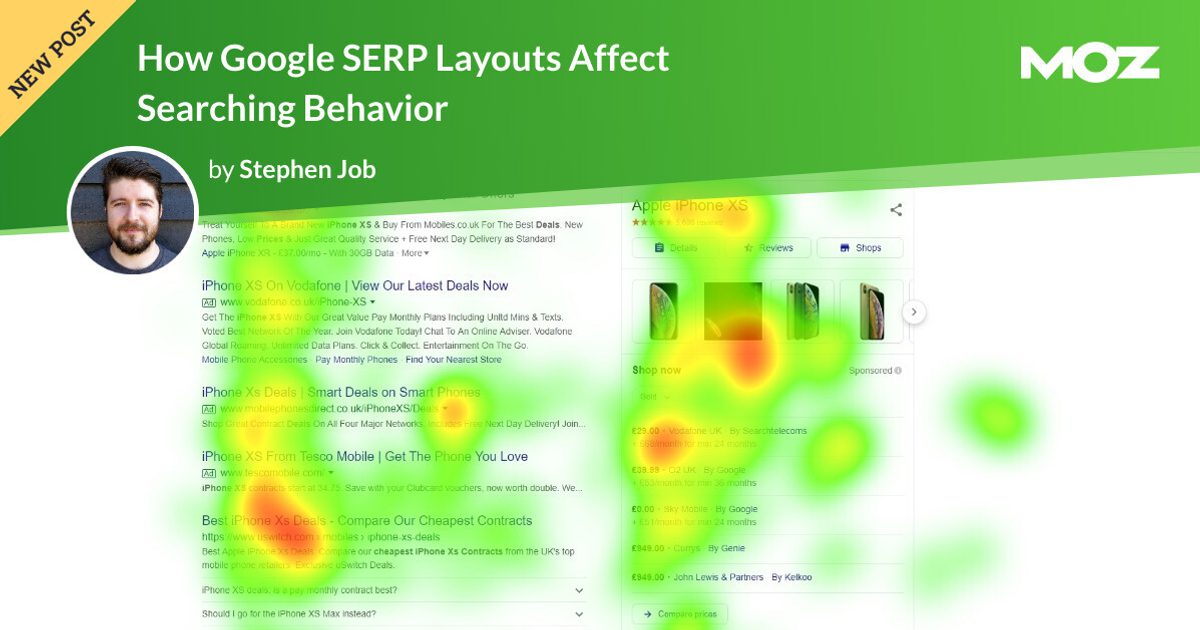
Search behavior used to be described with fairly predictable patterns. Users often started at the top-left area of the page, scanned the first result, moved down the list, and clicked when something looked relevant. That behavior still exists on simpler SERPs, but complex layouts have changed the rhythm.
When multiple SERP features appear, users often scan in a more scattered pattern. Their eyes jump from a featured snippet to a People Also Ask box, then to an image, then back to a title link, then to a shopping unit. It is less like reading a menu and more like playing pinball. The shiny things get attention first, especially when they contain bold text, images, ratings, prices, or quick answers.
This is why visual hierarchy matters. A plain blue link can still win, especially when the title is specific and trustworthy. But it competes against boxes, thumbnails, star ratings, maps, and summaries. If your organic result looks vague while a competitor’s result displays review stars, a clear answer, a recognizable brand name, or a compelling title, the user’s attention may never make it to your snippet.
The Featured Snippet Effect: Fast Answers, Mixed Clicks
Featured snippets are one of the most important examples of how Google SERP layouts affect searching behavior. A featured snippet usually appears near the top of the results and gives a short answer pulled from a webpage. It may be a paragraph, numbered list, table, or definition.
For users, featured snippets are convenient. They reduce effort. If someone searches “how long to boil eggs,” a concise answer may be enough. The user smiles, makes breakfast, and never clicks. That is great for the user and slightly less thrilling for the website owner who wrote the answer.
For SEO, the featured snippet can be both a trophy and a traffic leak. It increases visibility and can build authority, but it may also satisfy simple informational queries directly on the SERP. The key is understanding query depth. If the query needs only one fact, the snippet may create a zero-click search. If the query invites deeper learning, comparison, instructions, or trust-building, the snippet can become a powerful doorway to the full article.
How to optimize for featured snippets without giving everything away
Write concise answers near the top of your content, then provide deeper value below. Use clear definitions, step-by-step formatting, comparison tables, and descriptive subheadings. But do not stop at the snippet-sized answer. Add examples, common mistakes, expert tips, visuals, and practical context. The goal is to earn the SERP feature while making the user think, “Great, now I want the full version.”
People Also Ask: The Searcher’s Curiosity Machine
People Also Ask, often called PAA, is one of Google’s most behavior-shaping SERP features. It shows related questions that expand when clicked. For users, PAA is helpful because it reveals follow-up questions they may not have known how to ask. For SEOs, it is a live map of search intent.
PAA boxes can keep users on Google longer. Instead of clicking through to a website, searchers may expand several answers directly in the SERP. This creates a browsing experience inside Google itself. It is useful, but it can reduce traffic to traditional organic results.
However, PAA also provides content strategy gold. If several PAA questions appear for your target keyword, those questions should influence your article structure. They show what users want clarified before making a decision. Smart pages answer those questions naturally in H2 and H3 sections, helping the content match real search behavior instead of imaginary keyword spreadsheets that have never met a human.
Local Packs: When Search Behavior Becomes Action Behavior
Local SERP layouts are especially powerful because they turn searching into action. When users search for “dentist near me,” “coffee shop open now,” or “emergency plumber,” Google often displays a local pack with a map, business listings, ratings, hours, directions, and phone buttons.
In these searches, users may not scroll to organic results at all. They compare star ratings, distance, business hours, photos, and review snippets. The click may go to a phone call, driving directions, or a Google Business Profile instead of a website.
This changes how local SEO should be measured. Website traffic is important, but it is not the only sign of success. Calls, direction requests, profile views, bookings, and reviews all matter. A local business can win the search without earning a traditional website click. That sounds strange until you realize the customer is already walking through the door. At that point, analytics can stop sulking.
Knowledge Panels and Brand Trust
Knowledge panels appear for brands, people, organizations, places, and entities. They often sit on the right side of desktop results or near the top of mobile results. These panels can include descriptions, social profiles, facts, images, reviews, and related entities.
Knowledge panels influence searching behavior by shaping trust before the user clicks. If a brand search produces a polished panel, accurate information, strong reviews, and consistent profiles, users feel reassured. If the panel is missing, outdated, or filled with confusing information, users may hesitate.
For brand SEO, entity clarity is essential. That means consistent naming, structured data, updated business profiles, authoritative mentions, and a strong About page. Google needs to understand who you are before it can confidently present you as an entity. The SERP is now part of your brand’s first impression, and it is wearing a name tag.
Ads and Shopping Results: Commercial Attention Magnets
For transactional searches, paid ads and shopping results can dominate the upper SERP. Product images, prices, discounts, ratings, and retailer names attract attention quickly. This affects organic click-through rates because users with buying intent may compare options before reaching editorial or organic listings.
That does not mean organic SEO is dead for commercial keywords. It means organic results must understand their role. Sometimes the user wants to buy now. Sometimes they want comparisons, reviews, sizing help, alternatives, or “best for” recommendations. A product page may compete with ads, but a well-built guide can capture users who are not ready to purchase immediately.
For example, a search for “best running shoes for flat feet” may include shopping ads, images, reviews, and organic buying guides. A user may scan prices first, but still click an article that explains support, cushioning, fit, and injury prevention. The best SEO strategy meets the searcher at the right stage of the journey, not just at the cash register.
AI Overviews and the Rise of Zero-Click Behavior
AI Overviews have pushed SERP behavior into a new phase. These AI-generated summaries can appear above traditional organic results, offering a synthesized answer with source links. For users, the appeal is obvious: faster answers, less tab-hopping, and fewer open browser windows quietly judging them.
For publishers and marketers, AI Overviews complicate the click economy. If Google summarizes the answer directly, fewer users may click traditional results. But appearing as a cited source inside an AI Overview can still create visibility and trust. The challenge is that old SEO metrics do not fully capture this. Rankings, impressions, and average position may look healthy while click-through rate declines.
Content strategy now needs to serve both classic search and AI-assisted search. That means publishing original information, clear expertise, strong topical coverage, factual accuracy, structured formatting, and unique insights that deserve to be cited. Thin rewrites of common knowledge are less useful in an environment where AI can summarize common knowledge in seconds.
Mobile SERP Layouts Make the Battle Even Tighter
Mobile search behavior is more compressed than desktop behavior. The screen is smaller, scrolling is faster, and SERP features take up more vertical space. A single AI Overview, ad block, local pack, or shopping carousel can push organic results far below the first screen.
This makes mobile snippets incredibly important. Titles must be clear. Meta descriptions should be useful, not decorative. Brand names should be recognizable. Page speed and mobile usability matter because users who do click will not politely wait while your page loads like it is being delivered by carrier pigeon.
Mobile users also act differently. They tap call buttons, open maps, compare reviews, watch short videos, and refine searches quickly. Optimizing for mobile SERPs means thinking beyond rankings. It means thinking about the micro-action the user wants next.
How SERP Layouts Affect SEO Strategy
The biggest mistake in modern SEO is treating every keyword as if it produces the same type of search result. It does not. Two keywords with similar search volume can have completely different SERP layouts and completely different click potential.
Before targeting a keyword, study the live SERP. Ask what appears above the organic results. Are there ads? Is there an AI Overview? Is the featured snippet strong? Are videos dominating? Is there a local pack? Are forums ranking? Are product grids present? Does the query look informational, commercial, local, navigational, or mixed?
This SERP-first analysis helps you decide whether to create a blog post, product page, landing page, video, local page, comparison guide, FAQ section, or something else entirely. It also helps you estimate real opportunity. A keyword with lower search volume but a cleaner SERP may drive more traffic than a high-volume keyword covered in answer boxes and ads.
Practical SERP analysis checklist
- Identify the dominant search intent behind the query.
- Record which SERP features appear above the first organic result.
- Check whether the top results are guides, product pages, videos, forums, tools, or local listings.
- Review title formats and snippet angles used by competitors.
- Look for People Also Ask questions and related searches.
- Decide whether the keyword is likely to generate clicks, brand visibility, leads, or zero-click exposure.
Specific Examples of SERP Layouts and User Behavior
Example 1: Informational query
A search like “what is schema markup” may show a featured snippet, People Also Ask questions, videos, and beginner guides. The user wants a quick explanation first. If your content answers the definition clearly and then explains examples, benefits, and implementation, you have a better chance of earning both visibility and clicks.
Example 2: Local query
A search like “best Thai restaurant near me” will likely show a local pack. The user may compare ratings, photos, hours, and distance without visiting a website. For restaurants, strong reviews, accurate hours, updated menus, and attractive photos may influence behavior more than a traditional blog post.
Example 3: Commercial query
A search like “best standing desk 2026” may show shopping ads, product carousels, review articles, videos, and comparison content. Users may bounce between SERP features before clicking. Winning this query requires more than product keywords. It requires trust signals, comparison depth, updated recommendations, and clear buying guidance.
Example 4: Brand query
A search for a company name may show sitelinks, reviews, a knowledge panel, social profiles, news, and support pages. Users are evaluating credibility. Branded SERPs are reputation pages. If something ugly appears there, pretending not to see it is not a strategy; it is digital whistling in the dark.
How to Optimize for Search Behavior, Not Just Search Engines
Modern SEO should begin with the user’s behavior on the SERP. What do they see first? What might satisfy them instantly? What might make them skeptical? What would earn their click?
Strong titles are still essential. A title should clearly match intent and promise value. Instead of writing “SERP Features Guide,” a more compelling title might be “How SERP Features Change Clicks, Rankings, and SEO Strategy.” Specificity wins attention.
Meta descriptions also matter, even when Google rewrites them. A good description should summarize the benefit and set expectations. It should not sound like a tiny robot wrote it after drinking cold coffee.
Structured data can help content become eligible for rich results, depending on the page type and Google’s policies. FAQ content, product details, reviews, recipes, events, and how-to information should be marked up accurately when appropriate. Structured data is not a magic wand, but it helps search engines understand the page.
Content depth is another major factor. If the SERP already provides a quick answer, your page needs to offer something more: original examples, expert commentary, data, visuals, tools, templates, opinions, case studies, or step-by-step detail. The click must feel worth it.
Experience Section: What Working With SERP Layouts Teaches You
After analyzing SERPs across industries, one lesson becomes obvious: the keyword is only half the story. The layout tells you what Google believes the user wants. Ignore that layout, and your SEO strategy starts wearing mismatched socks to a job interview.
In real content planning, I like to begin with a simple exercise: search the target keyword manually and pretend I am the user. Not the marketer. Not the business owner. Not the person who lovingly created a 90-tab keyword spreadsheet. Just the searcher. What catches my eye first? Is there an answer box? Are the top results listicles? Are there videos? Is Reddit showing up? Does Google think this is a local query, a shopping query, or a “please explain this like I have five minutes before a meeting” query?
This habit changes everything. For example, a client may want to rank for a broad keyword like “email marketing.” That sounds attractive because the search volume is huge. But the SERP may be crowded with ads, software brands, beginner guides, PAA boxes, and comparison pages. The better opportunity might be a more specific query like “email marketing automation for dental clinics” or “welcome email sequence examples for ecommerce.” The search volume is smaller, but the intent is sharper and the SERP may be easier to satisfy.
I have also seen cases where a page ranked in the top three but delivered disappointing traffic. At first glance, the ranking looked successful. But the SERP told another story. A featured snippet answered the basic question. A video carousel pulled visual learners away. People Also Ask answered follow-up questions. By the time the organic listing appeared, the user had already consumed enough information to move on. The fix was not simply “get more backlinks.” The fix was to restructure the content around deeper intent, add original examples, improve the title, target related long-tail questions, and create supporting assets that could appear in multiple SERP features.
Local SEO offers another useful lesson. Many businesses obsess over website visits while ignoring Google Business Profile actions. A local contractor may receive fewer site clicks but more calls because the local pack gives users everything they need: rating, proximity, hours, and phone number. In that case, the SERP layout did not hurt the business. It changed the conversion path. Good SEO reporting should recognize that.
For ecommerce, SERP layouts teach humility. Users compare prices, images, reviews, shipping details, and brand trust before clicking. A plain category page may struggle against shopping features unless it offers a reason to visit: better filters, expert guidance, comparison charts, authentic reviews, or exclusive inventory. The searcher is not obligated to click your result just because you ranked. You still have to earn the tap.
The biggest experience-based takeaway is this: SERP analysis should happen before content creation, not after publication. Too many teams write first and check the SERP later, which is like baking a cake and then asking whether anyone wanted soup. Study the layout, understand the behavior, and then build the page that deserves to exist in that environment.
Conclusion: SERP Layouts Are Search Behavior
Google SERP layouts do more than display results. They guide attention, answer questions, create trust, reduce clicks, encourage comparisons, and shape decisions. Featured snippets can satisfy quick informational needs. People Also Ask boxes can redirect curiosity. Local packs can turn searches into calls or visits. Shopping features can pull commercial attention. AI Overviews can summarize complex topics before the first organic result gets a chance to wave hello.
For SEO professionals, the lesson is clear: stop optimizing for rankings in isolation. Optimize for the actual search experience. Study the layout. Match the intent. Improve the snippet. Build content that offers more than the SERP can summarize. Track visibility, clicks, conversions, and on-SERP actions. And above all, remember that users are not robots moving neatly from result one to result two. They are humans scanning a crowded page, looking for the fastest trustworthy answer.
The future of SEO belongs to teams that understand how people search, not just how algorithms rank. In a world of rich results, AI summaries, and zero-click behavior, the smartest strategy is not to complain that the SERP changed. It is to learn the layout, adapt the content, and give searchers a reason to choose you.