Note: This article is written in original American English for web publishing and contains no external links or citation placeholders in the publishable body.
A great project display board does not need glitter explosions, laser beams, or a title so large it can be seen from the parking lot. What it does need is clarity, smart organization, strong visuals, and a layout that helps people understand your work in about thirty seconds. That is the secret sauce behind an A+ project display board: it tells a complete story without making the viewer feel like they accidentally opened a textbook during lunch.
Whether you are preparing a science fair board, history project board, engineering display, book report presentation, or classroom research project, the goal is the same. Your board should explain what you studied, how you did the work, what you discovered, and why it matters. Think of it as your project’s billboard, résumé, and tour guide all standing on one tri-fold poster board trying very hard not to fall over.
This guide breaks down how to make a project display board that looks polished, earns attention, and makes your teacher or judge think, “Yes, this student understood the assignment.”
What Is a Project Display Board?
A project display board is a visual presentation of your research, experiment, design, or creative work. Most students use a standard tri-fold display board, often around 36 inches high by 48 inches wide, though exact size requirements can vary by school, fair, or competition. Before you cut, glue, print, or panic, always check your teacher’s instructions or event rules first.
The best project boards are not just decorated posters. They are organized communication tools. A strong board helps viewers quickly understand your topic, follow your process, see your evidence, and remember your conclusion. In other words, your board should do more than look nice. It should work nice. Yes, “work nice” is not grammar-class fancy, but it gets the job done.
Start With the Assignment Requirements
Before designing anything, read the rubric. Then read it again, preferably before the night before the deadline. Rubrics often tell you exactly what your teacher or judges will look for: title, research question, background information, methods, data, visuals, conclusion, references, neatness, creativity, and presentation quality.
If your board is for a science fair, the rules may also include display size limits, safety restrictions, required forms, source citations, image credits, and rules about what objects may sit in front of the board. Some fairs do not allow certain personal information, school names, hazardous materials, live organisms, exposed wires, or food samples. That may sound strict, but the goal is fairness and safetynot ruining your dream of taping a suspicious jar to cardboard.
Make a quick requirement checklist
Before you begin, create a checklist like this:
- Required board size
- Required sections
- Minimum font size or readability expectations
- Rules for photos, charts, and image credits
- Whether a notebook, abstract, bibliography, or report must be included
- Any banned materials or display restrictions
- Due date, presentation date, and setup instructions
This small step prevents big problems later. Nothing hurts quite like finishing a beautiful board and then discovering your teacher wanted the conclusion on the right panel, not hidden under a decorative comet sticker.
Choose a Clear, Specific Title
Your title is the first thing people notice, so make it useful. A vague title like “Plants” or “Volcanoes” is not doing your project any favors. A stronger title explains the focus: “How Different Light Colors Affect Bean Plant Growth” or “Why Baking Soda and Vinegar Create a Gas Reaction.”
For an A+ project display board, place the title at the top center. Use large, bold letters that are easy to read from several feet away. Avoid fonts that look like they were designed by a pirate with a calligraphy hobby. Fun fonts are fine for small accents, but your main title should be clean and readable.
Plan the Layout Before You Glue Anything
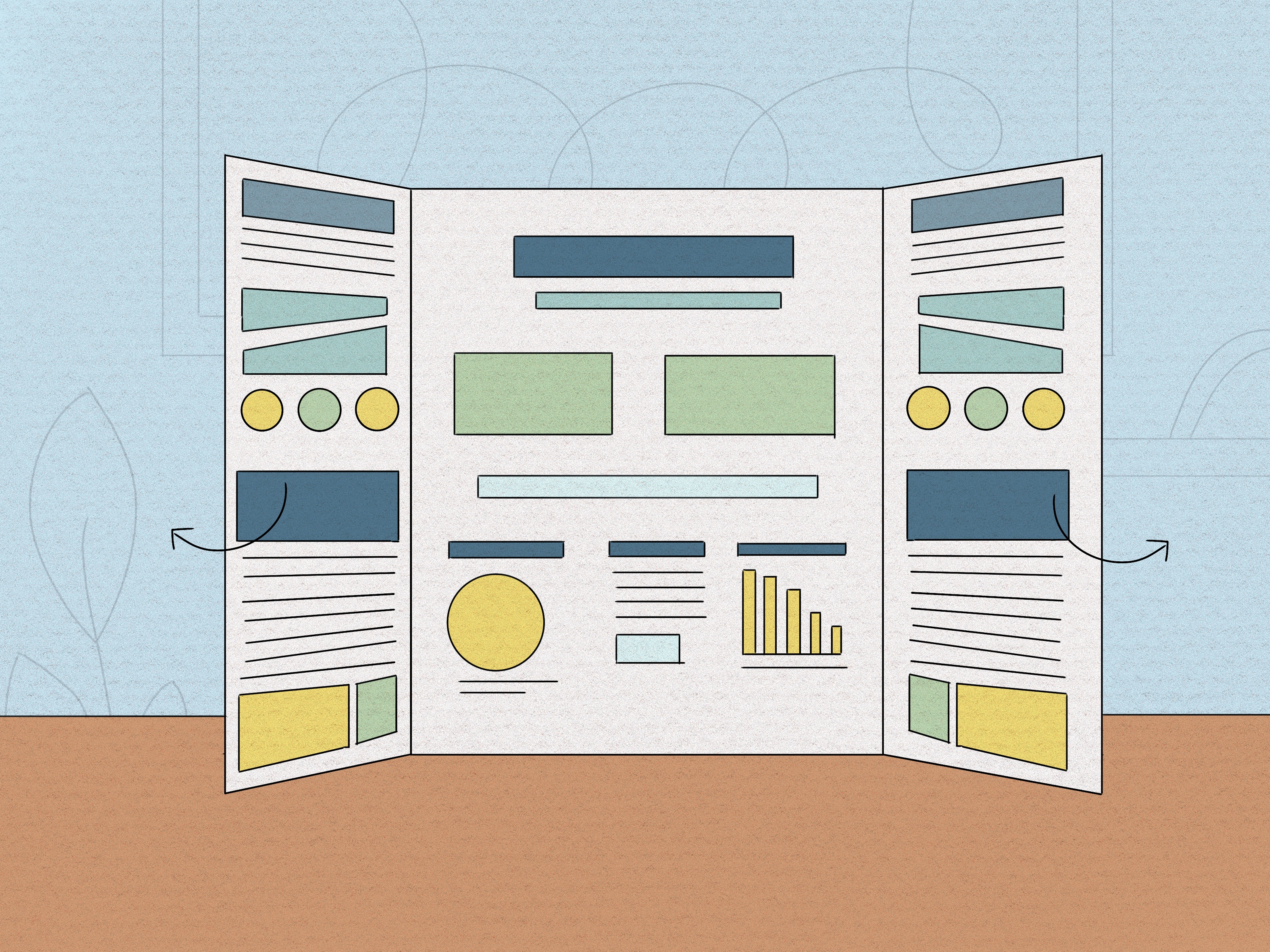
The classic tri-fold display board layout works because it follows a natural left-to-right reading path. The left panel introduces the project, the center panel highlights the main idea and most important evidence, and the right panel wraps everything up with analysis and conclusions.
Suggested tri-fold display board layout
Here is a simple layout that works for many school projects:
- Left panel: Introduction, research question, background, hypothesis or purpose
- Center panel: Title, main visuals, data, charts, photos, important findings
- Right panel: Results, conclusion, reflection, future research, bibliography or credits
For science projects, you might use sections such as Question, Hypothesis, Materials, Procedure, Variables, Data, Results, Conclusion, and Sources. For history or literature projects, you might use Background, Main Argument, Evidence, Timeline, Key Figures, Analysis, and Works Cited. The exact labels can change, but the structure should still guide the viewer smoothly through the story.
Use Visual Hierarchy Like a Pro
Visual hierarchy means making the most important information stand out first. On a project display board, not all text should be the same size. Your title should be largest. Section headings should be next. Body text should be smaller but still readable. Captions can be smaller, but not so tiny that viewers need a magnifying glass and a personal commitment to your grade.
A good rule is to make headings bold and easy to scan. Use consistent heading styles across the board. If “Methods” is printed in blue uppercase letters, then “Results” and “Conclusion” should follow the same style. Consistency makes the board feel professional, even if your glue stick has chosen chaos.
Readable font tips
- Use simple fonts such as Arial, Calibri, Helvetica, Georgia, or Times New Roman.
- Keep body text large enough to read from a few feet away.
- Avoid long paragraphs; use short blocks and bullet points.
- Do not use more than two or three font styles.
- Use bold text for emphasis, not for entire paragraphs.
Write Short, Strong Sections
Your board is not the place to paste your entire research paper. A project display board should summarize, not swallow the viewer whole. Use short paragraphs, bullets, tables, labels, and captions. If a section looks like a wall of text, break it up.
For example, instead of writing a giant paragraph explaining your procedure, use numbered steps:
- Gather materials.
- Set up the experiment.
- Test each condition three times.
- Record measurements in a data table.
- Compare results and identify patterns.
This format is easier to read and easier to grade. Teachers and judges appreciate a board that respects their eyeballs.
Make Data the Star of the Show
If your project includes data, do not hide it in a paragraph. Show it with a table, chart, graph, diagram, or photo sequence. A strong data display can turn a good board into an excellent one because it proves that your conclusion is based on evidence.
For a science fair project display board, graphs are especially important. Use bar graphs for comparing categories, line graphs for showing change over time, and pie charts only when you are showing parts of a whole. Label every axis, include units of measurement, and give each graph a clear title.
Example of a stronger graph title
Weak title: “Results”
Better title: “Average Plant Height After 14 Days Under Different Light Colors”
The better title tells viewers what was measured, when it was measured, and what was compared. That is a tiny sentence doing a big job. Applaud it quietly.
Use Photos and Diagrams With Purpose
Photos can make your project board more engaging, but every image should earn its place. Use pictures that show your process, materials, experiment setup, final product, map, model, or key results. A cute decorative image may look nice, but if it does not explain anything, it may be stealing space from useful content.
Diagrams are great when a process is hard to describe with words. If you built a bridge model, show a labeled diagram of its parts. If you studied the water cycle, use arrows and labels. If you tested paper airplane designs, show the different wing shapes. Clear visuals help viewers understand your thinking faster.
Always credit photos, graphics, and information sources according to your assignment rules. If you took the photo yourself, you can label it as your own photo. If you created a chart from your own data, say so. Academic honesty is not decoration; it is part of the grade.
Pick Colors That Help, Not Hurt
Color can make a project display board look sharp, but too much color can turn it into a birthday party invitation for a confused robot. Choose two or three main colors and use them consistently. High contrast is your friend: dark text on a light background is usually easiest to read.
Avoid placing yellow text on white paper, red text on green paper, or tiny blue text on a black background. Your board should not require viewers to solve an optical illusion before learning your conclusion.
Simple color strategy
- Use one background color or plain white board.
- Use one accent color for headings.
- Use one additional color for borders or section labels.
- Keep charts clean and easy to understand.
- Leave white space around sections so the board can breathe.
Build the Board in Draft Form First
Before attaching anything permanently, lay all printed pieces on the board. Step back. Squint a little. Ask yourself: Can I understand the project quickly? Does the title stand out? Are the sections in order? Are any parts crowded? Is the most important evidence easy to find?
This draft stage is where you fix problems before glue makes them permanent. Move sections around, resize headings, trim extra text, and check spacing. A neat board often comes from patient arranging, not magical artistic talent.
Make the Center Panel Count
The center panel is prime real estate. Use it for your title and strongest visual evidence. This might be a main graph, a photo of your experiment, a timeline, a model diagram, or a key comparison chart. Do not waste the center on a giant block of background text. The middle should say, “Here is the heart of my project,” not “Welcome to paragraph mountain.”
If your project has one major result, place it where people cannot miss it. Judges and teachers often scan many boards quickly, so make your strongest point easy to find.
Include a Clear Conclusion
Your conclusion should answer the original question. It should not simply say, “I learned a lot,” even if you did, and even if some of what you learned involved printer settings at midnight.
A strong conclusion explains:
- What the results showed
- Whether the hypothesis or main claim was supported
- What evidence supports the conclusion
- What limitations affected the project
- What you would improve or test next
For example: “The plants under blue light grew the tallest on average, which supports the hypothesis that light color affects plant growth. However, the experiment only lasted two weeks, so a longer test could show whether the pattern continues.”
That conclusion is specific, honest, and connected to evidence. That is A+ behavior.
Polish the Details Before Presentation Day
Once your board is assembled, inspect it like a detective with a grading rubric. Check spelling, alignment, spacing, and labels. Make sure everything is straight and firmly attached. Loose corners, crooked titles, and mystery smudges can distract from great work.
Also prepare what you will say when someone asks about your project. Your board should support your presentation, but it should not replace your voice. Practice a short explanation that covers your question, process, results, and conclusion in under one minute. Then prepare for follow-up questions such as “What surprised you?” or “What would you do differently?”
Common Project Display Board Mistakes to Avoid
Even smart students make display board mistakes. The good news is that most of them are easy to fix before presentation day.
Too much text
If your board looks like a printed essay wearing cardboard shoes, cut it down. Use summaries, bullets, and visuals.
Tiny fonts
If someone has to lean in until their nose nearly touches the board, the font is too small. Make it readable from a normal viewing distance.
No clear order
A viewer should know where to begin and where to go next. Arrange sections logically from left to right or top to bottom.
Unlabeled visuals
A graph without labels is just a mysterious collection of lines having a private meeting. Label charts, axes, units, and photos.
Decoration overload
Creative design is good. Visual chaos is not. Use decorations to support the theme, not bury the information.
Example Layout for an A+ Science Project Display Board
Here is a practical layout for a science project about how sunlight affects plant growth:
Left panel
- Project question: “How does daily sunlight affect bean plant growth?”
- Background research: short explanation of photosynthesis
- Hypothesis: “Plants receiving more sunlight will grow taller.”
- Variables: sunlight exposure, plant height, soil, water, container size
Center panel
- Large title at top
- Photo of experiment setup
- Main bar graph comparing average plant height
- Small data table with measurements
Right panel
- Results summary
- Conclusion connected to the hypothesis
- Limitations: sample size, weather, experiment length
- Future research idea
- Sources or acknowledgments
This layout works because it gives the viewer a beginning, middle, and end. It also keeps the most important evidence in the center, where attention naturally lands first.
of Real Experience: What Actually Makes a Board Feel “A+”
After looking at many school project boards, one thing becomes obvious: the winning board is not always the fanciest board. It is usually the clearest one. A board with neat headings, readable text, strong visuals, and a confident conclusion will often beat a board covered in expensive decorations but missing the actual point. The display board is not supposed to shout, “Look how many craft supplies I own.” It is supposed to say, “Here is my idea, here is my evidence, and here is why it matters.”
One of the most helpful habits is to design the board as if the viewer knows nothing about your topic. Students sometimes forget that they have been living with their project for days or weeks. They know every detail, every mistake, every surprising result, and probably the exact moment the printer betrayed them. But a judge, teacher, parent, or classmate is seeing the board for the first time. That person needs context. A short background section, clear labels, and a logical flow make the project much easier to understand.
Another experience-based tip: print more than one version of important sections if you can. Sometimes a paragraph that looks fine on a computer screen looks enormous on the board. Other times, a graph that seemed readable becomes too small once it is placed beside other sections. Draft printing allows you to test size, spacing, and readability before final assembly. If you cannot print drafts, sketch the layout on paper first. Even a rough pencil map can save you from the classic mistake of running out of room on the right panel.
It also helps to think like a viewer walking past several boards. What makes someone stop? Usually it is a clear title, a bold visual, or an interesting question. “Which Paper Towel Is Strongest?” is more inviting than “Absorbency Project.” “Can Music Affect Memory?” makes people curious. A good title does not need to be silly, but it should be specific enough to create interest.
When assembling the board, small details matter more than students expect. Straight edges, even margins, clean cuts, and consistent colors create a professional look. You do not need advanced design skills. You need patience, a ruler, and the emotional strength to reprint a crooked heading instead of pretending it is “modern art.” Mounting printed sections on colored paper can also make the board look more polished, as long as the colors do not overpower the content.
Finally, the best boards are easy to present. If you can point to your question, then your method, then your graph, then your conclusion, your board is doing its job. Practice your explanation using the board as a guide. If you keep jumping around or saying, “Wait, that part is over here,” the layout may need adjusting. An A+ project display board feels organized because it was built with the viewer in mind from the beginning.
Final Checklist for an A+ Project Display Board
- The title is large, specific, and easy to read.
- The board follows a clear left-to-right or top-to-bottom flow.
- Each section has a bold, consistent heading.
- Text is short, focused, and readable.
- Charts, photos, and diagrams are labeled.
- Data supports the conclusion.
- Colors and decorations improve readability.
- Sources and image credits are included if required.
- The board follows all assignment or competition rules.
- You can explain the whole project confidently in about one minute.
Conclusion
Learning how to make an A+ project display board is really about learning how to communicate clearly. The board should not just be pretty; it should help people understand your work quickly and remember it afterward. Start with the rubric, organize your sections in a logical flow, make your title and visuals easy to read, and use evidence to support your conclusion.
A strong display board shows that you planned carefully, understood your topic, and respected the viewer’s time. It does not need to be perfect, expensive, or covered in enough glitter to be seen from space. It needs to be clear, neat, accurate, and thoughtful. Do that, and your project board will not just stand up on the tableit will stand out.