If you grew up in the era of beige computers, cassette tapes, and game cartridges you had to blow on, you probably remember that unmistakable 80s robot voice.
It was crunchy, slightly garbled, and somehow more expressive than today’s ultra-realistic text-to-speech. The fun news? You can recreate that same retro charm
on a tiny ESP32 microcontroller and make your next DIY gadget sound like it was shipped straight from 1984.
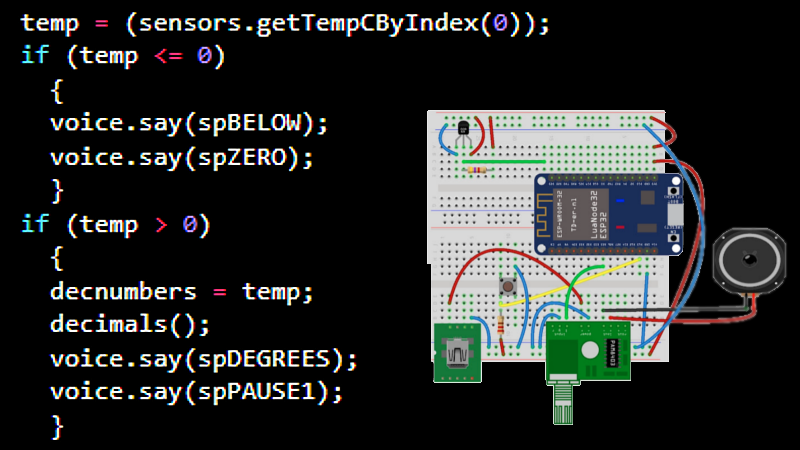
A popular Hackaday feature showcased exactly that: a talking thermometer built around the ESP32 that speaks its readings instead of using a display.
No fancy cloud services, no massive librariesjust clever use of the ESP32’s DAC, a small amplifier, a speaker, and a speech synthesis library that mimics
classic hardware from the 70s and 80s. In this guide, we’ll break down how that works, what you need, and how to give your own project an authentically
retro voice.
Why 80s Robot Voices Still Sound So Good
Before your phone could read full novels aloud in a smooth human voice, computers had to work with tiny memory footprints and painfully slow processors.
That constraint led to some ingenious tricks, especially in speech synthesis. One of the key techniques was Linear Predictive Coding (LPC),
a way of storing speech as a set of parameters about how the human vocal tract behaves rather than as raw audio samples.
Famous speech chips of the era, such as those used in the Texas Instruments Speak & Spell and various arcade machines, relied on LPC to compress
voice into very small ROMs. The result was speech that was:
- Recognizable – You could clearly understand the words.
- Compressed – Hundreds of words fit into kilobytes of memory.
- Quirky – That clipped, nasal tone that screams “vintage electronics.”
Modern ESP32 speech libraries bring that same architecture into a software-only implementation. Instead of plugging in a dedicated chip, you store those LPC-encoded
word samples in flash and let the ESP32 crunch through them in real time. The result sounds strikingly similar to the original hardware and fits perfectly with
any retro-themed project.
How the Hackaday Talking Thermometer Works
The Hackaday project that inspired this article is beautifully simple. A maker wired up an ESP32, a temperature sensor, and a small audio amplifier to create
a thermometer that literally announces the temperature out loudno LCD required.
The basic flow looks like this:
- The ESP32 reads the current temperature from a sensor (for example, a DS18B20 or similar digital sensor).
- It converts that reading into words like “twenty three point five degrees Celsius.”
- A speech library on the ESP32 plays pre-encoded LPC word samples through the built-in DAC.
- The DAC output passes through a simple amplifier board to drive a small speaker.
Because the voice output doesn’t need high fidelity, the hardware demands are tiny. The ESP32 does all the heavy lifting, and the speech still has that
delightfully crunchy quality that instantly evokes 80s hardware. This is a great demonstration of how you can use spoken feedback instead of displays, especially
for small embedded devices where screen space, cost, or power consumption are concerns.
Hardware You Need to Make Your ESP32 Talk
You don’t need much to make your ESP32 sound like a retro computer character. A minimal talking setup usually includes:
- ESP32 development board – Any common dev kit will do (DevKitC, NodeMCU-style, etc.).
- Small speaker – 4–8 Ω, around 0.5–3 W is fine for desktop projects.
- Audio amplifier module – A tiny class-D board like the PAM8403 or an I2S amplifier module.
- Power supply – USB power for the ESP32 and, ideally, a separate 5 V line for the amplifier if you want extra volume.
- Breadboard and jumper wires – For prototyping and quick changes.
- Optional: temperature sensor, buttons, or other inputs – Depends on what your talking gadget will do.
Many makers simply use the ESP32’s built-in DAC (for example, GPIO 25 or 26), feeding that analog output straight into an amplifier board.
If you want cleaner output or stereo, you can use an external I2S DAC module instead. But for authentic 80s flavor, the slightly imperfect built-in DAC is almost a feature.
Setting Up the Retro Speech Engine
Choose a Speech Library (Talkie and Friends)
To get an 80s-style voice, you don’t want a modern neural TTS engine; you want something that mimics old LPC speech chips. That’s where libraries like
Talkie and its ESP32 ports come in.
Talkie is a software implementation of that Texas Instruments speech synthesis architecture. It stores voice as LPC frames inside byte arrays, each representing
a word or phrase. Typical libraries include hundreds or even over a thousand pre-built English words such as numbers, common phrases, and basic system messages.
You can combine them to build sentences like:
On the ESP32, the Talkie-based libraries usually:
- Use the ESP32’s internal DAC on a specific pin to output audio.
- Stream LPC frames in real time while keeping CPU usage low enough for other tasks.
- Expose a simple API like
voice.say(word_array);to play speech.
Basic Code Flow
While implementations vary, the typical Arduino-style sketch for a talking ESP32 follows this pattern:
- Include the necessary libraries – Arduino core for ESP32, the Talkie (or ESP32Talkie) library, and any sensor libraries.
- Declare word samples – These are
const uint8_tarrays stored in program memory that represent words like “THE”, “TEMPERATURE”, or “DEGREES”. - Initialize I/O – Set up the built-in LED, buttons, or sensors, and make sure the DAC pin is configured.
- In
loop(), read data and speak – For example, read temperature, convert it to a rough phrase, then call the speech functions in sequence.
You’re not aiming for perfect grammar here; the charm is in the robotic delivery. If your device occasionally says “temperature twenty three point zero degrees,”
that just makes it feel more vintage.
Dialing In That 80s Audio Aesthetic
The ESP32 is capable of much cleaner audio than old 8-bit sound hardware, but we’re not here for clean. We’re here for nostalgic. To get that “computer voice in a school lab” tone,
think about a few design choices:
- Limited bandwidth – Use modest sample rates and small speakers. A narrow frequency response naturally gives you that telephone-quality sound.
- Simple DAC path – A direct DAC → amplifier → speaker chain, perhaps with only a basic RC filter, often sounds more retro.
- No reverb or fancy EQ – The more raw it sounds, the more it fits the 80s vibe.
If you want to go even deeper into nostalgia, you can look at older devices like the Covox Speech Thing and similar parallel-port sound gadgets.
Those devices used basic resistor ladder DACs and simple analog stages to play 8-bit audio. Recreating their limited dynamic range and mono output in software
on the ESP32 helps your project feel like it’s running on a vintage PC rather than a modern microcontroller.
Project Ideas for an 80s-Sounding ESP32
Once you’ve got your ESP32 talking, it’s hard to stop. Here are a few project ideas that work especially well with 80s-style speech:
1. Talking Thermometer or Weather Station
Follow the Hackaday-style build and have your device announce temperatures or humidity levels every few minutes, or when a button is pressed.
It’s practical, and the voice output means you can mount it where a display would be hard to read.
2. Retro Alarm or Countdown Timer
Use the ESP32’s Wi-Fi to sync time, then have it speak alarms using phrases like “Wake up human” or “Launch sequence complete.”
Add a seven-segment display if you want a visual touch, but keep the voice front and center.
3. Lab Status Announcer
In a workshop or makerspace, an ESP32 could monitor sensors and shout status updates: “Soldering iron is still on” or “3D print finished.”
The retro voice makes every notification feel like it’s coming from a vintage sci-fi console.
4. Talking Door Greeter
Add a PIR motion sensor and have your ESP32 greet visitors: “Welcome to the lab” or “Access granted.” Perfect for conventions, hacker spaces, or
just confusing the mail carrier.
Performance and Practical Considerations
Even though LPC speech is lightweight, you’re still balancing a few constraints:
- Flash usage – Each LPC word sample takes some space. If you need lots of vocabulary, consider external storage or generating phrases from a smaller word set.
- Timing – Speech playback is usually blocking, meaning the ESP32 is busy while a word is spoken. Plan your logic so time-critical tasks run between phrases or on a second core.
- Power – Amplifiers and speakers draw more current than sensors. If you run on battery, you may want to keep announcements short and infrequent.
On the plus side, offline speech means you don’t depend on cloud APIs, internet connections, or privacy-sensitive audio uploads.
Your project works the same in a basement, a workshop, or the middle of nowhere.
Hands-On Experiences: Lessons from Building 80s-Style ESP32 Speech
When you actually sit down to build one of these talking ESP32 projects, you quickly discover a few patterns. The first is that getting sound out of the ESP32 is surprisingly fast;
the moment you wire the DAC pin to an amplifier and load up a speech library example, you’ll hear something recognizable. It might be quiet or noisy at first, but the voice is there,
and that’s a magical moment all by itself.
The second thing you’ll notice is that most of the real work isn’t in the codeit’s in the phrases. Making your project sound natural, or at least pleasantly robotic, is a design exercise.
You might spend half an hour rearranging words to turn “temperature twenty three degrees Celsius” into something that sounds better as “it is twenty three degrees.”
With fixed word samples, you’re basically editing speech with LEGO bricks: you have a finite vocabulary, and you need to be clever with how you combine it.
Hardware quirks are another part of the experience. Small speakers resonate in funny ways, especially in 3D-printed or improvised enclosures.
One build might sound thin and tinny until you accidentally cup your hand around the speaker and discover that the enclosure shape matters as much as the code.
Makers often end up experimenting with foam, cardboard, or simple 3D-printed boxes to warm up the sound without changing any electronics.
Volume control is its own mini-adventure. It’s easy to crank the amplifier gain too high and end up with a distorted mess, especially when the DAC output is already a bit rough.
Dialing the volume back to where the voice is intelligible but still obviously “retro” is a matter of trial and error. Some builders even prefer to leave a bit of distortion in the signal,
because it makes the voice feel even more like an old computer struggling to be heard.
You will also run into timing surprises. Because speech playback often blocks, the board feels “busy” while talking.
If you’re reading sensors or handling Wi-Fi at the same time, you might see little hiccups until you restructure the codemoving slow operations outside the speech section
or leveraging the ESP32’s dual-core capabilities. Once you’ve done a couple of iterations, you start thinking about your project in two layers:
the logic that decides what to say, and the “announcer” that actually speaks it.
The best part, though, is how people react. Whether it’s a talking thermometer on a workbench or a door greeter by the lab entrance, the 80s-style voice almost always gets a smile.
Kids tend to treat it like a character, not just a gadget. Adults usually flash back to old PCs, early speech toys, or DOS games with Covox-style sound.
That blend of nostalgia and utility is what makes these projects so addictiveyou’re not just building a tool, you’re building a tiny time machine that just happens to run on an ESP32.
After a while, it’s hard to go back to silent microcontroller projects. Once you’ve heard your ESP32 declare, in a gloriously crunchy voice,
that “the light is on” or “temperature is twenty three degrees,” every blinking LED feels like it’s missing an important personality module.
And that’s the real lesson from making your ESP32 talk like it’s the 80s again: sometimes the most memorable upgrade isn’t more pixels or more sensorsit’s giving your hardware a voice.
Conclusion: Give Your ESP32 a Voice with Vintage Personality
Recreating 80s-style speech on an ESP32 is a perfect blend of nostalgia and practicality. By combining a lightweight LPC-based speech library with the ESP32’s DAC,
a modest amplifier, and a small speaker, you can build devices that talk instead of just blink. From talking thermometers to retro alarms and workshop announcers,
these projects stand out because they sound differentdistinctly old-school, yet powered by very modern silicon.
If you enjoy hardware that makes people stop, smile, and ask “How did you do that?”, this is exactly the kind of build you’ll love.
Fire up your ESP32, wire up a speaker, load a speech library, and let your next project introduce itself in a voice that could have come
from a classroom computer in 1985.