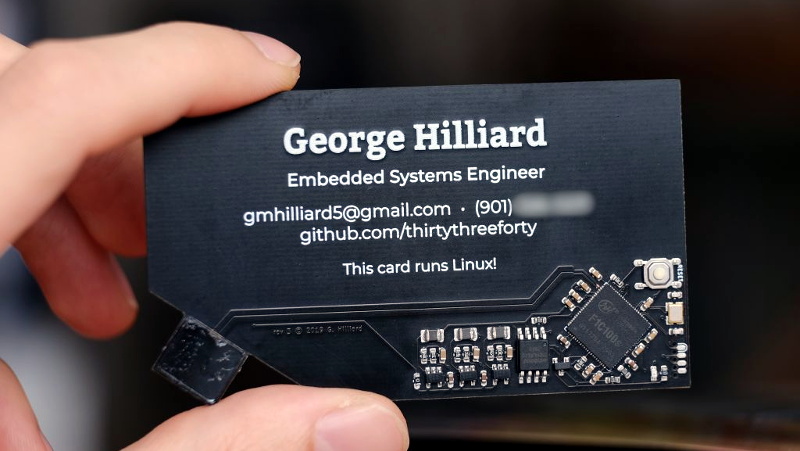
There was a time when a business card had one job: survive in someone’s wallet long enough to remind them who you were. Name, title, email, maybe a logo if the designer was feeling spicy. But then makers looked at that tiny rectangle of paper and thought, “Cute. What if this also booted an operating system?” And because the technology world is wonderfully incapable of leaving a simple object alone, we now have a business card that can run Linux.
The phrase sounds like a joke from a programmer who has had too much conference coffee, but the project is real. Embedded systems engineer George Hilliard built a business-card-sized computer that runs a customized Linux environment, connects through USB, appears as a flash drive and serial device, and costs less than a fancy sandwich to manufacture. It is part résumé, part engineering portfolio, part tiny computer, and part glorious nerd flex.
For anyone interested in Linux hardware, embedded systems, creative networking, open-source software, or just the bizarre joy of making computers absurdly small, this project is more than a novelty. It shows how cheap system-on-chip components, open-source build tools, and clever PCB design can turn an everyday object into a working Linux machine.
What Is a Linux Business Card?
A Linux business card is exactly what it sounds like: a printed circuit board shaped and used like a business card, but designed as a small computer capable of booting Linux. Unlike a novelty card with blinking LEDs, this one does not merely wave at electricity and call it a day. It contains a processor, RAM, flash storage, USB connectivity, firmware, and a stripped-down Linux system.
Hilliard’s card uses an Allwinner F1C100s system-on-chip, a low-cost ARM-based processor with embedded memory. That chip is the star of the show because it combines the CPU and RAM in one compact package, reducing the number of parts needed on the board. The card also includes an 8MB flash chip, which stores the bootloader, kernel, root filesystem, files, and a few fun extras.
When plugged into a computer, the card boots in about six seconds. It appears as a USB flash drive, and it also exposes a virtual serial port that allows the user to log into a shell. On the flash drive, Hilliard included items like a README file, résumé content, and photography. Inside the shell, the card can run lightweight command-line programs including classic Unix-style games, a small 2048 game, and MicroPython.
In other words, it is a business card that does not just say, “I build embedded Linux systems.” It demonstrates it. That is the difference between telling someone you can cook and handing them a taco.
The Tiny Hardware Behind the Magic
The Allwinner F1C100s: Small Chip, Big Personality
The Allwinner F1C100s is a compact ARM system-on-chip built for low-cost embedded devices. It includes an ARM926EJ-S CPU and 32MB of embedded DDR memory. By modern laptop standards, that sounds hilariously tiny. Your browser may use more memory thinking about opening a new tab. But for a carefully trimmed embedded Linux system, 32MB is enough to boot, run a shell, and host a few small applications.
This is where the engineering becomes interesting. The project is not about stuffing a desktop Linux experience into a card. There is no graphical desktop, no web browser, no video streaming, and certainly no “install 47 Chrome extensions and wonder why the fan is screaming” experience. Instead, it is a minimal Linux environment built for one purpose: prove that a real operating system can live inside a practical, giveaway-sized object.
Only 8MB of Flash Storage
The card’s 8MB flash storage is another impressive constraint. Hilliard’s original write-up explains that the bootloader, kernel, and root filesystem fit into only a portion of that space, leaving room for a virtual flash drive and a writable home directory. This is the kind of storage budget that forces discipline. Every file has to justify its rent.
That limitation is also what makes the project charming. A normal computer asks, “How many terabytes do you want?” This business card asks, “Do you really need that extra fortune-cookie quote database?” Minimalism is not just an aesthetic here; it is survival.
How the Card Runs Linux
Buildroot Makes the Software Possible
The software side of the card was built with Buildroot, a widely used tool for generating embedded Linux systems. Buildroot can create the cross-compilation toolchain, bootloader, Linux kernel image, and root filesystem needed for a target device. In simpler terms, it helps developers build a tiny Linux system for hardware that is not their desktop computer.
That matters because a card like this cannot run a full general-purpose distribution in the usual way. It needs a custom firmware image: small, predictable, and stripped down to the essentials. Buildroot is especially useful for this style of project because it lets the developer choose only the packages and features needed. No unnecessary desktop services. No mystery background apps. No printer daemon sitting around wondering whether it still has a purpose in life.
USB Gadget Mode: The Clever Doorway
The card communicates through USB using Linux’s USB Gadget framework. This allows a Linux device to behave like a USB peripheral when connected to a host computer. In Hilliard’s project, that means the business card can present itself as mass storage and as a serial interface.
The result is wonderfully practical. The recipient plugs the card into a computer, sees it as a small drive, and can also connect to its shell through the virtual serial port. The card has no display, keyboard, Wi-Fi, or Ethernet, but USB gives it just enough interaction to feel alive. It is the embedded-computing equivalent of a tiny creature tapping on the glass and saying, “I have a login prompt.”
Why This Project Got So Much Attention
It Is a Portfolio You Can Plug In
Most business cards make claims. This one provides evidence. For an embedded systems engineer, that is powerful. The PCB layout, component selection, firmware design, Linux porting, manufacturing decisions, and user experience are all visible in one object. It is not just contact information; it is a compact technical case study.
That is why the project spread widely across maker and open-source communities. It hits several delightful buttons at once: it is small, cheap, practical, funny, technically serious, and open enough for others to learn from. A recruiter or client might forget a standard card. They are less likely to forget the one that boots Linux.
It Makes Embedded Linux Feel Approachable
Embedded Linux can sound intimidating. Words like bootloader, root filesystem, cross-compilation, device tree, U-Boot, NOR flash, and kernel patches tend to make beginners look for the nearest exit. But a business card computer turns those concepts into something tangible.
You can hold the whole system in your hand. You can understand why every part exists. You can see the trade-offs: less storage, fewer components, limited I/O, lower cost, smaller board. That makes the project educational. It shows that embedded Linux is not magic. It is a chain of engineering decisions, each one shaped by cost, size, power, and purpose.
Business Cards Have Been Booting Linux for Years
The idea of Linux on a business card has older roots. In the late 1990s and early 2000s, “bootable business card” often referred to a small CD-ROM shaped like a business card. Linuxcare’s Bootable Business Card became known as a rescue and diagnostic tool that could fit in a wallet. Those discs were not business cards in the modern PCB sense, but they showed an early version of the same idea: portable Linux, small form factor, big usefulness.
Hilliard’s project is different because the card itself is the computer. It does not boot another machine from optical media. It brings its own processor, memory, flash, and Linux firmware. That shift is important. The old bootable card was portable software. The new Linux business card is portable hardware.
How It Compares to Other Tiny Linux Boards
It is tempting to compare the Linux business card with boards like the Raspberry Pi Zero. Both represent the thrill of small, inexpensive Linux-capable hardware. But they are designed for different jobs. A Pi Zero is a flexible development board with far more memory, display options, and general-purpose capability. Hilliard’s card is more like a minimalist embedded product: built to be cheap enough to hand out, small enough to act as a card, and focused enough to show a specific skill set.
That focus is the point. The card is not trying to replace a single-board computer. It is trying to make a memorable statement: embedded Linux hardware can be custom, tiny, inexpensive, and surprisingly polished when designed with discipline.
The Engineering Trade-Offs
No Networking
The business card does not include Wi-Fi, Bluetooth, or Ethernet. Adding networking would increase cost, complexity, board space, power requirements, and security concerns. For a giveaway card, that would be overkill. Sometimes the best engineering decision is not adding the shiny feature.
No Display
There is also no built-in screen. A display would make the project flashier, but it would increase the price and thickness. Instead, the card relies on the host computer for interaction through USB. This keeps the board thin and simple while still allowing the user to explore the system.
Limited Storage and Software
With 8MB of flash, there is no room for heavy applications. But that limitation makes the included software more impressive. A Linux kernel, root filesystem, small games, MicroPython, personal files, and a writable area all fit inside a space smaller than many modern website images. Somewhere, a bloated app installer is quietly avoiding eye contact.
Security: Do Not Plug in Random USB Gadgets
As fun as the project is, it also raises a practical reminder: do not plug unknown USB devices into your computer. A trusted demo from a known engineer is one thing. A mysterious device from a parking lot is another. USB devices can present themselves in different ways, and users should be cautious with anything unfamiliar.
That warning does not make the Linux business card suspicious. It simply reflects good digital hygiene. If you receive a programmable USB gadget from someone you do not know, test it only in a safe, controlled environment. Curiosity is great. Curiosity plus an untrusted USB device on your main laptop is how IT departments develop nervous twitches.
Why Marketers Should Pay Attention
This project is not just interesting for engineers. It is a lesson in personal branding. A great business card should answer one question: why should someone remember you? Most cards answer with typography. This one answers with a boot sequence.
For technical professionals, the best portfolio pieces are often interactive. A designer might show a beautiful interface. A developer might show a working app. An embedded engineer can show a physical object that proves competence across hardware and software. The Linux business card turns a small introduction into a hands-on experience.
Of course, not everyone needs a computer business card. A dentist handing out Linux cards might create more confusion than appointments. But for engineers, hardware designers, open-source developers, educators, and makers, the concept is brilliant because it matches the medium to the message.
What Makers Can Learn From It
Start With Constraints
The most inspiring part of the project is not that it runs Linux. It is that it runs Linux under brutal constraints. The board had to be thin. The parts had to be cheap. The assembly had to be manageable. The software had to be tiny. The interface had to work on ordinary computers. These constraints shaped every decision.
Good engineering often begins with limits. Without limits, projects expand until they become expensive, fragile, and permanently “almost done.” The Linux business card succeeds because it knows what it is and what it is not.
Use Open Tools
The project also shows the value of open-source tools and shared technical knowledge. Buildroot, Linux, U-Boot, community documentation, and prior work on the F1C100s helped make the card possible. Embedded development can be lonely when documentation is thin, but open communities create stepping stones for the next person.
Design for the Person Receiving It
The card is not only a technical achievement; it is also a user experience. It boots quickly. It appears as familiar USB devices. It includes readable files and interactive shell features. That matters. A clever project becomes much more impressive when the recipient can actually use it without decoding a 40-page ritual.
Experiences Related to “Now Even Your Business Card Can Run Linux”
The first time someone hears about a Linux business card, the reaction usually follows a predictable three-step journey. Step one: disbelief. Step two: delighted confusion. Step three: the sudden urge to own one, build one, or at least pretend to understand how it works at a dinner party. That emotional arc is part of the project’s charm. It takes an object associated with quick introductions and turns it into a tiny adventure.
Imagine receiving one at a tech conference. You have already collected a small forest of paper cards, most of which will later be found in a backpack pocket beside a crushed granola bar. Then someone hands you a rigid black PCB with exposed traces and a USB connector built into the corner. It has a name printed on it, yes, but it also has the quiet confidence of an object that knows it can boot. Suddenly, this is not just networking. This is show-and-tell for adults who own too many cables.
The experience of plugging it in is also memorable. A normal business card asks you to type an email address. This one introduces itself to your computer. It shows files. It opens a path to a shell. It makes the recipient participate. That interaction creates a stronger memory than a slogan ever could. In marketing terms, the card has engagement. In nerd terms, it has “wait, seriously?” energy.
For makers, the experience is even deeper. Looking at the board encourages questions. Why this chip? Why this flash size? How does the USB connector work mechanically? How small can Linux become? What did the developer remove to make everything fit? Those questions are the beginning of real learning. Instead of studying embedded Linux as an abstract topic, the learner sees it compressed into a physical object that has to obey cost, space, power, and manufacturing realities.
There is also a humbling side. Tiny hardware projects look simple only after someone else has finished them. Under the surface are board revisions, soldering challenges, footprint mistakes, driver issues, bootloader debugging, and the ancient engineering tradition of staring at a silent serial console while questioning your life choices. The final card feels playful, but the path to it requires patience and skill.
That is why the Linux business card remains such a great example years after it first attracted attention. It is not just “small computer is small.” It is a reminder that creativity often happens when practical knowledge meets a ridiculous idea and neither one backs down. The card is funny, useful, educational, and slightly absurd. That combination is rare, and it is exactly why people remember it.
Conclusion: The Smallest Flex in the Room
“Now Even Your Business Card Can Run Linux” sounds like a headline from an alternate universe where every object has a kernel panic, but the reality is more thoughtful. George Hilliard’s Linux business card is a clever embedded systems project that combines low-cost hardware, custom firmware, open-source software, and memorable personal branding.
It proves that Linux does not need a full desktop machine to be useful or impressive. With the right chip, careful software trimming, and a clear purpose, Linux can run inside a device small enough to hand to someone after saying, “Nice to meet you.” That is not just a business card. That is a conversation starter with a bootloader.
The project also captures what makes maker culture so enjoyable: the refusal to accept ordinary boundaries. A card can be more than paper. A résumé can be executable. A tiny board can teach big lessons. And yes, apparently, even your business card can run Linux.