Note: This article is an original, publication-ready rewrite based on real photography practices, public examples of Peter Stewart’s before-and-after editing work, and current conversations around digital image transparency.
We all know the internet is not exactly famous for honesty. It is the place where breakfast bowls glow like museum artifacts, hotel rooms look twice as large as physics allows, and sunsets appear to have been personally approved by a committee of angels. But when a photographer reveals how much online images are Photoshopped, the curtain liftsand behind it is not magic. It is layers, masks, color grading, exposure blending, sky replacement, and a very patient person drinking cold coffee at 1:00 a.m.
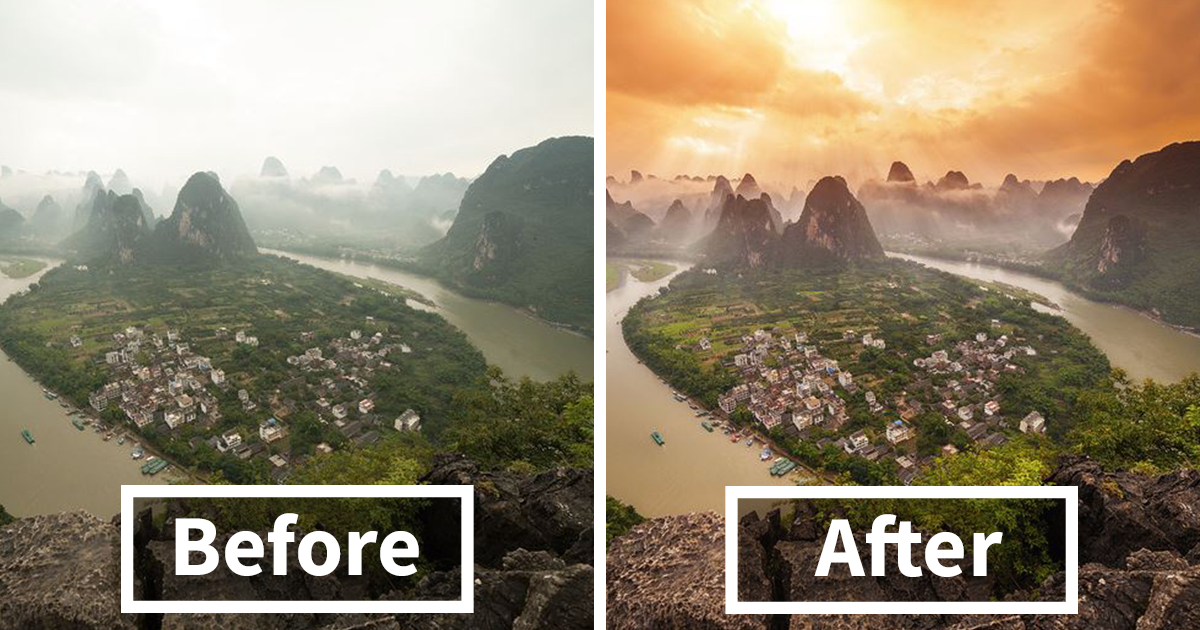
The viral idea behind “Photographer Reveals How Much Online Images Are Photoshopped (20 pics)” is simple: show the original photo, then show the edited version. The result is fascinating, slightly shocking, and oddly comforting. A dull city skyline becomes cinematic. A hazy landscape turns dramatic. A flat travel shot suddenly looks like a poster for an adventure film. The photographer is not just “fixing” pictures; he is showing how much modern online photography is shaped after the shutter clicks.
This matters because online images are no longer just pictures. They influence where we travel, what we buy, how we decorate our homes, how brands sell products, and how people judge themselves. A photo can be a memory, a marketing tool, a work of art, or a tiny emotional trap wearing a Valencia filter. Understanding Photoshop and photo editing helps us enjoy great images without mistaking every pixel for raw reality.
What the 20 Pics Reveal About Online Images
The biggest lesson from these before-and-after images is not “everything is fake.” That is too simple, and honestly, a little boring. The more accurate lesson is this: most polished online images are interpreted, adjusted, and enhanced. Photography has always involved choiceslens, angle, timing, lighting, film stock, crop, and development. Photoshop simply moved many of those decisions onto a screen.
In the 20 examples, the edits often fall into recognizable categories. Some images are improved with basic color correction. Others use more advanced post-production, such as manual HDR blending, composite skies, perspective correction, and selective brightening. The photographer’s work shows that the “wow” version may contain several invisible decisions stacked together like digital lasagna.
1. Color Temperature Can Change the Whole Mood
A cool-toned photo can feel calm, distant, or even lifeless. Warm it up, and suddenly the same scene feels like golden-hour poetry. Color temperature adjustments are among the most common Photoshop and Lightroom edits. They do not necessarily change the subject, but they strongly change the emotional weather of the image.
2. Contrast Turns Flat Scenes Into Drama
Many raw files look flatter than people expect. That is normal. Cameras capture information, not finished art. By increasing contrast, deepening shadows, and protecting highlights, a photographer can add depth and punch. The difference can be dramatic, especially in architecture, landscapes, and city photography.
3. HDR Blending Saves Detail the Camera Could Not Capture
High Dynamic Range, or HDR, often gets mocked when it is overcooked until a building looks like it has been dipped in radioactive syrup. But careful HDR blending can be useful. By combining multiple exposures, photographers can keep detail in bright skies and dark foregrounds at the same time. Done well, it looks natural. Done too aggressively, it looks like a video game menu screen.
4. Sky Replacement Is the Internet’s Favorite Weather Machine
One of the most eye-opening editing techniques is sky replacement. A plain gray sky can be swapped or blended with a dramatic sunset, storm cloud, or glowing twilight scene. This is where the line between enhancement and fantasy becomes clearer. The location may be real, the building may be real, but the sky might have missed the original appointment.
5. Perspective Correction Makes Architecture Behave
When you point a camera upward at tall buildings, vertical lines can lean inward. Perspective correction straightens them, making the image cleaner and more professional. This is common in architectural photography and real estate imagery. It is not usually deceptive; it is more like telling the buildings to stand up straight for picture day.
6. Haze Reduction Creates Instant Clarity
Travel and landscape photos often suffer from haze, pollution, mist, or weak atmospheric contrast. Dehazing tools can make distant mountains pop, sharpen skylines, and bring back color. Used carefully, they help recreate what the photographer felt in the moment. Used heavily, they can make the planet look like it was polished with glass cleaner.
Is Photoshopping Always Bad?
No. Photoshop is not the villain. It is a tool. A hammer can build a house or smash a window; the hammer is just sitting there wondering why humans are so dramatic.
Photo editing becomes a problem when it misleads viewers in a context where truth matters. In fine art, surreal composites and dramatic color grading are part of the creative process. In advertising, editing should not make a product appear to do something it cannot do. In journalism, altering image content can damage trust because news photography depends on accuracy. In social media, heavy editing becomes tricky when it presents an unrealistic lifestyle, body, place, or product as casual reality.
The National Press Photographers Association’s ethics guidance warns visual journalists not to manipulate images in ways that mislead viewers or misrepresent subjects. That standard is especially important for news. A travel artist replacing a sky is making a creative image. A news photographer replacing a sky in a wildfire photo would be crossing a serious ethical line.
Why Online Images Look More Perfect Than Real Life
Online images compete for attention inside a tiny rectangle. That competition encourages exaggeration. Brighter colors, cleaner backgrounds, smoother skin, wider rooms, sharper food, moodier skieseverything gets turned up because the scroll is ruthless. If a photo does not grab attention in half a second, it disappears into the digital soup.
There are also practical reasons. Cameras do not see exactly like human eyes. A raw image may look dull before editing because it is designed to preserve data. Professional editing can restore contrast, guide the viewer’s eye, and match the photographer’s memory of the scene. The issue is not editing itself; the issue is when editing pretends it never happened.
Social Media Changed the Meaning of “Normal”
Before social media, people mostly saw polished images in magazines, movies, and advertisements. Now they see edited images from friends, influencers, brands, restaurants, gyms, hotels, and strangers with suspiciously perfect kitchens. The volume is enormous. That makes it easier to forget that many online photos are staged, selected, filtered, retouched, or generated.
This is why media literacy matters. When people understand that a photo has been edited, they can appreciate it without comparing real life to a finished digital product. A dramatic cityscape might be beautiful. It also might include five exposures, a replaced sky, selective color work, and enough masking to qualify as a part-time relationship.
20 Common Photoshop Edits Hidden in Online Images
Based on the types of before-and-after transformations photographers often share, here are 20 common edits that can completely change how an online image feels:
- Exposure correction: Brightening an underexposed image or calming down blown highlights.
- White balance adjustment: Making a scene warmer, cooler, or more neutral.
- Contrast enhancement: Adding depth and visual punch.
- Shadow recovery: Bringing detail back into dark areas.
- Highlight recovery: Restoring detail in bright skies, windows, or reflections.
- Color grading: Giving the image a cinematic or stylized mood.
- Saturation control: Making colors richer or more restrained.
- Selective sharpening: Drawing attention to important details.
- Noise reduction: Cleaning up grain from low-light shots.
- Crop and composition changes: Removing distractions and improving balance.
- Perspective correction: Straightening buildings and lines.
- Lens correction: Fixing distortion or vignetting from the lens.
- Dehaze adjustment: Cutting through atmospheric softness.
- HDR exposure blending: Combining multiple exposures for balanced detail.
- Sky replacement: Swapping a dull sky for a more dramatic one.
- Object removal: Erasing trash cans, signs, wires, or photobombers.
- Light painting: Brightening selected areas to guide the eye.
- Composite blending: Combining pieces from multiple images.
- Skin retouching: Softening temporary blemishes or evening tone in portraits.
- Final polish: Adding finishing touches for a consistent style.
What Makes Peter Stewart’s Before-and-After Photos So Interesting?
The appeal of Peter Stewart’s editing examples is transparency. Instead of pretending the final photo fell from the heavens fully polished, the before-and-after format shows the process. Viewers can see the raw material and the final interpretation side by side. That is refreshing because the internet often gives us the final dish without showing the kitchen, the recipe, or the pile of dishes in the sink.
His work also highlights a truth many non-photographers miss: the camera is only part of the creative process. A photographer may plan the location, wait for the right light, shoot multiple exposures, choose the strongest frame, and then spend hours editing. The final image is not a random snapshot. It is a visual decision, refined step by step.
The Best Edits Still Respect the Image
Strong editing usually enhances what is already there. It brings attention to structure, light, color, and atmosphere. Weak editing tries to rescue a photo by burying it under effects. Viewers may not know the technical terms, but they often feel the difference. A good edit says, “Look at this scene.” A bad edit says, “Look at my software subscription.”
How Photoshop Affects Trust Online
Trust has become a major issue in digital media. Viewers are asking: Is this real? Was it edited? Was it AI-generated? Was the product altered? Did the influencer actually look like this, or did an app quietly rearrange reality during lunch?
This concern has led to new tools such as Content Credentials, which work like a digital nutrition label for images. They can show information about how a piece of content was made, edited, or generated. The Coalition for Content Provenance and Authenticity, known as C2PA, supports technical standards that help attach verifiable history to digital files. These tools are not perfect, but they show where the internet is heading: toward more transparency about what happened before an image reached your screen.
For photographers, this can be a good thing. Transparency does not reduce artistry. It can actually increase respect. When people understand the skill behind editing, they stop seeing Photoshop as cheating and start seeing it as craftunless the image is being used to mislead, in which case the craft has wandered into shady territory wearing sunglasses indoors.
Photoshop, Advertising, and the “Too Perfect” Problem
In advertising, retouching has special consequences. If a skincare product removes wrinkles in the photo but not in real life, consumers are being shown a fantasy. If a travel resort edits out crowds, construction, or a suspiciously swampy beach, guests may arrive with expectations that reality cannot cash. If food photography uses editing to make a product look significantly different from what buyers receive, trust takes a bite right out of the brand.
Regulators such as the Federal Trade Commission emphasize that advertising and endorsements should not mislead consumers. While the rules depend on context, the principle is simple: people deserve enough truthful information to make decisions. That includes understanding when a post is sponsored, when a result is not typical, and when an image has been altered in a way that affects the claim being made.
How Viewers Can Read Online Images More Carefully
You do not need to become a forensic image analyst to be a smarter viewer. A few habits can help.
- Look for impossible lighting. If the subject is lit from the left but the background glows from the right, something may have been composited.
- Check reflections and shadows. They often reveal edits because they are hard to fake perfectly.
- Watch for repeated patterns. Cloned textures in skies, grass, or walls can suggest object removal.
- Be skeptical of extreme perfection. Real places have wires, crowds, dust, and awkward signs.
- Separate art from evidence. A beautiful image can be inspiring without being documentary proof.
The goal is not to become cynical. The goal is to stay awake. Online images can still be beautiful, useful, funny, and moving. They just should not be treated as sworn testimony from the Pixel Court of Absolute Truth.
How Photographers Can Edit Ethically
Photographers do not have to avoid editing. They should understand the promise they are making to the viewer. A fine-art photographer can create a dream world. A wedding photographer can remove a distracting exit sign. A real estate photographer can correct lens distortion but should not make a cramped room look like a palace. A journalist should avoid changing the factual content of the scene.
Ethical editing starts with context. What is the image for? Who will see it? Will the edit change a viewer’s understanding of reality? If the answer is yes, disclosure may be the better path. A simple caption such as “composite image,” “sky replacement,” or “color-graded edit” can protect trust while still allowing creativity.
Why Before-and-After Photos Are Good for the Internet
Before-and-after editing posts are popular because they satisfy curiosity. People love seeing the trick. But they also perform a public service. They remind us that polished images are built. They lower the pressure to compare real life to edited life. They also teach beginners that great photography is not only about buying an expensive camera. It is about patience, observation, timing, and post-production skill.
For young photographers, this can be encouraging. A raw photo that looks dull is not necessarily a failure. It may simply be unfinished. Learning to edit is part of learning to see. The trick is not to use Photoshop as a personality replacement. Start with a strong idea, then use editing to support it.
Experience Section: What These Photoshop Reveals Teach Us in Real Life
After looking closely at before-and-after Photoshop examples, the biggest personal takeaway is how quickly our eyes accept the finished version as “normal.” That is the sneaky part. When we see a polished travel photo, we rarely imagine the gray original file, the uneven exposure, the dull sky, or the twenty small edits hiding behind the final glow. We just think, “Wow, why does my vacation look like a receipt with palm trees?”
In real life, this changes how we experience photography. When someone takes a picture at sunset, the moment may feel incredible, but the camera might capture something flatter. Then editing becomes a translation. The photographer is not always lying; sometimes they are trying to make the image feel closer to the memory. The orange light looked warmer in person. The skyline felt bigger. The shadows seemed richer. Good editing can bring that emotional truth back.
At the same time, these reveals teach healthy skepticism. A restaurant burger online may have perfect layers, heroic cheese, and lighting usually reserved for Oscar winners. The burger you receive may lean slightly to one side like it has had a long day. That does not mean all food photos are evil. It means photography is presentation. Brands, influencers, and creators choose the best angle, the best light, and often the best edit.
The same applies to travel. A destination may look empty, glowing, and peaceful online. In person, there may be crowds, traffic, entrance fees, cloudy weather, and one tourist blocking the view with a tablet the size of a cafeteria tray. Edited photos can inspire us, but they should not be the only basis for expectations. Before booking a trip, it helps to look at multiple sources: professional photos, traveler snapshots, recent videos, and reviews. Reality usually lives somewhere between the brochure and the blurry photo taken by someone’s uncle.
For creators, the lesson is balance. Editing can improve a photo, but too much editing can make it feel less believable. Viewers are becoming more aware of digital manipulation, AI imagery, and filters. Authenticity now has value. A slightly imperfect photo can sometimes feel more trustworthy than a flawless one. That does not mean photographers should stop polishing their work. It means the polish should serve the story, not bury it.
For everyday viewers, the healthiest habit is simple: admire the image, but do not compare your behind-the-scenes life to someone else’s final export. A great photo may include skill, timing, software, luck, and a dozen invisible edits. Your real life includes bad lighting, laundry, blinking, and weather that refuses to cooperate. That is not failure. That is reality being reality, which is basically its full-time job.
So when a photographer reveals how much online images are Photoshopped, the point is not to ruin the fun. It is to make the fun smarter. We can appreciate the artistry, learn from the process, and still remember that the internet is a gallerynot a mirror.
Conclusion
“Photographer Reveals How Much Online Images Are Photoshopped (20 pics)” is more than a catchy headline. It is a reminder that digital images are often crafted long after the camera clicks. Photoshop can brighten, blend, correct, replace, polish, and transform. In the hands of an artist, it can turn a good photo into a memorable one. In the wrong context, it can mislead people about products, places, bodies, and reality itself.
The smartest approach is not to reject edited images. It is to understand them. Editing is part of modern photography, but transparency is becoming just as important as beauty. As viewers, we can enjoy stunning images while asking better questions. As creators, we can use editing tools responsibly. And as internet users, we can finally stop expecting real life to arrive with perfect contrast, cinematic skies, and a built-in healing brush.