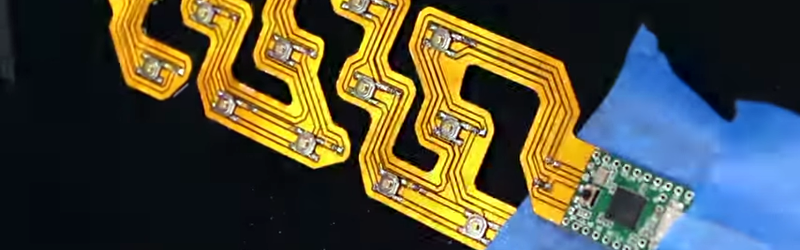
Printing a flexible keypad sounds like something that belongs in a futuristic lab where the coffee machine also files your taxes. In reality, it is a very practical maker project that blends flexible circuits, conductive materials, thoughtful design, and a little patience. Whether you want a custom USB macro pad, a wearable controller, a keypad wrapped around a curved surface, or a low-profile input panel for an enclosure, a flexible keypad can solve problems that ordinary rigid buttons handle about as gracefully as a brick in a yoga class.
A flexible keypad is exactly what the name suggests: a keypad that bends, conforms, or mounts on a surface where a standard circuit board would be awkward. Instead of relying only on chunky mechanical switches, it may use printed conductive traces, flexible PCB material, membrane switch layers, carbon or silver ink, copper on polyimide, or a hybrid of 3D-printed parts and flexible electronics. The goal is simple: create reliable button inputs in a thin, lightweight, custom-shaped form.
In this guide, we will explore how flexible keypads work, what materials are commonly used, how to design one, how to print or fabricate the circuit, and what mistakes to avoid before your beautiful DIY keypad becomes a decorative coaster.
What Is a Flexible Keypad?
A flexible keypad is an input device built on a bendable substrate instead of a rigid printed circuit board. Many commercial membrane keypads use thin polyester or polyimide layers, printed conductive traces, spacer adhesives, graphic overlays, and contact areas that close a circuit when pressed. You have probably used one without noticing it. Microwave panels, industrial controls, medical devices, security panels, and portable electronics often use membrane-style keypads because they are slim, sealed, and easy to clean.
For DIY electronics, the idea can be simplified. A flexible keypad may include:
- A flexible base, such as PET film, polyimide film, or copper-clad flexible PCB material
- Conductive paths made from copper, silver ink, carbon ink, conductive paint, or milled foil
- Button contact pads that connect when pressed
- A spacer layer that keeps contacts separated until pressure is applied
- A microcontroller that reads the button signals
- A cover layer or printed overlay with labels, icons, or numbers
The magic is not really magic. When you press a key, two conductive areas touch, changing the electrical state of a pin. The microcontroller detects that change and translates it into an action: a number, a keyboard shortcut, a menu command, a light toggle, or perhaps the “send snacks” macro we all deserve.
Why Print a Flexible Keypad Instead of Buying One?
Standard membrane keypads are inexpensive and useful, especially common 3×4 or 4×4 matrix keypads used with Arduino, Raspberry Pi, CircuitPython boards, and other microcontrollers. But premade keypads have fixed sizes, fixed layouts, and fixed shapes. If your project needs a keypad that curves around a handle, fits a custom enclosure, sits under fabric, wraps around a pole, or matches a unique industrial panel, buying one off the shelf may not work.
Printing or fabricating your own flexible keypad gives you control over layout, spacing, labeling, materials, and connection style. You can build a four-button wearable controller, a one-handed macro pad, a custom accessibility interface, a curved gaming control panel, or a sealed keypad for a garage project that faces dust, moisture, and the occasional mysterious workshop goo.
How Flexible Keypads Work
Simple Direct-Wired Keypads
The simplest flexible keypad gives each button its own signal line. One side of every button may connect to ground, while the other side connects to a microcontroller input pin with a pull-up resistor enabled in software. When the user presses the button, the pin reads LOW. This approach is easy to understand and reliable for small designs.
The downside is pin count. Four buttons are easy. Twelve buttons begin to look greedy. Twenty buttons may cause your microcontroller to wonder what it did wrong.
Matrix Keypads
A matrix keypad reduces the number of pins by arranging buttons in rows and columns. A 4×4 keypad has 16 buttons but only needs eight microcontroller pins: four rows and four columns. The controller scans the grid by driving one row or column at a time and checking which connections are closed.
This is the same principle used in many common membrane matrix keypads. It is efficient, affordable, and well supported by Arduino and CircuitPython libraries. For printed flexible keypads, matrix wiring is often the best option when you need more than a handful of keys.
Resistor Ladder Keypads
Another clever method is a resistor ladder, where each button connects through a different resistor value to a single analog input. When a button is pressed, the microcontroller reads a unique voltage and identifies the key. This reduces wiring dramatically, which is helpful in flexible designs where every trace adds complexity.
The tradeoff is that resistor values must be chosen carefully, and the analog readings need tolerance margins. Resistor ladders are great for small keypads, macro buttons, or space-limited layouts, but they are less ideal when multiple keys may be pressed at once.
Materials You Can Use to Print a Flexible Keypad
Flexible Substrate
The substrate is the foundation of the keypad. Common options include polyester film, PET sheet, polyimide film, and flexible copper-clad laminate. PET is affordable and works well for many printed electronics projects. Polyimide is more heat-resistant and commonly used in flex PCB manufacturing. Flexible copper-clad materials are useful when you want low-resistance traces and more traditional PCB-style fabrication.
For a maker project, PET film is friendly for conductive ink printing, while polyimide or Pyralux-style flex laminate works better for milled or etched copper traces. If soldering is involved, heat resistance matters. PET can deform under high temperature, while polyimide is much tougher.
Conductive Ink
Conductive ink allows traces to be printed directly onto a flexible surface. Silver ink is popular because it has strong conductivity, but it can be expensive. Carbon ink is cheaper and useful for contact pads, but it has higher resistance. Copper inks exist too, though they may require special curing or protection against oxidation.
Conductive paint and pens can work for prototypes, but consistency is the challenge. A trace that looks perfect may still have too much resistance or crack when bent. Always test with a multimeter before celebrating with your victory dance.
Copper Flex Circuit Material
Flexible copper-clad laminate can be milled, cut, or etched to create conductive traces. Copper has much lower resistance than most printed inks and is easier to solder when properly prepared. For a durable custom keypad, copper on polyimide is a strong choice.
The catch is fabrication. Milling flexible material requires careful fixturing because thin film loves to wrinkle, shift, and behave like it has a personal vendetta against precision. Chemical etching is possible but requires safe handling and cleanup. Laser cutting can help with outlines or cover layers, depending on the material and equipment.
Spacer Adhesive
A membrane keypad usually needs a spacer layer between the top and bottom contacts. This spacer has cutouts where the keys are located. When the key is pressed, the top contact bends through the opening and touches the lower contact. When released, the layers separate again.
Double-sided adhesive film can work well for prototypes. The thickness matters: too thin, and the keypad may trigger accidentally; too thick, and users may need to press like they are trying to wake a hibernating bear.
Graphic Overlay
The overlay is the visible top layer. It can be printed paper laminated under clear film, vinyl, polyester, or another flexible sheet. It gives the keypad labels, icons, branding, and protection. A good overlay turns a fragile science experiment into something that looks intentional.
For web-connected devices, smart home panels, workshop controls, or accessibility tools, the overlay can improve usability dramatically. Large labels, high contrast, tactile bumps, and intuitive spacing matter just as much as the electronics.
Step-by-Step: How to Print a Flexible Keypad
Step 1: Define the Use Case
Start with the question: what does this keypad need to do? A four-button media controller has very different requirements from a 16-key security keypad or a curved USB macro keyboard. Think about button count, surface shape, bend radius, expected use, environment, and whether the keypad needs to be removable.
For example, a keypad mounted on a flat project box can use a simple membrane stack. A keypad wrapped around a cylindrical handle needs traces that tolerate bending and a layout that remains comfortable when curved.
Step 2: Choose the Electrical Layout
If you only need a few keys, use direct wiring. If you need 9, 12, or 16 keys, use a row-column matrix. If you are trying to minimize wires and only one button will be pressed at a time, consider a resistor ladder.
For USB keyboard projects, choose a microcontroller that can act as a USB HID keyboard, such as a Teensy, certain Arduino-compatible boards with native USB, or boards based on chips that support keyboard emulation. For simple device controls, almost any microcontroller with enough pins can read keypad inputs.
Step 3: Design the Trace Pattern
Create your circuit in KiCad, Illustrator, Inkscape, Fusion, or another design tool. Keep traces wide enough for your fabrication method. Printed conductive ink usually needs wider traces than copper PCB routing. Avoid sharp corners because they concentrate mechanical stress. Rounded corners are friendlier to flexible circuits.
Place connection pads at the edge where a flex tail, header, connector, or soldered wires will attach. If the keypad will bend repeatedly, avoid putting solder joints directly in the bending zone. Solder is stiff, and stiff things on flexible parts tend to start drama.
Step 4: Print or Fabricate the Conductive Layer
For conductive ink, screen printing offers the best consistency, but stencils, plotters, or careful hand application may work for prototypes. Apply the ink evenly and cure it according to the manufacturer’s instructions. Curing may involve air drying, heat, or a controlled oven process.
For copper flex, mill or etch the pattern. Secure the material flat and avoid tool pressure that causes buckling. After fabrication, inspect for shorts, broken traces, and rough edges. Use a multimeter to check continuity across every trace before assembling layers.
Step 5: Build the Membrane Stack
A basic membrane keypad stack includes a bottom circuit layer, spacer adhesive with holes at the button locations, and a top contact layer or overlay that flexes when pressed. Align everything carefully. Even a small shift can cause a key to miss its contact area or trigger the wrong input.
If you want tactile feedback, you can add metal domes. These provide a satisfying snap and improve user confidence. Without domes, the keypad can still work, but the feel may be softer and less obvious.
Step 6: Connect the Microcontroller
Attach the keypad tail to your controller using soldered wires, a flat-flex connector, conductive adhesive, or a header strip. For prototypes, soldering works, but use strain relief. A dab of flexible adhesive, tape, or a clamp can prevent the connection from tearing during use.
In software, configure pins with pull-up or pull-down resistors. For matrix keypads, use a keypad scanning library or write your own scan routine. Add debouncing so a single press does not register as five chaotic little button ghosts.
Step 7: Test Every Key
Testing is not optional. Press each key lightly, firmly, repeatedly, and at different angles. Bend the keypad into its final shape and test again. Check resistance values if using analog input. Watch for ghosting in matrix layouts, especially when multiple keys are pressed. Diodes can reduce ghosting, but they complicate flexible fabrication.
Common Problems and How to Fix Them
Problem: The Trace Cracks When Bent
This usually means the trace is too brittle, too narrow, too thick, or placed in a high-stress area. Use wider traces, rounded paths, more flexible ink, or copper designed for flex circuits. Move traces away from tight bend zones when possible.
Problem: The Key Triggers Accidentally
The spacer may be too thin, the layers may be misaligned, or the top film may be pressing against the lower contact. Increase spacer thickness or reduce the size of the contact pads slightly.
Problem: The Key Requires Too Much Force
The spacer may be too thick, the top layer may be too stiff, or the button area may be too small. Use a thinner spacer, a more flexible overlay, or larger contact zones.
Problem: Readings Are Inconsistent
Conductive ink resistance, poor curing, weak connections, or electrical noise can cause unreliable readings. Test continuity, improve curing, shorten long high-resistance traces, and add software debouncing. For analog resistor ladders, create generous voltage ranges for each button.
Best Design Tips for a Reliable Flexible Keypad
Designing a flexible keypad is less about making something bend once and more about making something bend without sulking forever. Here are practical tips that improve durability and usability:
- Use rounded traces instead of sharp 90-degree corners.
- Keep traces out of repeated bend zones whenever possible.
- Use strain relief near connectors and solder joints.
- Make contact pads large enough to tolerate slight alignment errors.
- Choose materials based on heat, moisture, and bending requirements.
- Add a protective overlay to prevent abrasion and contamination.
- Test the keypad in its final mounted shape, not only flat on the bench.
Practical Project Ideas
Curved USB Macro Pad
A flexible USB macro pad can wrap around a monitor stand, tripod, microphone arm, or controller grip. Each button can trigger shortcuts for editing, streaming, design software, or gaming. A Teensy-style microcontroller can emulate a keyboard and send commands directly to the computer.
Wearable Control Panel
A soft keypad sewn or attached to fabric can control LEDs, sound modules, assistive devices, or cosplay electronics. In this use case, comfort matters. Keep hard components away from joints and pressure points.
Sealed Workshop Keypad
A printed membrane keypad mounted to a project enclosure can control motors, lights, dust collection, or test equipment. A sealed overlay helps keep dust and moisture away from the electronics.
Custom Accessibility Interface
Flexible keypads can be designed with large buttons, custom spacing, high-contrast labels, or unusual shapes for users who find standard keyboards difficult. This is one of the most meaningful uses of custom input hardware because the design can adapt to the person instead of forcing the person to adapt to the device.
My Experience Printing and Prototyping a Flexible Keypad
The first lesson I learned from making a flexible keypad is that “flexible” does not mean “indestructible.” A thin sheet with shiny conductive traces may look like it can survive anything, but bend it too sharply in the wrong spot and it will fail faster than a bargain umbrella in a thunderstorm. The early prototype looked promising on the desk. Every key worked. The multimeter gave cheerful continuity beeps. Then I wrapped it around the intended surface, pressed the second button three times, and one trace quietly left the chat.
The fix was not dramatic. I widened the traces, rounded the corners, and moved the connector away from the bend area. That last detail made a huge difference. The connector area is where many flexible keypad projects fail because wires, solder joints, and headers are stiff. If the flexible part moves but the connector does not, stress collects at the boundary. Adding strain relief with tape and a flexible adhesive turned a fragile prototype into something much more dependable.
Another experience worth sharing is that button feel matters more than expected. On paper, a membrane keypad only needs electrical contact. In real life, users want confirmation. They want to know the button was pressed without staring at a serial monitor like it contains the secrets of the universe. A flat non-tactile keypad can work, but it may feel vague. Adding slight embossing, a tactile dome, or even a small printed bump on the overlay can make the interface feel more professional.
Alignment was another sneaky challenge. When building a layered keypad by hand, the spacer, contact pads, and overlay must line up. Being off by a millimeter may not sound serious until one key works only when pressed from the northwest corner with the emotional intensity of a safecracker. Registration marks help. So does assembling under good lighting and testing before permanently sealing every layer.
Conductive ink also taught me patience. Some inks look dry before they are fully cured. If you test too soon, resistance may be higher than expected or readings may drift. After proper curing, the same trace can behave much better. I also learned not to assume every printed trace is equal. Long, narrow traces have more resistance, and hand-applied ink can vary in thickness. For digital buttons, this may be acceptable. For resistor-ladder designs, inconsistency matters more because the microcontroller depends on stable voltage values.
One practical example involved building a compact four-button flexible controller for media shortcuts. The first version used separate wires for each button and worked well, but the tail was bulky. The second version used a resistor ladder and needed only a few connections. That made the keypad easier to mount, but it required careful calibration in software. Each button was assigned a voltage range instead of a single exact value. That prevented false readings when temperature, pressure, or USB power variation changed the analog reading slightly.
The biggest takeaway is simple: prototype flat, test curved, then redesign. A flexible keypad should be evaluated in the same shape and environment where it will actually live. If it will wrap around a handle, test it on that handle. If it will sit under a vinyl overlay, test it under that overlay. If it will be pressed by gloved hands, test it with gloves. A keypad that works beautifully on a clean desk may behave differently once mounted, sealed, bent, and used by real fingers in the real world.
Printing a flexible keypad is a rewarding project because it combines design, electronics, fabrication, and ergonomics. It is not just a circuit. It is a physical interface. When it works, it feels almost magical: a thin custom surface bends into place and becomes a keyboard, controller, shortcut panel, or device interface. And when it does not work, it usually teaches you something useful right before asking for another prototype.
Conclusion
Learning how to print a flexible keypad opens the door to custom electronics that do not need to stay flat, square, or boring. By combining flexible substrates, conductive traces, membrane layers, careful circuit design, and microcontroller input scanning, you can create keypads for curved surfaces, wearable devices, sealed control panels, macro keyboards, and accessibility tools.
The most successful designs start with a clear use case, choose the right electrical layout, avoid stress points, and test thoroughly in the final shape. Conductive ink, copper flex circuits, PET film, polyimide, spacer adhesive, and graphic overlays all have roles to play. Use them wisely, and your keypad can be thin, durable, responsive, and custom-fit to your project.
Note: This article is written as original web-ready content based on practical electronics knowledge, flexible circuit design principles, membrane keypad construction methods, and real-world maker approaches to printed flexible input devices.