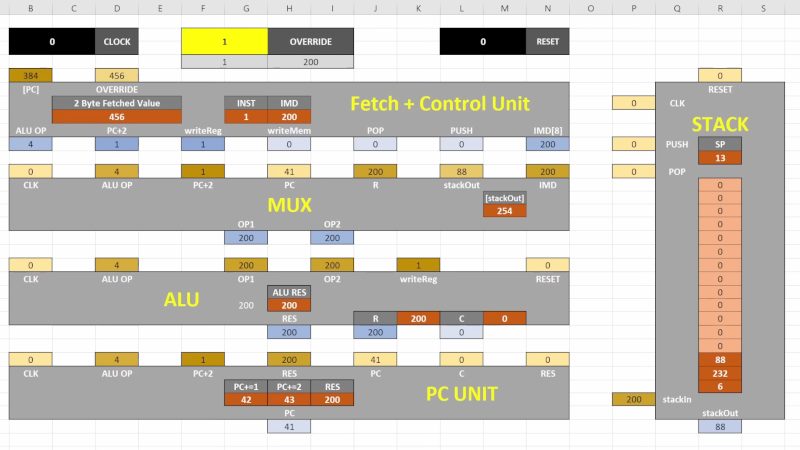
Somewhere between “I made a monthly budget” and “I built a tiny computer inside a workbook,” Microsoft Excel quietly became the garage workshop of modern nerd culture. Yes, the same grid where office heroes track invoices, fantasy football scores, and suspiciously optimistic workout plans can also host a working CPU. Not a metaphorical CPU. Not a cute dashboard pretending to be technical. A real, logic-driven, instruction-executing processor built with spreadsheet formulas.
The project commonly described as “RISC CPU Lives In Excel” is a wonderfully strange example of what happens when computer architecture meets spreadsheet stubbornness. Created by Inkbox, the Excel-based RISC CPU is an 8-bit processor with a tiny instruction set, stack-based behavior, memory, ROM, and even a small color display. It is not going to replace your laptop processor, unless your laptop’s biggest job is blinking politely at 12 Hz. But as an educational machine, a proof of concept, and a glorious act of spreadsheet mischief, it is brilliant.
What Does “RISC CPU Lives In Excel” Actually Mean?
A CPU, or central processing unit, is the part of a computer that fetches instructions, decodes them, executes them, and moves data around. In normal life, that CPU is silicon: microscopic circuits, billions of transistors, heat spreaders, thermal paste, and probably someone on the internet arguing about benchmarks. In this project, the CPU is recreated as spreadsheet logic. Cells become wires. Formulas become gates. Recalculation becomes the clock tick. Excel becomes the motherboard, the simulator, and the tiny digital pet cage all at once.
The “RISC” part stands for Reduced Instruction Set Computer. RISC design favors a smaller set of simpler instructions instead of a large menu of highly specialized commands. That makes the architecture easier to reason about, especially when your hardware is not a factory-made chip but a workbook that starts to sweat when you press F9 too aggressively.
Inkbox’s Excel RISC CPU uses a compact 8-bit design with a custom 10-instruction ISA, one register, a stack, 1KB of RAM, 1KB of ROM, and a 16-by-16 display capable of 64 colors. Those numbers sound tiny beside modern hardware, but that is exactly the charm. When the machine is small, every bit matters. You can actually see the architecture instead of treating the CPU like a magic black rectangle that gets hot when Chrome opens too many tabs.
Why Build a RISC CPU in Excel?
The honest answer is: because it is there. Excel has always attracted people who look at a spreadsheet and think, “This could be a database, a game engine, a calendar, a financial model, a dungeon crawler, and perhaps a slightly haunted toaster.” Building a RISC CPU inside Excel is part engineering exercise, part educational tool, and part joyful rebellion against the phrase “spreadsheets are boring.”
But there is a serious reason too. Computer architecture can feel abstract when taught only through diagrams. Students learn about registers, stacks, memory, opcodes, program counters, ALUs, and clock cycles, but the concepts often float around like tiny ghosts wearing binary hats. A spreadsheet CPU makes those ideas visible. Instead of hiding the processor inside silicon, it spreads the machine across rows and columns. You can inspect state changes. You can watch values move. You can break things and immediately understand what broke, which is how most real learning happens.
How Excel Becomes a Computer
Cells as Signals
At the lowest level, a CPU is a system of signals. A value goes here, a control line activates there, memory outputs something, an instruction changes the next step. Excel is strangely good at representing this because every cell can hold a value and every formula can react to other values. A spreadsheet is already a dependency network. When one cell changes, connected formulas update. That is not so different from digital logic, except with more gridlines and fewer clean room suits.
Formulas as Logic Gates
Spreadsheet formulas can model logical decisions, arithmetic, memory lookup, and state transitions. A simple formula can behave like a gate. A larger formula network can become a decoder, an arithmetic unit, or a display driver. The clever part is not that Excel can do math; everyone knows Excel can do math. The clever part is arranging formulas so that the workbook behaves like a machine with internal state.
Recalculation as a Clock
Real processors rely on a clock signal to coordinate operations. In Excel, recalculation can serve a similar role. Each calculation pass advances the simulated machine. This is where iterative calculation matters. Excel normally dislikes circular references because a formula that depends on itself can loop forever like a committee meeting with no agenda. However, iterative calculation lets a workbook intentionally recalculate in controlled steps. For a spreadsheet CPU, that behavior can help create the rhythm of execution.
The Beauty of a Tiny Instruction Set
A 10-instruction ISA sounds almost comically small. Modern processors support huge ecosystems of instructions, extensions, privilege modes, vector operations, and performance features. Inkbox’s Excel RISC CPU goes in the opposite direction. It trims the command list down until the core idea is visible: load, move, compute, branch, and control flow.
That smallness is not a weakness; it is the whole lesson. RISC architecture is built around the idea that simple instructions can combine into useful programs. You do not need a sprawling instruction buffet to demonstrate computation. You need enough operations to manipulate data, make decisions, and proceed through a program. The result is a machine that is easier to explain, easier to debug, and far less likely to make your spreadsheet resemble a digital lasagna.
Why the Stack Architecture Matters
The Excel RISC CPU uses a stack architecture, which means data is pushed onto and popped from a stack rather than constantly shuffled among many general-purpose registers. Imagine a stack of cafeteria trays. You put a tray on top. You take the top tray off. You do not politely remove tray number seven from the middle unless you enjoy chaos and mashed potatoes.
In CPU terms, stack-based designs can simplify instruction encoding because operations often work on the top values of the stack. This can reduce the amount of information each instruction needs to carry. In a spreadsheet implementation, that simplicity is golden. Every extra register, signal, and instruction field adds more formulas, more dependencies, and more opportunities for Excel to look at you as if you have personally insulted it.
Excel Versus Silicon: Obviously Unfair, Still Fascinating
Comparing an Excel CPU to a modern processor is like comparing a paper airplane to a fighter jet and then being delighted that the paper airplane has excellent classroom value. A hardware CPU executes billions of operations per second. A spreadsheet CPU may run in the neighborhood of a few cycles per second or a few dozen cycles per second, depending on the workbook, machine, and implementation. That is slow in performance terms, but speed is not the point.
The point is visibility. Silicon hides complexity behind fabrication and abstraction. Excel exposes the machine as a landscape. You can scroll across the processor. You can inspect memory as cells. You can see the display update. You can understand why an instruction does what it does because the entire mechanism is sitting in front of you like a transparent pocket watch made of formulas.
The Earlier 16-Bit Excel CPU
The RISC CPU was not Inkbox’s first trip into spreadsheet machinery. A previous 16-bit CPU project also ran in Excel and featured a larger design with 16 general-purpose registers, 128KB of RAM, and a 128-by-128 display. That earlier project was more ambitious in some ways, but also heavier. A 16-bit machine with more registers, more memory, and a custom assembly language has more moving parts. The 8-bit RISC version feels cleaner, faster, and more focused, like a sports car made out of graph paper.
The move from a larger 16-bit CPU to a smaller RISC-style design makes practical sense. Simpler architecture means fewer formulas and less spreadsheet burden. It also makes the project easier to study. A learner can understand the fetch-decode-execute loop, stack operations, and memory behavior without needing a survival guide, a flashlight, and three cups of coffee.
Why This Is Great for Learning Computer Architecture
It Makes Hidden Systems Visible
Most people use computers without seeing how instructions become action. They click icons, run apps, and maybe complain when software updates arrive at the worst possible time. A spreadsheet CPU turns invisible processes into visible ones. The program counter is not a mysterious hardware register; it is a value you can look at. Memory is not an abstract address space; it is a grid. Instructions are not magic; they are data being interpreted step by step.
It Rewards Curiosity
If you are curious, you can poke the machine. Change a value, break an instruction, modify a display cell, or alter a memory address. The CPU will respond, sometimes gracefully, sometimes like a raccoon trapped in a filing cabinet. That feedback loop is valuable. Students learn not only what works, but why it works.
It Connects Software and Hardware
Programming often begins with high-level languages where the hardware feels far away. A spreadsheet CPU collapses that distance. Assembly instructions affect memory. Memory affects output. The stack affects computation. Suddenly, software and hardware are not separate kingdoms; they are neighbors arguing over whose turn it is to borrow the accumulator.
What This Project Says About Excel
Excel is often treated as business software, and of course it is. It powers budgets, forecasts, inventories, reports, and the occasional spreadsheet so large it should require a building permit. But Excel is also a general-purpose computation environment. Its formula engine, dependency chains, named ranges, circular references, and recalculation controls make it more flexible than many people realize.
That flexibility explains why Excel has become a playground for unusual projects. People have built games, simulations, artwork, calculators, and now CPUs inside it. Excel is not the fastest platform for these things, nor the cleanest. But it is accessible. Millions of people already have it. The interface is familiar. The grid is visual. And when a project works inside Excel, it carries a special kind of comedy: the humble spreadsheet has once again escaped its cubicle.
RISC Ideas Are Bigger Than This Workbook
The Excel CPU is a toy in the best sense: small, playful, and educational. But RISC ideas are not toys. RISC principles influenced many real-world processor families and continue to matter today. RISC-V, the open-standard instruction set architecture, has grown into a major force in hardware design because it is modular, extensible, and open for implementation. The same general preference for simplicity and clarity that makes a small Excel CPU understandable also helps real chip designers reason about efficiency, customization, and scalability.
Of course, commercial CPUs are wildly more complex than a spreadsheet processor. They include caches, pipelines, branch prediction, memory management, security features, interrupts, privilege levels, and many other layers. But a tiny Excel RISC CPU gives learners a foothold. It says: here is the core idea. Here is how instructions become behavior. Here is the skeleton before the dragon grows wings.
Limitations: Where the Spreadsheet Starts Wheezing
An Excel CPU is not practical computing hardware. It is slow, fragile, and dependent on workbook settings. Large formula networks can be difficult to maintain. Debugging can become an archaeological dig through cell references. Performance depends on Excel’s calculation behavior and the host computer. One wrong setting can turn a neat demonstration into a silent rectangle of confusion.
There is also the problem of scale. Real processors benefit from physical parallelism, optimized circuits, and decades of engineering. Excel is a calculation tool, not a chip fabrication process. Once the workbook becomes too complex, the overhead grows quickly. In other words, Excel can host a CPU, but it would prefer that you not ask it to host a modern gaming console before lunch.
Specific Example: A Simple Stack Operation
Imagine the CPU needs to add two numbers. In a stack-based design, a program might push the first number, push the second number, then run an add instruction. The CPU takes the top two values from the stack, adds them, and pushes the result back. In a normal programming language, this process is hidden. In Excel, it can be represented as cell values changing across calculation steps.
This is why the project is so satisfying. You do not merely read that a stack works last-in, first-out. You watch it happen. You can see values climb onto the stack like tiny binary hikers and then tumble into an arithmetic operation. It is computer science with a front-row seat.
Why Hackers and Makers Love Projects Like This
Maker culture has always loved the question, “Can this run where it absolutely should not?” Doom on strange devices, games in terminal windows, neural networks in unexpected places, and CPUs made from logic gates all share the same spirit. The Excel RISC CPU belongs to that family. It is not valuable because it is efficient. It is valuable because it reframes the tool.
When someone builds a CPU in Excel, they are not just showing off technical skill. They are showing that computation is a pattern, not a product category. A CPU is not only something purchased from Intel, AMD, Apple, Arm partners, or a silicon vendor. It is a design idea: state, logic, instructions, memory, and time. If you can model those pieces, you can build a computer in surprising places.
Experience Notes: What It Feels Like to Meet a CPU Living in Excel
The first experience of seeing a RISC CPU live inside Excel is mild disbelief. You open the idea in your head and your brain immediately tries to file it under “spreadsheet trick.” Then the details arrive: instruction set, stack, RAM, ROM, display, clock behavior. At that point, the filing cabinet catches fire. This is not a chart with delusions of grandeur. It is a working model of a processor, built in the same environment where someone in accounting is probably formatting cell B14 as currency.
What makes the experience memorable is the way it changes your sense of scale. Modern computers are so powerful that they feel abstract. You type, click, swipe, compile, stream, and everything happens behind polished glass. But a tiny Excel CPU slows computation down enough for human eyes and human patience. It reminds you that every program, no matter how fancy, eventually becomes small operations performed in sequence. The machine fetches an instruction. It interprets it. It changes state. It moves forward. That rhythm is normally hidden under billions of cycles per second. In Excel, the rhythm becomes visible, almost mechanical, like listening to a clock tick in a quiet room.
There is also a wonderful debugging lesson here. In ordinary software, a bug can hide behind layers of compiler behavior, operating system services, libraries, and runtime assumptions. In a spreadsheet CPU, bugs feel more physical. A wrong value sits in a cell. A formula points to the wrong place. A simulated instruction fails because the dependency chain did not produce the expected state. The error is still annoying, naturally; debugging is debugging, and no one should pretend it is a spa treatment. But the transparency makes the process educational rather than mystical.
For learners, this kind of project can be more inspiring than a polished simulator. A professional simulator may be cleaner, faster, and easier to operate, but Excel adds drama. It forces you to think about what a CPU really requires. Which parts are essential? Which parts are convenience? How do you represent memory? How do you move from one instruction to the next? How do you make time pass in a world of cells? These questions are the heart of computer architecture, disguised as spreadsheet trouble.
The biggest takeaway is that technical creativity often begins with unreasonable constraints. “Build a CPU” is already ambitious. “Build a CPU in Excel” sounds ridiculous. “Build it without leaning on scripts as a shortcut” becomes a proper challenge. Yet those constraints make the final result more interesting. They force elegance. They expose trade-offs. They turn a familiar tool into a laboratory.
In the end, the Excel RISC CPU is not about replacing hardware. It is about understanding hardware. It is a reminder that computers are not magic boxes; they are organized logic. Sometimes that logic is etched into silicon. Sometimes it is spread across a workbook like a tiny electronic city. Either way, the lesson is the same: computation lives wherever rules, memory, and curiosity are allowed to meet.
Conclusion
RISC CPU Lives In Excel is more than a novelty headline. It is a compact lesson in processor design, a celebration of RISC simplicity, and a reminder that Excel is far stranger and more powerful than its office reputation suggests. By modeling an 8-bit RISC CPU with formulas, memory, stack behavior, and a tiny display, the project turns computer architecture into something visible and playful.
No, you will not run modern software on it. No, it will not beat a real processor. But it does something more charming: it makes the hidden machinery of computation feel understandable. It proves that a CPU is not just a chip. It is an idea. And sometimes, if you are patient enough, that idea can live happily in a spreadsheet.
SEO Tags
Note: This article is written for web publication and synthesizes real public information about spreadsheet-based CPU projects, RISC design principles, and Excel calculation behavior without inserting source-link clutter into the article body.