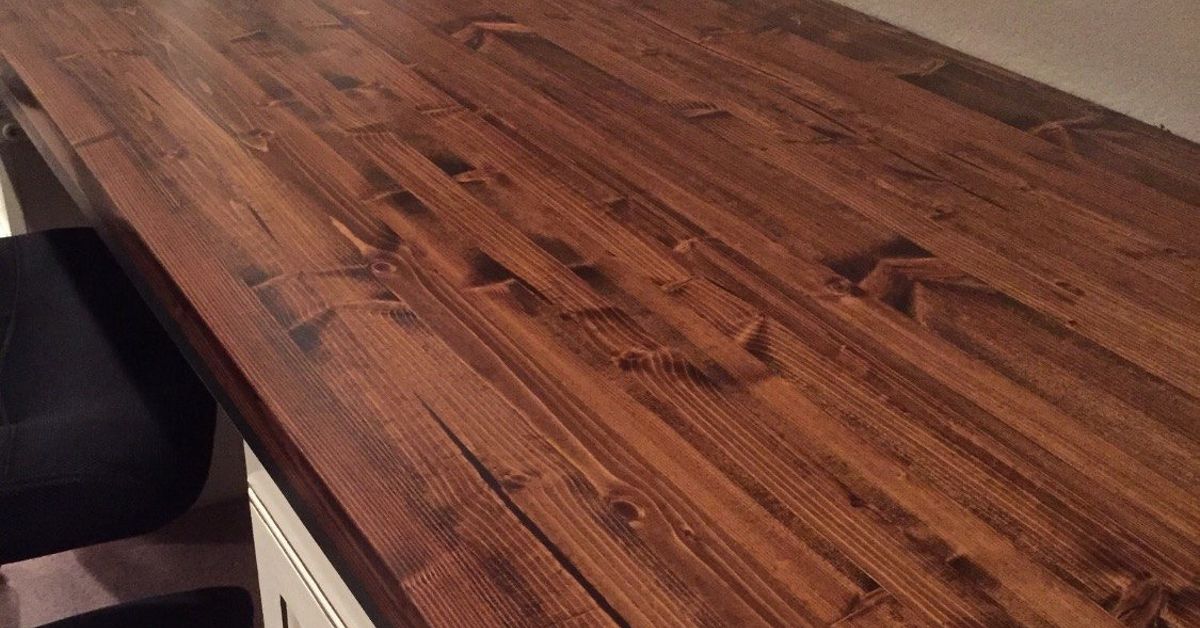
Note: Building a butcher block computer desk for exactly $50 usually requires a clearance, remnant, salvaged, or secondhand wood top, plus reused desk legs, cabinets, or other supports. Material prices vary by location, so consider the budget in this project a realistic bargain-hunting target rather than a guaranteed retail price.
A good computer desk needs to do several jobs without complaining. It must hold a monitor, keyboard, speakers, coffee cup, charging cables, and perhaps the occasional plate of crumbs disguised as lunch. It should also remain steady when someone types with the enthusiasm of a courtroom stenographer.
Unfortunately, many inexpensive desks are made from thin particleboard covered with a wood-patterned surface that looks convincing until the first loose screw, spilled drink, or overly ambitious monitor arm arrives. A solid butcher block desktop offers a warmer, sturdier alternative, and it does not necessarily require a designer-furniture budget.
Our goal was straightforward: create a practical butcher block computer desk for about $50 by shopping carefully, reusing what we already owned, and doing the finishing work ourselves. The result was a wide, durable work surface that looked far more expensive than it was. More importantly, it did not wobble every time the printer woke up and began its mysterious mechanical rituals.
Why Butcher Block Makes an Excellent Computer Desktop
Butcher block is made by joining narrow pieces of wood into a larger panel. Depending on the product, the strips may be arranged to display their faces, edges, or ends. Affordable countertop and desktop panels commonly use face-grain or edge-grain construction because it creates a stable, attractive surface without the cost of a thick solid slab.
For a home office, butcher block offers several useful advantages. It is strong enough for typical computer equipment, easier to repair than a veneered desktop, and simple to customize with stain or a clear finish. Small scratches can often be sanded out, cable holes can be added with ordinary tools, and the top can be refinished years later instead of being carried to the curb after one unfortunate encounter with a rolling chair.
A Natural Surface With Real Character
Every butcher block panel has its own grain patterns and color variations. Birch tends to look light and clean, while acacia often displays more dramatic changes in color. Maple is famously tough but may cost more. Other species, including rubberwood, beech, oak, and bamboo products, may also appear in countertop or desktop sections.
The right species is less important than the condition of the panel. For a budget desk, a flat, structurally sound clearance piece is more valuable than a premium species with a premium price tag and a name that sounds like it owns a vineyard.
A Surface That Can Be Renewed
A solid wood desktop can accumulate dents, scratches, and worn areas, but those marks do not automatically mean the desk is finished. Light sanding and a fresh protective coating can restore the surface. This repairability is one reason butcher block works especially well for busy home offices, gaming stations, craft rooms, and shared family workspaces.
How We Kept the Butcher Block Desk Near $50
The most important budgeting decision was not the finish, screws, or cable grommet. It was where we bought the top. Full-price butcher block countertops can easily consume the entire budget several times over, so we looked for offcuts, returned merchandise, damaged packaging, discontinued sizes, and local secondhand listings.
A panel with a dent near one end can be an excellent bargain when that end will be trimmed off. A countertop that is too short for a kitchen may still be perfect for a 48-inch computer desk. Building-material reuse stores, architectural salvage shops, local marketplace listings, cabinet shops, and home-improvement clearance racks are all worth checking.
| Item | Estimated Cost |
|---|---|
| Clearance or secondhand butcher block remnant | $30 |
| Sandpaper in several grits | $6 |
| Small container of clear protective finish | $9 |
| Screws, washers, and cable grommet | $5 |
| Total | $50 |
This budget assumes that the desk base is reused. Existing filing cabinets, drawer units, metal legs from an old desk, sturdy sawhorses, or a previously owned frame can all support the new top. Buying a new butcher block panel and new steel legs will produce a beautiful desk, but it will probably wave politely as the $50 budget disappears into the distance.
Choosing the Right Butcher Block Top
Check the Panel Before Falling in Love With It
Place the panel on a reasonably flat surface and inspect it from several angles. Look for excessive bowing, twisting, separated glue joints, deep cracks, water damage, and soft areas. Minor scratches and shallow dents are manageable. Serious warping or structural separation can turn a bargain into an advanced woodworking lesson that nobody requested.
Inspect both faces. Manufacturers sometimes designate one side as the primary surface and the other as the underside, but a clearance panel may have cosmetic flaws on either face. Decide whether defects can be placed underneath, hidden behind equipment, or removed when the panel is shortened.
Choose Useful Dimensions
A desktop approximately 24 to 30 inches deep provides room for a monitor, keyboard, and mouse without forcing the screen too close to the user. Width depends on the available space and equipment. A 48-inch top can handle a compact workstation, while a 60- or 72-inch surface provides more comfortable space for dual monitors, speakers, notebooks, or a desktop computer tower.
Longer tops require stronger support. A thick wood panel is sturdy, but a wide unsupported span can still sag over time. For a long desk, position supports near both ends and consider adding a center leg, stretcher, metal rail, or cabinet beneath the middle.
Tools and Materials for the Project
- Butcher block panel or countertop remnant
- Existing desk frame, legs, cabinets, or other supports
- Tape measure, pencil, and straightedge
- Circular saw, track saw, or table saw if resizing is necessary
- Fine-tooth blade suitable for clean wood cuts
- Random-orbit sander or sanding block
- 120-, 150-, 180-, and 220-grit sandpaper
- Drill, bits, screws, and washers
- Clear polyurethane, polycrylic, hard-wax oil, or another furniture finish
- Brush, applicator pad, or lint-free cloth recommended for the chosen finish
- Eye protection, hearing protection, and a dust mask or respirator
How to Turn Butcher Block Into a Computer Desk
Step 1: Plan the Finished Desk
Measure the room, chair, base, and computer equipment before cutting anything. Mark the intended location of the monitor, keyboard, computer tower, speakers, and cable openings. Confirm that drawers and doors can open without striking chair arms or wall trim.
Do not assume that a standard desk height will suit every person. Adjust the relationship among the chair, desktop, keyboard, and monitor so the shoulders remain relaxed and the wrists stay reasonably straight. The feet should rest firmly on the floor or on a footrest. The monitor should sit directly in front of the primary user, generally around an arm’s length away, with the top of the display at or slightly below eye level.
Step 2: Trim the Butcher Block if Necessary
Mark the cut line carefully and confirm the measurement twice. Clamp a straightedge or saw guide to the panel, support both the main piece and the offcut, and use a sharp fine-tooth blade. Painter’s tape over the cut line may help reduce surface splintering, although blade quality and steady feed speed matter more than performing ceremonial rituals with blue tape.
Cut slowly enough to maintain control without pausing long enough to burn the wood. Keep hands away from the cutting path, wear eye and hearing protection, and ensure that the offcut cannot fall and tear away the final section of the edge.
Step 3: Sand the Entire Surface
Begin with approximately 120-grit sandpaper if the panel has milling marks, rough patches, or shallow scratches. Continue through 150 or 180 grit and finish around 220 grit for a smooth furniture surface. Sand with the grain when working by hand and avoid pressing heavily on a random-orbit sander. Excess pressure can create swirls, uneven areas, and the mistaken impression that the sander needs to be punished.
Ease the sharp front edge with sandpaper or a small round-over router bit. A slightly softened edge is more comfortable against the forearms during long typing sessions. Carefully sand the sides, ends, and underside as well, particularly where hands may touch the wood.
Step 4: Remove Every Trace of Dust
Vacuum the panel and surrounding work area before finishing. Wipe the surface with a clean cloth appropriate for the selected coating. Dust left behind can become permanently preserved in the finish, creating tiny bumps that will receive far more attention than they deserve.
Step 5: Finish Every Face and Edge
An unfinished wood panel can absorb moisture unevenly, increasing the risk of cupping or warping. Apply the chosen finish to the top, underside, side edges, end grain, and any freshly drilled holes. The coating does not need to be equally decorative underneath, but it should provide balanced protection.
For a computer desk, a film-forming furniture finish such as water-based polyurethane or polycrylic is a practical choice. It resists routine spills, requires less maintenance than mineral oil, and creates a surface that is easy to wipe clean. Water-based products generally preserve the lighter color of birch or maple, while many oil-based finishes add a warmer amber tone.
Apply thin, even coats in the direction of the grain and follow the manufacturer’s drying and recoating instructions. Light sanding between coats can remove raised grain and improve smoothness. Two coats may be adequate for light use, but a third coat generally provides better protection for a heavily used desktop. Do not place computer equipment on the surface until the finish has dried and cured according to its label.
Step 6: Attach the Top Without Trapping the Wood
Solid wood expands and contracts as indoor humidity changes. The movement may be small, but rigid attachment can encourage cracks, splits, or distorted hardware. Use tabletop fasteners, figure-eight fasteners, slotted brackets, or slightly oversized holes with washers so the panel can move across its width.
Pre-drill screw holes to reduce the chance of splitting the hardwood. Select screws that penetrate securely without approaching the upper face of the desktop. Before driving anything, compare the screw length with the combined thickness of the frame and panel. Accidentally creating a shiny metal landmark in the middle of the finished desktop is memorable, but not in a rewarding way.
Step 7: Add Cable Management
A wood desk looks less impressive when surrounded by a nest of charging cords. Add a cable grommet near the back edge, attach a cable tray beneath the top, or use adhesive clips to guide wires along the frame. Leave enough slack for monitor adjustments and avoid sharply bending cables.
Power strips can be mounted beneath the desktop or along a rear support, provided ventilation openings remain clear and the installation follows the product instructions. Keep liquids away from electrical connections, avoid overloading outlets, and do not trap power cords where chair wheels or sharp edges can damage them.
Setting Up the Finished Computer Workstation
A beautiful desktop cannot compensate for an awkward workstation. Position the keyboard and mouse where they can be reached without extending the arms. Keep the elbows close to the body, relax the shoulders, and arrange frequently used items within easy reach.
Place the primary monitor directly in front of the chair. A monitor arm can free valuable surface space, but verify that the butcher block and mounting hardware are suitable for the concentrated load. Use the manufacturer’s reinforcement plate when recommended, especially with thinner panels or heavy displays.
If the desk is too high after installation, raising the chair and adding a footrest may improve the working position. If the desk is too low, properly secured risers or taller supports may help. The objective is not to force the body to match the furniture. The furniture has no feelings and can be adjusted.
Mistakes That Can Ruin a Budget Butcher Block Desk
Finishing Only the Top
Leaving the underside and end grain bare allows the panel to absorb and release moisture unevenly. Seal all exposed surfaces, including cable holes and fresh cuts.
Buying Before Measuring
A discounted six-foot countertop is not a bargain when the room only has five feet of wall space and the nearest suitable saw is located three counties away. Measure the room, doorways, vehicle, base, and final desk location first.
Using a Soft Finish Too Soon
A coating may feel dry before it has fully cured. Heavy monitor stands, rubber feet, desk mats, and clamp-mounted accessories can leave marks in a soft finish. Follow the product’s curing guidance instead of testing it with the heaviest object in the house.
Ignoring Long-Span Support
Butcher block is strong, but strength is not magic. Wide desks carrying multiple monitors should have adequate support beneath the center as well as the ends.
Rigidly Screwing the Top to the Frame
Driving tight screws through small fixed holes can prevent natural wood movement. Use suitable tabletop attachment methods and avoid gluing a solid wood top permanently to a rigid metal frame.
A Realistic $50 Butcher Block Desk Experience
The following project experience is a practical composite based on the situations budget DIY builders commonly encounter. The adventure began with a clearance countertop leaning behind several full-price panels at a building-supply store. Its packaging looked as though it had participated in a minor wrestling match, but the actual wood had only one dented corner and a few surface scratches.
The panel was longer than our intended desk, which turned the damaged corner into a discount rather than a problem. After measuring the office wall approximately seven times, we marked the final width and trimmed away the imperfect end. The cut was clean, the room still had enough space for a chair, and no one needed to explain why the desk extended into the hallway. This qualified as an excellent beginning.
Sanding produced the biggest visual transformation. The unfinished surface initially felt rough and looked slightly dull. Starting with 120 grit removed the shipping scratches, while 180 and 220 grit made the grain noticeably smoother. Softening the front edge required only a few minutes but greatly improved comfort. A perfectly square edge looks crisp in photographs; after three hours of typing, it may feel like the desk is slowly attempting to divide your forearms.
The first finishing coat also taught an important lesson: end grain drinks finish much faster than the broad faces. The freshly cut end needed additional attention to achieve an even appearance. We used a clear water-based protective coating because the desk would hold drinks, electronics, and a mouse pad rather than serve as a food-preparation surface. Thin coats produced better results than one heavy coat, which is unfortunate because one heavy coat feels faster right up until it begins to sag.
While the finish cured, we cleaned and reinforced the old metal desk frame that had been stored in the garage. Reusing the frame made the $50 target possible and prevented a serviceable piece of furniture from becoming scrap. We drilled slightly oversized mounting holes in the frame, added washers, and fastened the top without clamping the wood so tightly that seasonal movement would be restricted.
Cable management was nearly forgotten until the desk was placed against the wall. Fortunately, it was easier to install a basic under-desk tray before adding the computer. The tray held the power strip and excess cable length, while a simple grommet kept monitor and keyboard wires from spilling across the back edge. This small improvement made the finished desk look intentional rather than recently invaded by electronic vines.
During daily use, the most noticeable difference was stability. The heavier top reduced vibration from typing, and the wider surface allowed the monitor to sit farther back. The wood also made the office feel warmer and less temporary. Even inexpensive equipment looked better sitting on a real wood surface, which proves that computers appreciate attractive furniture even though they refuse to admit it.
A few details would be handled differently next time. We would drill cable openings before applying the finish, add the center support earlier, and allow even more curing time before installing a monitor arm. We would also inspect the underside of the clearance panel more carefully. One rough patch was harmless but required awkward sanding after the top had already been carried indoors.
The most useful lesson was that a low budget did not require rushed workmanship. Most of the quality came from careful measuring, patient sanding, proper sealing, and sensible support rather than expensive hardware. Bargain hunting saved money, but preparation made the desk successful.
The final cost remained close to $50 because the legs and tools were already available. Someone starting without a base, saw, drill, or finish may spend more. Even then, the same approach can produce a substantial desk for much less than many finished solid wood models. The project is flexible: begin with what is available, spend money where structural reliability matters, and upgrade accessories later.
Final Thoughts
A butcher block computer desk does not have to be a luxury purchase. A clearance remnant, reused base, modest finishing supplies, and a free afternoon can create a strong, attractive workstation with genuine personality. The key is to inspect the wood carefully, support it properly, seal every surface, allow for natural movement, and arrange the finished desk around the user rather than expecting the user to fold into an uncomfortable position.
Our approximately $50 project delivered more workspace, better stability, easier cable management, and the satisfaction of turning overlooked materials into useful furniture. It also confirmed one of the great truths of DIY work: the less money a project costs, the more often you will tell visitors exactly how much it cost.