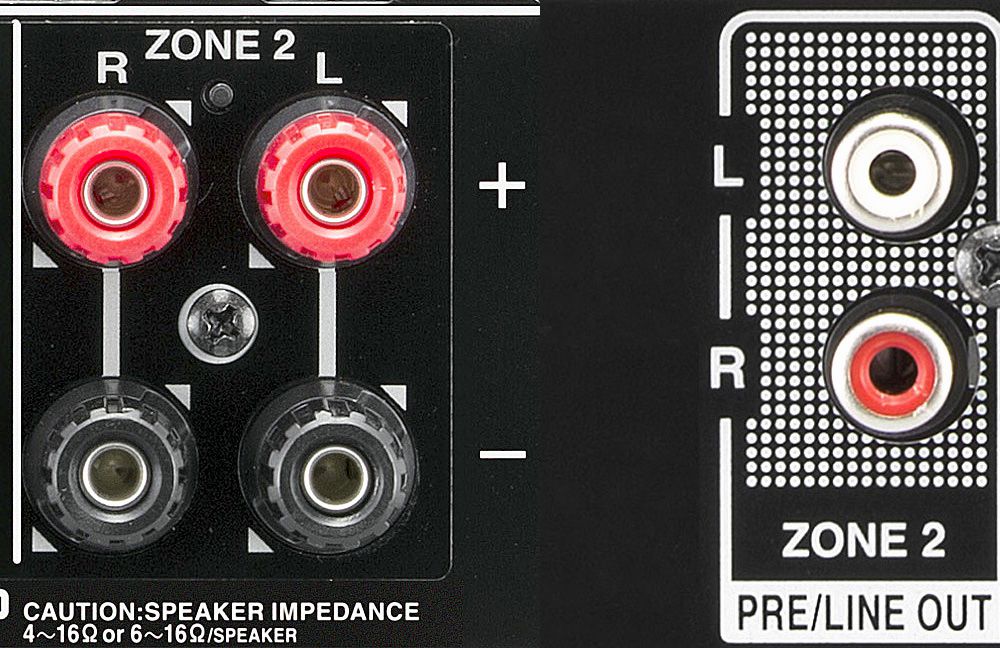
If you have ever looked at the back of an AV receiver and spotted labels like Zone 2, Zone 2 pre-out, or HDMI Zone 2, you may have wondered whether your receiver is secretly a real estate developer. Relax. In home theater language, a “zone” simply means a separate listening or viewing area. Your main surround-sound room is the main zone. Zone 2 is a second arealike a kitchen, patio, bedroom, office, or dining roomthat can receive audio, and sometimes video, from the same receiver.
In plain English, Zone 2 lets one receiver do double duty. You can watch a movie in the living room while music plays in the kitchen. You can send game audio to outdoor speakers during a party. You can enjoy a playlist in another room without buying a totally separate stereo system. It is one of those features that looks boring on a spec sheet but becomes wonderfully practical once you understand how it works.
What Is Zone 2 in a Home Theater Receiver?
Zone 2 in home theater means a second output area controlled by your AV receiver. The main zone is usually your primary home theater setup: TV, front speakers, center channel, surround speakers, subwoofer, and maybe Dolby Atmos height speakers. Zone 2 is a secondary area that receives its own audio signal, volume control, and sometimes its own source selection.
Think of your AV receiver as a traffic director. In the main room, it sends surround sound to your theater speakers. In Zone 2, it sends stereo audio to another pair of speakers or to an external amplifier. Depending on the receiver, Zone 2 may play the same source as the main room or a completely different source. For example, the family can watch a Blu-ray movie in the living room while someone else listens to FM radio, Spotify, a CD player, or a media streamer in the kitchen.
Main Zone vs. Zone 2
The main zone is where your receiver does its most cinematic work. This is the room where surround formats like Dolby Atmos, DTS:X, 5.1, 7.1, or 5.1.2 layouts matter most. Zone 2 is usually simpler. In most home theater receivers, Zone 2 is designed for two-channel stereo audio. That makes it great for music, background listening, casual TV audio, and whole-home entertainment, but not usually for full surround sound in a second room.
That distinction is important. Zone 2 is not normally a second complete home theater system. It is more like a smart extension of your receiver. It gives you more flexibility without turning your equipment rack into a spaghetti monster of duplicate amps and cables.
How Does Zone 2 Work?
Zone 2 works by sending a separate audio signal from your receiver to another location. There are two common ways to do this: using powered Zone 2 speaker terminals or using Zone 2 pre-outs.
Powered Zone 2 Speaker Outputs
Some AV receivers have speaker terminals that can be assigned to Zone 2. This means the receiver’s built-in amplifiers power the second pair of speakers directly. You run speaker wire from the receiver to speakers in the second room, then configure the receiver’s speaker assignment menu so it knows those terminals are being used for Zone 2.
This option is convenient because you do not need an additional amplifier. However, there is a trade-off. Many receivers have a fixed number of amplifier channels. If a 7-channel receiver powers two Zone 2 speakers, it may have to give up surround back speakers or height speakers in the main room while Zone 2 is active. In other words, your receiver can make popcorn for two rooms, but it may not be able to juggle every speaker at once.
Zone 2 Pre-Outs
A Zone 2 pre-out is different. It sends a low-level audio signal, usually through RCA outputs, to an external amplifier. The receiver controls the source, and sometimes the volume, while the external amp provides the power for the Zone 2 speakers.
This is often the cleaner solution if your main theater uses all available receiver channels. For example, if your main room has a 7.1.4 Dolby Atmos layout, you probably do not want to sacrifice height or surround channels just to play music on the patio. A Zone 2 pre-out lets you keep your main theater intact while a separate amp handles the second zone.
What Can You Use Zone 2 For?
The best use of Zone 2 is multi-room audio. It is ideal for spaces where you want good sound but do not need full surround sound. Common Zone 2 locations include kitchens, patios, decks, garages, home offices, bedrooms, dining rooms, and workout areas.
Example 1: Movie in the Living Room, Music in the Kitchen
Imagine someone is watching an action movie in the main room. Explosions are exploding, helicopters are helicoptering, and the subwoofer is doing its best impression of a polite earthquake. Meanwhile, in the kitchen, Zone 2 can play a jazz playlist at a lower volume. Same receiver, two different vibes.
Example 2: Outdoor Speakers for Parties
Zone 2 is perfect for outdoor speakers. You can connect weather-resistant speakers on the patio and control them from the receiver or a compatible app. During a cookout, the main room can stay off while Zone 2 plays music outside. Your burgers get a soundtrack, and your living room gets a break.
Example 3: Whole-House Background Music
If your receiver supports “All Zone Stereo” or a similar feature, you may be able to play the same source in the main room and Zone 2 at the same time. This is useful for parties, cleaning days, or those moments when you want your favorite playlist to follow you around the house like a loyal golden retriever with better bass response.
Can Zone 2 Play a Different Source?
Sometimes, yes. Many AV receivers allow Zone 2 to play a different source from the main zone. However, this depends on the receiver model and the type of source. Older or entry-level receivers may limit Zone 2 to analog audio sources. That means a CD player connected with red-and-white RCA cables may work in Zone 2, while an HDMI-only streaming box may not.
Newer and higher-end receivers often handle digital sources better. Some can send two-channel PCM audio from HDMI, optical, or coaxial inputs to Zone 2. Others include an HDMI Zone 2 output that can send video and audio to a second TV. The key phrase is “check the manual.” Yes, that dusty PDF is not glamorous, but it can save you from buying the wrong cables and questioning your life choices at 11:47 p.m.
What Is HDMI Zone 2?
HDMI Zone 2 means the receiver has an HDMI output designed to send video and audio to a second display. This can be useful if you want a TV in another room to receive content from the same receiver. For example, a receiver with HDMI Zone 2 may send a cable box or media player signal to a bedroom TV while the main theater uses another source.
However, HDMI Zone 2 is not always magical. Some receivers can send independent HDMI sources to the main zone and Zone 2. Others are more limited. In some setups, using the same HDMI source in both zones may force audio into two-channel PCM. That is not necessarily bad for Zone 2, but it may affect what happens in the main room. If your goal is full Dolby Atmos in the theater and simple stereo in the second room, make sure your receiver supports that exact behavior.
Zone 2 vs. Speaker A/B: What Is the Difference?
Speaker A/B outputs and Zone 2 can look similar, but they are not the same. A/B speaker switching usually sends the same audio source to two sets of speakers. It is basic and useful, but not very flexible. Zone 2 usually offers more control. You may be able to turn it on independently, adjust volume separately, and select a different source.
If all you want is the same music in two rooms, Speaker B may be enough. If you want the living room to play TV sound while the kitchen plays a streaming playlist, Zone 2 is the feature you want.
Zone 2 vs. Wireless Multi-Room Audio
Modern homes often use wireless systems like HEOS, MusicCast, Sonos, AirPlay, Chromecast built-in, or DTS Play-Fi. These platforms can be easier to expand because they do not always require speaker wire. Zone 2, on the other hand, is more traditional. It often uses wired speakers and the AV receiver as the control hub.
Neither option is automatically better. Wired Zone 2 can be reliable, clean-sounding, and cost-effective if you already own an AV receiver with the feature. Wireless multi-room audio can be more flexible for renters, finished homes, and people who would rather wrestle a raccoon than fish speaker wire through a wall.
How to Set Up Zone 2
Setting up Zone 2 is usually straightforward, but the details vary by receiver brand and model. Here is a practical setup path that applies to most systems.
Step 1: Decide Where Zone 2 Will Be
Choose the second listening area. Measure the distance from the receiver to the speakers. If the speakers are outdoors, choose outdoor-rated speakers and weather-safe wiring routes. Do not run ordinary indoor cable through damp areas and hope for the best. Hope is not a wiring standard.
Step 2: Choose Powered Outputs or Pre-Outs
If your receiver has assignable Zone 2 speaker terminals and you are not using every surround channel, powered Zone 2 may be simple. If your main theater already uses all amplifier channels, use Zone 2 pre-outs with an external amp.
Step 3: Connect the Speakers or Amplifier
For powered Zone 2, run speaker wire from the receiver’s assigned Zone 2 terminals to the second-room speakers. For pre-outs, connect RCA cables from the receiver’s Zone 2 pre-out jacks to the external amplifier, then connect that amplifier to the speakers.
Step 4: Configure Amp Assignment
Open your receiver’s setup menu and look for terms like Amp Assign, Power Amp Assign, Speaker Configuration, or Zone 2. Tell the receiver which terminals or outputs are being used for the second zone. Without this step, your receiver may sit there quietly, like a very expensive decorative brick.
Step 5: Select a Compatible Source
Choose a source that Zone 2 can actually play. If your receiver only supports analog sources in Zone 2, connect your source with analog audio cables. If it supports HDMI or digital PCM to Zone 2, configure the source output accordingly. Streaming services built into the receiver often work well, but compatibility varies.
Step 6: Turn On Zone 2 and Adjust Volume
Use the receiver remote, front panel, or mobile app to turn on Zone 2. Select the Zone 2 source, raise the Zone 2 volume gradually, and test both speakers. Label your inputs once everything works. Future you will appreciate not having to remember whether “CD” actually means “kitchen streamer.”
Common Zone 2 Problems and Fixes
No Sound in Zone 2
The most common issue is simple: Zone 2 is not turned on, the volume is muted, or the wrong source is selected. Check those first. Then verify amp assignment, speaker wiring, and whether your selected source is compatible with Zone 2.
HDMI Source Will Not Play in Zone 2
This is another classic. Some receivers do not send HDMI audio to Zone 2 speaker outputs or pre-outs unless the signal is two-channel PCM. Try setting the source device to stereo PCM. If that does not work, connect the source with analog audio cables or use the receiver’s All Zone Stereo mode if available.
Main Room Loses Surround Channels
If powered Zone 2 uses the receiver’s internal amplifier channels, the main room may temporarily lose surround back or height speakers. This is normal on many models. To avoid it, use Zone 2 pre-outs with an external amplifier.
Audio and Video Are Out of Sync
Zone 2 audio outputs are often designed for music, not video lip-sync precision. If you are sending video to a second TV, HDMI Zone 2 or audio from the second TV itself may work better than using separate Zone 2 speaker outputs.
Should You Use Zone 2?
You should use Zone 2 if you want a simple way to extend your home theater receiver into another room. It is especially useful if you already have wired speakers or plan to install them. It can save money, reduce equipment clutter, and make your home entertainment system feel more integrated.
Zone 2 may not be ideal if you want independent surround sound in two rooms, wireless speakers everywhere, or complex multi-room control across a large house. In those cases, a dedicated multi-room audio system or separate receiver may be better.
Buying Tips for a Receiver With Zone 2
Before buying an AV receiver, look beyond the words “Zone 2” on the box. Check whether it has powered Zone 2 speaker terminals, Zone 2 pre-outs, HDMI Zone 2, app control, independent source selection, and support for digital or HDMI sources in the second zone. Also check how Zone 2 affects the main theater speaker layout.
A good receiver spec sheet should answer these questions: Can Zone 2 play a different source? Can it play HDMI sources? Does it downmix to stereo? Does it require giving up height channels? Can volume be controlled from the receiver? Does the manufacturer’s app support Zone 2? These details matter more than marketing language.
Real-World Experiences With Zone 2
In everyday use, Zone 2 feels less like a luxury feature and more like a small household superpower. The first time you send music to the kitchen while the main room stays ready for movie night, the idea clicks. You stop thinking of your AV receiver as “the TV sound box” and start seeing it as the audio command center for the home.
One common experience is the party test. People gather in the living room, wander into the kitchen, drift out to the patio, and somehow the music needs to follow the crowd. Zone 2 handles this beautifully when it is connected to patio or kitchen speakers. The main room can play the same playlist, or the second zone can run on its own. The result feels polished without requiring a DJ booth, a stack of Bluetooth speakers, or someone shouting, “Who disconnected my phone?” every ten minutes.
Another real-world lesson is that Zone 2 rewards planning. If your receiver is tucked in a cabinet and the second-room speakers are across the house, wiring matters. Clean cable paths, proper speaker placement, and sensible volume control make the system enjoyable. Random wire runs and mystery inputs make it frustrating. Zone 2 is not difficult, but it is happier when treated like a small installation project rather than a last-minute cable adventure.
Homeowners also discover that Zone 2 changes how they use rooms. A quiet dining room becomes a better dinner space with low-volume music. A garage becomes more pleasant during weekend projects. A patio feels more finished when outdoor speakers are connected to the same receiver that powers the theater. Even a home office can benefit from Zone 2 if you want music from a central system without placing more gear on the desk.
The biggest surprise is usually the source limitation. Many people assume anything plugged into the receiver will automatically play in Zone 2. Then they select a streaming box connected by HDMI and hear nothing. That moment is annoying, but it is also common. The fix may be as simple as changing the player to PCM stereo, using a built-in streaming app, connecting analog audio, or using All Zone Stereo. The experience teaches one golden rule: Zone 2 is powerful, but it obeys the receiver’s source rules.
Volume control is another practical detail. Zone 2 should be adjusted carefully, especially with outdoor or ceiling speakers. Start low and raise the level slowly. If an external amplifier is involved, decide whether volume will be controlled by the receiver, the amp, a wall control, or an app. Too many volume controls can create confusion. One clear control method is better than three competing knobs having a tiny argument behind the scenes.
Overall, the best Zone 2 experiences happen when expectations are realistic. It is not usually a second Dolby Atmos theater. It is a flexible stereo zone that brings music, radio, podcasts, or casual TV audio to another part of the home. Used that way, Zone 2 is genuinely useful. It makes a home theater system feel less trapped in one room and more connected to daily life.
Conclusion
Zone 2 in home theater means your AV receiver can send audio, and sometimes video, to a second area of your home. It can power another pair of speakers directly, feed an external amplifier through pre-outs, or use HDMI Zone 2 on supported models. The feature is excellent for kitchens, patios, offices, bedrooms, and whole-home background music.
The most important thing to remember is that Zone 2 is model-specific. Some receivers support independent HDMI sources. Others only support analog or two-channel PCM audio. Some use internal amplifier channels, while others need an external amp. Once you understand those limits, Zone 2 becomes one of the most practical and underrated features in home theater.